Can I Use Other Cartridges In My Hp Printer Without Issues
Yes, you can use other cartridges in your HP printer, but there are important things to know first. Using compatible cartridges or remanufactured cartridges can save you money, but it may also affect print quality and warranty coverage. This guide walks you through every option so you can make the best choice for your HP printer model.
You have an HP printer sitting on your desk, ready to print. But then you notice the ink light is blinking. You check the price of a new HP cartridge and your jaw drops. So you wonder, can I use other cartridges in my HP printer? The short answer is yes. The longer answer is a bit more nuanced, and it is exactly what we are going to cover today.
Whether you are a student printing essays, a small business owner handling daily documents, or a home user printing photos, ink costs add up fast. The good news is that you have options beyond the expensive OEM cartridges that HP sells. You can choose compatible cartridges, remanufactured cartridges, or even refill your existing ones. Each option has its pros and cons, and this article will break them all down for you.
We will look at how third-party ink cartridges work, whether they can damage your printer, what to watch out for with cartridge chips, and how to pick the best option for your specific HP printer model. By the end, you will feel confident making a smart choice that fits your budget and your printing needs.
Key Takeaways
- Third-party cartridges work in most HP printers: You are not locked into using only HP-branded ink.
- Compatible and remanufactured options save money: You can cut printing costs by up to 50% or more.
- Print quality varies by brand: Not all non-HP cartridges deliver the same results.
- Warranty concerns exist: Using third-party ink may void your warranty in some cases.
- Chip compatibility matters: Some cartridges need updated chips to work with newer HP printers.
- Page yield differs between brands: A cheaper cartridge may not last as long as an OEM one.
📑 Table of Contents
- What Does “Using Other Cartridges” Actually Mean?
- Will Other Cartridges Work With Your HP Printer?
- Pros and Cons of Using Non-HP Cartridges
- Can Using Other Cartridges Void Your HP Warranty?
- How to Choose the Right Third-Party Cartridge
- Common Problems When Using Other Cartridges
- Quick Tips for Getting the Best Results
- Expert Insights on HP Cartridge Compatibility
- Key Takeaways
- Frequently Asked Questions
- Final Thoughts
What Does “Using Other Cartridges” Actually Mean?
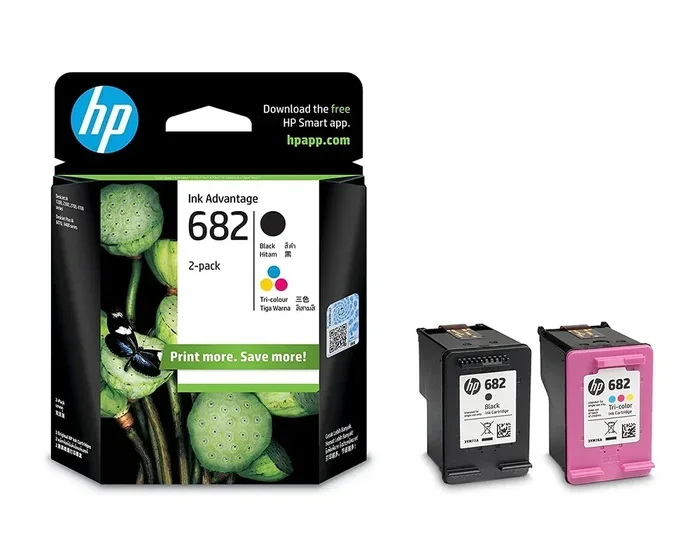
When we talk about using other cartridges in your HP printer, we are referring to any ink cartridge that is not the original HP brand cartridge. HP calls these “original HP cartridges” or OEM (Original Equipment Manufacturer) cartridges. But the market is full of alternatives. Let us break down the main types you will encounter.
Compatible Cartridges
Compatible cartridges are brand-new cartridges made by a third-party company. They are designed to fit and work in your HP printer just like the real thing. The difference is they do not carry the HP logo. These cartridges are usually much cheaper than OEM options. Many reputable brands sell them, and they often come with their own warranty.
Remanufactured Cartridges
Remanufactured cartridges are recycled HP cartridges that have been cleaned, refilled, and tested. They are an eco-friendly choice because they reduce plastic waste. These cartridges cost less than new OEM ones and can perform very well. However, quality can vary depending on the manufacturer.
Refilled Cartridges
Refilled cartridges are exactly what they sound like. You take your empty HP cartridge and fill it with ink yourself. This is the cheapest option, but it requires some patience and a steady hand. Messy refills can lead to print quality issues or even damage to your printer.
Continuous Ink Supply Systems (CISS)
A CISS connects large ink tanks to your printer through tubes. Instead of swapping small cartridges, you refill the tanks from bulk ink bottles. This is popular among people who print a lot. It dramatically reduces the cost per page. However, not all HP printer models support CISS setups.
Will Other Cartridges Work With Your HP Printer?
The short answer is yes, most of the time. HP printers are designed to accept cartridges that match the correct model number. If you buy a compatible cartridge with the right part number, it should click into place and work. But here is where things get a little tricky.
Newer HP printers use smart chip technology. These chips communicate between the cartridge and the printer. They tell the printer what ink levels are remaining and what type of ink is inside. Some third-party cartridges have chips that work perfectly. Others may not be recognized at all. This is why cartridge compatibility is such an important topic to understand before you buy.
Older HP printers are generally more forgiving. If you have a printer that is five or more years old, you can probably use almost any third-party ink cartridge that fits. Newer models, especially those released in the last two years, tend to be more restrictive. HP has tightened its ink system to push users toward their own branded cartridges.
If you are unsure whether a specific cartridge will work, check the product listing carefully. Reputable sellers list the HP printer models that each cartridge supports. Always double-check your printer model number before ordering. You can find this number on the back or bottom of your printer.
Pros and Cons of Using Non-HP Cartridges
Before you make the switch from OEM HP cartridges to a third-party option, it helps to weigh the benefits and drawbacks. Here is a clear look at both sides.
The Benefits
- Cost savings: Third-party cartridges can cost 30 to 70 percent less than OEM HP cartridges. Over time, this adds up to significant savings.
- More options: You are not limited to whatever HP has in stock. You can choose from dozens of brands and ink formulations.
- Eco-friendly choices: Remanufactured and refilled cartridges reduce waste and are better for the environment.
- High page yield: Some compatible cartridges offer higher page yields than their OEM counterparts, meaning you print more pages per cartridge.
- Bulk ink savings: CISS and bulk refill systems can bring your cost per page down to just a few cents.
The Drawbacks
- Print quality inconsistency: Not all third-party cartridges deliver the same sharpness and color accuracy as original HP ink. Some may produce faded or streaky prints.
- Warranty risks: HP states that using non-HP cartridges may void your printer warranty. If something goes wrong, HP may refuse to cover repairs.
- Cartridge recognition errors: Some printers display error messages or refuse to print when a non-OEM cartridge is detected.
- Ink leakage risks: Poorly manufactured cartridges can leak ink, which may damage the printhead or internal components.
- Shorter lifespan: Some budget cartridges dry out faster or have lower page yields than advertised.
Can Using Other Cartridges Void Your HP Warranty?
This is one of the most common questions people ask. The truth is, it depends on where you live and what happens as a result of using non-HP cartridges.
In the United States, the Magnuson-Moss Warranty Act protects consumers. This law states that a manufacturer cannot void your entire warranty just because you used a third-party product. However, if HP can prove that the non-OEM cartridge directly caused damage to your printer, they may deny the claim for that specific repair. This is an important distinction to understand.
In other countries, warranty laws vary. Some regions give manufacturers more control over what you can and cannot use. Before purchasing third-party ink cartridges, it is a good idea to review your printer’s warranty terms. You can find this information in the user manual or on HP’s official website.
Here is a practical tip. If you are worried about warranty issues, use third-party cartridges for everyday printing and keep your OEM HP cartridges for important documents or photos. This way, you save money on routine prints while protecting your warranty for critical jobs.
How to Choose the Right Third-Party Cartridge
Not all compatible cartridges are created equal. The market is flooded with options, and quality varies widely. Here is how to find a reliable cartridge that works well with your HP printer.
Check the Brand Reputation
Look for brands that have been around for a while and have good customer reviews. Some well-known third-party cartridge brands include Jet Tec, LD Products, 123inkjets, and Carrot Ink. These companies invest in quality control and offer satisfaction guarantees. Avoid no-name brands with suspiciously low prices, as they often cut corners on ink quality and cartridge construction.
Verify the Page Yield
Page yield tells you how many pages a cartridge can print before it runs out. OEM HP cartridges list their page yield on the packaging. Good third-party brands do the same. Compare the page yield of a compatible cartridge to the OEM version. A cheaper cartridge with a much lower page yield may not actually save you money in the long run.
Look for Chip Updates
HP regularly releases firmware updates that can block certain third-party cartridges. Before buying, check if the seller offers chip updates or has a track record of keeping up with HP firmware changes. A reputable brand will stay ahead of these updates and keep their cartridges working.
Read Return Policies
A good seller stands behind their product. Look for companies that offer a satisfaction guarantee or a return policy. If a cartridge does not work or produces poor print quality, you should be able to get a refund or a replacement. This protects you from wasting money on a product that does not meet your needs.
Consider Your Printing Needs
Think about what you print most often. If you print mostly text documents, a standard black cartridge will work fine. If you print photos or color presentations, look for cartridges with vibrant color profiles. Some brands offer specialized ink formulations for photo printing that rival the quality of original HP ink.
Common Problems When Using Other Cartridges
Using non-HP cartridges is generally straightforward, but sometimes issues come up. Here are the most common problems and how to fix them.
Printer Does Not Recognize the Cartridge
This is the most frequent issue. If your HP printer displays an error or refuses to print, try removing the cartridge and reinserting it firmly. Clean the copper contacts on the cartridge with a dry, lint-free cloth. If the problem persists, the cartridge chip may not be compatible with your printer model.
Print Quality Is Poor
If your prints look faded, streaky, or have banding, the ink may be low quality or the cartridge may need priming. Try running the printer’s built-in cleaning cycle. You can usually find this in the printer settings on your computer or on the printer’s control panel. If the problem continues, the cartridge may be defective.
Ink Leaks or Smears
This can happen with poorly manufactured cartridges. If you notice ink leaking from the cartridge or smearing on the page, stop using it immediately. Clean any ink from the printer interior carefully. Replace the cartridge with a different brand or an OEM cartridge to avoid further damage.
Low Ink Warnings Appear Early
Some third-party cartridges trigger low ink warnings even when they are still full. This is usually a chip issue. You can often override the warning and continue printing. Check your printer manual for instructions on how to dismiss the warning and keep going.
Quick Tips for Getting the Best Results
Want to get the most out of your third-party cartridges without the headaches? Follow these quick tips.
- Store cartridges properly: Keep them in a cool, dry place. Heat and humidity can dry out the ink and clog the printhead.
- Print regularly: Even if you do not have much to print, run a test page once a week. This prevents the ink from drying and clogging the nozzles.
- Use the right paper: Third-party ink can behave differently on different paper types. Use quality paper that matches your printing needs for the best results.
- Keep OEM cartridges on hand: Have at least one original HP cartridge available for important prints or warranty-related situations.
- Update your printer firmware: Sometimes HP releases updates that improve compatibility with third-party cartridges. Check for updates regularly.
- Do not mix old and new cartridges: If you are replacing a cartridge, do not mix an old nearly-empty cartridge with a new one. This can cause ink flow problems and affect print quality.
Expert Insights on HP Cartridge Compatibility
Many printing experts agree that using compatible cartridges is a perfectly fine option for most users. The key is choosing a quality brand and understanding the trade-offs. According to industry analysts, the ink cartridge market has evolved significantly over the past decade. Third-party manufacturers have invested heavily in improving their products, and today’s best compatible cartridges perform remarkably close to OEM options.
However, experts also caution that the cheapest options are not always the best. A very low price often signals lower-quality ink or a poorly built cartridge. This can lead to clogged printheads, poor color accuracy, and even permanent damage to your printer. The sweet spot is a mid-range compatible cartridge from a trusted brand that offers a satisfaction guarantee.
One thing to keep in mind is that HP has been moving toward a subscription-based ink model with their Instant Ink service. This service sends you cartridges automatically based on your printing volume. It can be convenient, but it also locks you into HP’s ecosystem. If you value flexibility and cost control, sticking with third-party cartridges remains a strong choice.
For users who have experienced issues similar to when a line wont delete in Microsoft Excel and frustration with things not working as expected, the same patience applies here. Sometimes it takes a bit of trial and error to find the right cartridge for your specific HP printer model. Do not give up after one bad experience. Different brands work better with different printers, and finding your perfect match is well worth the effort.
Key Takeaways
- You can use other cartridges in your HP printer: Compatible, remanufactured, and refilled cartridges are all viable options.
- Cost savings are significant: Third-party cartridges can save you 30 to 70 percent compared to OEM HP ink.
- Quality varies by brand: Choose reputable sellers with good reviews and satisfaction guarantees.
- Warranty risks exist but are manageable: Understand your rights and use third-party ink wisely to protect your coverage.
- Chip compatibility is crucial: Always verify that the cartridge chip works with your specific HP printer model.
- Print quality can match OEM: Top-tier compatible cartridges deliver results that are nearly indistinguishable from original HP cartridges.
- Trial and error may be needed: Finding the best cartridge for your printer sometimes takes trying a few options.
Frequently Asked Questions
Can I use compatible cartridges in my HP printer without voiding the warranty?
In most cases, yes. Using a compatible cartridge does not automatically void your HP warranty. However, if HP can prove that the third-party cartridge caused damage, they may deny the related repair claim. Always check your specific warranty terms for the full picture.
Are remanufactured cartridges as good as original HP cartridges?
High-quality remanufactured cartridges can perform just as well as OEM cartridges. The key is choosing a reputable brand. Cheap, no-name remanufactured cartridges may have inconsistent ink quality or lower page yields. Read reviews and buy from trusted sellers to get the best results.
Why does my HP printer say the cartridge is not recognized?
This usually happens when the cartridge chip is not compatible with your printer model. Try removing the cartridge, cleaning the copper contacts with a dry cloth, and reinserting it. If the problem continues, the cartridge may not be compatible with your specific HP printer model.
How much money can I save by using third-party cartridges?
Savings vary by brand and cartridge type, but most users save between 30 and 70 percent compared to OEM HP cartridges. If you print frequently, these savings can add up to hundreds of dollars per year. Investing in a continuous ink supply system can save even more for high-volume printers.
Can I refill my HP cartridge myself?
Yes, you can refill an HP cartridge yourself using a refill kit. However, it requires some care and patience. Improper refilling can lead to leaks, clogged printheads, or poor print quality. If you are not comfortable doing it yourself, pre-refilled remanufactured cartridges are a great alternative.
Do HP firmware updates block third-party cartridges?
Some HP firmware updates are designed to block certain third-party cartridges. This is part of HP’s strategy to encourage the use of their own ink. To avoid issues, check with your cartridge seller about chip compatibility and updates before purchasing. Reputable brands often provide updated chips to stay ahead of firmware changes.
Final Thoughts
So, can I use other cartridges in my HP printer? Absolutely. The world of printing is not limited to expensive HP-branded ink. Whether you choose compatible cartridges, remanufactured cartridges, or a full continuous ink supply system, you have plenty of options to save money without sacrificing quality. The key is doing your research, choosing a trusted brand, and understanding the trade-offs involved.
Your HP printer is a valuable tool, and keeping it running well should be a priority. With the right third-party cartridge, you can enjoy reliable prints, vibrant colors, and significant cost savings. Start by checking your printer model number, browsing reputable sellers, and trying a cartridge that fits your needs. Once you find a brand that works well for you, you will wonder why you ever paid full price for OEM ink.
Take control of your printing costs today. Explore your options, read reviews, and find the perfect cartridge for your HP printer. Your wallet and your prints will thank you.