How Do I Connect My Phone To My Old Stereo At Home
Connecting your phone to your old stereo at home is easier than you think. You can use an AUX cable, Bluetooth adapter, FM transmitter, or even a cassette adapter to get your music playing through your stereo system. This guide walks you through every method step by step so you can enjoy your favorite tunes on your old stereo without any hassle.
There is something special about hearing music come through a proper stereo system. Your old stereo at home has a warmth and richness that small phone speakers simply cannot match. But here is the problem. Most of us listen to music on our phones now, and connecting that phone to an older stereo can feel confusing.
If you have been wondering how to connect phone to old stereo at home, you are in the right place. This guide covers every practical method you can use today. Whether your stereo has a modern input or it is from the 1990s, there is a solution that works. You do not need to be tech savvy to make it happen.
The good news is that you probably already own most of the cables or adapters you need. And for the rest, the options are affordable and easy to set up. Let us walk through each method so you can start enjoying your phone music through your home stereo right away.
Key Takeaways
- Aux Cable Method: The simplest and most reliable way to connect your phone to an old stereo using a standard 3.5mm cable.
- Bluetooth Adapter: Adds wireless capability to any stereo with an AUX or RCA input for free streaming.
- FM Transmitter: A great option when your stereo lacks any direct input jacks or ports.
- Cassette Adapter: A clever workaround for stereos with a tape deck but no AUX or Bluetooth.
- Sound Quality Matters: Different connection methods affect audio quality, so choose wisely based on your needs.
- Avoid Common Mistakes: Using the wrong cable or skipping proper pairing can cause frustration and poor performance.
📑 Table of Contents
- Why Connecting Your Phone to an Old Stereo Makes Sense
- Methods to Connect Your Phone to Your Old Stereo
- Step-by-Step Guide for Each Connection Method
- Comparison of Connection Methods
- Tips for Getting the Best Sound Quality
- Common Mistakes People Make When Connecting Phone to Old Stereo
- Making Your Old Stereo Future-Proof
- Frequently Asked Questions
- Conclusion
Why Connecting Your Phone to an Old Stereo Makes Sense
You might wonder why bother with an old stereo when you have smart speakers and wireless earbuds. But there are real reasons to make this connection. A good stereo system delivers sound in a way that no pair of headphones or small Bluetooth speaker can match.
First, your stereo likely has larger speakers that produce richer bass and clearer highs. Second, playing music through a stereo fills a room with sound in a way that headphones simply cannot. Third, using your old stereo saves you money. You do not need to buy a new expensive speaker system.
Many people also feel attached to their old stereo setups. Maybe it was a gift, or maybe it has been in the family for years. Whatever the reason, your old stereo still has value. Connecting your phone to it brings modern convenience to a trusted piece of equipment. It is one of the best home audio upgrades you can make without spending much at all.
Methods to Connect Your Phone to Your Old Stereo
Not all stereos are the same. The method you choose depends on what inputs your stereo has available. Let us look at the four main ways to connect phone to old stereo at home.
Method 1: Using an AUX Cable
The AUX cable method is the simplest option available. Almost every old stereo made in the last 30 years has an AUX input. This is a standard 3.5mm jack, the same size as your phone’s headphone port.
All you need is a cable with a 3.5mm plug on each end. Plug one end into your phone and the other into the AUX input on your stereo. Then switch your stereo to AUX mode and start playing music. That is it. No batteries, no pairing, no setup required.
This method gives you a direct wired connection, which means stable audio with no lag or interference. It is also the most affordable option. A good AUX cable costs just a few dollars. If your stereo has an AUX port, this should be your first choice.
Method 2: Using a Bluetooth Adapter
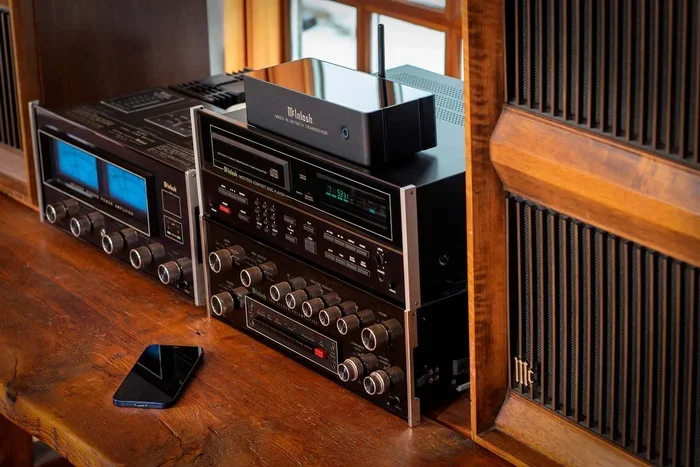
If your stereo does not have an AUX input, a Bluetooth adapter can save the day. This small device plugs into your stereo’s existing input, such as an RCA jack or AUX port. It then creates a wireless bridge between your phone and your stereo system.
To set this up, you plug the adapter into your stereo. Then you pair your phone with the adapter through your phone’s Bluetooth settings. Once paired, any music you play on your phone streams wirelessly to your stereo.
Bluetooth adapters are very convenient because they remove the need for any cables between your phone and stereo. You can leave your phone across the room and still play music. Just keep in mind that Bluetooth can slightly compress audio quality compared to a direct wired connection. For most casual listening, though, the difference is barely noticeable.
Method 3: Using an FM Transmitter
An FM transmitter is a clever workaround for stereos with no direct input at all. This small device plugs into your phone’s charging port or headphone jack. It then broadcasts your phone’s audio over an open FM radio frequency.
You tune your stereo to that same FM frequency, and your phone’s audio plays through the stereo speakers. It works like a tiny radio station just for your phone. This method is especially useful for older stereos that only have a radio tuner and no AUX or RCA inputs.
The downside is that FM transmitters can sometimes pick up interference or static. The audio quality is also not as strong as a direct cable connection. But for a quick and easy setup, an FM transmitter gets the job done with very little effort.
Method 4: Using a Cassette Adapter
This is a fun and nostalgic option. If your old stereo has a cassette tape player, you can use a cassette adapter. This device looks like a regular cassette tape, but it has a cord and a 3.5mm plug built in.
You simply insert the cassette adapter into your stereo’s tape deck. Then you plug the cord into your phone. The stereo reads the adapter like a normal tape and plays your phone’s audio through the speakers.
Cassette adapters work well and do not need batteries. They also do not compress audio quality the way Bluetooth sometimes does. The only catch is that your stereo must have a working tape deck. If it does, this is a surprisingly effective and low-tech way to connect phone to old stereo at home.
Step-by-Step Guide for Each Connection Method
Now that you know the options, let us walk through the setup for each one. Follow these steps carefully and you will be listening to your music in minutes.
Setting Up an AUX Cable Connection
Here is how to get started with an AUX cable in just a few simple steps:
- Find the AUX input on your stereo. It is usually labeled “AUX” or “Line In” and looks like a small round jack.
- Take your 3.5mm AUX cable and plug one end into your phone’s headphone jack or charging port.
- Plug the other end of the cable into the AUX input on your stereo.
- Turn on your stereo and switch the input source to AUX mode.
- Play music on your phone and adjust the volume on both your phone and your stereo.
Quick tip: If your phone does not have a headphone jack, you can use a USB-C to 3.5mm adapter. These adapters are inexpensive and work perfectly with AUX cables.
Setting Up a Bluetooth Adapter
Follow these steps to get your Bluetooth adapter working with your stereo:
- Plug the Bluetooth adapter into your stereo’s AUX input, RCA jack, or other available port.
- Turn on the adapter and put it into pairing mode. Most adapters have a button or LED indicator for this.
- On your phone, go to Settings and open the Bluetooth menu.
- Find the adapter in the list of available devices and tap to pair.
- Once connected, play music on your phone and you should hear it through your stereo.
Quick tip: Keep your phone within 30 feet of the adapter for the best wireless connection. Walls and obstacles can weaken the signal.
Setting Up an FM Transmitter
Here is how to use an FM transmitter with your old stereo:
- Plug the FM transmitter into your phone’s headphone jack or USB-C port.
- Turn on the transmitter and set it to an empty FM frequency. Choose a frequency that has no local radio stations.
- Tune your stereo to that same FM frequency using the radio dial.
- Play music on your phone. You should hear it coming through your stereo.
Quick tip: If you hear static, try switching to a different FM frequency. Frequencies between 88.1 and 89.5 often work well because they are less crowded.
Setting Up a Cassette Adapter
Using a cassette adapter is simple. Follow these steps:
- Insert the cassette adapter into your stereo’s tape deck.
- Press play on the tape deck. The adapter’s built-in belt will spin like a real tape.
- Plug the 3.5mm cord from the adapter into your phone.
- Play music on your phone and adjust the volume on both devices.
Quick tip: If the tape keeps stopping, try pressing the adapter’s reset button or replacing the batteries if it uses any.
Comparison of Connection Methods
Not sure which method is right for you? Here is a side-by-side look at each option to help you decide.
| Method | Best For | Sound Quality | Setup Difficulty | Cost |
|---|---|---|---|---|
| AUX Cable | Stereos with AUX input | Excellent | Very Easy | Under $10 |
| Bluetooth Adapter | Stereos with AUX or RCA input | Very Good | Easy | $15-$30 |
| FM Transmitter | Stereos with no direct input | Good | Very Easy | $10-$20 |
| Cassette Adapter | Stereos with tape deck | Very Good | Very Easy | $10-$15 |
As you can see, each method has its strengths. The AUX cable offers the best sound quality and simplest setup. The Bluetooth adapter gives you wireless freedom. The FM transmitter works when nothing else fits. And the cassette adapter is perfect for tape deck owners.
Think about what your stereo has available and what matters most to you. If sound quality is your top priority, go with a wired option. If convenience and wireless freedom matter more, a Bluetooth adapter or FM transmitter is the way to go.
Tips for Getting the Best Sound Quality
Once you have your phone connected to your old stereo, you want to make sure you are getting the best possible audio. Here are some practical tips to improve your listening experience.
- Keep your phone volume at about 70%: This gives your stereo’s amplifier room to boost the signal without distorting the sound.
- Use high-quality cables: Cheap cables can introduce static and reduce audio clarity. A well-made AUX cable or Bluetooth adapter makes a real difference.
- Position your phone close to the stereo: If you are using Bluetooth, keeping your phone nearby improves the wireless signal and reduces audio dropouts.
- Clean the input jacks: Dust and dirt in your stereo’s AUX or RCA ports can cause crackling sounds. A quick wipe with a dry cloth can help.
- Adjust your stereo’s equalizer: Most old stereos have bass and treble controls. Experiment with these settings to find the sound profile you like best.
- Turn off other wireless devices nearby: Other Bluetooth devices, Wi-Fi routers, and microwaves can interfere with your wireless audio connection.
Expert insight: Many people do not realize that their phone’s music app has its own equalizer settings. Apps like Spotify, Apple Music, and YouTube Music all have built-in EQ options. Adjusting these on your phone can dramatically improve how your music sounds through your old stereo system.
Common Mistakes People Make When Connecting Phone to Old Stereo
Connecting your phone to an old stereo is straightforward, but a few common mistakes can cause frustration. Here is what to watch out for.
- Using the wrong cable: Not all cables are the same. Make sure you have the right type for your stereo’s input. A 3.5mm cable will not work in an RCA port without an adapter.
- Forgetting to switch the stereo input: This is the most common mistake. You can plug everything in correctly, but if your stereo is still set to radio mode, you will not hear anything.
- Ignoring Bluetooth pairing mode: Many people try to connect without putting the adapter into pairing mode first. Always make sure the adapter is discoverable before trying to pair.
- Setting the phone volume too low: If your phone volume is turned down, the stereo will also play quietly. Balance the volume on both devices for the best results.
- Using a damaged cable: Frayed or bent cables can cause intermittent sound or static. Inspect your cables regularly and replace them if they look worn.
- Overlooking battery needs: Some Bluetooth adapters and FM transmitters need batteries or charging. Check this before you start playing music.
Quick tip: If you are not hearing any sound, go through this simple checklist. Is the stereo on the right input? Is the cable fully plugged in on both ends? Is the phone volume turned up? Is the stereo volume turned up? Nine times out of ten, one of these simple checks solves the problem.
Making Your Old Stereo Future-Proof
Once you have successfully connected your phone to your old stereo, you might want to make the setup even better. There are a few upgrades you can consider to improve your experience over time.
One option is to add a smart Bluetooth receiver to your stereo permanently. This device stays plugged in and ready to go, so you never have to fuss with adapters. You can pair your phone instantly every time you want to play music.
Another idea is to add a subwoofer to your stereo system. Many old stereos have a dedicated subwoofer output. Adding a powered subwoofer can bring deep, rich bass to your music that your stereo’s built-in speakers cannot produce on their own.
You can also consider upgrading your stereo’s speakers. If your old stereo uses small or worn-out speakers, replacing them with modern speakers can make a huge difference. Your stereo will sound almost like new again.
These upgrades are optional, but they can extend the life of your old stereo system by many years. There is something rewarding about keeping a quality stereo alive and making it work with modern technology.
Frequently Asked Questions
Can I connect my iPhone to an old stereo without an AUX input?
Yes, you can. An FM transmitter or Bluetooth adapter are both great options for iPhones without a headphone jack. The FM transmitter plugs into your iPhone’s charging port and broadcasts audio to your stereo over an FM frequency. A Bluetooth adapter connects to your stereo’s existing input and pairs wirelessly with your iPhone.
Do I need any special equipment to connect my phone to my old stereo?
It depends on the method you choose. For an AUX cable, you only need a standard 3.5mm cable. For Bluetooth, you need a Bluetooth adapter. For FM transmission, you need an FM transmitter. Most of these items are inexpensive and easy to find online or at any electronics store.
Will connecting my phone damage my old stereo?
No, connecting your phone to your old stereo will not cause any damage. The audio signal from your phone is very low and safe for any stereo input. Just make sure you do not turn the volume up too high on either your phone or your stereo, as this can cause speaker distortion over time.
Why is there static or buzzing when I play music through my stereo?
Static or buzzing usually comes from a few common sources. A damaged or low-quality cable is the most frequent cause. Other culprits include loose connections, electrical interference from nearby devices, or a stereo input that needs cleaning. Try a different cable first, and if the problem continues, check your connections and input jacks.
Can I connect multiple phones to my old stereo at the same time?
This depends on your connection method. With a wired AUX cable, only one phone can be connected at a time. With a Bluetooth adapter, you can usually pair multiple phones, but only one can stream at a time. Some advanced Bluetooth adapters support multipoint pairing, which allows two phones to stay connected simultaneously.
What is the best way to connect phone to old stereo at home for the best sound quality?
For the best sound quality, use a wired AUX cable or a cassette adapter. Both methods deliver a direct, uncompressed audio signal from your phone to your stereo. Bluetooth adapters and FM transmitters are more convenient but they do compress the audio slightly. If sound quality is your top priority, a wired connection is always the winner.
Conclusion
Connecting your phone to your old stereo at home is one of the simplest and most rewarding upgrades you can make. Whether you choose an AUX cable, a Bluetooth adapter, an FM transmitter, or a cassette adapter, the process is straightforward and the results are worth it.
You get the best of both worlds. Modern convenience from your phone combined with the rich, warm sound of your trusted old stereo. No need to replace your stereo system or buy expensive new speakers.
Start with the method that fits your stereo best. Follow the setup steps carefully. And do not be afraid to experiment with the sound settings until you find what you love. Once you hear your favorite songs coming through your stereo speakers, you will wonder why you ever settled for phone speakers alone.
Now you know exactly how to connect phone to old stereo at home. Pick your favorite method, gather your supplies, and enjoy your music the way it was meant to be heard.