Can I Buy An Ipad With Cellular And Not Activate It
Yes, you can buy an iPad with cellular and not activate it. When you skip activation, the device still works fully on Wi-Fi, and you keep complete control over when and how you set up cellular service. This guide covers everything you need to know about buying an iPad with cellular and not activating it, including practical tips, risks, and expert advice.
Have you ever wondered if you can buy an iPad with cellular and not activate it? The short answer is yes. You can absolutely purchase an iPad with cellular and keep it sitting in a drawer without ever turning on the cellular service. But why would someone want to do that? And what does it actually mean for how you use the device?
Many people buy iPad cellular models for various reasons. Some want to gift them. Others plan to activate later. And some simply want the peace of mind that comes with knowing the device has cellular capabilities, even if they never use them right away. Whatever your reason, this guide covers everything you need to know about buying an iPad with cellular and not activating it.
In this article, we will walk you through what happens when you skip activation, which features still work, and whether this approach makes sense for you. We will also share expert tips and common mistakes to help you make the best decision. Let us dive in.
Key Takeaways
- You can buy and own an iPad with cellular without ever activating the service. The device remains yours and works perfectly on Wi-Fi.
- Skipping activation does not harm your device. All Wi-Fi features, apps, and offline capabilities remain fully functional.
- You can activate cellular service anytime later. There is no deadline or expiration when you decide to turn it on.
- An unlocked iPad gives you more carrier flexibility. You are not tied to one provider if you choose this route.
- Offline features like drawing, note-taking, and media playback still work. You do not need cellular data to enjoy your iPad.
- Common mistakes include forgetting to check carrier lock status. Always verify the device is unlocked before purchasing.
📑 Table of Contents
What Does It Mean to Buy an iPad With Cellular?
Understanding the Cellular Model
When Apple sells an iPad cellular model, it means the device has a built-in cellular chip that can connect to mobile networks. This is different from a Wi-Fi only iPad, which can only connect to wireless internet networks. The cellular model gives you the option to access the internet anywhere there is a mobile signal, just like your phone does.
Apple offers cellular versions across its entire iPad lineup. You will find iPad Pro cellular, iPad Air cellular, and iPad mini cellular models. Each one includes the same powerful features as its Wi-Fi counterpart, plus the ability to connect to a wireless data plan through a carrier.
The cellular chip inside these tablets handles the connection to mobile networks. It works with a physical SIM card or an eSIM, depending on the model and region. This tablet connectivity feature is what sets the cellular models apart and gives users more freedom when they are on the go.
How the Cellular Chip Works
The cellular chip in your iPad communicates with nearby cell towers. It sends and receives data just like your smartphone does. When you insert a SIM card or activate an eSIM, the chip connects to your carrier’s network and provides data connectivity.
Here is how the process works step by step:
- The iPad detects available cellular networks in your area.
- It connects to the nearest tower using your carrier credentials.
- Data flows through the network, giving you internet access.
- The network settings on your iPad manage this connection.
When you choose not to activate, steps two through four simply do not happen. The chip is still there, but it remains idle until you decide to set up a cellular service plan.
Can You Buy an iPad With Cellular and Not Activate It?
The Short Answer
Can I buy an iPad with cellular and not activate it? Yes, you can. Apple does not require you to activate cellular service at the time of purchase. You can buy the device, set it up with Wi-Fi only, and leave the cellular service untouched for as long as you want.
There is no contract or obligation that forces you to activate. When you buy an unlocked device, you own it completely. You decide when, or even if, you want to turn on the cellular features. This gives you full control over your purchase.
What Happens When You Skip Activation
When you skip eSIM activation or do not insert a physical SIM card, your iPad operates in a limited but still useful mode. Here is what you can expect:
- Wi-Fi works normally. You can browse the web, stream videos, and use apps that need internet access.
- Cellular data is unavailable. You cannot use mobile data without activating a plan.
- Offline features remain fully functional. Drawing, note-taking, reading downloaded content, and playing offline games all work perfectly.
- The device does not expire. There is no time limit on when you must activate.
- Settings stay accessible. You can always go into network settings and activate when you are ready.
Think of it like buying a car with a GPS system but never turning on the navigation. The feature is there, ready to use, but you choose when to engage it.
How to Use an Unactivated iPad With Cellular
Wi-Fi Functions That Still Work
Even without activating cellular service, your iPad is far from useless. In fact, most people use their iPads primarily on Wi-Fi anyway. Here is a list of things you can still do without ever turning on cellular:
- Browse the internet over Wi-Fi
- Stream videos on Netflix, YouTube, or Disney+
- Use social media apps
- Send and receive emails
- Play online games
- Download and use productivity apps
- Read books on Apple Books or Kindle
- Video call friends and family on FaceTime or Zoom
- Download music and podcasts for offline listening
- Use the camera and edit photos
As you can see, the list is long. A Wi-Fi only iPad experience is nearly identical to a cellular iPad when it is not activated. The main difference is simply that the cellular option sits there, waiting for you.
Offline Features You Can Use
One of the best things about an iPad is that it works great offline. You do not need any internet connection at all to enjoy many of its features. Here are some offline activities that work perfectly on an unactivated iPad cellular model:
- Drawing and note-taking with Apple Pencil
- Reading downloaded books and PDFs
- Watching downloaded movies and TV shows
- Playing offline games
- Taking photos and videos with the camera
- Editing documents in Pages, Numbers, or Keynote
- Listening to downloaded music on Apple Music or Spotify
- Using the calculator, clock, and reminders
These features work because they do not rely on data connectivity. They use the iPad’s internal storage and processing power. So even with no cellular service and no Wi-Fi, your iPad remains a powerful tool.
Pros and Cons of Buying Without Activating
Benefits of Keeping It Unactivated
There are several good reasons to buy an iPad with cellular and not activate it right away. Here are the main benefits:
- Flexibility. You are not locked into a wireless data plan or a contract. You can activate on your own schedule.
- Future-proofing. If you travel frequently later, you already have the hardware ready to go.
- Gift-ready. You can give someone a fully functional iPad and let them handle activation themselves.
- No commitment. You avoid any monthly charges or carrier agreements until you are sure you want them.
- Resale value. An unlocked device with a clean activation history tends to hold its value better.
Drawbacks to Consider
Of course, there are some downsides to keeping your iPad cellular model unactivated. It is important to know about these before you buy:
- You cannot use mobile data. If you are away from Wi-Fi, you have no internet access.
- No mobile hotspot. You cannot share your iPad’s connection with other devices.
- Some apps may not work fully. Apps that require a data connection will be limited.
- You miss out on the main purpose. If you bought the cellular model for on-the-go access, not activating defeats that purpose.
- Potential confusion. Some buyers may not understand why their data connectivity options are grayed out.
Comparison: Activated vs. Unactivated iPad Cellular
| Feature | Activated | Unactivated |
|---|---|---|
| Wi-Fi Access | Yes | Yes |
| Mobile Data | Yes | No |
| Cellular Calls | Yes (with setup) | No |
| Mobile Hotspot | Yes | No |
| Offline Apps | Yes | Yes |
| Camera and Photos | Yes | Yes |
| Carrier Flexibility | Depends on lock | Full freedom |
| Monthly Charges | Yes | No |
This table shows that an unactivated iPad still offers a lot of value. You lose mobile data and hotspot features, but everything else remains intact.
Expert Tips for iPad Cellular Buyers
Quick Tips
Before you buy an iPad with cellular and decide whether to activate, keep these quick tips in mind:
- Check the carrier lock status. Make sure the device is an unlocked device so you can choose any carrier later.
- Verify the model number. Look for the cellular model number (it usually ends in “LL/A” or similar for the US).
- Buy from a trusted source. Apple Store, authorized resellers, and reputable sellers reduce the risk of problems.
- Ask about return policies. Know your options if you change your mind about activation.
- Consider your usage habits. If you are almost always near Wi-Fi, a Wi-Fi only model may save you money.
Common Mistakes to Avoid
Many buyers make avoidable mistakes when purchasing an iPad cellular model. Here are the ones to watch out for:
- Buying a carrier-locked device. This limits your ability to switch carriers or activate later on your terms.
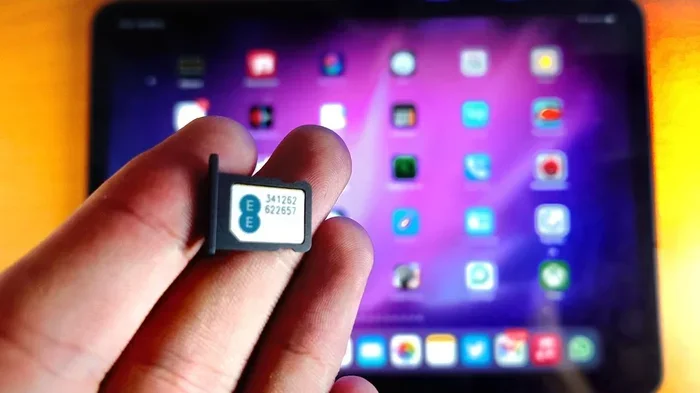
- Forgetting to check the SIM card tray. Some models use physical SIM cards, while others use eSIM. Know which one your iPad uses.
- Assuming activation is mandatory. It is not. You have full control over when you activate.
- Not understanding data roaming. If you plan to use your iPad abroad, check your carrier’s roaming policies before activating.
- Ignoring the prepaid data plan option. Many carriers offer short-term or pay-as-you-go plans that work great with iPads.
When Should You Activate?
Timing your activation is a personal choice. Here are some situations where activating makes sense:
- You are traveling and need mobile data away from Wi-Fi.
- You want to use your iPad as a mobile hotspot for your laptop or phone.
- You have signed up for a prepaid data plan and want to start using it.
- You are gifting the iPad and the recipient wants cellular service right away.
- You have decided that the cellular service is worth the monthly cost for your lifestyle.
On the other hand, keeping it unactivated makes sense when you want flexibility, are unsure about your needs, or simply prefer to use the device on Wi-Fi only for now.
Final Thoughts on Buying an iPad With Cellular and Not Activating It
Can I buy an iPad with cellular and not activate it? Absolutely. You have full control over your device from the moment you purchase it. Whether you choose to activate immediately, wait a few months, or never activate at all is entirely up to you.
The iPad cellular model gives you options. It gives you the hardware capability for mobile connectivity without forcing you into any commitment. This is a huge advantage for buyers who want flexibility or are not yet sure about their needs.
Just remember to check that your device is unlocked, understand what features you will miss without activation, and plan for when you might want to turn on cellular service. With the right approach, buying an unactivated iPad with cellular can be a smart and practical choice.
Take your time. Explore your options. And when you are ready, activation is just a few taps away. Your iPad cellular model will be waiting for you.
Frequently Asked Questions
Do I have to activate my iPad with cellular right away?
No, you do not have to activate right away. Apple does not require you to set up cellular service at the time of purchase. You can use the iPad on Wi-Fi only and activate whenever you are ready.
Will my iPad cellular model work if I never activate it?
Yes, it will work perfectly on Wi-Fi. All the features that do not need mobile data, like apps, cameras, games, and offline media, will function normally even without activation.
Can I activate my iPad cellular later after not using it?
Absolutely. You can activate your cellular service at any time. Simply go to network settings, insert your SIM card or set up an eSIM, and follow the prompts. There is no expiration or penalty for waiting.
Is it better to buy a Wi-Fi only iPad or a cellular model?
If you are always near Wi-Fi, a Wi-Fi only model saves you money. But if you travel often or want the option for on-the-go access, a cellular model gives you more flexibility even if you do not activate it right away.
Can I use a prepaid data plan with my iPad cellular?
Yes, many carriers offer prepaid data plans that work great with iPads. These are a great option if you only need data connectivity occasionally and do not want a long-term contract.
What is the difference between eSIM and a physical SIM for iPad?
An eSIM is a digital SIM built into the device. A physical SIM is a small card you insert into the tray. Both provide the same cellular service. Some newer iPads support only eSIM, while others support both options.