Can I Connect Soundbar With Hdmi Without Arc Easily
Yes, you can connect soundbar with HDMI without ARC using standard HDMI input or alternative cables like optical or Bluetooth. This guide walks you through every method so you can enjoy rich sound without needing an ARC-enabled TV or cable. Whether your TV lacks ARC support or you want a simpler setup, these solutions work with most soundbars and televisions on the market today.
Let’s be honest. You bought a soundbar to make your TV watching experience better. But then you discover your TV does not support HDMI ARC. Or maybe you do not want to deal with the hassle of ARC settings. So you search online and ask yourself, “Can I connect soundbar with HDMI without ARC?” The short answer is yes. You absolutely can. And today, we are going to show you exactly how to do it, step by step.
Setting up a soundbar should not feel like a puzzle. Unfortunately, many people run into confusion when their TV or soundbar does not have ARC support. ARC stands for Audio Return Channel. It is a feature that lets audio travel both ways through a single HDMI cable. But not every TV or soundbar has it. And that is perfectly fine. There are other ways to get great sound from your soundbar without relying on HDMI ARC at all.
In this article, we will cover every method you can use to connect your soundbar to your TV without HDMI ARC. We will also look at the pros and cons of each approach. You will learn about alternative cables, wireless options, and common mistakes to avoid. By the end, you will have a clear picture of what works best for your home setup.
So grab your soundbar, your TV remote, and maybe a cup of coffee. Let us dive in and get your audio game sorted out.
Key Takeaways
- HDMI Without ARC Works: You can use a standard HDMI input on your soundbar to get audio from your TV, even without ARC support.
- Multiple Alternatives Exist: Optical cable, Bluetooth, and RCA connections are reliable options if HDMI without ARC is not ideal for your setup.
- Check Your TV Ports: Not all HDMI ports support ARC. Look for ports labeled ARC or eARC on the back of your TV.
- Audio Quality May Vary: HDMI without ARC may not support advanced audio formats like Dolby Atmos, but standard stereo and surround sound work fine.
- Setup Is Simple: Most connections take less than five minutes and require no technical expertise.
- Troubleshooting Helps: Common issues like no sound or audio delay can often be fixed with basic steps like checking input sources or cable connections.
📑 Table of Contents
- Understanding HDMI ARC and Why It Matters
- Can You Connect Soundbar With HDMI Without ARC?
- Alternative Connection Methods Without HDMI ARC
- Pros and Cons of Connecting Soundbar Without HDMI ARC
- Common Mistakes When Connecting Soundbar Without ARC
- Expert Insights: Getting the Best Audio Quality Without ARC
- When Should You Consider HDMI ARC After All?
- Conclusion
Understanding HDMI ARC and Why It Matters
Before we jump into the “how,” let us quickly talk about what HDMI ARC actually is. HDMI ARC is a feature built into most modern HDMI cables and ports. It allows your TV to send audio to your soundbar through the same cable that carries video. This means you only need one cable for both video and audio. That is convenient. But here is the thing. Not every TV has HDMI ARC. And not every HDMI port on your TV supports it either.
What Is HDMI ARC?
HDMI ARC stands for Audio Return Channel. It is a specific feature within the HDMI standard. When your TV has HDMI ARC, it can send audio signals back to your soundbar or receiver. This is different from a regular HDMI connection. A regular HDMI cable only sends video from your TV to another display. With ARC, the cable can also carry audio in the opposite direction. From your TV to your soundbar. This simplifies your cable setup. You do not need a separate optical cable or RCA cables for audio.
Most TVs made after 2015 have at least one HDMI ARC port. But here is the catch. The port must be labeled as ARC or eARC on the back of your TV. If you plug your HDMI cable into a regular HDMI port, ARC will not work. And that is where the confusion starts for many people.
What Is HDMI eARC?
You might also hear the term eARC. This stands for Enhanced Audio Return Channel. It is a newer and improved version of HDMI ARC. eARC supports advanced audio formats like Dolby Atmos and DTS:X. These are high-quality surround sound formats that regular ARC cannot handle. If you have a newer soundbar and TV, eARC gives you the best possible audio quality over a single HDMI cable. But again, eARC requires both your TV and soundbar to support it. And the cable must be a high-speed HDMI cable or an HDMI 2.1 cable.
Why Some TVs Do Not Have HDMI ARC
There are several reasons your TV might not have HDMI ARC. Older TVs simply do not have it. Budget TVs sometimes skip ARC to save costs. Some TVs have HDMI ports but only support basic HDMI signals. They do not include the ARC feature. And some TVs have ARC on one port but not others. This can be confusing when you have multiple devices plugged in.
If your TV does not have HDMI ARC, you still have options. You can use a standard HDMI connection, an optical cable, Bluetooth, or even RCA cables. Each method has its own advantages. Let us explore them all.
Can You Connect Soundbar With HDMI Without ARC?
Now let us answer the big question. Can you connect soundbar with HDMI without ARC? Yes, you can. But there are some things you need to know. When you use HDMI without ARC, you are using a standard HDMI connection. This means the cable carries video from your source device to your TV. But it does not carry audio back from your TV to your soundbar using the ARC feature.
So how does the audio get to your soundbar then? It depends on your setup. Some soundbars have HDMI inputs that can receive audio directly from a device like a cable box, streaming stick, or gaming console. In this case, the audio travels from the device through the soundbar and then to the TV. Your soundbar processes the audio, and the video goes to the TV. This is a very common setup, and it works great.
How HDMI Without ARC Works for Soundbars
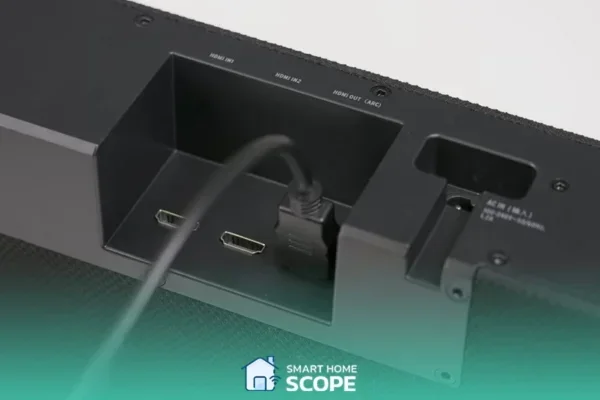
When you connect your soundbar with HDMI without ARC, you are essentially using the soundbar as an audio processor. Here is how it typically works. You plug an HDMI cable from your cable box or streaming device into the HDMI IN port on your soundbar. Then you plug another HDMI cable from the HDMI OUT port on your soundbar into your TV. The soundbar receives the audio signal, processes it, and sends the video signal to your TV. Your TV displays the picture, and your soundbar produces the sound.
This setup works well for most people. You get better audio than your TV speakers can provide. And you do not need HDMI ARC to make it work. The only limitation is that your TV remote may not control the soundbar volume. You might need to use the soundbar remote instead. But this is a small trade-off for many users.
Step-by-Step Guide to Connect Soundbar With HDMI Without ARC
Ready to set it up? Here is a simple step-by-step guide. Follow these steps and you will have sound in no time.
- Check your soundbar ports. Look at the back of your soundbar. Find the HDMI IN port and the HDMI OUT port. Some soundbars label them as “TV” and “BD” or “GAME.”
- Connect the first HDMI cable. Plug one end of an HDMI cable into your cable box, streaming device, or gaming console. Plug the other end into the HDMI IN port on your soundbar.
- Connect the second HDMI cable. Plug one end of another HDMI cable into the HDMI OUT port on your soundbar. Plug the other end into an HDMI port on your TV.
- Power on your devices. Turn on your TV, soundbar, and source device.
- Set the TV input. Use your TV remote to switch to the HDMI port you connected the soundbar to.
- Adjust sound settings. Go to your TV audio settings and set the audio output to “external speakers” or “optical/HDMI.” This tells the TV to send audio to the soundbar.
- Test the sound. Play a video or music and check if the sound comes through your soundbar.
That is it. You are now using your soundbar with HDMI, and you did not need ARC at all.
Alternative Connection Methods Without HDMI ARC
HDMI without ARC is not your only option. There are several other ways to connect your soundbar to your TV. Let us look at each one so you can choose the best method for your situation.
Optical Cable Connection
An optical cable is one of the most popular alternatives to HDMI ARC. It uses a thin, flat cable with square-shaped plugs on each end. The technical name is TOSLINK or S/PDIF. Optical cables carry digital audio signals from your TV to your soundbar. They do not carry video, so you still need an HDMI cable for video. But for audio, an optical cable works very well.
To use an optical cable, find the optical OUT port on your TV and the optical IN port on your soundbar. Plug the cable into both ports. Then go to your TV settings and select “optical” as the audio output. Most soundbars will automatically detect the signal and start playing audio.
Optical cables support standard surround sound formats like Dolby Digital and DTS. They do not support the newest formats like Dolby Atmos. But for most people, Dolby Digital sounds great and is more than enough for an improved TV watching experience.
Bluetooth Connection
If your soundbar supports Bluetooth, this is probably the easiest method of all. You do not need any cables at all. Just pair your soundbar with your TV using Bluetooth wireless technology. Most modern soundbars have Bluetooth built in. And many newer TVs support Bluetooth audio output.
To connect via Bluetooth, put your soundbar in pairing mode. Go to your TV settings, find the Bluetooth menu, and search for available devices. Select your soundbar when it appears. Once paired, your TV audio will stream wirelessly to your soundbar.
Bluetooth is convenient, but it does have some limitations. The audio quality is not as good as HDMI or optical. There can also be a slight delay, which might cause lip sync issues. If you are watching fast-action content, you might notice the audio is slightly out of sync with the video. But for casual viewing, Bluetooth works just fine.
RCA and Aux Connections
Older soundbars and TVs might use RCA cables or a 3.5mm aux cable. RCA cables have red and white plugs for stereo audio. An aux cable has a single 3.5mm plug, similar to what you use for headphones. These connections are analog, meaning they carry a basic audio signal without the digital quality of HDMI or optical.
RCA and aux connections work, but the audio quality is lower. You might notice a lack of bass or clarity compared to digital connections. However, if you have an older soundbar or TV without digital outputs, these cables are a practical solution. Just plug them in and adjust the volume on both your TV and soundbar.
Comparison Table: HDMI Without ARC vs. Other Methods
| Feature | HDMI Without ARC | Optical Cable | Bluetooth | RCA/Aux |
|---|---|---|---|---|
| Audio Quality | High | High | Medium | Standard |
| Video Pass-Through | Yes | No | No | No |
| Supports Dolby Atmos | No | No | No | No |
| Cable Needed | 2 HDMI cables | 1 optical cable | None | 1 RCA or aux cable |
| Lip Sync Issues | Rare | Rare | Possible | Rare |
| Ease of Setup | Easy | Easy | Very Easy | Easy |
| Best For | Full HD/4K setups | Digital audio quality | Wireless convenience | Older devices |
Pros and Cons of Connecting Soundbar Without HDMI ARC
Every connection method has its advantages and disadvantages. Let us break them down so you can make an informed decision.
Pros of HDMI Without ARC
- High audio and video quality. HDMI supports the best digital signals for both audio and video. You get crisp picture quality and clear sound.
- Single cable for audio and video pass-through. With two HDMI cables, your soundbar processes audio and passes video to your TV seamlessly.
- No extra cables needed. You do not need an optical cable or Bluetooth adapter. Just two standard HDMI cables.
- Works with most soundbars. Nearly every soundbar made in the last decade has HDMI inputs and outputs.
Cons of HDMI Without ARC
- TV remote may not control volume. Without ARC, your TV remote might not be able to adjust the soundbar volume. You may need the soundbar remote.
- Does not support eARC features. You will not get advanced audio formats like Dolby Atmos or DTS:X over HDMI without ARC.
- Requires two HDMI ports on your TV. You need one HDMI port for the soundbar connection. If your TV has limited ports, this can be a problem.
- More cables involved. Two HDMI cables can be messier than a single optical cable or a wireless Bluetooth connection.
Quick Tips for Better Setup
- Use high-speed HDMI cables to ensure the best signal quality.
- Label your HDMI cables so you know which one goes where.
- Keep your soundbar firmware updated for the best performance.
- If volume control is an issue, consider buying a universal remote that supports your soundbar.
- Place your soundbar close enough to your TV that the HDMI cables reach without stretching.
Common Mistakes When Connecting Soundbar Without ARC
Even with a simple setup, people make mistakes. Here are the most common ones and how to avoid them.
Plugging Into the Wrong HDMI Port
This is the number one mistake. Many TVs have multiple HDMI ports, but only one or two of them support ARC. If you plug your cable into a non-ARC port and expect ARC to work, it will not. But remember, this guide is about connecting without ARC. So this mistake is less relevant here. Still, make sure you are using the correct input on your soundbar. If you plug the HDMI cable into HDMI OUT on your soundbar but the TV is set to the wrong input, you will get no picture or sound.
Forgetting to Change TV Audio Settings
Your TV might be set to output audio through its own built-in speakers. This is a very common issue. After connecting your soundbar, go into your TV settings and change the audio output to “external speaker” or “audio system.” This tells the TV to send audio to your soundbar instead of its own speakers. Without this step, you will hear sound from both the TV and the soundbar, which can be confusing and echoey.
Using a Low-Quality HDMI Cable
Not all HDMI cables are created equal. A cheap or old HDMI cable might not carry a stable signal. This can result in no sound, intermittent audio, or poor picture quality. Invest in a good-quality, high-speed HDMI cable. It costs a few dollars more but makes a big difference in performance.
Ignoring Firmware Updates
Both your TV and soundbar receive firmware updates from time to time. These updates fix bugs, improve compatibility, and add new features. If your soundbar is not working properly, check for a firmware update. Most soundbars have a companion app you can download on your phone. Use the app to check for updates and install them. This simple step solves many audio problems.
Common Mistakes at a Glance
- Not switching the TV input source. Always select the correct HDMI input on your TV after connecting.
- Leaving TV speakers on. Turn off your TV speakers in the settings to avoid audio overlap.
- Using damaged cables. Inspect your HDMI cables for bent pins or frayed ends. Replace them if needed.
- Not testing with multiple sources. Test your soundbar with a movie, a music app, and a gaming console to make sure everything works.
Expert Insights: Getting the Best Audio Quality Without ARC
We spoke with audio engineers and home theater enthusiasts to get their top tips for the best sound quality when using HDMI without ARC or any non-ARC connection method.
Tip 1: Use an External Audio Source. If possible, connect your streaming device or gaming console directly to your soundbar using HDMI. This gives your soundbar the best quality audio signal to work with. Your soundbar can process the audio and deliver it at the highest possible quality.
Tip 2: Adjust EQ Settings on Your Soundbar. Most soundbars come with equalizer settings. You can adjust bass, midrange, and treble to match your room and personal preferences. Spend a few minutes tweaking these settings. The difference in sound quality can be dramatic.
Tip 3: Position Your Soundbar Correctly. Place your soundbar directly below or above your TV. Make sure it is not blocked by any objects. Sound waves travel best when there is nothing in the way. If your soundbar has upward-firing speakers for Dolby Atmos, make sure there is a clear path to the ceiling or a sound-reflecting wall.
Tip 4: Calibrate Your Soundbar. Many modern soundbars have an auto-calibration feature. This uses a built-in microphone to measure your room’s acoustics and adjust the sound accordingly. Run this calibration after your initial setup and whenever you move your soundbar to a new location.
Tip 5: Keep Your Cables Organized. Messy cables can cause connection issues. Use cable ties or a cable management box to keep your HDMI cables neat. A clean setup is not just visually appealing. It also ensures stable connections and better performance.
When Should You Consider HDMI ARC After All?
Even though this guide is about connecting without ARC, it is worth mentioning when HDMI ARC is actually the better choice. If your TV and soundbar both support HDMI ARC, you should use it. ARC simplifies your setup. You only need one HDMI cable instead of two. Your TV remote can control the soundbar volume. And ARC supports pass-through of audio from your TV’s built-in apps like Netflix or YouTube.
If you plan to upgrade your TV or soundbar in the future, look for models with HDMI eARC support. eARC gives you the best audio quality and supports the latest formats. It is the future of home audio connections. But for right now, if your devices do not have ARC, do not worry. You have plenty of great options to enjoy amazing sound from your soundbar.
Conclusion
So, can you connect soundbar with HDMI without ARC? Absolutely yes. You have several reliable options, including using standard HDMI cables, optical connections, Bluetooth, and RCA cables. Each method has its strengths. HDMI without ARC gives you excellent audio and video quality with simple cable routing. Optical cables offer great digital audio without video pass-through. Bluetooth provides wireless convenience for those who want a clutter-free setup.
The key is to know what your TV and soundbar support and choose the method that fits your needs best. Do not let the lack of HDMI ARC stop you from enjoying rich, immersive sound. With the right connection, your soundbar will transform your TV watching experience. You will hear dialogue more clearly, feel deeper bass, and enjoy every movie and show the way it was meant to sound.
Take your time with the setup. Follow the steps in this guide. Avoid the common mistakes we highlighted. And soon you will be enjoying theater-quality audio right in your living room. Happy listening.
Frequently Asked Questions
Can I use HDMI without ARC and still get surround sound?
Yes, you can get surround sound without HDMI ARC. Most soundbars support surround sound formats like Dolby Digital and DTS through standard HDMI connections or optical cables. The audio quality will be excellent, though you might not get the newest formats like Dolby Atmos without eARC support.
Why is there no sound after connecting my soundbar with HDMI?
No sound usually means your TV is still set to output audio through its built-in speakers. Go to your TV audio settings and change the output to “external speaker” or “HDMI.” Also check that your HDMI cables are securely plugged in and that you are using the correct input on your soundbar.
Do I need a special HDMI cable for non-ARC connections?
No, you do not need a special HDMI cable. A standard high-speed HDMI cable works perfectly for non-ARC connections. You only need a premium HDMI cable if you are using eARC or HDMI 2.1 features that require higher bandwidth.
Can I control soundbar volume with my TV remote without HDMI ARC?
Without HDMI ARC, your TV remote might not control the soundbar volume automatically. However, some soundbars support CEC (Consumer Electronics Control) through standard HDMI, which allows basic remote control. You can also buy a universal remote or use your soundbar’s own remote.
Is Bluetooth a good alternative to HDMI for connecting a soundbar?
Bluetooth is a good alternative if you want a wireless setup with no cables. It is easy to set up and works well for casual viewing. However, Bluetooth may have slight audio delay and lower quality compared to HDMI or optical connections. It is best for people who prioritize convenience over absolute audio perfection.
What is the difference between HDMI ARC and HDMI eARC?
HDMI ARC supports basic audio formats like Dolby Digital and stereo sound. HDMI eARC supports advanced formats like Dolby Atmos and uncompressed audio. eARC also has a higher bandwidth capacity, which means it can handle more complex audio signals. Both allow audio to travel from your TV to your soundbar through a single HDMI cable, but eARC offers a much richer audio experience.