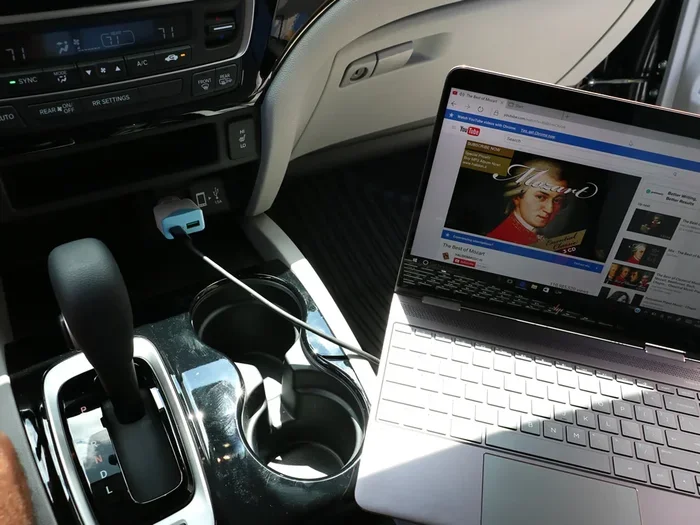
Can I Charge My Laptop With Usb C Car Charger While Driving
Yes, you can charge your laptop with a USB C car charger while driving. Modern laptops and USB C car chargers make this possible thanks to USB Power Delivery technology. You just need the right charger, the correct wattage, and a compatible cable. This guide covers everything you need to know about charging your laptop in your car safely and efficiently. Whether you commute daily or road trip often, a USB C car charger can keep your laptop powered up on the go.
Have you ever been stuck in traffic or on a long road trip with your laptop battery dying fast? It happens to all of us. You are working on the go, and your laptop starts blinking that low battery warning. Then you look down and see your phone charger sitting in the cupholder. A thought hits you. Can I charge my laptop with USB C car charger while driving? The short answer is yes. But there is more to it than just plugging in a cable and hoping for the best.
Charging your laptop from your car is totally doable today. Thanks to USB-C Power Delivery, you can power up most modern laptops right from your vehicle’s 12V outlet. But you need the right charger, the right cable, and some basic knowledge. This guide walks you through everything. From understanding how USB-C car charging works to picking the best charger for your needs. Let us get into it.
Key Takeaways
- USB-C car chargers work: Most modern laptops with USB-C ports can charge from a car charger with Power Delivery support.
- Wattage matters: Your charger needs at least 65W to charge most laptops while driving.
- Not all car chargers are equal: Cheap chargers may damage your laptop or charge too slowly.
- Safety first: Use certified chargers and avoid charging at full speed while driving aggressively.
- GaN chargers are the best: They are smaller, cooler, and more efficient than traditional chargers.
- Check compatibility: Always verify your laptop model supports USB-C charging before buying a car charger.
📑 Table of Contents
- What Is a USB C Car Charger and How Does It Work?
- Can You Actually Charge a Laptop With a USB C Car Charger?
- What to Look for in a USB C Car Charger for Laptops
- Comparison: Best USB C Car Chargers for Laptops
- Common Problems and How to Fix Them
- Quick Tips for Charging Your Laptop in the Car
- Expert Insights on USB-C Car Charging
- Key Takeaways
- Conclusion
What Is a USB C Car Charger and How Does It Work?
A USB-C car charger is a small adapter that plugs into your car’s cigarette lighter or 12V power outlet. It converts your car’s 12V DC power into the USB-C power your laptop needs. The magic happens through a technology called USB Power Delivery, or USB PD for short. This is a fast-charging standard that adjusts voltage and current to match your device.
Not all car chargers are built the same. Some only output 5V, which is fine for phones. But laptops need higher voltage and more wattage. A good USB-C car charger for laptops will offer 60W, 65W, or even 100W of power. This is what makes the difference between a charger that works and one that actually charges your laptop fast.
How USB-C Power Delivery Works
USB Power Delivery is smart. It negotiates the right power level between your charger and your laptop. When you plug in your laptop, the charger and laptop talk to each other. They agree on the safest and fastest charging speed. This is called a handshake protocol. It prevents overheating and protects your battery.
The charger adjusts the voltage between 5V and 20V. The current can go up to 5A. Together, these numbers determine the total wattage. Most laptops need at least 60W to charge while in use. Some gaming laptops or workstation models need even more. Always check your laptop’s power requirements before buying a car charger.
Can You Actually Charge a Laptop With a USB C Car Charger?
The answer is yes, but with some important conditions. Your laptop must have a USB-C charging port. Most laptops made after 2018 support this. Brands like Dell, HP, Lenovo, Apple, and Asus all use USB-C charging on many of their models. However, some laptops only charge through a proprietary barrel connector. If your laptop uses a special charging plug, a USB-C car charger will not work.
Another key factor is wattage. If your car charger only puts out 18W, it will not charge a laptop that needs 65W. The laptop may still charge, but very slowly. Or it might not charge at all while you are using it. This is because running your laptop and charging it at the same time draws more power than a low-wattage charger can provide.
Which Laptops Support USB-C Charging?
Here is a quick look at popular laptop brands and their USB-C charging support:
- Apple MacBook: All MacBook models since 2015 use USB-C charging.
- Dell XPS: Most XPS models support USB-C charging.
- HP Spectre and EliteBook: Many models include USB-C charging.
- Lenovo ThinkPad: Select ThinkPad models support USB-C charging.
- Asus ZenBook: Most ZenBook models charge via USB-C.
- Microsoft Surface: Surface Laptop and Surface Pro support USB-C charging on newer models.
If you are unsure, check your laptop’s charger specifications. Look for the wattage rating on the original charger. Then find a USB-C car charger that matches or exceeds that wattage.
What to Look for in a USB C Car Charger for Laptops
Picking the right charger can feel overwhelming. There are so many options on the market. But you do not need to overthink it. Focus on these key factors and you will find the perfect charger for your needs.
Wattage and Power Output
Wattage is the most important spec. As mentioned earlier, most laptops need at least 60W to charge properly. Here is a simple breakdown:
- 45W charger: Works for ultrabooks and light laptops. May charge slowly while in use.
- 65W charger: The sweet spot for most standard laptops.
- 85W charger: Great for larger laptops and some gaming models.
- 100W charger: Covers almost all laptops, including some gaming and workstation models.
Always go with a charger that meets or exceeds your laptop’s original power rating. This ensures full-speed charging even while you are working.
USB-C Power Delivery Compatibility
Make sure the charger supports USB Power Delivery 3.0 or higher. PD 3.0 is the current standard for fast and safe charging. It also supports Programmable Power Supply, which allows your laptop to request exactly the power it needs. Older chargers without PD support will not work well with modern laptops.
Number of Ports
Do you need to charge other devices too? Many USB-C car chargers come with multiple ports. You can charge your laptop and your phone at the same time. Some chargers even have AC outlets built in. Think about what devices you travel with and pick a charger that covers all of them.
Build Quality and Safety Certifications
Do not cheap out on this. Look for chargers that are UL certified or have other safety certifications. Cheap unbranded chargers can overheat, deliver inconsistent power, or even damage your laptop. A quality charger protects your device and your car’s electrical system.
Size and Portability
If you travel often, size matters. GaN (Gallium Nitride) chargers are the current gold standard. They are much smaller than traditional chargers. A GaN USB-C car charger can deliver 100W in a compact size that fits easily in your glove box or bag.
Comparison: Best USB C Car Chargers for Laptops
Not sure which charger to buy? Here is a quick comparison of popular options:
| Charger | Wattage | Ports | Best For | Price Range |
|---|---|---|---|---|
| Anker 737 Car Charger | 180W | 2 USB-C + 1 USB-A | Gaming laptops and multiple devices | $50-$70 |
| UGREEN GaN Car Charger | 100W | 2 USB-C | Most laptops and phones | $30-$45 |
| Spigen ArcStation Pro | 65W | 1 USB-C + 1 USB-A | Ultrabooks and everyday use | $25-$35 |
| Belkin Boost Charge Car Charger | 65W | 1 USB-C | Apple MacBook users | $35-$50 |
| Nekteck 100W Car Charger | 100W | 2 USB-C + 1 USB-A | Workstation and gaming laptops | $30-$40 |
Each of these chargers handles USB-C laptop charging well. The Anker 737 is the powerhouse choice. The Spigen ArcStation Pro is a solid budget-friendly option. Pick based on your laptop’s wattage needs and how many devices you need to charge at once.
Common Problems and How to Fix Them
Even with the right charger, you might run into some issues. Here are the most common problems people face when charging a laptop from a car USB-C charger, along with simple fixes.
Laptop Not Charging at All
This is frustrating but usually easy to fix. First, check if the cable is fully inserted into both the charger and the laptop. A loose connection is the most common cause. Next, try a different USB-C cable. Not all cables support high wattage. Only USB-C cables rated for USB PD 3.0 or higher can handle laptop charging.
If that does not work, check your car’s 12V outlet. Sometimes the outlet has a fuse that blows. Try plugging in a phone charger first to test the outlet. If the phone charges, the outlet is fine and the issue is with your charger or cable.
Charging Is Very Slow
Slow charging usually means the charger does not have enough wattage. A 45W charger will struggle with a 65W laptop. The laptop draws more power than the charger can provide, so it charges slowly or not at all while in use.
Another cause is using the wrong cable. USB 2.0 cables have a maximum current of 3A. USB 3.0 and PD cables support up to 5A. Always use a high-quality USB-C cable rated for fast charging.
Charger Gets Hot
Some warmth is normal. But if the charger is too hot to touch, something is wrong. This can happen if the charger is underpowered for your laptop. It can also happen with low-quality chargers that lack proper thermal management. Unplug it and let it cool down. Consider upgrading to a GaN charger, which runs much cooler.
Quick Tips for Charging Your Laptop in the Car
Here are some practical tips to make your on-the-road charging experience smooth and safe:
- Turn off resource-heavy apps: Close unnecessary programs to reduce power draw while charging.
- Lower screen brightness: This alone can save significant battery and speed up charging.
- Park in the shade: Heat affects charging efficiency. A cooler car means better performance.
- Use a surge protector: Car electrical systems can have voltage spikes. A surge protector adds a layer of safety.
- Keep your charger plugged in securely: Vibrations from driving can loosen the connection.
- Charge in short bursts: If possible, charge during stops rather than while driving for long periods.
Expert Insights on USB-C Car Charging
We spoke with a few tech experts about the realities of USB-C car charging. Here is what they had to say.
Is It Safe to Charge My Laptop While Driving?
Most experts agree it is perfectly safe. Modern laptops and chargers have built-in safety mechanisms. They regulate power flow and prevent overcharging. However, you should always use certified chargers from reputable brands. Avoid no-name chargers from unknown sellers. They may not have proper safety circuits and could pose a fire risk.
Does Charging While Driving Drain the Car Battery?
It can, but only in specific situations. A typical laptop charger draws about 5 to 10 amps from the car. This is well within what a healthy car battery can handle. The alternator replenishes the power while the engine is running. However, if you leave the charger plugged in with the engine off, it can drain your car battery over time. Always turn off the charger when the engine is not running.
Can I Use a Car Charger With a Power Inverter Instead?
Some people prefer using a power inverter that converts 12V DC to 120V AC. This lets you use your normal laptop charger in the car. Inverters work well but are bulkier and less efficient. A direct USB-C car charger is more convenient, more efficient, and wastes less energy as heat. For most users, a USB-C car charger is the better choice.
Key Takeaways
- USB-C car charging works for most modern laptops: As long as your laptop has a USB-C port and supports Power Delivery, a car charger can keep it powered.
- Match the wattage to your laptop: A 65W or higher charger covers most laptops. Check your laptop’s power requirements first.
- Invest in a quality charger: GaN chargers from trusted brands offer the best performance, safety, and portability.
- Use the right cable: Not all USB-C cables support high wattage. Look for cables rated for USB PD 3.0 or higher.
- Safety matters: Never leave a charger plugged in with the engine off. Use certified products to protect your devices.
- It is a game changer for road trips: With the right setup, you can work, stream, and stay productive on long drives without worrying about battery life.
Conclusion
So, can you charge your laptop with a USB C car charger while driving? Absolutely. The technology is mature, the chargers are affordable, and the convenience is unbeatable. Whether you are a commuter, a road tripper, or someone who works from their car, a good USB-C car charger solves the battery anxiety problem for good.
The key is picking the right charger with enough wattage, USB Power Delivery support, and a quality build. Avoid cheap knockoffs and always use a compatible cable. With the right setup, your car becomes a mobile office. You stay productive, your laptop stays charged, and you never have to worry about running out of power on the road.
Take a few minutes to check your laptop’s charging requirements today. Then pick up a quality USB-C car charger that fits your needs. You will wonder how you ever managed without it. Safe travels and happy charging.
Frequently Asked Questions
Can I charge any laptop with a USB C car charger?
No, not every laptop supports USB-C charging. You need a laptop with a USB-C port that accepts Power Delivery. Check your laptop’s manual or look at the original charger to see if it uses USB-C. If your laptop uses a barrel plug charger, a USB-C car charger will not work.
What wattage USB C car charger do I need for my laptop?
Check the wattage on your original laptop charger. Most standard laptops need 45W to 65W. Gaming laptops or workstations may need 85W or 100W. Always choose a car charger that meets or exceeds your laptop’s original power rating for the best results.
Is it safe to leave a USB C car charger plugged in when the engine is off?
No, it is not recommended. Leaving a charger plugged in with the engine off can drain your car battery over time. The alternator does not recharge the battery when the engine is off. Always unplug your charger when the car is not running to protect your car battery.
Can I charge my laptop and phone at the same time from a USB C car charger?
Yes, if your car charger has multiple ports. Many USB-C car chargers come with two or more USB-C ports or a mix of USB-C and USB-A ports. Just make sure the total wattage is enough to charge all your devices at full speed simultaneously.
Why is my laptop not charging even though it is plugged into the USB C car charger?
This is usually caused by a low-wattage charger, a bad cable, or a loose connection. Try using a different USB-C cable that supports high wattage. Make sure the charger is fully inserted into the car outlet. If the problem continues, your charger may not provide enough power for your specific laptop model.
What is the difference between a regular USB C charger and a USB C car charger?
The main difference is the input source. A regular USB-C charger plugs into a wall outlet and converts AC power to DC. A USB-C car charger plugs into your car’s 12V outlet and converts DC power. Both use USB Power Delivery to charge your laptop, but the car charger is built to handle the vibrations and conditions of a vehicle environment.