Can Hdmi Go Bad And How To Tell If Hdmi Is Failing
Yes, HDMI cables can go bad over time due to wear, damage, or poor quality. Understanding the signs of HDMI cable failure helps you fix audio and video problems fast. This guide covers the causes, symptoms, testing methods, and tips to keep your HDMI connections working perfectly.
Have you ever been watching your favorite show and suddenly the screen goes black? Or maybe the audio cuts out randomly during a movie night. These frustrating moments can make you wonder, can HDMI go bad? The short answer is yes. HDMI cables are not immune to damage, wear, and eventual failure.
Many people assume that once they plug in an HDMI cable, it works forever. That is not the case. Like any electronic connector, HDMI cables degrade over time. They face physical stress, heat exposure, and everyday wear that can weaken the signal. Understanding HDMI cable failure helps you troubleshoot problems faster and avoid unnecessary frustration.
This guide covers everything you need to know about HDMI cable problems. You will learn the warning signs, how to test your cables, what causes them to go bad, and how to prevent issues in the future. Whether you are dealing with a flickering screen or complete signal loss, this article has practical answers for you.
Key Takeaways
- HDMI cables do fail: Physical damage, bending, and age can cause signal loss and poor performance.
- Common symptoms include no signal, flickering, and audio dropouts: These are clear signs your HDMI cable may be going bad.
- Testing is simple: You can use a multimeter, try different ports, or swap cables to isolate the problem.
- HDMI cable lifespan averages 5-10 years: Proper care can extend this significantly.
- Prevention beats replacement: Avoid tight bends, use quality cables, and store them properly.
- Not all problems are cable issues: Sometimes the port, device, or software is the real culprit.
- Replace cables when needed: A new high-quality HDMI cable is inexpensive and solves most problems.
📑 Table of Contents
What Causes HDMI Cables to Go Bad
HDMI cables are built to last, but they are not indestructible. Several factors can lead to HDMI signal loss and eventual cable failure. Knowing the causes helps you protect your cables and spot trouble early.
Physical Damage and Wear
The most common reason HDMI cables fail is physical damage. Bent connectors, pinched cables, and pulled cords all take a toll. Over time, the internal wires inside the cable can break. The outer jacket may fray or crack, exposing the delicate wiring inside.
Think about how often you unplug and replug your HDMI cable. Each connection puts stress on the pins and the cable housing. After hundreds of plug cycles, the connection can become loose. This leads to intermittent HDMI connection problems that come and go without warning.
Poor Cable Quality
Not all HDMI cables are created equal. Cheap cables with thin shielding and low-grade copper wires are more prone to failure. They may work fine at first but degrade faster than high-quality HDMI cables. Investing in reputable brands pays off in the long run.
Budget cables often lack proper insulation. This means the internal wires can touch or short out over time. The result is HDMI audio video issues that seem to appear out of nowhere.
Heat and Environmental Factors
Heat is a silent killer of HDMI cables. Cables running behind entertainment centers or through walls can overheat. Prolonged heat exposure weakens the insulation and damages the internal conductors. Moisture and humidity also play a role in cable degradation.
Dust and dirt buildup in the HDMI port can cause connection problems too. Over months and years, particles accumulate and interfere with the metal-to-metal contact. This leads to HDMI no signal errors that mimic cable failure.
Connector and Port Damage
Sometimes the problem is not the cable itself but the connector or the port. HDMI connectors have tiny pins that can bend or break. If you force a cable into a port at the wrong angle, you can damage both the plug and the socket.
Port damage on your TV, monitor, or AV receiver is another common issue. A bent port pin means the cable will never make proper contact. This is why HDMI troubleshooting should always include checking the ports, not just the cable.
Common Signs Your HDMI Cable Is Failing
Spotting the early warning signs of HDMI cable failure can save you from sudden signal loss. Here are the most common symptoms to watch for.
Flickering or Intermittent Screen
Does your screen flicker or go blank for a few seconds? This is one of the top signs of a failing HDMI cable. The internal wires may have partial breaks that cause the signal to drop in and out. If the flickering stops when you wiggle the cable, that confirms a cable problem.
No Audio or Video
A complete loss of audio or video is a clear red flag. If your device powers on but shows nothing on the screen, the HDMI cable could be the issue. Try connecting a different device to rule out a problem with the source. If the new device works, your original cable is likely failing.
Garbled or Pixelated Image
A distorted or pixelated picture often signals HDMI signal degradation. The cable cannot transmit data cleanly, resulting in visual artifacts. You might see sparkles, color banding, or blocks of pixels across the screen. This usually happens when internal wires are partially broken.
Audio and Video Sync Issues
When the audio does not match the video, the HDMI cable may be struggling. HDMI audio video sync problems are a telltale sign of a failing cable. The data streams for audio and video travel through the same cable, and a degraded cable can delay one signal more than the other.
Intermittent No Signal Message
If your TV or monitor keeps displaying a “no signal” or “checking cable” message, do not ignore it. This often means the HDMI connection is unstable. It could be the cable, the port, or a compatibility issue. But the cable is the easiest thing to test first.
How to Test if Your HDMI Cable Is Bad
Testing an HDMI cable is easier than most people think. You do not need expensive tools. A few simple methods can reveal whether your cable is the problem.
Visual Inspection
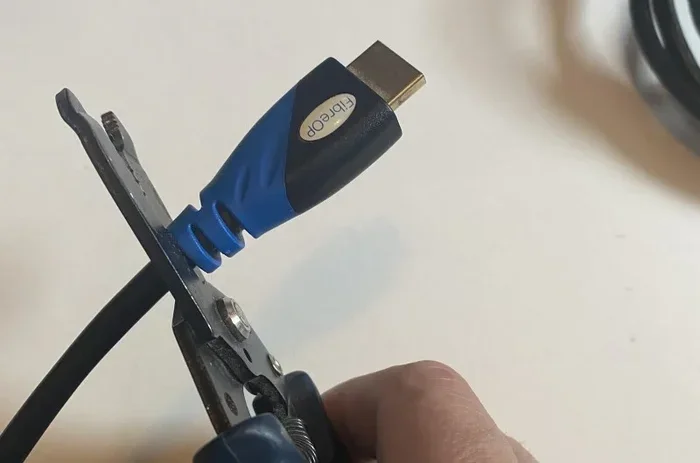
Start with a close look at the cable. Check the connector ends for bent or missing pins. Look for frayed outer jackets, kinks, or exposed wires. Any visible damage means the cable needs replacement. Even if it still works, damaged cables can worsen over time.
Swap the Cable
The simplest test is to swap in a different HDMI cable. If the new cable works perfectly, your old one has failed. Keep a spare cable on hand for this reason. It is the fastest way to confirm a HDMI cable problem.
Try Different Ports
Plug the cable into a different HDMI port on your TV or device. If the problem follows the cable to every port, the cable is bad. If the problem stays on one port, the port itself may be damaged.
Use a Multimeter
For a more thorough test, use a digital multimeter. Set it to continuity mode and test each pin in the HDMI connector. You should get a beep for each pin. No beep means a broken wire inside the cable. This method is great for confirming HDMI cable failure with certainty.
Try a Different Device
Connect the cable to a different source device. If the cable works with one device but not another, the issue may be device compatibility rather than cable failure. This step helps eliminate false assumptions.
Comparison Table: Cable Test Methods
| Test Method | Difficulty | What It Reveals | Best For |
|---|---|---|---|
| Visual Inspection | Easy | Visible damage, bent pins | Quick initial check |
| Swap Cable | Easy | Confirms cable vs. device issue | Fastest diagnosis |
| Try Different Ports | Easy | Identifies port vs. cable problem | Isolating the fault |
| Multimeter Test | Moderate | Internal wire breaks | Thorough verification |
| Different Device Test | Easy | Rules out device compatibility | Complex signal issues |
Quick Tips for Testing
- Always test with the cable at the same angle it normally sits.
- Clean the HDMI connector pins with a dry cloth before testing.
- Test in a well-lit area so you can spot small visual damage.
- Do not rely on just one test method. Combine two or three for accuracy.
HDMI Cable Lifespan: How Long Should They Last
Most HDMI cables last between five and ten years with normal use. However, this varies based on cable quality, usage patterns, and storage conditions. A premium HDMI 2.1 cable built with quality materials often outlasts a cheap one by several years.
The average home user will not need to replace HDMI cables frequently. But heavy use, frequent plugging and unplugging, or harsh environments can shorten the lifespan significantly. Understanding HDMI cable durability helps you set realistic expectations.
Factors That Shorten Cable Life
- Frequent bending at the connector: This creates stress points that break internal wires over time.
- Tight cable routing: Cables squeezed behind furniture or under carpets wear out faster.
- High heat environments: Cables near radiators or behind TVs that generate heat degrade quicker.
- Low-quality construction: Thin cables with poor shielding fail sooner than robust ones.
- Exposure to moisture: Humidity and spills corrode the metal connectors and internal wires.
Factors That Extend Cable Life
- Using cable management clips to prevent sharp bends.
- Storing cables loosely coiled rather than tightly wound.
- Choosing cables with braided or reinforced outer jackets.
- Keeping cables away from heat sources and direct sunlight.
- Buying from reputable brands that use quality materials.
How to Prevent HDMI Cable Problems
Prevention is always better than cure. A few simple habits can keep your HDMI cables working reliably for years.
Handle Connectors With Care
Always grip the connector body when plugging in or pulling out an HDMI cable. Never yank the cable itself. Pulling by the cord puts stress on the internal wires and the solder joints at the connector. Over time, this causes HDMI connector damage that leads to signal problems.
Avoid Sharp Bends
Do not bend an HDMI cable at sharp angles. The minimum bend radius for most HDMI cables is about one inch. Sharp kinks can break the internal conductors. Use cable clips or ties to route cables gently along furniture edges.
Use Quality Cables
Spend a little more on premium HDMI cables from trusted brands. Quality cables have better shielding, thicker conductors, and more durable connectors. They resist signal interference and physical stress far better than cheap alternatives. A good cable costs $10 to $20 and lasts for years.
Keep Connectors Clean
Dust and debris in HDMI ports cause connection issues. Use a can of compressed air to clean ports periodically. Wipe cable connectors with a dry microfiber cloth before plugging them in. Clean contacts mean better signal transfer and longer cable life.
Store Cables Properly
If you store spare cables, do not coil them tightly. Use the over-under coiling method to prevent kinking. Store them in a cool, dry place away from direct sunlight. Proper storage prevents HDMI cable wear and tear even when the cable is not in use.
Expert Insights
According to audio video technicians, most HDMI cable failures are preventable. The two biggest culprits are sharp bending and low-quality cables. A well-made cable handled with care can easily last a decade or more without issues.
When to Replace Your HDMI Cable
Sometimes the right move is simply to replace the cable. Knowing when to do so saves you time and frustration.
Replace Immediately If
- The cable has visible damage like fraying or exposed wires.
- You get no signal on any device or port.
- The cable produces a garbled picture that no other fix resolves.
- The connector pins are bent, broken, or corroded.
- The cable is more than ten years old and showing any symptoms.
Common Mistakes to Avoid
- Blaming the cable when it is the port: Always test with a different cable and different port before assuming the cable is bad.
- Buying the cheapest cable available: Ultra-cheap cables often use substandard materials and fail quickly.
- Wrapping cables too tightly: Tight wrapping creates internal stress that leads to wire breakage.
- Ignoring firmware updates: Sometimes the real issue is a device firmware bug, not the cable. Always update device software first.
- Using the wrong HDMI version: An older HDMI cable may not support the resolution or features of your new device.
How to Choose a Replacement Cable
When buying a new HDMI replacement cable, look for these features:
- HDMI version: Match the cable version to your devices. HDMI 2.1 supports 4K at 120Hz and 8K.
- Cable length: Keep cables as short as possible for the best signal quality. Longer cables are more prone to signal loss.
- Build quality: Choose braided or reinforced cables for durability.
- Brand reputation: Stick with known brands or certified cables.
- Gold-plated connectors: These resist corrosion and provide better conductivity.
Common Mistakes Section
Many people make mistakes when dealing with HDMI problems. One of the biggest is assuming the cable is bad without proper testing. Another is buying the most expensive cable when a mid-range one would work perfectly. Understanding HDMI cable troubleshooting helps you make smarter decisions.
Do not ignore software updates on your devices. Firmware bugs can mimic cable failure symptoms. Always rule out software issues before replacing hardware. And never force a cable into a port. If it does not fit, check the orientation or look for damage to the port or connector.
Conclusion
So, can HDMI go bad? Absolutely. HDMI cables are vulnerable to physical damage, heat, poor quality, and simple wear and tear. The good news is that recognizing the signs of HDMI cable failure early helps you take action before the problem gets worse.
By following the testing methods in this guide, you can quickly determine if your cable is the culprit. By applying the prevention tips, you can extend the life of your cables significantly. And when replacement is necessary, choosing a quality cable ensures reliable performance for years to come.
HDMI troubleshooting does not have to be complicated. Start with the simplest tests and work your way up. Check the cable, try different ports, and rule out device issues. Most HDMI signal loss problems are solved with a simple cable replacement. Keep this guide handy for your next audio or video problem, and you will save time, money, and frustration.
Take care of your cables, invest in quality, and your entertainment setup will keep running smoothly. A little attention goes a long way when it comes to maintaining your HDMI connections and enjoying uninterrupted audio and video.
Frequently Asked Questions
How long do HDMI cables typically last before they go bad?
Most HDMI cables last between five and ten years with normal use. High-quality cables handled with care can last even longer. Heavy use, frequent plugging, and harsh environments shorten the lifespan significantly.
Can a bad HDMI cable damage my TV or other devices?
In most cases, a bad HDMI cable will not damage your devices. However, a short circuit from severe cable damage could potentially cause issues. Always replace visibly damaged cables promptly to avoid any risk to your equipment.
Why does my HDMI cable work sometimes but not others?
Intermittent connection is a classic sign of a failing cable. Internal wires may have partial breaks that make contact only in certain positions. Wiggling the cable or bending it slightly often confirms this issue.
Is it worth repairing a damaged HDMI cable?
No, repairing an HDMI cable is not practical or safe. The internal wiring is difficult to access and solder properly. A new cable is inexpensive and far more reliable than any DIY repair attempt.
Does cable length affect HDMI signal quality?
Yes, longer cables are more prone to signal degradation. Standard HDMI cables work well up to about 15 feet. Beyond that, you may need an active cable or a signal booster to maintain quality.
What is the difference between HDMI cable versions and does version matter?
HDMI versions like 2.0 and 2.1 support different resolutions, refresh rates, and features. Using an older cable with a newer device may limit performance. Always match your cable version to your device capabilities for the best experience.