Can HDMI 14 Run 120Hz Here Is Everything Explained
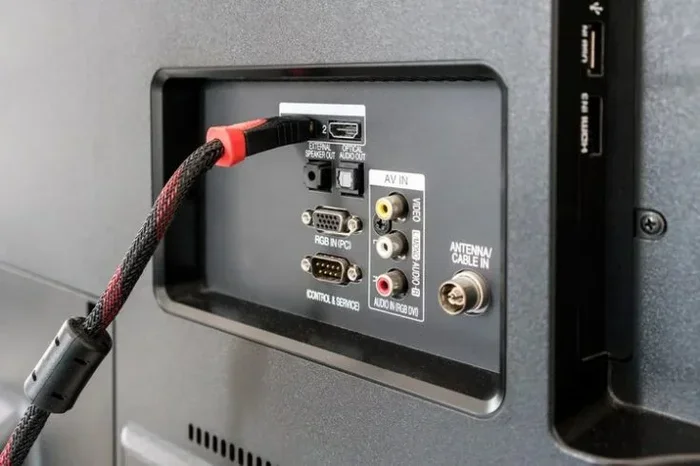
Yes, HDMI 1.4 can run 120Hz, but only at 1080p resolution. If you want to push 120Hz at 4K, you need a newer cable like HDMI 2.0 or higher. Many gamers and tech users assume HDMI 1.4 handles everything, but the truth about HDMI bandwidth limits and refresh rate support is more nuanced than you might think.
This is a comprehensive guide about Can Hdmi 1 4 Run 120hz.
Key Takeaways
- HDMI 1.4 can run 120Hz at 1080p: The bandwidth of 10.2 Gbps is enough for full HD at 120 frames per second.
- 4K at 120Hz requires HDMI 2.0 or higher: HDMI 1.4 maxes out at 4K 30Hz, which is not smooth for gaming or video.
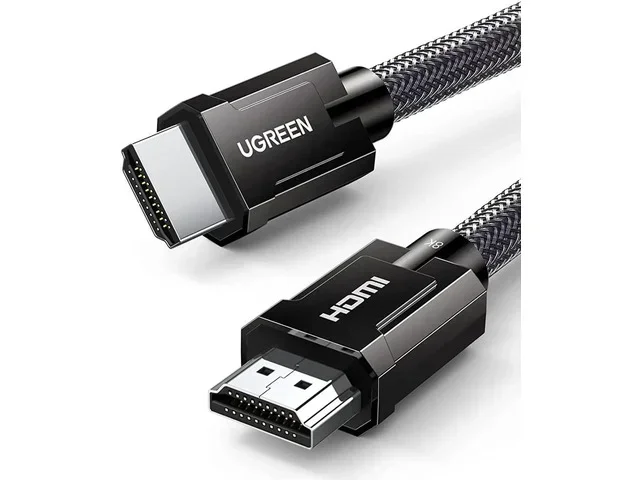
- HDMI cable versions matter: Not all HDMI cables are the same, and using the wrong one limits your display performance.
- Your device must support 120Hz too: Even with the right cable, your monitor, TV, or GPU needs to output 120Hz.
- HDMI 2.0 offers 18 Gbps bandwidth: This doubles the data capacity and opens up true 4K 120Hz support.
- Check your hardware chain: The cable, source device, and display must all support 120Hz for it to work.
[FEATURED_IMAGE_PLACEHOLDER]
Can HDMI 1.4 Run 120Hz? The Short Answer
The short answer is yes, but with a big catch. HDMI 1.4 can run 120Hz, but only at 1080p resolution. If you want 120Hz at 4K, HDMI 1.4 simply does not have enough bandwidth. This is the most important fact to understand before you buy any cable or upgrade your setup.
Many people buy an HDMI 1.4 cable and assume it will handle everything. They plug it into their gaming monitor or TV and expect smooth 120 frames per second at any resolution. That is not how it works. The HDMI bandwidth in version 1.4 caps out at 10.2 gigabits per second. That is enough for 1080p at 120Hz, but not much more.
Think of it like a highway. HDMI 1.4 is a two-lane road. It can handle a lot of traffic at 1080p, but when you try to push 4K data through it, there is a traffic jam. The result? Your display drops to 30Hz or lower, which looks choppy and frustrating.
So if you are a 120Hz gaming enthusiast, you need to know exactly what your HDMI version can and cannot do. Let us break it all down in simple terms.
Understanding HDMI 1.4: What You Are Working With
What Is HDMI 1.4?
HDMI 1.4 was released in 2009. It was a big step forward at the time. It introduced 4K support at 30Hz, 3D video, and the Audio Return Channel (ARC). These were huge features back then. But technology has moved on fast.
HDMI 1.4 has a maximum bandwidth of 10.2 Gbps. That number is the ceiling. No matter what device you use, HDMI 1.4 cannot go past that limit. This is the same reason why HDMI 2.0 and HDMI 2.1 were created. They needed more bandwidth for higher resolutions and refresh rates.
Here is a quick look at what HDMI 1.4 supports:
- 1080p at 120Hz — Yes, this works perfectly.
- 1440p at 75Hz — Supported but not ideal.
- 4K at 30Hz — Yes, but the motion is not smooth.
- 4K at 60Hz — Not supported on HDMI 1.4.
- 3D video — Supported at 1080p.
- ARC (Audio Return Channel) — Supported.
As you can see, HDMI 1.4 has clear limits. The 120Hz at 1080p support is the sweet spot for this version. If your monitor or TV is 1080p and runs at 120Hz, HDMI 1.4 will do the job just fine.
HDMI 1.4 vs HDMI 2.0: The Real Difference for 120Hz
Bandwidth Comparison
The biggest difference between HDMI 1.4 and HDMI 2.0 is bandwidth. This is the number that determines everything about what your cable can handle.
| Feature | HDMI 1.4 | HDMI 2.0 |
|---|---|---|
| Maximum Bandwidth | 10.2 Gbps | 18 Gbps |
| 4K at 60Hz | No | Yes |
| 1080p at 120Hz | Yes | Yes |
| 4K at 120Hz | No | Yes |
| 3D Support | Yes | Yes |
| ARC Support | Yes | Yes |
| Release Year | 2009 | 2013 |
As you can see from the table, HDMI 2.0 doubles the bandwidth. That extra 7.8 Gbps makes a huge difference. It is the difference between a choppy 4K experience and buttery smooth 4K 120Hz gaming.
Think of it this way. HDMI 1.4 can carry a compact car at high speed. HDMI 2.0 can carry a luxury SUV at the same high speed. Both get you there, but one carries much more weight.
Many people ask, can HDMI 1.4 run 120Hz at 1440p? The answer is technically yes, but only at 75Hz. For true 120Hz at 1440p, you need HDMI 2.0 or higher. This is a common point of confusion, so make sure you check your specific resolution and refresh rate combination.
Can HDMI 1.4 Run 120Hz at Different Resolutions?
1080p at 120Hz — Yes, No Problem
This is where HDMI 1.4 shines. 1080p at 120Hz is fully supported. If you have a 1080p gaming monitor that runs at 120Hz or 144Hz, an HDMI 1.4 cable will work perfectly. You will get smooth motion, great for competitive gaming.
Many esports monitors use 1080p at high refresh rates because the pixel count is lower. This means less data needs to travel through the cable. HDMI 1.4 handles this easily. If your GPU can output 120 frames per second at 1080p, and your monitor supports it, HDMI 1.4 will not hold you back.
1440p at 120Hz — Not Supported
Here is where things get tricky. HDMI 1.4 cannot run 1440p at 120Hz. The bandwidth is simply not enough. At best, you will get 1440p at 75Hz over HDMI 1.4. That is still a good experience, but it is not the full 120Hz you might be hoping for.
If you want 1440p at 120Hz, you need HDMI 2.0 or higher. This is a hard limit that no cable trick or workaround can fix. The data just requires more space than HDMI 1.4 can provide.
4K at 120Hz — Definitely Not with HDMI 1.4
Let be clear about this. HDMI 1.4 cannot run 4K at 120Hz. Period. HDMI 1.4 supports 4K at 30Hz maximum. That means your video will look stuttery and unresponsive. This is not acceptable for gaming or fast-paced video content.
For 4K 120Hz, you need HDMI 2.0 at minimum. HDMI 2.1 is even better and supports 4K at 120Hz with room to spare. If you are shopping for a new setup and want that smooth 4K experience, make sure every piece of your chain supports it.
What Devices Can Output 120Hz Over HDMI 1.4?
Gaming Consoles
Some gaming consoles can output 120Hz, but not all of them work over HDMI 1.4. The PlayStation 5 and Xbox Series X both support 120Hz, but they need HDMI 2.0 or higher for 4K 120Hz. At 1080p, these consoles can push 120Hz frames even through HDMI 1.4.
If you are using an older console or a setup with HDMI 1.4 ports, you can still enjoy 120Hz at 1080p. Just know that you will not get the full 4K 120Hz experience. This is something to keep in mind when setting up your home theater or gaming room.
PC and Graphics Cards
Your graphics card plays a big role here. Even if your GPU can output 120Hz at 1080p, the HDMI 1.4 port on your card or monitor limits the resolution. Many modern GPUs support multiple output options, including DisplayPort and HDMI 2.0 or higher.
When building or upgrading a PC, check your display outputs carefully. If you want 120Hz at 1440p or 4K, you need the right ports and the right cable. HDMI 1.4 is fine for 1080p high refresh rate gaming, but it is not enough for higher resolutions.
Understanding your computer system components helps you make the right choices. Just like knowing the 4 main parts of a computer system helps you build the right machine, knowing your HDMI version helps you build the right display setup.
Monitors and TVs
Not all 120Hz monitors are created equal. Some monitors have HDMI 1.4 ports, and others have HDMI 2.0 or even HDMI 2.1 ports. Before you buy a monitor, check what HDMI version the port supports. This is often listed in the specifications.
Many budget gaming monitors offer 1080p at 120Hz or 144Hz with HDMI 1.4 ports. These are great for competitive gamers who want smooth gameplay without spending a fortune. Just make sure your source device can match the monitor’s capabilities.
How to Get the Best 120Hz Experience with HDMI 1.4
Check Your Cable Version
Not all HDMI cables are labeled clearly. Some cables say “High Speed HDMI” which usually means HDMI 1.4 or higher. Look for the official HDMI certification on the packaging. This tells you the exact version and bandwidth.
Here are quick tips for checking your cable:
- Look for the “High Speed” label on the cable packaging.
- Check if the cable supports Ethernet and ARC.
- Read the specifications online if the packaging is missing.
- Use a cable tester if you are unsure about the version.
Match Your Resolution to the Right HDMI Version
The golden rule is simple. Match your resolution and refresh rate to the right HDMI version. For 1080p at 120Hz, HDMI 1.4 works great. For 1440p at 120Hz or 4K at 60Hz and above, you need HDMI 2.0 or higher.
Do not just buy the most expensive cable and assume it will fix everything. The version matters more than the price tag. An expensive HDMI 1.4 cable will still not support 4K at 120Hz because the bandwidth is physically limited.
Use DisplayPort When Possible
If your GPU or device has a DisplayPort output, consider using it for high refresh rate gaming. DisplayPort 1.2 supports 1080p at 240Hz and 1440p at 144Hz. It often provides better performance than HDMI 1.4 for gaming setups.
Many PC gamers prefer DisplayPort for their high refresh rate monitors. It is not that HDMI is bad, but DisplayPort often offers more bandwidth at the same price point. Check what your monitor supports and choose accordingly.
Common Mistakes People Make with HDMI 1.4 and 120Hz
Assuming All HDMI Cables Are the Same
This is the biggest mistake. People buy any HDMI cable and expect 120Hz at 4K. It does not work that way. The HDMI version and cable bandwidth determine what is possible. Using an HDMI 1.4 cable for 4K 120Hz will result in a disappointing experience.
Ignoring the Source Device
Even if you have the right cable, your source device must support 120Hz output. Some older GPUs and consoles do not output 120Hz at all. Check your device specifications before blaming the cable.
Not Checking the Monitor’s HDMI Port Version
Your monitor might have an HDMI 1.4 port even if it supports 120Hz. In that case, you are limited to 1080p at 120Hz. Always check the port version on both ends of the cable. A mismatch anywhere in the chain will limit your experience.
Confusing HDMI Version with Cable Quality
A thicker or more expensive HDMI cable is not necessarily a higher version. Cable quality matters for signal integrity over long distances, but it does not change the HDMI version or bandwidth. Always look for the version number, not the price.
It is like thinking a longer app for finding dog walkers is better just because it has more features. More features do not always mean better performance for your specific needs. Similarly, a newer HDMI version is not always necessary if your setup does not require it.
Expert Insights: What the HDMI Forum Says
The HDMI Forum and the HDTV Upgrade community consistently recommend matching your cable version to your display needs. HDMI 1.4 remains perfectly valid for 1080p high refresh rate content. It is not obsolete, but it is no longer the best choice for 4K setups.
Experts also point out that backward compatibility is a strength of HDMI. You can plug an HDMI 1.4 cable into an HDMI 2.1 port and it will work. However, you will only get the performance that the lowest version in the chain supports. This is called the “weakest link” principle.
If you are building a new setup, consider future-proofing with HDMI 2.1. It supports 4K at 120Hz, 8K at 60Hz, and even 10K in some configurations. The extra cost is worth it if you plan to keep your setup for several years.
Final Thoughts: Is HDMI 1.4 Enough for Your 120Hz Setup?
So, can HDMI 1.4 run 120Hz? Yes, it absolutely can, but only at 1080p. If you are gaming on a 1080p monitor or watching fast-paced content at full HD, HDMI 1.4 will serve you well. The 10.2 Gbps bandwidth is more than enough for this resolution and refresh rate combination.
However, if you want to push higher resolutions like 1440p or 4K at 120Hz, HDMI 1.4 is not enough. You need HDMI 2.0 or HDMI 2.1 for that level of performance. The difference comes down to bandwidth, and bandwidth is a physical limit that no software update can fix.
The key takeaway is to know your setup. Check your cable version, your source device, and your display. When all three match and support 120Hz, you will enjoy the smooth, responsive experience that high refresh rate gaming offers. When one link in the chain falls short, the whole experience suffers.
Take the time to understand your HDMI bandwidth needs. It is a small investment of time that saves you from frustration and wasted money. Whether you are a casual gamer or a competitive player, the right cable makes all the difference.
HDMI 1.4 is not going away anytime soon. Millions of devices still use it, and for good reason. It handles 1080p at 120Hz with ease and provides a reliable connection for most everyday uses. Just know its limits, and you will be happy with what it delivers.
FAQs
Can HDMI 1.4 do 120Hz at 1080p?
Yes, HDMI 1.4 fully supports 120Hz at 1080p resolution. This is the sweet spot for HDMI 1.4 and works perfectly for most gaming and media needs. You will get smooth motion and responsive gameplay at this resolution and refresh rate combination.
Can HDMI 1.4 run 4K at 120Hz?
No, HDMI 1.4 cannot run 4K at 120Hz. The maximum bandwidth of 10.2 Gbps is not enough for that level of data transfer. HDMI 1.4 supports 4K at a maximum of 30Hz, which results in a choppy and unresponsive viewing experience.
What HDMI version do I need for 120Hz at 1440p?
You need HDMI 2.0 or higher for 120Hz at 1440p. HDMI 2.0 offers 18 Gbps of bandwidth, which is enough to handle this resolution and refresh rate. HDMI 1.4 can only manage 1440p at up to 75Hz.
Does the HDMI cable version matter for 120Hz?
Yes, the cable version matters a lot. HDMI 1.4 cables support 120Hz at 1080p but not at higher resolutions. HDMI 2.0 and 2.1 cables unlock 120Hz at 1440p and 4K. Always match your cable version to your resolution and refresh rate needs.
Can I use an HDMI 1.4 cable with an HDMI 2.0 port?
Yes, you can. HDMI is backward compatible, so an HDMI 1.4 cable will work in an HDMI 2.0 port. However, the connection will only perform at HDMI 1.4 speeds. You will not get the full benefits of HDMI 2.0 unless both the cable and the devices support it.
Is 120Hz at 1080p good for gaming?
Absolutely. 120Hz at 1080p is excellent for gaming, especially competitive titles. The high refresh rate provides smoother motion and a responsive feel. Many professional esports players prefer 1080p at high refresh rates because the lower resolution allows their hardware to push more frames per second.
Frequently Asked Questions
What is Can Hdmi 1 4 Run 120hz?
Can Hdmi 1 4 Run 120hz is an important topic with many practical applications.