Can Any HDMI Cable Do 4K and What You Need to Know
Not every HDMI cable can handle 4K content. The right cable depends on its version, bandwidth, and certification. Can Any HDMI Do 4K? Only High Speed or Premium High Speed cables reliably deliver 4K resolution and HDR without issues.
You just unboxed a shiny new 4K TV. Or maybe you upgraded your Blu-ray player or gaming console. You want to see every detail in stunning clarity. But then you grab the HDMI cable you have on hand. Can Any HDMI Do 4K? The short answer is no. Not every HDMI cable can carry 4K signals without issues. The wrong cable might give you a blank screen, a fuzzy picture, or no sound at all. That’s frustrating when you just want to relax and watch a movie. This guide answers the question “Can Any HDMI Do 4K” once and for all. You’ll learn which cables work, what versions matter, and how to avoid buying the wrong one. We’ll also cover common mistakes, troubleshooting tips, and what the future holds. By the end, you’ll know exactly what to look for.
Many people assume all HDMI cables are identical. That’s a common myth. In reality, HDMI cables come in different versions and speeds. Some can handle 1080p, while others support 4K resolution and even 8K. The cable you choose directly affects your viewing experience. It impacts picture sharpness, color accuracy, and frame rates. If you have a 4K TV, you need a cable that can keep up with the data demands. This article breaks down the technical details in simple terms. No jargon, no fluff. Just clear advice to help you make the right choice.
Key Takeaways
- Not all HDMI cables support 4K: Only High Speed or Premium High Speed cables can reliably carry 4K signals.
- Check the HDMI version: HDMI 2.0 and HDMI 2.1 are the standards that enable 4K at different refresh rates.
- Bandwidth matters: Higher bandwidth means better support for 4K resolution, HDR, and high frame rates.
- Certification is key: Look for the “Premium High Speed” label to ensure the cable meets 4K requirements.
- Cable length can affect quality: Longer cables may cause signal loss, so choose the right length for your setup.
- Old cables might not work: Using an outdated HDMI cable with a 4K TV can lead to no signal or poor picture quality.
📑 Table of Contents
What Does 4K Mean for Your HDMI Setup?
Before you pick a cable, you need to understand what 4K actually means. 4K refers to a screen resolution of about 4,000 pixels wide. It’s also called Ultra HD. The picture is much sharper than standard HD. But sharpness isn’t the only thing that matters. The cable must be able to carry all that data. That’s where bandwidth comes in. Bandwidth is the amount of information a cable can move at once. Higher bandwidth means more data can flow through. 4K at 60 frames per second needs a lot of bandwidth. So does HDR, which stands for High Dynamic Range. HDR gives you brighter highlights and deeper shadows. A good HDMI cable must support these features.
Understanding 4K Resolution
4K resolution is 3840 x 2160 pixels. That’s four times the pixels of a standard 1080p TV. More pixels mean more detail. But your HDMI cable must be able to send all those pixels every second. If the cable can’t keep up, you might see a blank screen. Or the TV might drop down to a lower resolution. That defeats the purpose of having a 4K display. You paid for a 4K TV, so you deserve a cable that delivers the full picture.
Why Bandwidth Matters
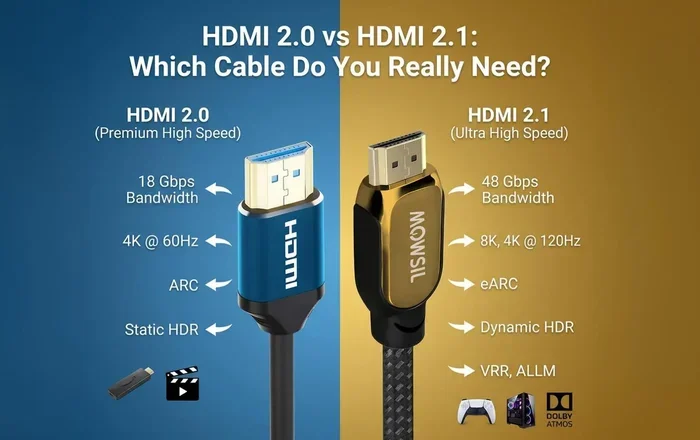
Bandwidth is measured in gigabits per second (Gbps). 4K at 60Hz with HDR needs at least 18 Gbps of bandwidth. HDMI 2.0 cables provide exactly that. HDMI 2.1 cables go even higher, up to 48 Gbps. This extra bandwidth allows for 4K at 120Hz and even 8K. If you want smooth motion for sports or gaming, you need that higher bandwidth. The cable’s version determines its maximum bandwidth. So when you ask, “Can Any HDMI Do 4K?”, the version is the first thing to check.
HDR and Color Depth
HDR comes in different formats like HDR10, Dolby Vision, and HDR10+. These formats add richer colors and better contrast. They require the cable to handle higher color depths. A cable that supports 4K at 18 Gbps can usually handle HDR10. For Dolby Vision, you still need 18 Gbps. But if you want 4K at 120Hz with HDR, you need HDMI 2.1 with 48 Gbps. The cable’s bandwidth must match the format you use.
Can Any HDMI Do 4K? The Short Answer Is No
Let’s be clear. Not any HDMI cable can do 4K. Older cables like Standard Speed HDMI or High Speed HDMI were designed for 1080p or lower resolutions. They lack the bandwidth for 4K content. If you plug a 4K source into a 4K TV with an old cable, you might get no signal. Or you might see a low-resolution picture. The cable simply can’t handle the data load.
The cables that support 4K are called High Speed HDMI cables or Premium High Speed HDMI cables. These cables are certified to handle at least 10.2 Gbps or 18 Gbps. They can carry 4K resolution at 60Hz with HDR. If you see the “High Speed” label on the cable packaging, that’s a good sign. But not all High Speed cables are equal. Some cheap cables might claim to be High Speed but fail to deliver stable 4K signals. That’s why certification matters.
HDMI Versions Explained
HDMI versions tell you what a cable can do. HDMI 1.4 can support 4K at 30Hz. That’s okay for movies but not great for fast action. HDMI 2.0 brought 4K at 60Hz and HDR support. This is the sweet spot for most 4K TVs today. HDMI 2.1 is the newest standard. It supports 4K at 120Hz, 8K, and features like Variable Refresh Rate (VRR) and Auto Low Latency Mode (ALLM). These features are crucial for gaming. If you have a gaming console like the PlayStation 5 or Xbox Series X, you’ll want an HDMI 2.1 cable.
High Speed vs Premium High Speed Cables
The HDMI Licensing Authority created the “Premium High Speed” certification. This label guarantees the cable can handle 4K at 60Hz with HDR. Premium High Speed cables are tested for performance. They have better shielding and higher-quality conductors. Standard High Speed cables might work for basic 4K, but they can be unreliable. For peace of mind, go with Premium High Speed. It’s the safest choice for 4K setups.
What Happens When You Use the Wrong Cable?
Using the wrong cable can cause several problems. You might see a blank screen. The TV might display a “no signal” message. Or you might get a picture that’s blurry or pixelated. Sometimes the audio and video fall out of sync. These issues are often mistaken for a broken TV or source device. Before you call for help, check your HDMI cable. A simple cable swap can solve the problem.
Comparison: HDMI Cable Types and 4K Support
| Cable Type | Max Bandwidth | 4K Support | Best For |
|---|---|---|---|
| Standard Speed HDMI | 4.95 Gbps | 1080p only | Older devices, basic setups |
| High Speed HDMI | 10.2 Gbps | 4K at 30Hz | 1080p with some 4K |
| Premium High Speed HDMI | 18 Gbps | 4K at 60Hz with HDR | Most 4K TVs and players |
| Ultra High Speed HDMI | 48 Gbps | 4K at 120Hz, 8K | Gaming, next-gen consoles |
This table shows why not any HDMI can do 4K. Standard and basic High Speed cables fall short. Premium High Speed and Ultra High Speed cables are built for 4K and beyond.
How to Choose the Right HDMI Cable for 4K
Choosing the right cable is easier than you think. You just need to know what to look for. Here are the key factors to consider.
Check the Version Label
Look for the HDMI version on the cable or its packaging. It should say HDMI 2.0 or HDMI 2.1. If it just says “High Speed” without a version number, check the bandwidth. Premium High Speed cables are rated for 18 Gbps. That’s enough for 4K at 60Hz with HDR. If you want 4K at 120Hz or 8K, you need HDMI 2.1 with 48 Gbps bandwidth.
Consider Your Devices and Needs
Think about what you’ll connect. Are you hooking up a 4K Blu-ray player? A gaming console? A soundbar with eARC? Each device has different needs. For a 4K Blu-ray player, HDMI 2.0 is usually enough. For a PS5 or Xbox Series X, HDMI 2.1 is a must. If you use ARC (Audio Return Channel) or eARC, make sure the cable supports it. eARC allows you to send high-quality audio from your TV to a soundbar. Not all cables support eARC, so check the specs.
What About HDMI with Ethernet and ARC?
Some HDMI cables have an Ethernet channel built in. This lets devices share an internet connection without a separate network cable. It’s handy but not essential for 4K. ARC (Audio Return Channel) is more important. ARC lets your TV send audio back to a soundbar or receiver through the HDMI cable. This means you only need one cable for audio. eARC is an enhanced version that supports higher-quality audio formats like Dolby Atmos. Make sure your cable supports ARC or eARC if you plan to use these features. Most Premium High Speed cables include ARC support.
Cable Length and Quality Tips
Longer cables can lose signal strength. For runs under 10 feet, almost any Premium High Speed cable will work. For longer runs, you might need a cable with better shielding or an active HDMI cable. Active cables have built-in amplifiers to boost the signal. They’re more expensive but reliable for long distances. Also, look for gold-plated connectors. They resist corrosion and provide a better connection. Avoid cables that are too thin or flimsy. A sturdy cable lasts longer and performs better.
Quick Tips for Buying the Right Cable
- Always look for the Premium High Speed or Ultra High Speed label.
- Check that the cable supports HDMI 2.0 or 2.1.
- Measure the distance between your devices before buying.
- Buy from reputable brands or authorized sellers.
- Don’t pay extra for “gold-plated” marketing hype—look for actual certification.
Common Mistakes People Make with 4K HDMI Cables
Even with the best intentions, people make mistakes. Here are the most common ones.
Buying the Cheapest Cable
It’s tempting to buy the cheapest HDMI cable you can find. But a very cheap cable might not support 4K properly. It might cause flickering, dropouts, or no signal at all. Spending a little more on a certified Premium High Speed cable saves you from headaches. A reliable cable costs around $10 to $20. That’s a small price for a stable 4K picture.
Ignoring Cable Certification
Not all cables are certified. The HDMI Licensing Authority tests cables and gives them the Premium High Speed label. If a cable doesn’t have this label, it might not meet the 4K standard. Some cables claim to be “4K compatible” but aren’t tested. Look for the official certification. It’s the best way to ensure the cable works as promised.
Using Old Cables for New TVs
If you have an older HDMI cable from a previous TV, don’t assume it will work with your new 4K TV. Older cables might be Standard Speed or High Speed HDMI 1.4. They can’t handle the bandwidth of modern 4K content. It’s a good idea to replace old cables when you upgrade your TV or other devices. This prevents compatibility issues and ensures you get the best picture.
Assuming All “4K” Labeled Cables Are Equal
Some cables are sold with a “4K” sticker but don’t meet the official standards. They might work for a while and then fail. Always check for the Premium High Speed or Ultra High Speed certification. That’s the only way to be sure.
Troubleshooting 4K HDMI Connection Problems
Even with the right cable, you might run into issues. Here’s how to fix common problems.
No Signal or Flickering Screen
If your TV shows no signal, first check the cable connections. Make sure the HDMI plug is fully seated in both the source device and the TV. Try a different port on your TV. If that doesn’t work, test the cable with another device. If the problem persists, the cable might be faulty. Replace it with a certified Premium High Speed cable. Also, check if the cable is too long. Long cables can suffer from signal loss. A shorter cable or an active cable can fix this.
Audio and Video Sync Issues
Sometimes the audio and video get out of sync. This can happen with 4K content, especially at high frame rates. It’s often caused by a cable that can’t handle the bandwidth. Upgrading to an HDMI 2.0 or 2.1 cable usually solves this. You can also check your TV’s settings. Some TVs have an “HDMI Ultra HD Deep Color” setting. Make sure it’s enabled on both the source and the TV. If you use ARC or eARC, ensure the cable supports it. A cable that doesn’t support eARC can cause audio delays.
Step-by-Step Troubleshooting Checklist
- Unplug the HDMI cable from both ends.
- Inspect the connectors for dust or damage.
- Plug the cable back in firmly.
- Try a different HDMI port on your TV.
- Test the cable with another source device.
- If the problem continues, replace the cable with a certified Premium High Speed or Ultra High Speed cable.
Quick Fixes for Common 4K HDMI Issues
- Restart both the source device and the TV.
- Try a different HDMI port on your television.
- Use a shorter cable to rule out signal loss.
- Check your TV’s HDMI settings for Ultra HD Deep Color.
- Ensure the cable is firmly seated at both ends.
The Future: HDMI 2.1 and Next-Gen 4K
HDMI 2.1 is the latest standard, and it’s designed for the future. It brings huge improvements for 4K and beyond.
What HDMI 2.1 Brings to the Table
HDMI 2.1 cables support 48 Gbps of bandwidth. That’s more than double HDMI 2.0. This allows for 4K at 120Hz, 8K at 60Hz, and Dynamic HDR. Dynamic HDR adjusts the picture frame by frame for the best contrast and color. HDMI 2.1 also supports features like VRR (Variable Refresh Rate) and ALLM (Auto Low Latency Mode). VRR reduces screen tearing in games. ALLM lowers input lag for a smoother experience. If you’re a gamer or a movie enthusiast, HDMI 2.1 is a game-changer.
Is HDMI 2.1 Backward Compatible?
Yes, HDMI 2.1 is backward compatible. You can plug an HDMI 2.1 cable into an HDMI 2.0 port and it will work. The cable will automatically adjust to the lower bandwidth. This means you can future-proof your setup now. You don’t have to replace your cables every year. But if you’re buying a new cable, HDMI 2.1 is a smart investment.
Should You Upgrade Your Cables Now?
If you have a 4K TV and a 4K Blu-ray player, HDMI 2.0 cables are still great. They handle 4K at 60Hz with HDR perfectly. You don’t need HDMI 2.1 unless you have a next-gen gaming console or want 4K at 120Hz. However, buying an HDMI 2.1 cable now is a smart investment. It’s future-proof. You’ll be ready for the next TV or console. HDMI 2.1 cables are backward compatible. They work with older devices too. So there’s no downside to upgrading if the price is right.
Conclusion
So, Can Any HDMI Do 4K? The answer is clear. No, not any HDMI cable can do 4K. You need a High Speed or Premium High Speed cable with the right version. HDMI 2.0 is the minimum for reliable 4K at 60Hz with HDR. HDMI 2.1 takes it further with 4K at 120Hz and 8K support. Avoid cheap, uncertified cables. Check the labels on your cables and devices. Choose the right length and quality for your setup. With the correct cable, your 4K TV will deliver stunning picture quality. You’ll enjoy every detail, every color, and every frame. The next time you set up a new device, remember these tips. A good HDMI cable makes all the difference. Now you know exactly what to look for. Happy viewing!
Frequently Asked Questions
Can I use an old HDMI cable for 4K?
It depends on the cable’s version. Old Standard Speed or High Speed HDMI 1.4 cables might not support 4K at 60Hz with HDR. They could work for 4K at 30Hz, but that’s not ideal for smooth motion. For reliable 4K, use a High Speed or Premium High Speed HDMI cable rated for HDMI 2.0 or higher.
What’s the difference between High Speed and Premium High Speed HDMI?
High Speed HDMI cables support up to 10.2 Gbps, which is enough for 1080p and basic 4K. Premium High Speed cables are certified for 18 Gbps. They reliably handle 4K at 60Hz with HDR. Premium High Speed cables undergo stricter testing, so they’re more dependable for demanding 4K setups.
Does HDMI cable length affect 4K quality?
Yes, longer cables can lose signal strength. For runs under 10 feet, most Premium High Speed cables work fine. For longer distances, signal degradation can cause flickering or no picture. Use an active HDMI cable with a built-in amplifier for runs over 15 feet. This keeps the 4K signal strong and stable.
Do I need HDMI 2.1 for 4K gaming?
If you game on a PS5 or Xbox Series X, HDMI 2.1 is recommended. It supports 4K at 120Hz, VRR, and ALLM. These features reduce input lag and screen tearing. HDMI 2.0 can handle 4K at 60Hz, which is fine for many games. But for the smoothest next-gen experience, HDMI 2.1 is the way to go.
Are expensive HDMI cables worth it?
Not always. A $20 Premium High Speed certified cable performs just as well as a $100 “premium” cable. The key is certification, not price. Look for the Premium High Speed label. Avoid cables that make exaggerated claims. A well-certified mid-range cable gives you the best value for 4K.
Can I use an HDMI splitter with 4K?
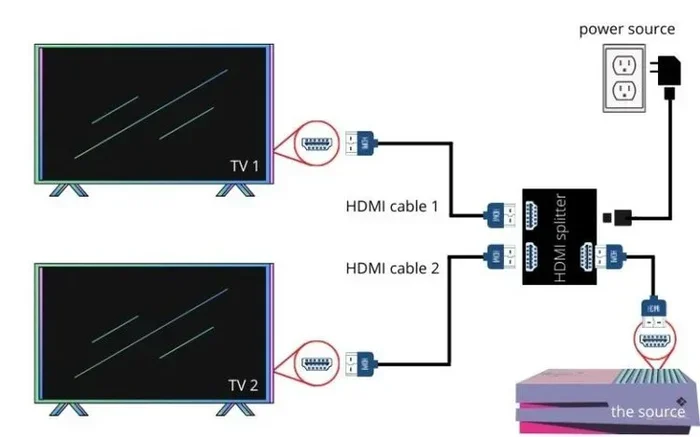
Yes, but the splitter must support 4K bandwidth. Many cheap splitters only handle 1080p. They’ll downgrade your 4K signal. Look for an HDMI splitter rated for HDMI 2.0 or 2.1 with 18 Gbps or 48 Gbps bandwidth. Also, active splitters can help maintain signal quality over long runs.