Can Cricut Do Sublimation Heres Everything You Need to Know
Yes, a Cricut can do sublimation when paired with the right tools like sublimation ink, sublimation paper, and a heat press machine. Many crafters use Cricut Infusible Ink sheets or compatible inkjet printers to create stunning custom mugs, t-shirts, and sublimation blanks. This guide covers everything from setup to finished projects.
If you love crafting and have been eyeing sublimation printing, you might wonder whether your Cricut machine can handle it. The short answer is yes, but with a few important caveats. Cricut machines are amazing cutting tools, but they do not print or press on their own. To do sublimation, you need to pair your Cricut with a few extra supplies.
This guide walks you through everything from the basics of sublimation to step-by-step instructions, project ideas, and common pitfalls. Whether you are a complete beginner or a seasoned crafter looking to expand your skills, this article has you covered. Let us dive in.
Key Takeaways
- A Cricut machine alone cannot sublimate: You need sublimation ink, special paper, and a heat press.
- Cricut Infusible Ink sheets are the easiest way to start sublimation without a separate printer.
- Compatible Cricut models like the Maker and Explore series work great for cutting sublimation blanks.
- A heat press machine is essential for transferring designs onto coated substrates.
- Sublimation coating on blanks is what makes the ink bond permanently to the surface.
- Common mistakes include using the wrong paper, skipping the coating, and incorrect heat settings.
- Sublimation projects range from mugs and t-shirts to coasters, pillows, and ornaments.
📑 Table of Contents
- What Is Sublimation and Why Is It So Popular?
- Can Cricut Do Sublimation? Understanding the Basics
- What You Need for Sublimation with a Cricut
- Step-by-Step: How to Sublimation Using a Cricut
- Best Sublimation Projects You Can Make with a Cricut
- Common Mistakes to Avoid in Sublimation
- Expert Insights on Cricut Sublimation
- Key Takeaways
- Conclusion
What Is Sublimation and Why Is It So Popular?
Sublimation printing is a process where special ink turns from a solid directly into a gas when heated. This gas then bonds with a polymer coating on a blank item, creating a permanent design. Unlike vinyl or iron-on transfers, sublimation becomes part of the surface itself. You cannot feel the design, peel it, or crack it. That is why so many crafters love it.
The popularity of sublimation crafts has exploded in recent years. People love that the results look professional and last a long time. You can create custom mugs, t-shirts, coasters, phone cases, and even all-over print items. The colors are vibrant, and the finish is smooth. No texture, no cracking, no peeling. It is no wonder sublimation crafting has become a favorite hobby.
How Sublimation Differs from Other Craft Methods
To understand why sublimation is special, compare it to other popular crafting methods. Vinyl cutting, which Cricut machines excel at, applies a layer on top of the surface. You can feel the edges. Over time, vinyl can peel or crack, especially after washing. Iron-on transfers work similarly but use heat to bond a plastic layer to fabric.
With sublimation transfer, the ink actually becomes part of the material. This makes it ideal for items that need to look flawless and last long. It is especially popular for sublimation blanks like mugs, tiles, and fabric. The trade-off is that sublimation only works on polyester or polymer-coated surfaces. You cannot sublimate onto cotton or uncoated wood. This limitation actually drives crafters to get creative with their product range.
Can Cricut Do Sublimation? Understanding the Basics
Here is the most important thing to understand: a Cricut machine is a cutting machine, not a printer or a heat press. It does not print designs or transfer them on its own. So when people ask, can Cricut do sublimation, the answer is that a Cricut plays a supporting role. It helps you cut your sublimation blanks to the right size and shape, and it can even cut the sublimation paper if needed. But the actual printing and pressing require other tools.
That said, many crafters use a Cricut alongside a sublimation setup every single day. The Cricut handles the precision cutting, which is one of the trickiest parts of sublimation. If you have ever tried to cut a perfect circle or intricate shape by hand, you know how valuable a cutting machine can be. The Cricut Maker and Cricut Explore series are both excellent choices for this workflow.
Which Cricut Models Work for Sublimation?
Most modern Cricut machines can be used in a sublimation workflow. Here is a quick look at popular models:
- Cricut Maker: The most versatile model. It cuts a wide range of materials with precision and handles sublimation blanks easily.
- Cricut Explore Air 2: A reliable and affordable option that works well for cutting sublimation blanks and paper.
- Cricut Explore 3: A newer model with faster cutting speeds and improved blade systems.
- Cricut Joy: A compact and budget-friendly option, though it has a smaller cutting mat, which limits blank size.
All of these machines can cut sublimation compatible materials like coated blanks, sublimation paper, and even the special Cricut Infusible Ink sheets. The key is choosing the right model for your budget and the types of projects you want to make.
What You Need for Sublimation with a Cricut
Before you start, you need to gather your supplies. The good news is that you probably already own some of these items if you are a Cricut user. Here is a complete list of what you need to do sublimation with a Cricut.
A Sublimation Printer and Ink
If you are not using Cricut Infusible Ink sheets, you need a dedicated sublimation printer. Many crafters use an inkjet printer that has been converted or purchased specifically for sublimation. Popular choices include printers from brands like Epson and Sawgrass. These printers use sublimation ink, which is specially formulated to turn into gas when heated.
Using a regular printer with regular ink will not work. The ink must be able to bond with the polymer coating on your blanks. This is a non-negotiable part of the process. If you are just starting out, Cricut Infusible Ink sheets are the easiest route. You print directly onto these special sheets using a compatible Cricut printer or a converted inkjet printer.
Sublimation Paper
Sublimation paper is different from regular printer paper. It has a special coating that holds the sublimation ink in place until the heat press releases it onto your blank. Using regular paper will result in a messy, faded, or failed transfer. The quality of your paper matters a lot. Cheap paper can cause ink bleeding and uneven designs. Invest in good-quality sublimation transfer paper for the best results.
A Heat Press Machine
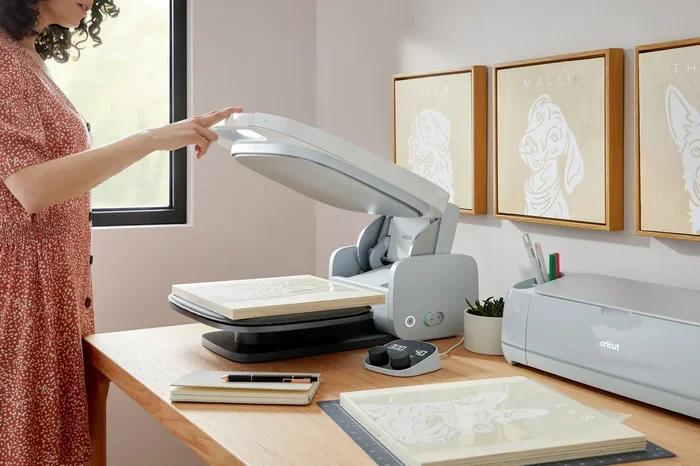
A heat press machine is the tool that applies both heat and pressure to transfer the design. Without it, sublimation simply cannot happen. There are several types of heat presses:
- Flat heat press: Great for mugs, tiles, and flat blanks. The most common type for beginners.
- Mug press: Specially designed for curved surfaces like coffee mugs and tumblers.
- Hat press: Used for caps and headwear with curved surfaces.
- Multi-function press: Can handle multiple shapes and sizes with interchangeable attachments.
Your Cricut cannot replace a heat press. Think of the Cricut as the cutting tool and the heat press as the transferring tool. They work together to create finished products. Many crafters start with a basic flat press and add a mug attachment as their business grows.
Sublimation Blanks
Sublimation blanks are items that have a special polymer coating on the surface. This coating is what allows the sublimation ink to bond permanently. You can find blanks in almost any shape: mugs, t-shirts, tote bags, coasters, ornaments, phone cases, and more. Always check that the product is labeled as sublimation compatible. If it is not coated, the ink will not adhere properly.
Design Software
You need design software to create or prepare your artwork. Cricut Design Space is the most popular choice because it works seamlessly with Cricut machines. You can create original designs, upload custom graphics, or use templates. Other options include Canva, Adobe Illustrator, and Silhouette Studio. The software lets you size your design, flip it for mirror printing, and send it to your printer or cutting machine.
Step-by-Step: How to Sublimation Using a Cricut
Now that you have your supplies, let us walk through the actual process. Following these steps will help you achieve clean, vibrant, and permanent results every time.
Step 1: Create Your Design
Open Cricut Design Space and create or upload your design. Keep in mind that sublimation prints in reverse. You must mirror your design before printing so it appears correctly on the final product. Pay attention to the size of your design relative to your blank. Measure your blank carefully and resize your design accordingly.
Step 2: Print Your Design
If you are using Cricut Infusible Ink sheets, load them into your printer and print from Design Space. Make sure you select the correct paper type and print settings. If you are using a separate sublimation printer, load sublimation paper and print from your design software. Use the highest quality print setting for the sharpest and most vibrant results.
Step 3: Cut Your Sublimation Blank (Optional)
If you are working with a large sheet of sublimation material, use your Cricut machine to cut it to the exact size you need. Place the material on your cutting mat, set the correct material type in Design Space, and cut. Precision matters here because uneven edges can cause misaligned designs during pressing.
Step 4: Trim Your Printed Sublimation Paper
After printing, trim the excess paper around your design. Leave a small border, but remove as much white space as possible. This helps prevent ink from transferring to areas where you do not want it. Clean, trimmed edges lead to a more professional finish.
Step 5: Position and Press
Place your sublimation blank on the heat press. Lay your trimmed sublimation paper on top of the blank with the printed side facing down. Use heat-resistant tape to hold everything in place. Set your heat press to the recommended temperature and time for your specific blank. Typically, this is around 380 to 400 degrees Fahrenheit for 60 to 90 seconds.
Step 6: Cool and Peel
Once the pressing time is complete, carefully remove the blank from the press. Let it cool for a few minutes before peeling the paper. The design should now be permanently bonded to the surface. Peel the paper slowly, and you will see a vibrant, smooth, and professional-looking print.
Quick Tips for Better Results
- Always use a heat-resistant glove when handling hot blanks.
- Do a test run on a cheap blank before pressing your final product.
- Clean your heat press platen regularly to avoid ink buildup.
- Store sublimation paper in a dry, dark place to prevent moisture damage.
- Use a lint roller on blanks before pressing to remove any dust or fibers.
Best Sublimation Projects You Can Make with a Cricut
One of the best things about sublimation is the variety of projects you can create. Here are some popular ideas that work beautifully with a Cricut setup.
Custom Mugs and Tumblers
Custom mugs are the most popular sublimation project for beginners. A plain white mug coated with sublimation-ready polymer becomes a canvas for your creativity. You can make personalized gifts, sell them online, or stock your own kitchen. Sublimation tumblers are equally popular, especially for sports teams, families, and small businesses.
Sublimation T-Shirts
Sublimation t-shirts offer a lightweight, breathable print that feels like part of the fabric. Unlike vinyl or screen printing, sublimation does not add any texture. The design stretches with the fabric and never cracks. This makes it ideal for athletic wear, custom apparel, and all-over print designs. Keep in mind that sublimation works best on white or light-colored polyester shirts.
Coasters and Tiles
Sublimation coasters make excellent gifts and are incredibly easy to produce. Sublimation tiles are another versatile option. You can turn them into wall art, fridge magnets, or decorative pieces. The flat surface of tiles makes them very forgiving for beginners.
Ornaments and Keychains
During the holiday season, sublimation ornaments sell like crazy. You can create personalized keepsakes with names, dates, and festive designs. Sublimation keychains are also a fun and profitable project. They are small, lightweight, and easy to ship.
Phone Cases and Tech Accessories
Sublimation phone cases offer a full-coverage, durable print that wraps around the edges of the case. You can also sublimate onto tablet covers, laptop sleeves, and mouse pads. These items are always in demand and make great personalized gifts.
Common Mistakes to Avoid in Sublimation
Sublimation can be forgiving once you understand the basics, but there are some common mistakes that trip up beginners. Knowing what to avoid saves time, money, and frustration.
Using the Wrong Paper
This is the number one mistake new sublimators make. Regular copy paper or even standard printable vinyl will not work. You must use paper specifically designed for sublimation. The coating on sublimation paper is what holds the ink and releases it during the heat press. Skimping on paper quality leads to poor transfers and wasted ink.
Forgetting the Polymer Coating
You cannot sublimate onto any surface. The item must have a sublimation coating or be made of polyester. Trying to sublimate onto cotton, wood, or non-coated metal will result in nothing sticking. Always verify that your blanks are sublimation compatible before you start pressing.
Incorrect Heat or Time Settings
Too much heat or too little time can cause faded or washed-out designs. Too little heat or too much time can lead to color distortion or ghosting. Every blank has recommended settings, and it is worth testing those settings before committing to a batch of products. Keep a log of your time, temperature, and results for each type of blank.
Not Mirroring the Design
This is an easy mistake to make when you are in a hurry. If you forget to mirror your design before printing, your finished product will be backwards. Always double-check the mirror setting before you hit print.
Skipping the Lint Roller
Dust, lint, and fibers on your blank can create spots or uneven areas in your finished design. A quick pass with a lint roller before pressing makes a noticeable difference. This simple step takes only a few seconds but can save you from ruined prints.
Expert Insights on Cricut Sublimation
Many experienced crafters recommend starting with Cricut Infusible Ink sheets because they remove the need for a separate sublimation printer. The sheets work directly with your Cricut machine and a standard printer, making the setup simpler and less expensive. However, if you plan to produce sublimation items regularly or sell them as products, investing in a dedicated sublimation printer pays off in the long run.
Experts also emphasize the importance of heat press calibration. Every machine is slightly different, and even the same model can vary from unit to unit. Doing test presses with your specific press and blanks helps you dial in the perfect settings. Once you find your sweet spot, document it and use it consistently.
Another tip from seasoned sublimators is to batch your work. Print multiple designs at once, cut all your blanks, and press them in groups. This workflow saves time and keeps your creative momentum going. Many successful sellers started small with a few products and grew their inventory by refining their batch process.
Key Takeaways
- A Cricut machine alone cannot sublimate: You need sublimation ink, special paper, and a heat press.
- Cricut Infusible Ink sheets are the easiest way to start sublimation without a separate printer.
- Compatible Cricut models like the Maker and Explore series work great for cutting sublimation blanks.
- A heat press machine is essential for transferring designs onto coated substrates.
- Sublimation coating on blanks is what makes the ink bond permanently to the surface.
- Common mistakes include using the wrong paper, skipping the coating, and incorrect heat settings.
- Sublimation projects range from mugs and t-shirts to coasters, pillows, and ornaments.
Conclusion
So, can Cricut do sublimation? Absolutely, but with the understanding that your Cricut is one piece of the puzzle. It handles the precision cutting and design work beautifully, while a sublimation printer and heat press do the heavy lifting of printing and transferring. Together, these tools open up a world of creative possibilities.
Whether you want to make personalized gifts, start a small business, or simply enjoy a new crafting technique, sublimation with a Cricut is a rewarding journey. Start with the basics, practice your technique, and do not be afraid to experiment with new projects. The learning curve is gentle, and the results are worth every effort.
Grab your supplies, fire up your Cricut Design Space, and start creating. The world of sublimation crafts is waiting for you, and there is no better time to dive in than right now.
Frequently Asked Questions
Can any Cricut machine do sublimation?
Any Cricut cutting machine can be used in a sublimation workflow for cutting blanks and sublimation paper. However, the machine itself does not print or press. You still need a sublimation printer and a heat press. Popular models like the Cricut Maker and Explore series work especially well for this purpose.
Do I need a special printer for sublimation?
Yes, you need either a dedicated sublimation printer or a converted inkjet printer that uses sublimation ink. Regular printers and regular ink will not work for sublimation. Alternatively, you can use Cricut Infusible Ink sheets, which are printed on with a standard printer and then transferred using a heat press.
Can I sublimate on Cricut vinyl?
No, you cannot sublimate on regular Cricut vinyl. Sublimation requires a polymer coating or polyester material. Vinyl is not coated for sublimation and will not accept the ink properly. Stick to sublimation blanks and sublimation-compatible materials for the best results.
Is sublimation better than vinyl for t-shirts?
It depends on your needs. Sublimation produces a soft, breathable print that becomes part of the fabric. Vinyl adds a textured layer on top. Sublimation works best on polyester, while vinyl works on cotton and blended fabrics. For all-over designs on polyester shirts, sublimation is usually the better choice.
How long does a sublimation print last?
A sublimation print is permanent and does not fade, crack, or peel under normal use. With proper care, sublimated items can last for years without any degradation in print quality. This durability is one of the biggest advantages of sublimation over other craft methods.
What is the difference between Cricut Infusible Ink and regular sublimation?
Cricut Infusible Ink sheets are pre-coated sublimation sheets that work with a standard printer and Cricut machine. Regular sublimation uses sublimation ink in a dedicated printer and sublimation paper. Both methods produce the same permanent bond, but Infusible Ink sheets are more beginner-friendly because they eliminate the need for a separate sublimation printer.