Can A Zebra Printer Print In Color Here Is The Answer
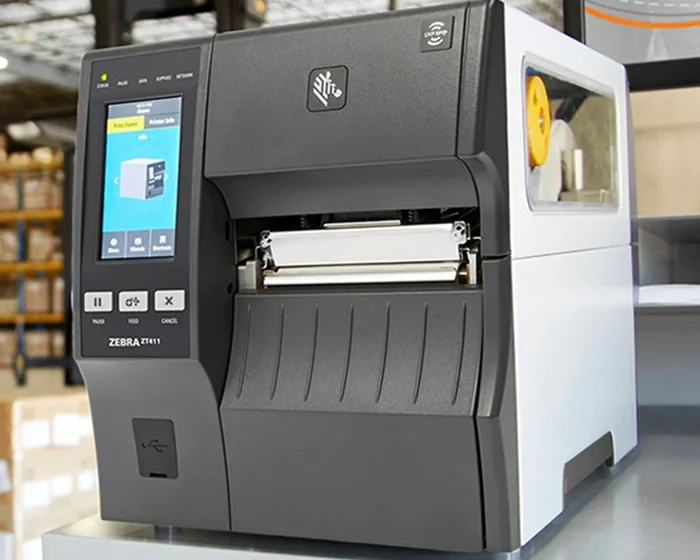
Can a Zebra printer print in color? The short answer is yes, but with important caveats. Most traditional Zebra printers are black-and-white thermal printers designed for labels, barcodes, and receipts. However, Zebra does offer select color label printers and newer models that handle full-color printing. Understanding which Zebra printer you own and what it supports is essential before making a purchase or changing your setup.
Have you ever stood in front of a Zebra printer and wondered whether it could deliver color prints? Maybe you need colorful product labels, vibrant badges, or eye-catching receipts. The question can a Zebra printer print in color comes up more often than you might think. Many people assume all Zebra printers work the same way, but that is far from the truth. Let us walk through everything you need to know about Zebra color printing in plain, simple terms.
Zebra Technologies is a well-known name in the barcode and label printing world. They make printers for warehouses, retail stores, healthcare facilities, and shipping docks. But their printers serve a very specific purpose. Most of them focus on speed, durability, and crisp black-and-white output. That does not mean color is completely off the table. Zebra has models that handle color, but they work differently from the standard units most people picture.
In this article, we will explore the full picture. We will look at which Zebra printers support color, how the technology works, and what you should consider before buying. Whether you are a small business owner or an IT manager, this guide will help you make the right decision.
Key Takeaways
- Most Zebra printers are monochrome: The majority of Zebra thermal printers print in black and white, not color.
- Zebra does make color printers: Models like the Zebra GC420d and ZD420 support limited color capabilities for labels and badges.
- Color depends on the technology: Thermal transfer and dye-sublimation methods enable color output on select Zebra devices.
- Check your model number: Always verify your specific Zebra printer model to confirm whether it supports color printing.
- Ribbons matter: Color thermal transfer printing requires compatible color ribbons for best results.
- Consider your needs: If you need full-color photo-quality prints, a dedicated color label printer may be a better fit than a standard Zebra unit.
📑 Table of Contents
- Understanding Zebra Printers and Their Capabilities
- Can a Zebra Printer Print in Color?
- How Color Printing Works on Zebra Printers
- When You Need Color Labels and Barcodes
- Setting Up and Troubleshooting Zebra Color Printing
- Zebra Printer Maintenance for Best Print Quality
- Comparing Zebra Printers: Color vs. Monochrome
- Expert Insights on Zebra Color Printing
- Key Takeaways
- Conclusion
Understanding Zebra Printers and Their Capabilities
Before we dive into color printing, it helps to understand what makes a Zebra printer tick. Zebra builds several categories of printers, and each one has different strengths. Knowing the basics will make the rest of this discussion much clearer.
What Makes a Zebra Printer Different
Zebra printers are built for one main job: printing labels, barcodes, tags, and receipts. They are not office document printers like the ones you find on a desk. Instead, they use thermal printing technology to produce sharp, readable text and graphics. This technology relies on heat to create marks on special paper or ribbon materials.
There are two main types of thermal printing used by Zebra:
- Direct thermal printing: The printer heats special thermal paper directly. No ribbon is needed. This method works great for short-term labels and receipts. However, the print can fade over time when exposed to heat or sunlight.
- Thermal transfer printing: The printer uses a heated ribbon to transfer ink onto the label material. This produces more durable prints that last longer. It is the preferred method for shipping labels and product tags.
Both of these methods are primarily monochrome by default. That means they print in shades of black, or black and one accent color at most. True full-color printing requires a different approach, which brings us to the next question many people ask.
Popular Zebra Printer Model Lines
Zebra organizes its printers into several series. Here are the most common ones you will encounter:
- ZQ Series: These are compact, desktop printers designed for light-duty tasks like printing receipts and small labels.
- GC Series: The GC line includes models like the GC420 and GC420d. These are popular for retail and office environments. Some models in this series support limited color printing.
- ZD Series: The ZD420 and ZD620 are mid-range printers built for heavier workloads. They offer more durability and faster print speeds.
- ZR Series: These are industrial-grade printers designed for high-volume environments like distribution centers and manufacturing plants.
- LP Series: The LP line focuses on low-cost, simple label printing for basic applications.
When asking can a Zebra printer print in color, your specific model number is the key to the answer. Not every model in every series supports color output.
Can a Zebra Printer Print in Color?
This is the big question, and the answer is more nuanced than a simple yes or no. The truth is that most Zebra printers do not print in full color. They are designed for monochrome or limited-color output. But Zebra does offer select models that can handle color printing under the right conditions.
The Truth About Zebra Color Printing
When we say a Zebra printer can print in color, we usually mean one of two things:
- Limited color barcodes and logos: Some Zebra models can print a single accent color alongside black. This is useful for adding brand colors to labels or highlighting specific barcode types.
- Full-color badge and card printing: Zebra has a separate line of card and badge printers that use dye-sublimation technology. These produce vibrant, photo-quality color prints on ID cards and access badges.
If you are looking for a Zebra printer that can print full-color images like photographs or complex graphics, your options are more limited. Standard Zebra thermal printers simply are not built for that task. They excel at sharp black text, barcodes, and simple graphics in one or two colors.
Zebra Printers That Support Color
Here are some Zebra models that offer color capabilities:
- Zebra GC420d: This model supports two-color printing (black and one additional color). It is great for retail labels that need a pop of brand color.
- Zebra ZD420: Similar to the GC420d, this printer can handle two-color thermal transfer printing for more professional-looking labels.
- Zebra ZXP Series card printers: These are full-color dye-sublimation printers designed for ID badges, membership cards, and visitor passes. They produce high-quality photo prints.
- Zebra HC100: This is a handheld color printer designed for mobile applications like ticket printing and guest badges.
Notice that none of these are standard office or document printers. They are specialized tools built for specific color printing tasks. If your goal is to print full-color marketing materials or photographs, a Zebra printer is probably not the right choice.
How Color Printing Works on Zebra Printers
Understanding the technology behind Zebra color printing helps you set realistic expectations. The process is quite different from what you see in a home inkjet printer.
Direct Thermal vs. Thermal Transfer for Color
Direct thermal printing does not typically support color. The thermal paper reacts to heat and produces black marks. Some specialty thermal papers can produce blue or red marks, but this is rare and limited.
Thermal transfer printing opens the door to color. Here is how it works:
- The printer uses a color ribbon made of wax, resin, or a hybrid material.
- A thermal print head heats specific areas of the ribbon.
- The heated ribbon transfers ink onto the label material.
- By using a ribbon with multiple color panels, the printer can layer colors to create a limited color palette.
This method allows for two-color or even limited full-color printing, depending on the ribbon and printer model. The results are not as vivid as an inkjet or laser printer, but they are durable and resistant to fading and moisture.
The Role of Ribbons in Color Output
If you want your Zebra printer to produce color labels, you need the right ribbon. Ribbons come in several types:
- Wax ribbons: The most affordable option. Good for basic barcodes and text on matte labels.
- Resin ribbons: More durable. Ideal for labels that need to withstand chemicals, moisture, or extreme temperatures.
- Wax-resin hybrid ribbons: A balance of cost and durability. Works well for most general-purpose applications.
- Color ribbons: These ribbons contain panels of different colors (usually CMY or CMYK). They enable multi-color label printing on compatible Zebra models.
Using the wrong ribbon can cause poor print quality, smearing, or even damage to your printer. Always check your Zebra printer manual for the recommended ribbon type. If you are running a zebra printer setup for the first time, make sure you load the correct ribbon before starting your print job.
When You Need Color Labels and Barcodes
Why would someone need a Zebra printer to output in color? There are several real-world scenarios where color adds real value.
Use Cases for Color Barcode Printing
Color labels are not just for looks. They serve practical purposes in many industries:
- Retail: Color-coded price labels help shoppers quickly identify sale items or product categories.
- Warehousing: Color barcodes make it easier to sort and route packages. A red barcode might indicate priority shipping, while blue could mean standard delivery.
- Healthcare: Color-coded patient wristbands and sample labels improve safety and reduce errors.
- Manufacturing: Color labels on parts and components help with quality control and inventory tracking.
- Events: Color badges with photos make it easy to identify attendees and control access.
In all these cases, the zebra printer delivers the durability and speed that businesses need, while the added color improves functionality and brand visibility.
Zebra’s Color Printing Solutions
Zebra offers a range of solutions for businesses that need color. Their color label printers and badge printers are built to handle specific tasks. If you are considering adding a Zebra color printer to your setup, here are a few tips:
- Start by identifying your primary use case. Are you printing labels, badges, or cards?
- Check the print resolution. Higher DPI (dots per inch) produces sharper color images.
- Consider the volume. Some color Zebra printers are built for high throughput, while others are better for low-volume tasks.
- Think about connectivity. Most modern Zebra printers support USB, Ethernet, Bluetooth, and Wi-Fi.
- Factor in ongoing costs. Color ribbons and specialty label materials can add to your operating expenses.
Setting Up and Troubleshooting Zebra Color Printing
Getting color output from a Zebra printer requires proper setup. If you are running into issues, a few common culprits can be at play.
Common Setup Steps for Color Printing
Follow these steps to set up your Zebra printer for color printing:
- Install the correct drivers: Visit the Zebra website and download the latest driver for your specific model. Using outdated drivers is one of the most common causes of color printing problems.
- Load the color ribbon: Make sure the ribbon is installed correctly with the right side facing the label material. Reversing the ribbon will result in blank or faded prints.
- Configure print settings: In your printing software, select the correct color profile and resolution. For best results, choose the highest DPI your printer supports.
- Calibrate the printer: Run the printer calibration utility. This ensures the print head aligns properly with the label material and ribbon.
- Test with a sample print: Before running a full batch, print a small test page to verify color accuracy and alignment.
Troubleshooting Common Color Issues
What if your Zebra printer is not printing in color as expected? Here are some common issues and fixes:
- Faded or washed-out colors: This usually means the ribbon is low on ink or the print head temperature is too low. Replace the ribbon or adjust the heat settings in the driver.
- Streaks or lines on prints: A dirty print head can cause this. Use a cleaning card or lint-free cloth to gently clean the head.
- Wrong colors printed: Check that the ribbon panels are oriented correctly. A reversed or misaligned ribbon will swap or distort colors.
- No color at all: Make sure your software is set to print in color mode, not grayscale or black and white. Sometimes the default setting overrides your preferences.
- Ribbon jams: This can happen if the ribbon is loaded incorrectly or if the printer rollers are worn. Clean the rollers and reload the ribbon carefully.
If you are dealing with file compatibility issues, you might run into situations where your label design software does not communicate well with the printer driver. This is where checking your file format and driver version becomes critical. Sometimes users run into issues similar to those described in articles like a line wont delete in microsoft excel, where software formatting conflicts cause unexpected behavior. The same principle applies here: make sure your design file, driver, and printer firmware are all compatible and up to date.
Zebra Printer Maintenance for Best Print Quality
Keeping your Zebra printer in good shape ensures consistent, high-quality color output. Regular maintenance goes a long way in preventing problems.
Simple Maintenance Tips
- Clean the print head regularly: Use approved cleaning supplies after every ribbon change. A dirty print head is the number one cause of poor print quality.
- Replace worn rollers: Feed rollers degrade over time. Worn rollers cause paper jams and misaligned prints.
- Store ribbons properly: Keep unused ribbons in their original packaging, away from heat and direct sunlight.
- Update firmware: Zebra releases firmware updates that improve performance and fix bugs. Check the Zebra website periodically.
- Use quality label stock: Cheap or incompatible label materials can cause smearing, poor adhesion, and print defects.
When to Seek Professional Support
If you have tried all the troubleshooting steps and your Zebra printer still will not print in color correctly, it may be time to contact Zebra support. Persistent issues could indicate a hardware problem with the print head or internal components. Zebra offers warranty coverage and repair services for most of their printers. Do not hesitate to reach out if you are under warranty or have a service contract.
Comparing Zebra Printers: Color vs. Monochrome
To help you decide whether a color Zebra printer is right for you, here is a quick comparison of the key differences.
| Feature | Monochrome Zebra Printer | Color Zebra Printer |
|---|---|---|
| Print Color | Black only (or black + one accent) | Full color (CMYK or limited palette) |
| Print Technology | Direct thermal or thermal transfer | Thermal transfer or dye-sublimation |
| Print Speed | Faster (up to 12 inches per second) | Slightly slower (varies by model) |
| Ribbon Cost | Lower (single-color wax or resin) | Higher (multi-panel color ribbons) |
| Best For | Barcodes, shipping labels, receipts | Color labels, ID badges, event passes |
| Price Range | $200 – $1,500 | $500 – $3,000+ |
| Durability | Excellent for monochrome prints | Excellent for color prints with proper ribbons |
This comparison shows that color Zebra printers cost more and run slightly slower, but they open up possibilities that monochrome models simply cannot match. If your business relies on color-coded information or branded labels, the investment can pay for itself quickly.
Expert Insights on Zebra Color Printing
Industry professionals who work with Zebra printers every day share a few valuable insights:
Start with your actual need. Many businesses buy color printers when a monochrome model would suffice. Before making a purchase, audit your printing tasks. How many of your labels truly need color? If the answer is fewer than half, a monochrome printer with a two-color ribbon might be the smarter choice.
Ribbon quality makes all the difference. Cheap ribbons save money upfront but often produce inferior prints and wear out the print head faster. Invest in quality ribbons from Zebra or trusted third-party suppliers. Your print head is one of the most expensive parts to replace, so protecting it with good ribbons is a smart move.
Think about scalability. If you plan to expand your color printing operations, choose a model that supports high volumes and easy ribbon loading. The Zebra ZD420 is a solid mid-range option that balances cost, speed, and color capability for growing businesses.
Key Takeaways
- Most Zebra printers are monochrome: The standard Zebra thermal printer prints in black and white. Color is not the default for most models.
- Select Zebra models do print in color: Look at the GC420d, ZD420, ZXP card printers, and HC100 for color-capable options.
- Color printing uses thermal transfer technology: Multi-panel ribbons transfer color ink onto labels through a heated print head.
- Setup and maintenance matter: Proper driver installation, ribbon loading, and regular cleaning keep your color prints looking sharp.
- Evaluate your needs before buying: If you only need occasional color, a monochrome printer with a two-color ribbon may be sufficient and more cost-effective.
Conclusion
So, can a Zebra printer print in color? Yes, but with important limitations. The vast majority of Zebra printers are built for monochrome output. They excel at barcodes, labels, and receipts in black and white. However, Zebra does offer select models that handle color printing through thermal transfer and dye-sublimation technologies.
If you need color labels, badges, or cards, Zebra has solutions that work well. Just make sure you choose the right model for your specific use case. Check the specifications, confirm color support, and budget for the higher ribbon costs that come with color printing.
The key takeaway is simple: know your printer model, understand the technology, and match your printer to your actual printing needs. With the right setup and maintenance, a Zebra color printer can deliver professional-quality results for years to come.
Take the time to research your options, compare models, and test before committing to a large purchase. A little preparation goes a long way in avoiding frustration and getting the best return on your investment.
Frequently Asked Questions
Can any Zebra printer print full-color photos?
No, standard Zebra thermal printers cannot print full-color photos. Zebra card printers like the ZXP series use dye-sublimation technology and can produce photo-quality color prints, but only on specialty card stock. For true photo printing, a dedicated photo printer or inkjet is a better choice.
How much does a color Zebra printer cost?
Color Zebra printers range from about $500 for entry-level models to over $3,000 for high-end industrial units. The price depends on the print technology, speed, resolution, and intended use. Always compare features against your actual printing volume and needs.
Do I need special ribbons for color printing on a Zebra printer?
Yes, you need multi-panel color ribbons for color thermal transfer printing. These ribbons contain panels of different colors (usually cyan, magenta, yellow, and sometimes black). Using the wrong ribbon will result in poor color quality or no color at all.
Is color printing slower on Zebra printers?
Generally, yes. Color thermal transfer printing takes slightly longer than monochrome printing because the printer needs to pass the ribbon over the label multiple times to layer different colors. However, the speed difference is usually small and acceptable for most business applications.
What is the difference between a Zebra color label printer and a Zebra card printer?
A color label printer uses thermal transfer technology to print color on adhesive label stock. A card printer uses dye-sublimation to print on rigid or flexible card materials like PVC. They use different print mechanisms, ribbons, and media. Make sure you choose the right type for your application.
Can I print color barcodes on a Zebra printer?
Yes, on models that support two-color or limited color printing, you can print color barcodes. This is useful for color-coding inventory, highlighting priority shipments, or adding brand colors to product labels. Just make sure the barcode remains scannable after adding color elements.
=== META DESCRIPTION ===
Find out if a Zebra printer can print in color. We cover the truth about Zebra color printing, which models support it, and how to get the best results.