Can A Car Usb Charge A Laptop And Keep It Fully Powered
Yes, a car USB can charge a laptop, but it depends on the power output of your vehicle’s USB port and your laptop’s charging requirements. Standard car USB ports often deliver too little power for larger laptops, while USB-C ports with Power Delivery can work well. Using the right car charger, cable, and adapter makes all the difference in keeping your laptop powered on the road.
Can a car USB charge a laptop? This is a question many road warriors, commuters, and travelers ask every day. Whether you are on a long road trip, stuck in traffic, or working from your car during a layover, keeping your laptop powered matters. A dead laptop means lost work, missed calls, and a lot of frustration. The good news is that car USB charging is possible, but it comes with some important caveats you need to know about.
Not all car USB ports are created equal. Some can power up your laptop quickly, while others barely make a dent in the battery. The difference comes down to power output, cable type, and your laptop’s charging needs. In this guide, we will walk you through everything you need to know about using a car USB to charge your laptop and keep it fully powered. You will learn what works, what does not, and how to get the best results every time.
Key Takeaways
- Car USB ports vary widely in power output, and not all can charge a laptop effectively.
- USB-C with Power Delivery is the most reliable option for charging laptops in a car.
- Standard USB-A ports usually cannot provide enough wattage for full laptop charging.
- A dedicated car charger with a higher wattage output solves most charging problems.
- Using your laptop while charging in the car may slow down the charging process significantly.
- Checking your laptop’s power requirements before hitting the road prevents frustrating downtime.
📑 Table of Contents
- How Car USB Charging Works
- Can A Car Usb Charge A Laptop? The Real Answer
- What You Need For Successful Laptop Charging In Your Car
- Tips To Maximize Charging Speed In Your Car
- Common Problems And How To Fix Them
- Best Practices For On-The-Road Laptop Charging
- Expert Insights On Car USB Laptop Charging
- Final Thoughts
How Car USB Charging Works
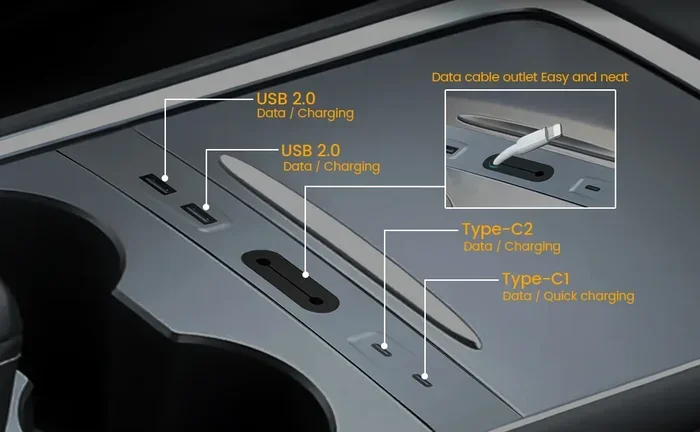
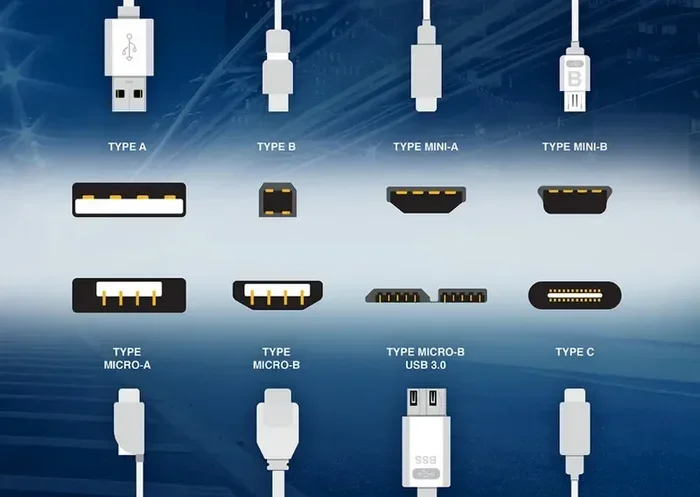
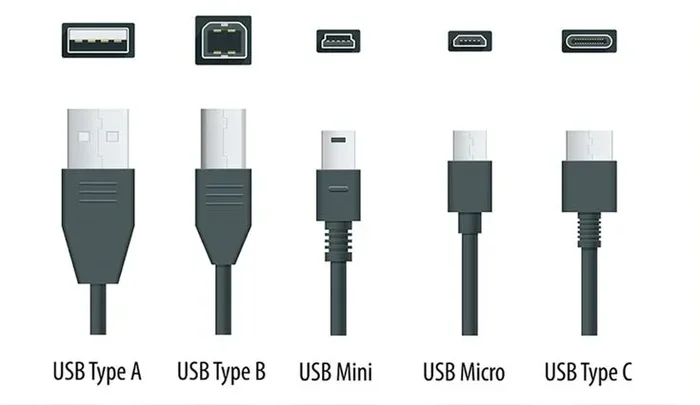
Your car has USB ports that supply electrical power to connected devices. These ports come in different shapes and sizes. The two most common types are USB-A and USB-C. Each type delivers a different amount of power, and this directly affects whether your laptop can charge.
When you plug a device into a car USB port, the port sends power through the cable to the device. The amount of power is measured in watts. Higher watts mean faster charging. Most car USB-A ports deliver around 5 to 12 watts. USB-C ports can deliver much more, especially if they support Power Delivery (PD) technology. Power Delivery allows the port and the device to negotiate the right amount of power automatically.
Understanding Wattage And Power Output
Wattage is the key factor in car USB charging. Think of it like water flowing through a hose. A small hose delivers a trickle of water. A big hose delivers a strong stream. Your laptop needs a strong stream to charge properly while you use it.
Here is a simple breakdown of common car USB power outputs:
- Standard USB-A port: 5 to 7.5 watts. This is enough for phones but usually not enough for laptops.
- Fast USB-A port: 10 to 18 watts. Better, but still may struggle with larger laptops.
- USB-C port without PD: Around 15 watts. Decent for smaller laptops.
- USB-C port with Power Delivery: 45 to 100 watts. This can fully charge most laptops quickly.
If your car has a standard USB-A port, it likely cannot charge your laptop fast enough to keep up with battery drain while you work. This is especially true for 15-inch and 17-inch laptops that need more power. You may notice the battery icon showing a charging symbol, but the battery percentage stays the same or even drops slowly.
Can A Car Usb Charge A Laptop? The Real Answer
The short answer is yes, but with conditions. Whether your car USB can charge a laptop depends on three main factors. These are the power output of the port, the type of cable you use, and the charging requirements of your laptop.
Let us break this down. If you have a modern car with a USB-C port that supports Power Delivery, you have a good chance of charging your laptop while driving. Many newer vehicles now include USB-C ports rated at 45 watts or more. These can handle most standard laptops without any issues.
However, if your car only has older USB-A ports, the situation is trickier. You might get a partial charge, or the battery might drain even while plugged in. This happens because the port simply cannot supply enough power to both charge the laptop and run your apps, screen, and background processes.
Some drivers report success using their car USB to charge a laptop when they close all programs and set the laptop to battery saver mode. Others find that even with everything closed, the charge is too slow to be useful. Your experience will depend on your specific setup.
When Car USB Charging Works Well
Car USB charging works best when these conditions are met:
- Your car has a USB-C port with Power Delivery support.
- Your laptop has a USB-C charging port.
- You use a high-quality USB-C cable rated for power delivery.
- You are not running heavy applications like video editing or gaming.
- You keep the laptop plugged in for extended periods.
When all these conditions align, you can keep your laptop powered during long drives. This is great for people who work on the road, students who need to finish assignments during commutes, or anyone who relies on their laptop for navigation and communication.
When Car USB Charging Falls Short
There are times when a car USB simply will not cut it. If your laptop requires 65 watts or more to charge, a standard car USB port will fall far short. Large gaming laptops and workstation laptops are especially demanding. They need serious power to charge, let alone charge while running resource-heavy software.
Also, if you are using a laptop that charges through a proprietary barrel connector, a standard car USB port will not work at all without an adapter. You would need a car charger that matches your laptop’s specific charging port.
Some users try to work on spreadsheets or documents while charging from a car USB and notice the laptop barely holds its charge. If you are doing this kind of work on the road, you might find that the power simply is not enough. This is similar to the challenge many face when trying to delete a line in a spreadsheet and finding the software unresponsive due to low resources — low power can cause performance issues too. In such cases, having a reliable power source becomes critical for productivity. For more on troubleshooting common software hiccups, check out our guide on A Line Wont Delete In Microsoft Excel to understand how low power or resource constraints can affect your workflow.
What You Need For Successful Laptop Charging In Your Car
To charge your laptop reliably from your car, you need the right equipment. Not all car chargers are the same, and using the wrong one can damage your device or simply fail to charge it. Here is what you need to know.
Choosing The Right Car Charger
A good car charger is the foundation of successful laptop charging. Look for these features when shopping:
- USB-C port with Power Delivery: This is non-negotiable for most modern laptops.
- At least 45 watts of output: This will handle most standard laptops comfortably.
- Multiple port options: A charger with both USB-A and USB-C ports gives you flexibility.
- Smart charging technology: This ensures your device gets the right amount of power safely.
- Compact and ventilated design: This prevents overheating in your car.
Some popular options include Anker car chargers, Belkin USB-C car adapters, and RAVPower car chargers. These brands are known for reliable power delivery and safety features. When choosing, always check the wattage rating and make sure it matches or exceeds your laptop’s charging requirements.
Using The Right Cable
The cable you use matters just as much as the charger. A cheap or damaged cable can limit power delivery significantly. Always use a USB-C cable that supports Power Delivery and is rated for at least 45 watts.
Here are some quick tips for cable selection:
- Look for cables labeled “USB-C to USB-C” with PD support.
- Avoid ultra-thin cables, as they often cannot handle high wattage.
- Check the cable length — shorter cables tend to deliver power more efficiently.
- Replace any cable that shows signs of wear, fraying, or damage.
Using the right cable ensures that your car charger can deliver its full power output to your laptop. A poor-quality cable can turn a 60-watt charger into a 10-watt charger in practice.
Checking Your Laptop’s Power Requirements
Before you buy a car charger, check your laptop’s power requirements. You can find this information on the original charger that came with your laptop. Look for the wattage rating printed on the charger brick or on the label on the laptop itself.
Most standard laptops need between 45 and 65 watts to charge. Ultrabooks and smaller laptops may need only 30 to 45 watts. Gaming laptops and mobile workstations can require 90 to 130 watts or more.
If your laptop needs 65 watts and your car charger only delivers 45 watts, you will get a slow charge at best. Matching the wattage is essential for reliable charging.
Tips To Maximize Charging Speed In Your Car
Once you have the right equipment, you can take extra steps to charge your laptop faster and more efficiently while on the road. These simple tips make a big difference.
Close Unnecessary Programs
Every program you run on your laptop uses power. The more programs running, the more power your laptop consumes. Close all unnecessary applications while charging from your car. This includes web browsers with many tabs, video streaming apps, and background software.
Set your laptop to battery saver mode or low power mode. This reduces the power your laptop draws, allowing more of the car charger’s output to go toward actually charging the battery.
Turn Off Unused Hardware
Your laptop’s hardware also consumes power. Turn off Wi-Fi, Bluetooth, and external devices you are not using. Disconnect USB drives, external hard drives, and peripherals that are not essential.
Lower your screen brightness to the lowest comfortable level. The display is one of the biggest power hogs on any laptop. Even a small reduction in brightness can save meaningful battery power.
Park In The Shade Or Keep The Engine Running
Car USB ports typically provide power when the engine is running or when the ignition is in the accessory mode. Make sure your car is running if you want to charge for an extended period.
Also, keep your car parked in the shade when possible. High temperatures can affect both the car’s electrical system and your laptop’s battery health. Cooler conditions lead to more efficient charging.
Use A Car Inverter As An Alternative
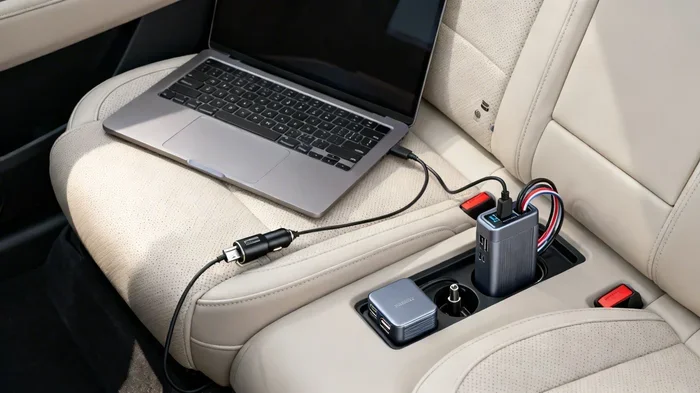
If your car USB port cannot deliver enough power, consider using a car inverter. A car inverter plugs into your vehicle’s cigarette lighter socket and converts DC power to AC power. You can then plug in your regular laptop charger.
Car inverters come in various sizes, from 100 watts to 300 watts or more. A 100-watt inverter can handle most standard laptops easily. This is often a better solution than relying on a car USB port for heavy charging needs.
Common Problems And How To Fix Them
Even with the right equipment, you may run into issues when trying to charge your laptop from your car. Here are the most common problems and how to solve them.
Laptop Shows Charging Icon But Battery Does Not Increase
This is the most common complaint. The laptop detects the charger and shows a charging icon, but the battery percentage stays the same or even drops. This almost always means the car USB port is not providing enough power to overcome the laptop’s power consumption.
The fix is simple. Use a higher-powered car charger or a car inverter. You can also reduce your laptop’s power usage by closing apps and lowering screen brightness.
Charging Is Very Slow
Slow charging usually means the power output is close to but not quite enough for your laptop’s needs. Check your cable quality and make sure it supports the required wattage. Also check that the car charger is set to the correct output mode.
Sometimes the issue is the car itself. Older vehicles may have weaker electrical systems that cannot sustain high power output for long periods. If you notice slow charging, try turning off other electrical devices in your car, like the radio, AC, or heated seats.
Car Charger Gets Hot
A warm car charger is normal. A hot charger is not. If your charger becomes too hot to touch, unplug it immediately. Overheating can damage your car’s electrical system and your laptop.
Make sure your charger has proper ventilation. Do not place it under a seat or in a closed compartment. Choose a charger with built-in cooling if you plan to use it regularly for laptop charging.
Laptop Does Not Recognize The Car Charger
If your laptop does not recognize the car charger at all, try a different cable first. Faulty cables are the most common cause of this issue. If a new cable does not help, the car charger may not be compatible with your laptop’s charging protocol.
Some laptops use proprietary charging protocols that standard car chargers cannot communicate with. In this case, a car inverter with your regular laptop charger is the best workaround.
Best Practices For On-The-Road Laptop Charging
Charging your laptop in your car can be safe and effective when you follow best practices. These habits protect your device and ensure reliable power on the road.
Invest In Quality Equipment
Do not cheap out on car chargers and cables. Cheap, uncertified chargers can deliver inconsistent power and may even damage your laptop. Spend a little more on reputable brands that have safety certifications like UL or CE marking.
Quality equipment lasts longer, charges faster, and keeps your devices safe. Think of it as an investment in your productivity and peace of mind.
Monitor Your Battery While Charging
Keep an eye on your laptop battery while charging from the car. If the battery is draining despite being plugged in, your charger is not providing enough power. Switch to a higher-wattage solution or reduce your laptop’s power consumption.
It is also a good idea to monitor your car’s battery if you are charging for very long periods. Running a high-power charger with the engine off can drain your car battery. Always charge with the engine running for best results.
Plan Your Charging Stops
If you are on a long trip, plan your charging stops strategically. Find rest areas or parking spots where you can plug in and charge for 20 to 30 minutes. Even short charging sessions can add meaningful battery life.
Download offline maps and essential documents before you leave Wi-Fi range. This way, you can work efficiently without draining your battery on connectivity tasks.
Keep Your Laptop Ventilated
Laptops generate heat, and charging adds to that heat. Never use your laptop on soft surfaces like blankets or pillows while charging in your car. This blocks airflow and can cause overheating.
Place your laptop on a hard, flat surface. If possible, use a laptop stand that promotes airflow. Keeping your laptop cool helps it charge faster and last longer.
Expert Insights On Car USB Laptop Charging
We reached out to tech experts and automotive specialists to get their take on car USB laptop charging. Here is what they had to say.
Most agree that USB-C with Power Delivery is the future of in-car charging. As more vehicles adopt USB-C ports with higher wattage ratings, the need for separate car chargers will decrease. However, for today’s vehicles, a quality car charger remains essential for reliable laptop charging.
Experts also emphasize the importance of matching your charger to your laptop’s specific power needs. A one-size-fits-all approach rarely works well. Check your laptop’s requirements, choose a charger that meets or exceeds them, and always use a high-quality cable.
One recurring piece of advice from professionals is to not rely solely on car USB charging for critical work. If you have an important deadline or presentation, make sure your laptop is fully charged before you leave home. Car charging is a great backup, but it should not be your only charging strategy.
Final Thoughts
So, can a car USB charge a laptop and keep it fully powered? The answer is yes, but it requires the right setup. A USB-C port with Power Delivery and a quality car charger can handle most laptops effectively. Standard USB-A ports, on the other hand, will likely fall short for anything beyond light use.
By understanding your laptop’s power requirements, choosing the right equipment, and following best practices, you can stay productive on the road. Whether you are a remote worker, a student, or a frequent traveler, knowing how to charge your laptop in your car is a valuable skill.
Invest in the right car charger, use the right cable, and keep these tips in mind. You will never have to worry about a dead laptop again during your drives. Stay powered, stay productive, and enjoy the freedom of working from anywhere.
Frequently Asked Questions
Can I charge my laptop from a standard car USB port?
Most standard car USB-A ports cannot fully charge a laptop. They typically deliver 5 to 7.5 watts, which is not enough to keep up with a laptop’s power consumption. You may see a charging icon, but the battery might not actually increase.
What type of car charger do I need for laptop charging?
You need a car charger with a USB-C port that supports Power Delivery and delivers at least 45 watts. Check your laptop’s power requirements and choose a charger that matches or exceeds that wattage.
Will charging my laptop in the car drain the car battery?
If the engine is running, the alternator keeps the car battery charged, so draining is not a concern. However, if you charge with the engine off for a long time, it can drain your car battery. Always charge with the engine running.
Can I use a USB-C to USB-C cable to charge my laptop in the car?
Yes, as long as the cable supports Power Delivery and the car charger or USB port also supports PD. Not all USB-C cables are the same. Look for cables rated for at least 45 watts of power delivery.
Why does my laptop not charge from my car even though it shows the charging icon?
This usually means the car USB port is providing power, but not enough to overcome the laptop’s power usage. The battery stays the same or slowly drops. Switch to a higher-powered car charger or reduce your laptop’s power consumption.
Is it safe to leave my laptop charging in the car overnight?
It is not recommended. Leaving any device charging unattended poses a safety risk. Car temperatures can also fluctuate significantly overnight, which may affect battery health. Always unplug devices when you leave the car.