Can a 3D Printer Print Spare Parts for Your Projects
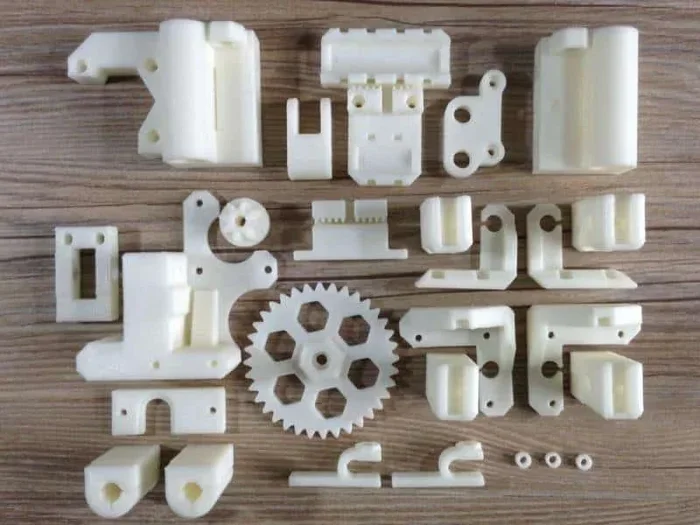
Yes, a 3D printer can absolutely print spare parts for your projects. With the right additive manufacturing setup and 3D model files, you can produce replacement components in hours instead of days. This guide covers everything you need to know about DIY repairs using 3D printing technology.
Key Takeaways
- 3D printers excel at producing spare parts: You can create replacement components for gadgets, furniture, and household items at home.
- FDM and resin printers both work well: Each technology has strengths for different types of spare parts and materials.
- Digital files are essential: You need STL files or 3D model files to start printing replacement components.
- Material choice matters: PLA, ABS filament, and PETG each offer different durability levels for spare parts.
- On-demand manufacturing saves money: Printing spare parts at home costs a fraction of buying new replacements.
- Quality depends on settings: Proper slicing software configuration and print bed calibration ensure strong spare components.
- 3D printing accessories expand your options: Upgrades like better extruders and heated beds improve spare part production.
📑 Table of Contents
- Can a 3D Printer Print Spare Parts for Your Projects?
- How 3D Printing Creates Spare Parts
- Types of 3D Printers for Spare Parts
- Best Materials for Printing Spare Parts
- Finding and Creating 3D Model Files
- Tips for Printing High-Quality Spare Parts
- Common Mistakes to Avoid
- Quick Tips for Success
- Expert Insights on 3D Printed Spare Parts
- Conclusion
Can a 3D Printer Print Spare Parts for Your Projects?
The short answer is yes. A 3D printer can print spare parts for your projects, your home, and even your workplace. Additive manufacturing has changed how we think about repairs and replacements. Instead of ordering a new part and waiting days, you can design or download a file and print it yourself.
This guide walks you through everything you need to know. We will cover how 3D printing technology works for spare parts, which materials to use, and what 3D printer accessories help you get the best results. Whether you are a hobbyist or a DIY enthusiast, you will find practical tips here.
Understanding your printer matters too. A 3D printer is essentially a computer system with main parts that work together to create physical objects layer by layer. Just like a computer has components that handle processing and output, your printer has an extruder, a print bed, and a control board. Knowing these 4 main parts computer system elements helps you troubleshoot and optimize your prints.
How 3D Printing Creates Spare Parts
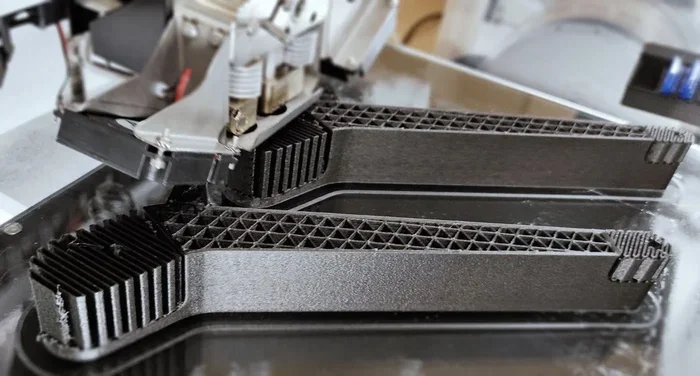
3D printing technology builds objects one thin layer at a time. This process is called additive manufacturing. You start with a digital file, send it to your printer, and the machine deposits material layer by layer until the part is complete.
The Process Explained Simply
First, you create or download a 3D model file. Most people use STL files because they are widely compatible. Next, you load the file into slicing software. This software slices your model into thin layers and generates instructions for the printer. Finally, the printer follows those instructions and builds your spare part.
The beauty of this process is speed. A small replacement clip or bracket might take just one to two hours. Larger parts could take half a day or more. But either way, you get a functional replacement component without leaving your home.
Why This Matters for DIY Projects
Traditional manufacturing requires molds, tooling, and large production runs. That makes sense for factories. But for one-off spare components, it is overkill and expensive. 3D printing technology removes that barrier entirely. You print exactly what you need, when you need it.
Types of 3D Printers for Spare Parts
Not all 3D printers are the same. Different technologies suit different types of spare parts. Here is a look at the most common options.
FDM Printers (Fused Deposition Modeling)
FDM printers are the most popular choice for printing spare parts. They melt plastic filament and deposit it layer by layer. These printers are affordable, easy to use, and great for functional parts.
FDM printers work well with PLA, ABS filament, PETG, and other thermoplastics. For everyday spare parts like clips, covers, and brackets, FDM is usually the best option.
Resin Printers (Stereolithography)
Resin printers use ultraviolet light to cure liquid resin into solid layers. They offer higher detail and smoother surfaces. However, they are better for small, intricate parts rather than large structural components.
If you need a tiny gear or a detailed decorative piece, a resin printer shines. For heavy-duty spare parts, FDM is usually the better choice.
Comparison Table
| Feature | FDM Printer | Resin Printer |
|---|---|---|
| Best for | Functional spare parts | Small detailed parts |
| Materials | PLA, ABS, PETG | Resin varieties |
| Cost | Low to medium | Medium to high |
| Print speed | Faster for larger parts | Slower but more detailed |
| Ease of use | Beginner-friendly | Requires more care |
| Part strength | Strong for functional parts | Good for small parts |
Best Materials for Printing Spare Parts
Choosing the right material is critical. Your spare part needs to be strong, durable, and fit for purpose. Here are the most popular options.
PLA (Polylactic Acid)
PLA is the go-to material for beginners. It is easy to print, biodegradable, and affordable. PLA works well for non-load-bearing spare parts like decorative covers, organizers, and light brackets.
However, PLA has limits. It softens at around 60°C, so it is not ideal for parts that will face heat or heavy stress. Think of it as a great starting point for DIY repairs around the house.
ABS (Acrylonitrile Butadiene Styrene)
ABS filament is tougher and more heat-resistant than PLA. It can handle temperatures up to 100°C. This makes ABS a strong choice for functional spare parts like machine housings, automotive clips, and mechanical components.
ABS does require a heated print bed and good ventilation. It also warps more easily than PLA, so you need to pay attention to your printer settings.
PETG (Polyethylene Terephthalate Glycol)
PETG strikes a nice balance between PLA and ABS. It is easy to print like PLA but stronger and more heat-resistant. PETG is excellent for spare parts that need durability without the complexity of ABS.
Many experienced makers consider PETG the best all-around material for replacement components. It prints reliably and produces strong parts.
Finding and Creating 3D Model Files
You cannot print a spare part without a digital file. The good news is there are many ways to get 3D model files for almost anything.
Downloading Existing Files
Websites like Thingiverse, Printables, and MyMiniFactory host thousands of free STL files. You can search for your specific part and download a file ready to print. Many community members share files for common replacement parts like knobs, clips, and gears.
Before you print, check the file quality. Look for files with good reviews and high resolution. A poorly modeled file will produce a poor spare part.
Creating Your Own Files
If a file does not exist, you can create one yourself. Free software like Tinkercad and Fusion 360 let you design 3D model files from scratch. You measure your broken part, recreate it digitally, and export it as an STL file.
This approach takes more time but gives you full control. You can customize the part for your exact needs. It is a powerful skill for anyone serious about on-demand manufacturing and home manufacturing.
Scanning Physical Objects
Some people use 3D scanners to capture real-world objects as digital files. This is useful when you need a spare part that matches an existing component exactly. While scanners can be expensive, phone-based scanning apps are improving rapidly.
Tips for Printing High-Quality Spare Parts
Getting great results takes practice and the right approach. Here are proven tips to improve your spare part prints.
Calibrate Your Print Bed
A level print bed is essential for strong, flat parts. If your bed is not calibrated, your first layer will be uneven. This causes weak spots and poor adhesion. Take time to level your bed before every print session.
Use the Right Infill Percentage
Infill determines how solid your part is inside. For functional spare parts, use 20-50% infill. Decorative parts can use 10-15%. Higher infill means stronger parts but longer print times.
Optimize Print Speed
Slower print speeds produce better quality. For spare parts that need to be strong, print at 40-50 mm/s. Fast printing (over 80 mm/s) can cause layer separation and weak spots.
Add Support Structures When Needed
Overhangs and bridges need support structures. These are temporary structures that your printer builds during the print. Remove them carefully after printing to get a clean spare part.
Post-Processing for Better Results
Sanding, acetone smoothing (for ABS), and painting can improve the look and feel of your spare parts. These steps make your replacement components look professional and fit better in their intended application.
Common Mistakes to Avoid
Even experienced makers run into problems. Here are common mistakes when printing spare parts and how to avoid them.
- Skipping bed leveling: This causes poor first layers and weak parts. Always level your bed before printing.
- Using the wrong material: PLA is not suitable for heat-exposed parts. Choose ABS filament or PETG for functional applications.
- Ignoring file scale: Always double-check that your 3D model files are scaled correctly before sending to the printer.
- Printing too fast: Speed sacrifices quality and strength. Slow down for spare parts that need to be durable.
- Not testing fit: Print a small test piece first to check dimensions before committing to a full print.
- Forgetting support structures: Missing supports ruin overhangs and create unusable spare parts.
Quick Tips for Success
Here are quick, actionable tips to get the most out of your 3D printer for spare parts.
- Keep a spool of PLA and ABS filament on hand for common repairs.
- Save your best STL files in an organized folder for quick access.
- Join online 3D printing communities to find files and advice.
- Document your print settings for each material so you can reproduce results.
- Invest in a heated print bed if you plan to print with ABS regularly.
- Clean your print bed with isopropyl alcohol before each print for better adhesion.
Expert Insights on 3D Printed Spare Parts
3D printing accessories and rapid prototyping have matured significantly in recent years. Experts agree that home manufacturing is no longer a novelty. It is a practical tool for repairs, customization, and project development.
Many professionals use 3D printing technology to produce jigs, fixtures, and spare parts for their workshops. The ability to print on demand eliminates wait times and reduces inventory costs. For hobbyists, it means never being stuck because of a missing clip or broken bracket.
Understanding your specific printer and its capabilities is key. Every machine has strengths. Some excel at detailed small parts. Others handle large functional components better. Know your machine, choose the right materials, and you will be surprised what you can create.
Conclusion
Can a 3D printer print spare parts for your projects? Absolutely. With the right printer, materials, and digital files, you can produce replacement components quickly and affordably. Additive manufacturing puts the power of production in your hands.
Start with simple parts and gradually tackle more complex projects. Experiment with different materials like PLA, ABS filament, and PETG. Learn your printer’s quirks and optimize your settings. Over time, you will build a collection of reliable spare parts and develop skills that save you time and money.
The world of 3D printing technology is vast and growing. Every project you complete teaches you something new. Embrace the process, enjoy the creativity, and remember that every spare part you print is one less trip to the store.
Frequently Asked Questions
Can any 3D printer print spare parts?
Most 3D printers can print spare parts, but the results vary. FDM printers are the most versatile for functional parts. Resin printers work best for small detailed pieces. Choose a printer that matches the type of spare parts you need to produce.
What materials are best for durable spare parts?
ABS filament and PETG are the best choices for durable spare parts. They offer strong impact resistance and heat tolerance. PLA works well for lighter-duty parts that do not face stress or heat.
How long does it take to print a spare part?
Print time depends on part size, material, and print settings. Small parts like clips take one to two hours. Larger functional parts may take six to twelve hours. Always factor in print time when planning your DIY repairs.
Do I need special software to print spare parts?
Yes, you need slicing software to prepare your 3D model files for printing. Popular free options include Cura, PrusaSlicer, and Orca Slicer. These programs convert digital files into printer instructions.
Are 3D printed spare parts as strong as factory-made parts?
This depends on the material and print settings. Well-printed parts with high infill and the right material can match or exceed factory parts for many applications. However, injection-molded parts still have an edge in mass production consistency.
Where can I find free STL files for spare parts?
Popular sites include Thingiverse, Printables, and MyMiniFactory. These platforms host thousands of free STL files for common replacement parts. You can also create your own files using design software like Fusion 360 or Tinkercad.
=== INTERNAL LINKS ===
Understanding how technology components work together helps you appreciate what your 3D printer accomplishes. Just as the 4 main parts of a computer system work together to process and output information, your printer’s components collaborate to create physical objects layer by layer.
When exploring the world of spare components and digital design, it is interesting to note how different technology fields share foundational concepts. Learning about how various parts fit together, much like understanding Macromedia Flash basic parts, gives you a broader perspective on how individual pieces contribute to a larger working system.