Are Usb Bluetooth Dongles Universal for All Devices
USB Bluetooth dongles are not always universal, but many work across multiple devices depending on the Bluetooth version and operating system. This guide covers everything you need to know about compatibility, setup, and choosing the right dongle for your needs.
Key Takeaways
- Not all dongles are universal: Compatibility depends on your device’s operating system and Bluetooth version.
- Bluetooth version matters: Newer versions like Bluetooth 5.0 offer better range and faster speeds.
- Most dongles are plug and play: Many work instantly on Windows and Mac without extra setup.
- Check device support first: Always verify that your device supports USB Bluetooth adapters before buying.
- Range varies by model: Some dongles work up to 30 feet, while others reach further.
- Driver updates may be needed: Older devices sometimes require manual driver installation for the dongle to work.
📑 Table of Contents
- What Is a USB Bluetooth Dongle?
- Are USB Bluetooth Dongles Universal for All Devices?
- How Do USB Bluetooth Dongles Work?
- Compatibility: Which Devices Work with USB Bluetooth Dongles?
- Benefits of Using a USB Bluetooth Dongle
- How to Choose the Right USB Bluetooth Dongle
- Common Problems and How to Fix Them
- Final Thoughts
What Is a USB Bluetooth Dongle?
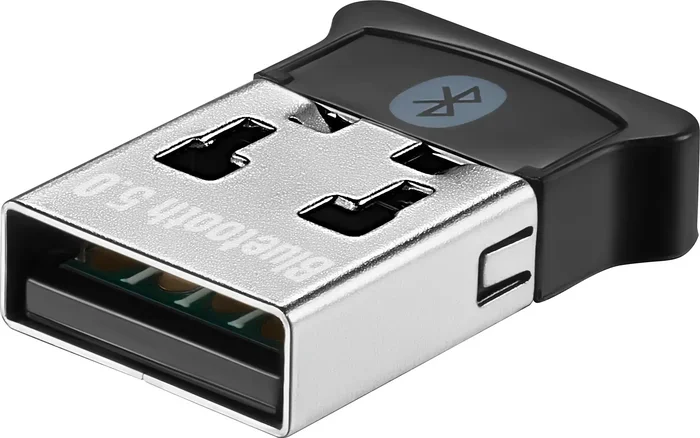
A USB Bluetooth dongle is a small adapter that plugs into a USB port. It gives your device the ability to connect wirelessly to other Bluetooth devices. Think of it as a tiny bridge that sends and receives wireless signals.
These little gadgets are incredibly handy. They let you connect wireless headphones, speakers, keyboards, and mice to devices that do not have built-in Bluetooth. You just plug them in, and boom — instant wireless connectivity.
The technology behind these dongles has come a long way. Early models were slow and limited. Today, Bluetooth 5.0 dongles offer fast speeds, long range, and stable connections. But here is the big question most people ask: Are USB Bluetooth Dongles Universal for All Devices?
Much like how wireless technology has expanded into everyday services — such as platforms for finding dog walkers — USB Bluetooth dongles have become essential tools for modern connectivity. But are they truly universal? Let us find out.
How Bluetooth Dongles Work
A Bluetooth dongle uses radio waves to communicate with other Bluetooth-enabled devices. When you plug it in, it broadcasts a signal that nearby devices can pick up. This is how you connect your laptop to a Bluetooth speaker or your desktop computer to a wireless keyboard.
The dongle acts as a Bluetooth receiver and transmitter. It sends data out and receives data back. This two-way communication is what makes wireless connections possible. Without it, your device would need a cable or built-in Bluetooth hardware.
Different Bluetooth Versions Explained
Not all Bluetooth dongles are created equal. They come in different versions, and each version has different capabilities. Here is a quick look at the main versions you will encounter:
- Bluetooth 4.0: Introduced low energy consumption. Great for basic tasks like audio streaming.
- Bluetooth 4.2: Faster than 4.0. Better security and improved data handling.
- Bluetooth 5.0: Double the speed of 4.2. Range extends up to 800 feet in open spaces.
- Bluetooth 5.3: The latest version. Offers the best stability and lowest power usage.
When shopping for a dongle, always check the Bluetooth version. A newer version means better performance and wider device compatibility.
Are USB Bluetooth Dongles Universal for All Devices?
The short answer is no — not all USB Bluetooth dongles work with every device. But the longer answer is more helpful. Most dongles work with a wide range of devices, as long as a few conditions are met.
Understanding Universal Compatibility
When people say a dongle is “universal,” they usually mean it works across different operating systems. A truly universal Bluetooth adapter should work on Windows, Mac, Linux, and even some smart TVs. However, real-world compatibility depends on several factors.
First, your device needs a free USB port. Second, the device must support USB Bluetooth adapters. Third, the dongle’s Bluetooth version should match or exceed what your device needs. If all three conditions are met, you are in good shape.
What “Universal” Really Means
Let us be clear about something. The word “universal” in product marketing can be misleading. A dongle that works on Windows may not work the same way on a Mac. Some dongles need specific drivers for certain operating systems. Others work instantly with no setup at all.
So when a product claims to be “universal,” read the fine print. Check the compatibility list on the packaging or product page. Look for supported operating systems and minimum Bluetooth version requirements.
Here are some quick tips to avoid disappointment:
- Always check if the dongle supports your device’s operating system.
- Look for dongles that list multiple devices they work with.
- Choose a dongle with a newer Bluetooth version for better future-proofing.
- Read user reviews to see real-world compatibility experiences.
How Do USB Bluetooth Dongles Work?
Understanding how a USB Bluetooth dongle works helps you troubleshoot issues and choose the right one. The process is simpler than most people think.
The Technology Behind Bluetooth Dongles
At its core, a Bluetooth dongle uses a tiny chip that sends and receives radio signals. These signals operate on the 2.4 GHz frequency band. This is the same band used by Wi-Fi routers and microwave ovens.
When you pair a dongle with a device, they exchange encryption keys. This creates a secure, private connection. After pairing, the devices remember each other and reconnect automatically in most cases.
The dongle also handles wireless data transfer. Whether you are streaming music to a speaker or typing on a wireless keyboard, the dongle manages the data flow. Newer dongles with Bluetooth 5.0 or higher handle this much faster and more efficiently.
Plug and Play vs. Driver Installation
Many modern dongles follow a plug and play design. You insert the dongle into a USB port, and your device recognizes it instantly. No downloads, no setup wizard, no fuss.
However, older devices or certain operating systems may require a Bluetooth driver. A driver is a small software program that tells your device how to communicate with the dongle. Most dongles come with a driver CD, but you can also download the latest driver from the manufacturer’s website.
Here is how to tell which type you have:
- Plug the dongle into a USB port.
- Wait 30 seconds. If a notification appears saying the device is ready, it is plug and play.
- If nothing happens, you may need to install a driver manually.
Compatibility: Which Devices Work with USB Bluetooth Dongles?
Device compatibility is the most important factor when buying a USB Bluetooth dongle. Let us break it down by device type.
Windows Computers and Laptops
Most USB Bluetooth dongles work great with Windows computers. Windows 10 and Windows 11 have built-in Bluetooth support. A dongle usually works right out of the box. Even older versions like Windows 7 and Windows 8 can work, but you may need to install a driver.
If you have a Windows laptop without built-in Bluetooth, a dongle is an easy fix. Just plug it in, install the driver if needed, and you are ready to go. This is one of the most common use cases for Bluetooth adapters.
Mac Computers
Macs are a bit more selective. Apple has strict requirements for Bluetooth accessories. Most modern dongles work with Macs, but not all of them. Look for dongles that specifically mention Mac compatibility.
Macs running macOS 10.10 or newer generally support most USB Bluetooth dongles. However, some advanced features like low energy mode may not work perfectly on older Mac models. Always check the manufacturer’s compatibility list before buying.
Smart TVs and Streaming Devices
Smart TVs are another popular use case for Bluetooth dongles. Many smart TVs have built-in Bluetooth, but some budget models do not. A USB Bluetooth dongle can add wireless audio streaming to a TV that lacks it.
You can connect wireless headphones, speakers, or a soundbar to your TV using a dongle. This is great for late-night watching without disturbing anyone. Just make sure your TV has a USB port that supports accessories, not just charging.
Gaming Consoles
Some gaming consoles support USB Bluetooth dongles, but it varies by brand. The PlayStation 5, for example, has limited Bluetooth support and may not work with all dongles. The Xbox Series X does not support Bluetooth at all, so a dongle will not help there.
If you want wireless gaming on PC, a Bluetooth dongle works well with wireless headsets and controllers. Just double-check the console or platform’s Bluetooth support before purchasing.
Smartphones and Tablets
Most smartphones and tablets already have built-in Bluetooth. So a USB Bluetooth dongle is not usually needed for them. However, if you have a tablet or phone with a broken Bluetooth module, a dongle will not fix it. These devices do not support external Bluetooth adapters in most cases.
That said, some Android tablets with USB-C ports can use certain Bluetooth dongles. Check your device specifications to confirm before buying.
Benefits of Using a USB Bluetooth Dongle
Wireless connectivity through a USB Bluetooth dongle offers several real advantages. Here is why so many people use them.
Wireless Freedom
The biggest benefit is freedom from cables. You can move around your desk or room without being tethered to your device. Connect a Bluetooth speaker across the room or type on a wireless keyboard from across the office.
This is especially useful for people who work from home. A wireless setup means fewer cables cluttering your desk and more flexibility in where you place your devices.
Easy Setup and Portability
Most dongles are tiny and lightweight. You can carry one in your laptop bag and use it on any compatible device. This makes them perfect for travel or office setups where you switch between computers.
Setup is usually simple. Plug it in, pair your device, and you are done. No technical expertise required. Even if you are not tech-savvy, a USB Bluetooth dongle is one of the easiest accessories to set up.
Cost-Effective Upgrade
If your older computer or laptop does not have Bluetooth, buying a dongle is far cheaper than replacing the entire device. A good Bluetooth adapter costs between $10 and $30. That is a small price for wireless freedom.
It is also a great way to future-proof an older device. Add Bluetooth 5.0 capabilities to an older laptop and enjoy faster, more stable wireless connections.
How to Choose the Right USB Bluetooth Dongle
Not all dongles are the same. Choosing the right one depends on what you need it for. Here are the key factors to consider.
Bluetooth Version Matters
As we mentioned earlier, the Bluetooth version affects performance. If you want the best experience, go with Bluetooth 5.0 or higher. These versions offer faster data transfer, better range, and lower power consumption.
For basic tasks like connecting a wireless mouse or keyboard, Bluetooth 4.0 is usually fine. But for audio streaming or file transfers, a newer version makes a big difference.
Range and Signal Strength
Range is another important factor. Most standard dongles work up to 30 feet. High-end models with Bluetooth 5.0 can reach up to 800 feet in open spaces. Your walls, furniture, and other electronics can reduce the effective range.
If you need a long-range connection, look for dongles that advertise extended range. These are great for large offices or open-plan living spaces.
Brand Reputation and Reviews
Stick with reputable brands when buying a Bluetooth dongle. Brands like TP-Link, ASUS, and Intel are well-known for quality adapters. Check online reviews to see what other users say about performance and reliability.
Avoid cheap, no-name dongles from unknown sellers. They may have poor signal quality, short range, or compatibility issues. Spending a little extra on a trusted brand saves you headaches down the road.
Common Problems and How to Fix Them
Even with the best dongle, you may run into issues sometimes. Here are the most common problems and how to solve them.
Dongle Not Recognized by the Device
If your device does not recognize the dongle, try these steps:
- Try a different USB port. Some ports may not supply enough power.
- Restart your device and plug the dongle back in.
- Check if the dongle needs a driver. Visit the manufacturer’s website and download the latest version.
- Test the dongle on another device to rule out a hardware defect.
Pairing Issues
If your dongle will not pair with a device, make sure Bluetooth is turned on. Also, ensure the device you are trying to connect is in pairing mode. Sometimes, simply turning Bluetooth off and back on fixes the issue.
Distance can also cause pairing problems. Move the devices closer together and try again. If the problem persists, remove the device from the dongle’s paired list and pair it fresh.
Connection Drops or Interference
Wireless connections can drop due to interference. Wi-Fi routers, microwaves, and other Bluetooth devices can all cause signal disruption. To reduce interference:
- Move the dongle closer to the connected device.
- Keep the dongle away from other wireless devices.
- Use a USB extension cable to place the dongle in a better position.
- Switch to a less crowded Wi-Fi channel if your router supports it.
Final Thoughts
Are USB Bluetooth Dongles Universal for All Devices? The answer is nuanced. Most dongles work with a wide range of devices, but true universal compatibility is rare. Your best bet is to check compatibility before you buy. Match the dongle’s Bluetooth version and operating system support to your device.
A good USB Bluetooth dongle is a small investment with big rewards. It adds wireless capability to almost any device with a USB port. Whether you want to connect wireless headphones, stream audio to a speaker, or free your desk from cables, a Bluetooth dongle gets the job done.
Choose wisely, set it up correctly, and enjoy the convenience of wireless connectivity. With the right dongle, your devices talk to each other without a single cable in sight.
Frequently Asked Questions
Can I use any USB Bluetooth dongle with my laptop?
Most USB Bluetooth dongles work with laptops that have a free USB port and support Bluetooth adapters. However, you should check the dongle’s compatibility with your laptop’s operating system. Windows and Mac laptops usually work well, but always verify before buying.
Do USB Bluetooth dongles work with smart TVs?
Yes, many smart TVs support USB Bluetooth dongles, but only if the TV has a USB port that supports accessories. Check your TV’s manual or settings to confirm. Some budget smart TVs may not support external Bluetooth adapters.
What is the difference between Bluetooth 4.0 and Bluetooth 5.0 dongles?
Bluetooth 5.0 is faster, has a longer range, and uses less power than Bluetooth 4.0. Bluetooth 5.0 can reach up to 800 feet in open spaces, while Bluetooth 4.0 typically maxes out around 30 feet. For audio streaming and file transfers, Bluetooth 5.0 is the better choice.
Do I need to install drivers for a USB Bluetooth dongle?
Many modern dongles are plug and play and do not need drivers. However, older devices or certain operating systems may require a manual driver install. Check the manufacturer’s website for the latest driver if your dongle is not recognized automatically.
Can a USB Bluetooth dongle connect multiple devices at once?
Yes, most Bluetooth dongles can connect to multiple devices simultaneously. This is called multipoint pairing. You can connect a wireless keyboard and headphones to the same dongle at the same time. Check the dongle’s specifications to confirm multipoint support.
Are expensive Bluetooth dongles worth the money?
Expensive dongles usually offer better range, faster speeds, and more stable connections. They also tend to have better build quality and customer support. For casual use, a budget dongle works fine. For heavy audio streaming or professional use, investing in a premium dongle is worthwhile.
=== CONCLUSION ===
USB Bluetooth dongles are a simple yet powerful way to add wireless connectivity to almost any device. While they are not always universal, most work across a wide range of devices and operating systems. The key is to check compatibility, choose the right Bluetooth version, and buy from a reputable brand.
Whether you are upgrading an older laptop, adding wireless audio to a smart TV, or freeing your desk from cables, a USB Bluetooth dongle is a smart and affordable solution. Pick the right one, follow the setup steps, and enjoy seamless wireless connections every day.