Can You Amplify A Bluetooth Signal To Get Better Range
Yes, you can amplify a Bluetooth signal to get better range. Using Bluetooth repeaters, signal boosters, and smart placement tricks, you can significantly extend your wireless connectivity. Learn the proven methods that actually work to boost your Bluetooth range and eliminate dead zones.
Can you amplify a Bluetooth signal to get better range? The short answer is yes. Whether you are struggling with a weak connection in another room or trying to stream music across your backyard, there are real solutions that work. Many people think Bluetooth range is fixed and unchangeable. But that is not true at all. With the right tools and techniques, you can significantly boost your Bluetooth range. This guide covers everything you need to know about amplifying your Bluetooth signal. We will explore signal boosters, repeaters, free DIY tricks, and common mistakes that kill your range. By the end, you will have a clear action plan to get stronger wireless connectivity.
Bluetooth technology has come a long way over the years. But many users still deal with frustrating range limits every day. The good news is that amplifying a Bluetooth signal is more accessible than ever. Whether you use Bluetooth for audio streaming, file transfers, or connecting peripherals, better range means a better experience. Let us dive into how Bluetooth signals work and what you can do to improve them.
Key Takeaways
- Bluetooth signals can be amplified: Using repeaters, boosters, and proper positioning, you can extend your Bluetooth range well beyond the default limits.
- Bluetooth repeaters are the most effective solution: They receive and retransmit your Bluetooth signal, doubling or tripling your coverage area.
- Interference is the biggest enemy: Wi-Fi routers, microwaves, and physical walls can weaken your Bluetooth signal significantly.
- Simple fixes make a big difference: Moving devices closer, updating firmware, and reducing obstacles can improve range without any extra equipment.
- Bluetooth version matters: Newer versions like Bluetooth 5.0 and above offer much better range than older versions.
- DIY methods work too: Simple household adjustments can boost your Bluetooth signal without spending money on extra hardware.
📑 Table of Contents
- Understanding How Bluetooth Signals Work
- Can You Actually Amplify A Bluetooth Signal?
- Bluetooth Signal Boosters and Repeaters
- DIY Methods to Improve Bluetooth Range
- Comparison: Signal Boosters vs. Other Solutions
- Common Mistakes That Weaken Bluetooth Signals
- Expert Insights on Bluetooth Signal Amplification
- Conclusion
Understanding How Bluetooth Signals Work
Before you can boost a Bluetooth signal, it helps to understand how the technology works. Bluetooth uses radio waves to transmit data between devices. These waves travel through the air at a specific frequency. Most Bluetooth devices operate on the 2.4 GHz band. This is the same frequency band used by Wi-Fi routers and microwave ovens. Because of this shared space, interference is common.
What Is Bluetooth Technology?
Bluetooth is a short-range wireless communication standard. It lets devices exchange data over short distances without cables. The technology was designed for convenience and low power consumption. When two Bluetooth devices pair, they create a small personal network called a piconet. This network has a master device and up to seven active slave devices. The range of this network depends on several factors. These include the Bluetooth version, the device class, and the environment.
How Far Can Bluetooth Reach?
The range of a Bluetooth connection varies a lot. Class 1 Bluetooth devices can reach up to 100 meters. Class 2 devices, which are most common in phones and headphones, reach about 10 meters. Class 3 devices have a range of less than 10 meters. Bluetooth 5.0 and newer versions offer much better range. Some Bluetooth 5.0 devices can reach up to 240 meters in open space. However, real-world conditions usually reduce this number. Walls, furniture, and other obstacles weaken the signal. This is where signal amplification becomes very useful.
Can You Actually Amplify A Bluetooth Signal?
The idea of amplifying a Bluetooth signal is not new. But many people are unsure if it is possible. The truth is that you can boost Bluetooth range using several methods. Some methods involve buying extra hardware. Others are free and require no additional equipment. The key is understanding what limits your range in the first place.
The Science Behind Bluetooth Signal Boosting
Bluetooth signals are radio frequency (RF) transmissions. Like all RF signals, they lose strength as they travel through space. This is called signal attenuation. The further the signal travels, the weaker it gets. Amplifying a Bluetooth signal means increasing the power of the transmission. This can be done at the source or by using a repeater. A repeater receives the weak signal and retransmits it at full strength. This effectively extends the range of your Bluetooth connection.
It is important to understand that you cannot violate the laws of physics. You can not make a Class 2 Bluetooth device transmit at Class 1 range without external help. But you can use tools like Bluetooth range extenders to bridge the gap. These devices act as a middleman between your source and your receiver. They capture the signal and boost it to the other end.
What Limits Bluetooth Range?
Several factors limit your Bluetooth range. Understanding these helps you fix the problem more effectively.
- Physical obstacles: Walls, floors, and large furniture block Bluetooth signals. Concrete and metal are especially bad for signal strength.
- Interference from other devices: Wi-Fi networks, baby monitors, and microwaves operate on the same 2.4 GHz frequency. They compete with Bluetooth signals and cause dropouts.
- Device class and power: Lower-class devices simply have less transmission power. They cannot reach as far as higher-class devices.
- Bluetooth version: Older Bluetooth versions have shorter range and slower data speeds. Upgrading to a newer version can help significantly.
- Battery level: Low battery on a Bluetooth device can reduce transmission power. This weakens the signal and shortens the range.
Bluetooth Signal Boosters and Repeaters
The most effective way to amplify a Bluetooth signal is by using a dedicated booster or repeater. These devices are designed specifically to extend Bluetooth range. They come in different shapes and sizes for different use cases.
How Bluetooth Repeaters Work
A Bluetooth repeater is a simple device. It has two main components. First, it has a receiver that captures the incoming Bluetooth signal. Second, it has a transmitter that sends the signal again at full power. This process effectively doubles the range of your Bluetooth connection. The repeater sits between your source device and your receiving device. It acts as a bridge that carries the signal further.
Most Bluetooth repeaters are plug-and-play. You do not need special technical skills to set them up. Simply plug the repeater into a power outlet. Pair it with your source device. Then pair your receiving device with the repeater. The repeater handles the rest. Some repeaters also support Bluetooth 5.0, which gives you better speed and range.
Types of Bluetooth Amplifiers
There are several types of Bluetooth amplification solutions available. Here is a quick look at the most popular options.
- Bluetooth repeaters: These are the most common and affordable option. They work with most Bluetooth devices and are easy to set up.
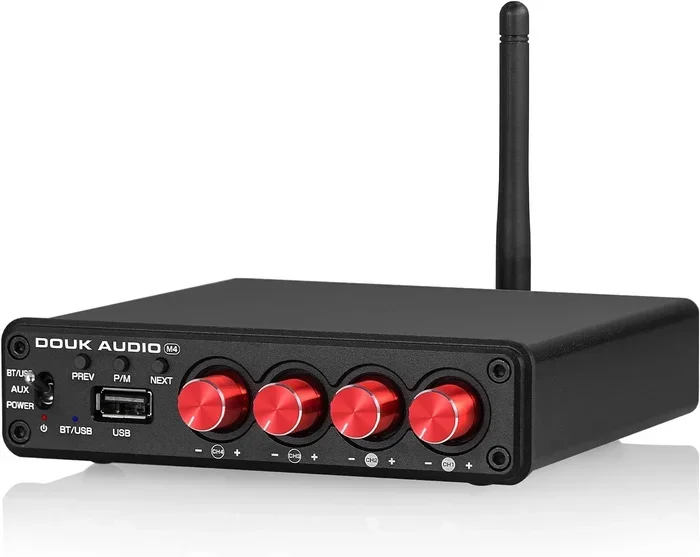
- Bluetooth adapters with amplifiers: These plug into your computer or laptop. They boost the Bluetooth signal from your device directly. They are great for desktop setups.
- External Bluetooth antennas: Some devices allow you to attach an external antenna. This antenna boosts the signal strength significantly. It is a good option for advanced users.
- Bluetooth mesh networks: Mesh networks use multiple nodes to extend range. Each node passes the signal to the next. This is common in smart home setups.
Choosing the Right Bluetooth Signal Booster
Not all boosters are created equal. Here are some things to consider before buying one.
- Compatibility: Make sure the booster works with your devices. Check the Bluetooth version and profile support.
- Range claims: Manufacturers often overstate range. Look for reviews and real-world test results before purchasing.
- Power source: Some repeaters need a wall outlet. Others are battery-powered. Choose one that fits your setup.
- Latency: Some boosters add a small delay to the signal. This matters for gaming and video calls. Look for low-latency options if speed is important.
DIY Methods to Improve Bluetooth Range
You do not always need to buy extra equipment. There are several free methods that can improve your Bluetooth range. These simple tips can make a noticeable difference.
Positioning and Placement Tips
Where you place your Bluetooth devices matters a lot. Here are some tips that help.
- Keep devices in line of sight: Bluetooth signals travel best when there are no obstacles between devices. Try to keep them in the same room or within direct view.
- Elevate your devices: Place Bluetooth devices on higher surfaces. Signals travel better when they are not blocked by furniture or floor obstacles.
- Move closer to the router: If your Bluetooth device connects through a hub or router, moving closer to it can help. The stronger the input signal, the stronger the output signal.
- Avoid corners and edges: Signals get weaker when devices are placed in corners or against walls. Center your devices in the room for better coverage.
Reducing Interference
Interference is one of the biggest causes of weak Bluetooth signals. Here is how to reduce it.
- Switch Wi-Fi bands: Many Wi-Fi routers can operate on both 2.4 GHz and 5 GHz bands. Switching your Wi-Fi to 5 GHz reduces interference with Bluetooth.
- Keep Bluetooth devices away from microwaves: Microwaves emit strong 2.4 GHz signals. Keep Bluetooth devices away from your kitchen microwave.
- Turn off unused Bluetooth devices: Every connected device adds to the congestion. Turn off Bluetooth on devices you are not using.
- Update device firmware: Manufacturers often release updates that improve Bluetooth performance. Keep your devices up to date.
Quick Tips for Better Bluetooth Performance
Here are some quick wins that take only a few minutes.
- Restart both Bluetooth devices before troubleshooting. This clears temporary connection issues.
- Remove old Bluetooth pairings that you no longer use. This frees up memory and reduces clutter.
- Check for software updates on all connected devices. Updates often include Bluetooth range improvements.
- Reset your Bluetooth settings if problems persist. This gives you a clean slate for pairing.
- Sometimes fixing connection issues can feel like trying to get a line that won’t delete in Microsoft Excel – frustrating but totally solvable with the right approach.
Comparison: Signal Boosters vs. Other Solutions
There are many ways to improve Bluetooth range. But not all solutions work the same way. Here is a comparison of the most common approaches.
| Solution | Cost | Effectiveness | Ease of Setup | Best For |
|---|---|---|---|---|
| Bluetooth Repeater | Low to Medium | High | Very Easy | Home and office use |
| Bluetooth Adapter with Amp | Medium | Medium to High | Easy | Desktop computers |
| Mesh Network | High | Very High | Moderate | Large homes and smart homes |
| Repositioning Devices | Free | Low to Medium | Very Easy | Minor range issues |
| Reducing Interference | Free | Low to Medium | Easy | All setups |
| Upgrading to Bluetooth 5.0 | Medium to High | High | Moderate | Long-term improvement |
As you can see, Bluetooth repeaters offer the best balance of cost and effectiveness for most users. They are affordable, easy to set up, and deliver real results. If you have a larger space, a mesh network might be worth the investment. But for most people, a simple repeater or repositioning is all you need.
Common Mistakes That Weaken Bluetooth Signals
Many people unknowingly make mistakes that hurt their Bluetooth range. Avoiding these common errors can improve your connection significantly.
Placing Devices Too Far Apart
The most common mistake is simply placing devices too far apart. Bluetooth has a limited range by design. If your phone is in one room and your speaker is in another, you may lose signal. Try to keep Bluetooth devices within the recommended range for your device class. If you need more range, use a repeater.
Ignoring Firmware Updates
Firmware updates often include improvements to Bluetooth performance. Many people skip these updates. Over time, your devices may fall behind in terms of range and stability. Make it a habit to check for updates regularly. This simple step can make a big difference.
Using Old Bluetooth Versions
Older Bluetooth versions have significantly shorter range. If your device only supports Bluetooth 4.0 or earlier, you are missing out on better range and speed. Upgrading to a device with Bluetooth 5.0 or newer is one of the best things you can do. Newer versions offer up to four times the range of older versions.
Overlooking Environmental Factors
Your environment plays a huge role in Bluetooth performance. Metal objects, water, and thick walls all weaken signals. If you notice poor Bluetooth performance, look around. Is there a large metal cabinet between your devices? Is there a fish tank nearby? These small environmental factors add up.
Expert Insights on Bluetooth Signal Amplification
What Do the Pros Recommend?
Audio engineers and tech professionals agree on a few key points. First, always start with the simplest solutions. Repositioning your devices and reducing interference cost nothing and often solve the problem. Second, invest in a quality Bluetooth repeater if you need more range. Cheap repeaters often introduce latency and connection drops. Third, consider upgrading your devices if they are several years old. Newer Bluetooth versions offer much better performance.
The Future of Bluetooth Range
Bluetooth technology continues to improve. Bluetooth 5.3 and newer versions are pushing the boundaries of range and speed. Mesh networking is becoming more common in smart home devices. These advancements mean that amplifying a Bluetooth signal will become even easier in the future. For now, the methods in this guide will serve you well.
Conclusion
So, can you amplify a Bluetooth signal? Absolutely. Whether you use a Bluetooth repeater, adjust your device placement, or reduce interference, there are many ways to get better range. The key is to start with the simplest solutions and work your way up. Repositioning your devices and reducing interference are free and easy first steps. If those do not work, a Bluetooth signal booster or repeater can make a huge difference. Remember that your Bluetooth version and device class also play a role. Upgrading to newer devices can provide better range without any extra equipment.
The goal is a strong, stable Bluetooth connection in every room. With the right approach, you can eliminate dead zones and enjoy seamless wireless connectivity. Try the tips in this guide today. You will notice the difference immediately. Better Bluetooth range means better music, smoother file transfers, and a more enjoyable wireless experience overall. Take control of your Bluetooth signal and get the range you deserve.
Frequently Asked Questions
Can a Bluetooth signal be amplified without buying extra equipment?
Yes, you can improve Bluetooth range for free. Simple steps like repositioning your devices, reducing interference from Wi-Fi and microwaves, and keeping devices in line of sight can make a noticeable difference. These methods do not require any extra hardware.
What is the best Bluetooth signal booster for home use?
The best Bluetooth signal booster depends on your needs. For most home users, a simple Bluetooth repeater like the Avantree Oasis or the TaoTronics Bluetooth 5.0 adapter works great. Look for repeaters that support the latest Bluetooth version and have good user reviews for real-world performance.
Does a Bluetooth range extender reduce audio quality?
Some Bluetooth repeaters can add a small amount of latency or slight quality loss. However, modern repeaters with Bluetooth 5.0 support minimize this impact. Choose a high-quality repeater to maintain excellent audio quality while extending your range.
How far can Bluetooth reach with a signal booster?
With a good Bluetooth repeater, you can extend your range from the standard 10 meters to 30 meters or more. In ideal conditions with minimal interference, some setups can reach even further. The exact range depends on your devices, the booster quality, and your environment.
Why does my Bluetooth signal keep dropping even after amplification?
Signal drops after amplification are often caused by interference from other wireless devices. Try switching your Wi-Fi to the 5 GHz band, moving away from microwaves, and ensuring your Bluetooth devices have fresh firmware. If the problem continues, try resetting your Bluetooth settings and re-pairing your devices.
Is Bluetooth 5.0 better for long-range connections?
Yes, Bluetooth 5.0 offers significantly better range than older versions. It can reach up to 240 meters in open space compared to about 10 meters for Bluetooth 4.2. Bluetooth 5.0 also provides faster data speeds and better energy efficiency. If you need long-range connectivity, upgrading to Bluetooth 5.0 devices is highly recommended.
=== CONCLUSION ===
Amplifying your Bluetooth signal is one of the best ways to improve your wireless experience. You now have all the tools and knowledge to get better range. Whether you choose a Bluetooth repeater, adjust your setup, or reduce interference, the results are worth the effort. Start with the free methods and upgrade to a signal booster if needed. Share this guide with friends who struggle with weak Bluetooth connections. Better range means better connectivity for everyone.