Can You Add Bluetooth To A Receiver For Better Sound
Yes, you can add Bluetooth to a receiver and transform your old audio setup into a wireless powerhouse. Whether you have a stereo receiver, home theater system, or car audio setup, a Bluetooth adapter or transmitter can bring modern wireless streaming to your existing gear. This guide walks you through every method, device option, and troubleshooting tip so you can enjoy wireless audio without buying a whole new system.
Key Takeaways
- Bluetooth adapters work with most receivers: You can add wireless capability to almost any audio receiver using a simple adapter or transmitter.
- Multiple connection methods exist: From 3.5mm aux inputs to optical outputs, there is a Bluetooth solution for nearly every receiver type.
- Audio quality stays high: Modern Bluetooth codecs like aptX and LDAC deliver near-lossless sound over wireless connections.
- Setup is simple and affordable: Most Bluetooth adapters cost between $15 and $50 and take minutes to configure.
- Common issues are easy to fix: Pairing problems, latency, and range issues all have straightforward solutions.
- Compatibility matters: Always check your receiver’s inputs before buying a Bluetooth adapter to ensure a smooth setup.
📑 Table of Contents
- Can You Add Bluetooth To A Receiver And Why It Makes Sense
- How To Add Bluetooth To Your Receiver
- Types Of Bluetooth Adapters For Receivers
- Benefits Of Adding Bluetooth To Your Receiver
- Common Problems When Adding Bluetooth To A Receiver And How To Fix Them
- Expert Tips For Best Wireless Audio Quality
- How To Choose The Right Bluetooth Adapter For Your Receiver
- Final Thoughts On Adding Bluetooth To Your Receiver
Can You Add Bluetooth To A Receiver And Why It Makes Sense
If you love your current receiver but wish it had wireless streaming, you are not alone. Many people wonder, can you add Bluetooth to a receiver, and the answer is a resounding yes. Adding Bluetooth to your receiver opens up a world of convenience. You can stream music from your phone, tablet, or laptop without any cables. It is one of the easiest and most affordable upgrades you can make to your home audio setup.
Older receivers were built before wireless streaming became the norm. They have great amplifiers and speakers but lack modern connectivity. A Bluetooth adapter bridges that gap perfectly. You get the warm, rich sound of your existing receiver combined with the freedom of wireless audio. Think of it as giving your old gear a fresh lease on life.
There are several ways to add Bluetooth, and the right method depends on your receiver model and your audio needs. Some solutions plug directly into an input jack. Others connect through optical or RCA cables. We will cover every option in detail below. By the end, you will know exactly which method works best for your setup.
Many people also explore 10 Gadgets To Make Moms Life Easier that include wireless audio devices, and adding Bluetooth to a receiver fits right into that category of smart, simple upgrades that improve daily life. Let us dive into the specifics.
Why Wireless Audio Matters Today
Wireless audio has become the standard. Most people stream music from services like Spotify, Apple Music, or YouTube. Cables feel outdated and limit where you can place your devices. Bluetooth removes those restrictions. You can control your music from across the room. You can invite friends over and let everyone take turns picking songs from their phones.
Bluetooth technology has improved dramatically over the years. Early versions had noticeable lag and lower sound quality. Modern Bluetooth 5.0 and later versions offer near-lossless audio and virtually no latency. The wireless streaming experience today is smooth, reliable, and genuinely enjoyable. This makes adding Bluetooth to your receiver a very worthwhile investment.
How To Add Bluetooth To Your Receiver
Adding Bluetooth to a receiver is simpler than most people think. You have several options depending on what inputs your receiver supports. Let us walk through each method step by step.
Method 1: Using a Bluetooth Audio Adapter
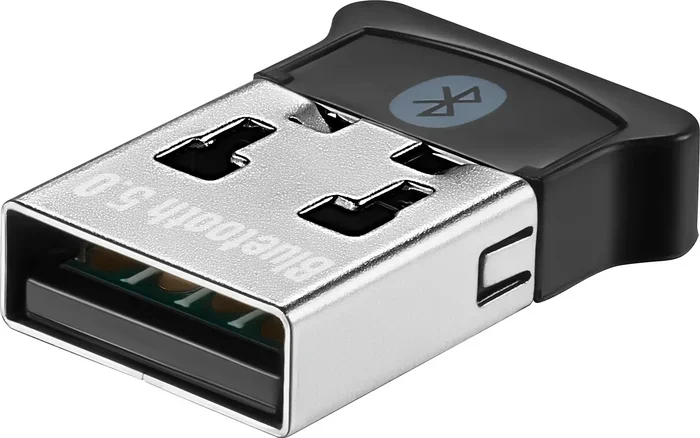
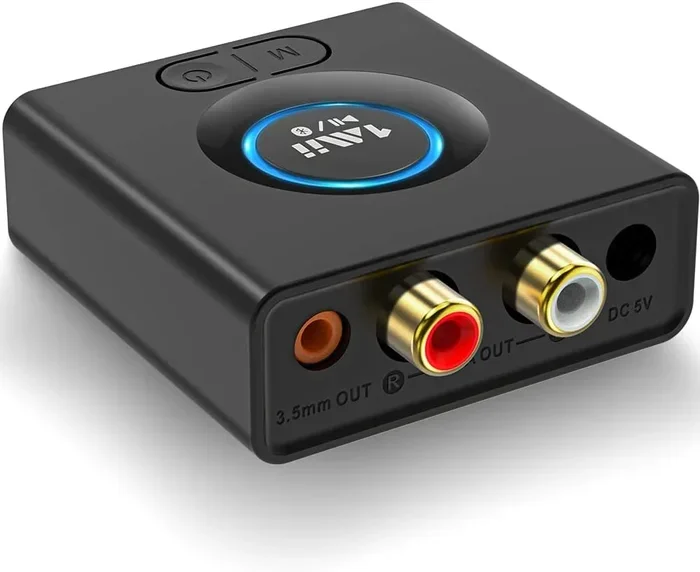
A Bluetooth audio adapter is the most popular solution. These small devices plug directly into your receiver’s auxiliary input. They act as a bridge between your phone and the receiver. The adapter receives the Bluetooth signal and converts it into an audio signal your receiver can play.
Here is how it works:
- Plug the adapter into the 3.5mm aux port on your receiver.
- Power the adapter using the USB cable or batteries provided.
- Put the adapter into pairing mode.
- Open Bluetooth settings on your phone and select the adapter.
- Once paired, any audio from your phone streams wirelessly to your receiver.
This method is plug-and-play. No technical skills are needed. Most adapters cost between $15 and $40. They are a great starting point if you want a simple, no-fuss solution.
Method 2: Using a Bluetooth Transmitter
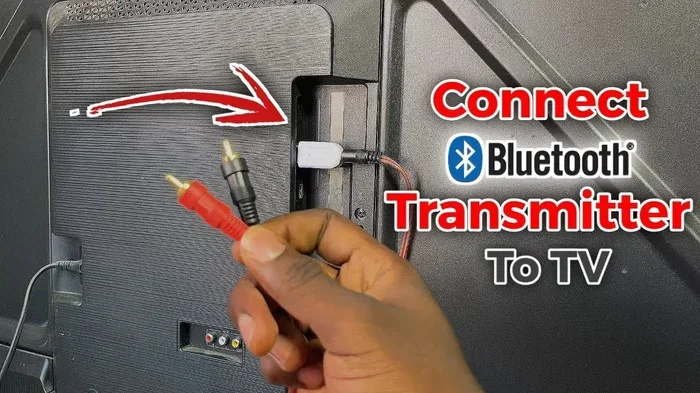
A Bluetooth transmitter works differently from an adapter. It connects to your receiver’s output and sends audio to Bluetooth headphones or speakers. This method is ideal if you want to make your receiver wireless for headphones or a second pair of speakers.
You connect the transmitter to your receiver using an RCA cable or a 3.5mm cable. Then the transmitter sends the audio signal wirelessly to your Bluetooth headphones or speaker. This is perfect for late-night listening. You can enjoy your receiver’s sound without disturbing anyone else in the house.
Method 3: Using a Bluetooth Receiver With Optical Input
If your receiver has an optical audio input, you have another great option. A Bluetooth receiver with optical output connects directly to your receiver’s optical port. This method often provides better audio quality than aux-based solutions because optical connections carry a cleaner digital signal.
Here is the setup process:
- Connect the Bluetooth receiver to your receiver using an optical cable.
- Power on the Bluetooth receiver.
- Pair your phone or device with the receiver.
- Select the optical input on your receiver.
- Start streaming and enjoy high-quality wireless audio.
This method is especially good for receivers that do not have an aux input. It also tends to produce better sound quality than analog connections.
Types Of Bluetooth Adapters For Receivers
Not all Bluetooth adapters are the same. Different types offer different features, ranges, and audio qualities. Understanding your options helps you choose the right one for your setup.
Bluetooth 4.0 vs Bluetooth 5.0
Bluetooth 5.0 is the current standard for most wireless audio devices. It offers a range of up to 800 feet in open spaces. It also supports dual audio, meaning you can connect two devices at once. Bluetooth 4.0 is older but still works fine for basic streaming. The range is shorter, and the audio quality is slightly lower.
If you are buying a new adapter, always look for Bluetooth 5.0. The upgrade in range and stability is significant. You will notice fewer dropouts and a stronger connection throughout your home.
Bluetooth Codecs: What They Mean For Your Sound
A Bluetooth codec is the technology that compresses and sends audio wirelessly. Different codecs offer different levels of quality. Here are the most common ones you will encounter:
- SBC: The default codec for all Bluetooth devices. It works everywhere but offers basic audio quality.
- aptX: Provides better sound quality with lower latency. Great for music and video watching.
- aptX HD: Delivers high-definition wireless audio. A big step up from standard aptX.
- LDAC: Sony’s codec that offers near-lossless quality over Bluetooth. Audiophiles love it.
- AAC: Apple’s preferred codec. It works well with iPhones and provides solid quality.
When choosing a Bluetooth adapter, check which codecs it supports. If you want the best audio quality, look for devices that support aptX HD or LDAC. These codecs make a real difference in how your music sounds.
Portable vs Desktop Bluetooth Adapters
Portable adapters are small and battery-powered. They are great for travel or for receivers in different rooms. Desktop adapters are larger and usually plug into a power outlet. They tend to offer better stability and sound quality. Choose based on where you plan to use the adapter.
Benefits Of Adding Bluetooth To Your Receiver
Adding Bluetooth to a receiver brings several real benefits that improve your daily listening experience. Here is what you gain:
1. Wireless Convenience
The biggest benefit is freedom from cables. You can control your music from your phone without being tethered to the receiver. You can leave your phone in another room and still play music. This convenience changes how you interact with your audio system.
2. Multi-Device Support
Most Bluetooth adapters let you connect multiple devices. You can switch between your phone, tablet, and laptop seamlessly. This is perfect for households where different people want to play their own music. Everyone can take turns without unplugging or re-pairing cables.
3. Cost Savings
Buying a new receiver with built-in Bluetooth can cost hundreds of dollars. A Bluetooth adapter costs a fraction of that. You get the same wireless functionality without replacing your entire system. This is a smart and budget-friendly upgrade.
4. Better Sound Quality
Modern Bluetooth codecs deliver excellent audio quality. With an aptX or LDAC adapter, the difference between wired and wireless is minimal. You get rich bass, clear mids, and detailed highs. Your receiver’s amplifier does all the heavy lifting, so the sound quality depends on your receiver’s speakers and drivers.
5. Future-Proofing Your Setup
Technology keeps moving forward. Adding Bluetooth now ensures your receiver stays relevant. You will not need to upgrade your receiver just to keep up with new phones and devices that have dropped the headphone jack.
Common Problems When Adding Bluetooth To A Receiver And How To Fix Them
While the process is straightforward, you may run into a few hiccups along the way. Here are the most common issues and how to solve them.
Pairing Failures
If your phone will not connect to the Bluetooth adapter, try these steps:
- Turn off Bluetooth on your phone and turn it back on.
- Make sure the adapter is in pairing mode. Most adapters have a flashing light when in pairing mode.
- Delete the adapter from your phone’s Bluetooth memory and try pairing again.
- Move closer to the adapter. Distance can interfere with initial pairing.
Sometimes the simplest fix works. Just restart both your phone and the adapter. This clears most temporary connection issues.
Audio Lag Or Latency
Audio lag happens when there is a delay between the video on your screen and the sound from your receiver. This is most noticeable when watching videos. To reduce latency:
- Use an adapter that supports aptX Low Latency.
- Keep your phone close to the adapter.
- Close other apps that might be using Bluetooth bandwidth.
- Check for firmware updates for your adapter.
Just like troubleshooting a line that wont delete in Microsoft Excel, audio latency issues often have simple fixes that require a bit of patience and step-by-step problem solving. Once you find the right setting, the problem usually disappears.
Weak Signal Or Dropouts
If your connection keeps cutting out, try these solutions:
- Move the adapter closer to your phone or streaming device.
- Remove physical obstacles between the devices. Walls and metal objects weaken Bluetooth signals.
- Switch to a less crowded Bluetooth channel if your adapter supports it.
- Make sure the adapter is fully charged or plugged in for power.
Bluetooth range is typically 30 to 50 feet indoors. If you go beyond that range, expect signal degradation. For best results, keep your streaming device within the same room as the receiver.
Poor Audio Quality
If your wireless audio sounds muffled or unclear:
- Check that your adapter supports a high-quality codec like aptX or LDAC.
- Make sure your phone’s Bluetooth settings are set to the highest available quality.
- Reduce interference by keeping Wi-Fi routers away from the adapter.
- Try a different power source. Some USB ports on computers provide insufficient power.
Also, keep in mind that your phone’s Bluetooth settings can affect audio quality. When you first connect your device, you might need to adjust settings on your phone. For iPhone users, checking how your device handles audio profiles can help. Sometimes reviewing how you manage audio connections, like adding prefixes to numbers on iPhone for better organization, can give you insight into managing your Bluetooth profiles more effectively.
Expert Tips For Best Wireless Audio Quality
Want to get the most out of your Bluetooth-enabled receiver? Follow these expert tips to maximize your wireless audio experience.
Keep Your Devices Updated
Firmware updates for Bluetooth adapters often improve performance and fix bugs. Check the manufacturer’s website or app regularly. Updating your phone’s operating system also helps. Newer software versions often include better Bluetooth optimization.
Place Your Adapter Strategically
Position your Bluetooth adapter near the center of your listening area. Avoid placing it inside closed cabinets. Open spaces allow Bluetooth signals to travel freely. If you place the adapter behind a TV or inside a shelf, the signal may weaken significantly.
Use High-Quality Cables For Wired Connections
If you are using a cable to connect the adapter to your receiver, invest in good quality cables. Cheap cables can introduce noise and reduce signal strength. A well-shielded 3.5mm cable or optical cable makes a noticeable difference in clean audio output.
Limit Connected Devices
Most Bluetooth adapters work best with one or two connected devices at a time. If too many devices try to connect simultaneously, you may experience audio dropouts. Keep your connections manageable for the best experience.
Consider A Dedicated Bluetooth Receiver For Audiophiles
If you are an audiophile who demands the best possible sound, consider a dedicated Bluetooth receiver. These devices are designed specifically for high-quality wireless audio. They support premium codecs and offer superior digital-to-analog conversion. Brands like FiiO, Qudelix, and iFi make excellent options.
How To Choose The Right Bluetooth Adapter For Your Receiver
Choosing the right adapter depends on a few key factors. Here is what to consider before making your purchase.
Check Your Receiver’s Inputs
Look at the back of your receiver. What inputs do you have available?
- 3.5mm aux input: Works with most Bluetooth audio adapters.
- RCA inputs: Use an adapter with RCA outputs or a 3.5mm-to-RCA cable.
- Optical input: Choose a Bluetooth receiver with optical output for best quality.
- USB input: Some receivers can accept Bluetooth audio through a USB DAC adapter.
Matching the adapter to your receiver’s inputs is the most important step. Buy the wrong type, and you will need an extra cable or adapter to make it work.
Set A Budget
Bluetooth adapters range from $10 to $150. Budget options under $25 work well for casual listening. Mid-range adapters between $25 and $60 support better codecs and offer improved range. Premium adapters above $60 deliver audiophile-grade wireless audio. Set a budget based on how much you care about sound quality.
Read Reviews Before Buying
Always check user reviews before purchasing. Look for feedback on connection stability, audio quality, and ease of setup. Real-world experiences from other users help you avoid buying a poorly performing adapter. Pay attention to reviews that mention your specific receiver model.
Consider Your Primary Use Case
Think about how you will use the Bluetooth connection most often. If you mostly stream music, any decent adapter will work. If you watch a lot of videos, prioritize low-latency adapters. If you listen to audiophile-quality music, invest in a premium adapter with LDAC or aptX HD support.
Final Thoughts On Adding Bluetooth To Your Receiver
Adding Bluetooth to a receiver is one of the best upgrades you can make to your audio setup. It is affordable, easy to install, and instantly modernizes your listening experience. Whether you choose a simple Bluetooth adapter or a premium wireless receiver, the results speak for themselves. You get the rich, powerful sound of your existing receiver combined with the freedom of wireless streaming.
The technology has matured to the point where wireless audio quality is virtually indistinguishable from wired connections. With the right adapter and proper setup, you will forget you are not using a cable. Your music, podcasts, and videos will flow seamlessly from your devices to your speakers.
Take some time to evaluate your receiver’s inputs, choose the right adapter, and follow the setup steps in this guide. You will be enjoying wireless audio in no time. The process is straightforward, the cost is minimal, and the payoff is huge. Give it a try and transform how you listen to music at home.
Frequently Asked Questions
Can I Add Bluetooth To Any Receiver?
Most receivers can accept Bluetooth through an adapter or transmitter. You need at least one available input, such as a 3.5mm aux port, RCA input, or optical input. Check the back of your receiver to see what connections are available. Almost any receiver made in the last 20 years can be upgraded with Bluetooth.
Does Adding Bluetooth To A Receiver Reduce Audio Quality?
Modern Bluetooth adapters with aptX or LDAC support deliver excellent audio quality. The difference between wired and wireless is minimal for most listeners. Only the most discerning audiophiles may notice a slight difference. Using a high-quality adapter ensures you get the best possible wireless sound from your receiver.
How Much Does A Bluetooth Adapter For A Receiver Cost?
Basic Bluetooth adapters cost between $10 and $25. Mid-range options with better codecs run from $25 to $60. Premium adapters that support LDAC or aptX HD can cost $60 to $150. You can find a great option at almost any price point depending on your needs.
Can I Use Bluetooth With A Car Receiver?
Yes, you can add Bluetooth to a car receiver using a Bluetooth adapter or transmitter. Many car receivers have aux inputs that work perfectly with small Bluetooth adapters. Some adapters even plug directly into the cigarette lighter for power. This upgrade makes hands-free calling and music streaming possible in older cars.
What Is The Best Bluetooth Adapter For A Home Stereo Receiver?
The best adapter depends on your receiver’s inputs and your budget. For most users, the TaoTronics Bluetooth 5.0 adapter offers great value. For audiophiles, the FiiO Bluetooth receiver supports LDAC for high-definition wireless audio. Always match the adapter to your receiver’s available inputs for the best results.
How Far Can Bluetooth Reach From My Phone To The Receiver?
Bluetooth 5.0 can reach up to 800 feet in open spaces. In a typical home with walls and furniture, the effective range is about 30 to 50 feet. Metal objects, microwaves, and Wi-Fi routers can reduce the range. Keep your phone within the same room or nearby for the most reliable connection.
=== CONCLUSION ===
So, can you add Bluetooth to a receiver? Absolutely. It is one of the simplest and most rewarding upgrades you can make to your home audio or car audio system. Whether you go with a Bluetooth adapter, transmitter, or dedicated receiver, the process is straightforward and the results are impressive. You get wireless freedom without sacrificing the sound quality your receiver was built to deliver.
Take action today. Look at your receiver, pick the right adapter, and start streaming. Your ears will thank you. The world of wireless audio is waiting, and your receiver is ready to join it.