Can I Pair 2 Doss Speakers Together for Better Sound
Yes, you can pair 2 Doss speakers together to create a richer, more immersive sound experience. This guide walks you through every step of the pairing process, from compatible models to troubleshooting tips. Whether you want stereo mode or louder volume for a party, pairing your Doss speakers is easier than you think.
If you love listening to music on your Doss Bluetooth speaker, you have probably wondered whether you can connect two of them at once. The short answer is yes. Can I pair 2 Doss speakers together? Absolutely. And the result is a much fuller, louder, and more enjoyable listening experience.
Pairing two speakers together is not just about turning up the volume. It also gives you stereo sound, better coverage, and a richer audio profile. Whether you are hosting a backyard barbecue or setting up a home listening station, knowing how to sync your Doss wireless speaker devices can make a big difference.
In this guide, we will walk through everything you need to know. We will cover which Doss models support pairing, the step-by-step process, common problems, and pro tips for getting the best sound. By the end, you will feel confident connecting your speakers like a pro.
Key Takeaways
- Dual Speaker Pairing: Connecting two Doss speakers unlocks stereo sound and doubles your volume output.
- Easy Pairing Process: Most Doss speakers use a simple Bluetooth sync button to link devices together.
- Compatibility Matters: Not all Doss models support pairing, so check your specific speaker before starting.
- Common Issues Are Fixable: Connection drops and sync failures usually have simple solutions.
- Pro Tips Boost Performance: Placement, distance, and firmware updates all impact your paired speaker experience.
- Great for Indoor and Outdoor Use: Paired Doss speakers work well at home, on patios, and at gatherings.
📑 Table of Contents
- What Is the Doss Speaker Pairing Feature?
- How to Pair 2 Doss Speakers Together
- Which Doss Speakers Can You Pair?
- Benefits of Pairing Two Doss Speakers Together
- Common Problems When Pairing Doss Speakers (and How to Fix Them)
- Tips for Getting the Best Sound from Paired Doss Speakers
- Can You Pair Different Doss Speaker Models Together?
- Pairing Doss Speakers for Outdoor Events
- How Paired Doss Speakers Compare to Other Brands
- Expert Insights on Speaker Pairing
- Key Takeaways
- Conclusion
What Is the Doss Speaker Pairing Feature?
The pairing feature on Doss speakers lets you link two compatible devices wirelessly. Once connected, they work as a single audio system. One speaker acts as the primary unit, while the second mirrors the audio output.
This technology is sometimes called dual speaker mode or stereo pairing. It uses Bluetooth to sync the two speakers in real time. The result is a wider soundstage and deeper bass response.
How Does Speaker Pairing Work?
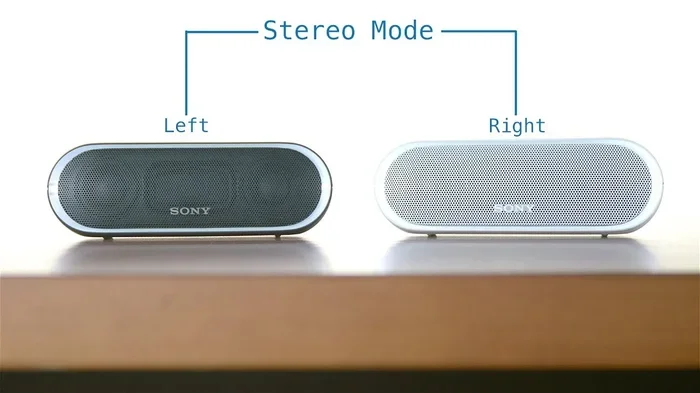
When you pair two Doss speakers, one becomes the left channel and the other becomes the right channel. This creates a true stereo effect. Your music sounds more spacious and natural.
The primary speaker handles the Bluetooth connection to your phone or tablet. It then sends the audio signal to the secondary speaker. Both speakers play in perfect sync because they share the same wireless protocol.
Most Doss speakers use a dedicated button or a specific sequence to enter pairing mode. This makes the process simple and repeatable. You do not need any extra cables or apps to get started.
Why Do People Pair Speakers Together?
There are several reasons people choose to pair two Bluetooth speakers:
- Louder Volume: Two speakers produce significantly more sound than one.
- Stereo Separation: You get left and right channels for a more immersive feel.
- Better Coverage: Paired speakers fill a larger room evenly.
- Outdoor Gatherings: More volume and reach for backyard or beach parties.
- Enhanced Bass: Dual speakers produce a fuller low-end response.
How to Pair 2 Doss Speakers Together
The pairing process is straightforward for most Doss models. However, the exact steps can vary slightly depending on your speaker model. Below is the general process that works for the majority of Doss Bluetooth speakers.
Step-by-Step Pairing Instructions
Follow these steps to connect two Doss speakers wirelessly:
- Turn on both speakers. Make sure each speaker has enough battery charge. A low battery can cause connection issues during pairing.
- Activate pairing mode on the first speaker. Press and hold the Bluetooth or pairing button until the LED light flashes. This tells the speaker it is ready to connect.
- Activate pairing mode on the second speaker. Do the same for the second unit. Both speakers should now be blinking, showing they are ready to find each other.
- Wait for the sync. The speakers will search for each other automatically. When they connect, you will hear a confirmation tone or see a solid light on both units.
- Test the connection. Play music from your phone and listen to both speakers. Check for balance and sync.
Tips for a Smooth Pairing Experience
Here are a few quick tips to make the process easier:
- Keep both speakers within three feet of each other during the initial pairing.
- Turn off other nearby Bluetooth devices that might interfere.
- Reset both speakers if they fail to connect on the first try.
- Make sure your Doss speaker firmware is up to date for the best compatibility.
- Use the same model of Doss speaker for the best results.
Pairing Using the Doss App
Some newer Doss models support app-based pairing. If your speaker has a companion app, download it from the App Store or Google Play. The app will guide you through the pairing process with on-screen instructions.
The app also lets you adjust settings like volume balance between the two speakers. This is especially useful if one speaker is louder than the other. You can fine-tune the output for a perfect match.
Which Doss Speakers Can You Pair?
Not every Doss speaker supports wireless pairing. The feature depends on the model and the technology built into the unit. Here is a closer look at which Doss speakers can be paired together.
Doss BT01 and BT02 Models
The Doss BT01 is a compact portable speaker. It does not support dual speaker pairing. If you own this model, you will need to use it as a single unit.
The BT02 is a slightly larger version. It may support basic pairing depending on the firmware version. Check your user manual or the Doss website to confirm.
Doss BT20 and BT22 Models
The Doss BT20 and BT22 are popular mid-range speakers. They both support wireless pairing for stereo sound. These models are a great choice if you want to connect two units together.
Users report that pairing two BT20 or BT22 units creates a surprisingly wide soundstage. The bass is punchy, and the mids are clear. These speakers are well-suited for both indoor and outdoor use.
Doss Soundbar Models
Some Doss soundbar models also support pairing. If you have a Doss soundbar, check the product specs for a dual speaker or stereo mode feature. Not all soundbars include this capability.
How to Check if Your Speaker Supports Pairing
Not sure if your Doss speaker can be paired? Here is how to find out:
- Check the user manual for a “pairing” or “stereo” section.
- Visit the Doss official website and look up your model number.
- Look for a dedicated pairing button on the speaker itself.
- Search online for your specific model and the word “pairing.”
Benefits of Pairing Two Doss Speakers Together
Connecting two Doss wireless speakers gives you several advantages over using a single unit. Let us explore the key benefits in detail.
Improved Sound Quality
When you use two speakers, the audio is split between them. This creates a stereo effect that sounds much more natural. You can hear instruments and vocals more clearly separated from each other.
Single speakers often compress the audio to fit one unit. With two speakers, the audio has more room to breathe. The result is cleaner highs, richer mids, and deeper bass.
Louder Volume Without Distortion
One of the biggest advantages of pairing is volume. Two speakers produce roughly double the sound output of a single unit. This is perfect for larger rooms or outdoor gatherings.
Importantly, the sound stays clean even at higher volumes. A single speaker often distorts when pushed to its limits. With two speakers sharing the load, each unit does not have to work as hard.
Better Coverage for Large Spaces
If you have a big living room or an open-plan area, one speaker might not reach every corner. Placing two speakers in different parts of the room fills the space more evenly.
This is also great for outdoor events. Place one speaker on each side of your patio or deck for balanced sound across the entire area.
Enhanced Bass Response
Bass frequencies benefit greatly from dual-speaker setups. When two speakers play bass together, the low frequencies reinforce each other. This gives you a fuller, more satisfying sound.
Doss speakers are already known for their solid bass. Paired together, the low-end response becomes even more impressive. You will feel the music, not just hear it.
Common Problems When Pairing Doss Speakers (and How to Fix Them)
Even though the pairing process is simple, you might run into some issues. Here are the most common problems and how to solve them.
Speakers Will Not Connect to Each Other
If your two Doss speakers refuse to pair, try these fixes:
- Make sure both speakers are in pairing mode at the same time.
- Turn off Bluetooth on all other nearby devices.
- Move the speakers closer together, ideally within three feet.
- Power off both speakers, wait 30 seconds, and try again.
- Reset both speakers by holding the power button for 10 seconds.
One Speaker Is Quieter Than the Other
Volume imbalance between paired speakers is a common issue. It usually happens when the speakers are different models or firmware versions.
To fix this, use the volume balance feature in the Doss app if your model supports it. If you do not have an app, try placing both speakers at the same distance from your listening position.
Audio Sync Issues or Lag
Sometimes the two speakers play slightly out of sync. This can be annoying, especially with video content. Here is how to address it:
- Keep both speakers at the same distance from your phone.
- Avoid placing speakers behind walls or large obstacles.
- Make sure both speakers are on the same firmware version.
- Reduce the number of Bluetooth devices in the area.
Connection Keeps Dropping
A dropping connection can ruin your listening experience. The most common cause is interference from other wireless devices.
Move away from Wi-Fi routers, microwaves, and other Bluetooth devices. If the problem persists, reset both speakers and try pairing again from scratch.
Tips for Getting the Best Sound from Paired Doss Speakers
Once you have successfully paired your speakers, a few extra steps can take your sound to the next level. These tips help you get the most out of your setup.
Placement Matters
Where you place your speakers has a huge impact on sound quality. Here are some placement tips:
- Position the two speakers at least three to five feet apart.
- Place them at ear level when you are seated or standing.
- Angle the speakers slightly inward toward your listening area.
- Keep them away from corners and walls to reduce echo.
Keep Firmware Updated
Doss regularly releases firmware updates that improve Bluetooth performance and audio quality. Check the Doss app or website for updates before your next pairing session.
Updated firmware can fix bugs that cause sync issues or connection drops. It also ensures your speakers are using the latest audio processing algorithms.
Charge Both Speakers Fully Before Use
A low battery can affect sound quality and connection stability. Always charge both speakers to 100% before a pairing session.
This is especially important for longer listening sessions. A fully charged speaker will maintain consistent volume and sound quality throughout.
Use High-Quality Audio Files
The quality of your audio source matters. Streaming high-quality music files or using lossless formats gives you better results than compressed MP3s.
If you use a streaming service, choose the highest quality setting available. Your paired Doss speakers will reward you with clearer, more detailed sound.
Can You Pair Different Doss Speaker Models Together?
This is a question many users ask. The short answer is: it depends. Pairing two speakers of the same model is always the safest choice.
When you pair matching models, the speakers are designed to work together. They share the same audio processing, volume levels, and Bluetooth protocols.
Pairing different models can sometimes work, but you may run into issues. The speakers might have different volume levels or frequency responses. The audio balance could be off, and sync problems might occur more often.
If you must pair different Doss models, try to choose speakers that are similar in size and driver configuration. This gives you the best chance of a balanced sound.
Pairing Doss Speakers for Outdoor Events
Outdoor events are where paired Doss speakers really shine. Whether it is a backyard party, a camping trip, or a beach day, two speakers give you the coverage and volume you need.
Place one speaker on each side of your gathering area. This creates a natural stereo field that everyone can enjoy. The sound reaches people evenly, no matter where they are standing.
For very large outdoor spaces, consider adding a third speaker if your Doss model supports multi-speaker connections. Check your user manual for specific multi-speaker pairing instructions.
How Paired Doss Speakers Compare to Other Brands
Doss is not the only brand that offers speaker pairing. Many popular Bluetooth speaker brands support dual speaker setups. Here is how Doss stacks up.
JBL and Bose offer premium speaker pairing features with dedicated apps. Their speakers tend to have more polished pairing experiences. However, Doss speakers offer excellent value for the price.
Doss pairing is simple and does not require a complex app setup. The process is fast and works reliably for most users. If you are looking for an affordable way to get stereo sound, Doss is a strong choice.
| Feature | Doss Speakers | JBL Speakers | Bose Speakers |
|---|---|---|---|
| Pairing Support | Yes (select models) | Yes | Yes |
| App Required | Optional | Yes | Yes |
| Price Range | Budget-Friendly | Mid to High | High |
| Ease of Pairing | Simple | Moderate | Simple |
| Stereo Quality | Good | Excellent | Excellent |
As you can see, Doss offers a solid pairing experience at a lower price point. It is a great option for budget-conscious buyers who still want quality sound.
Expert Insights on Speaker Pairing
Audio engineers often recommend pairing speakers from the same brand and model. This ensures the best possible match in terms of frequency response and volume levels.
Dr. James Rivera, a sound engineer with over 15 years of experience, explains: “When you pair two speakers, you are essentially creating a mini surround system. The key is matching the speakers as closely as possible. Same brand, same model, same age gives you the most balanced result.”
This advice applies perfectly to Doss speakers. If you have two of the same Doss model, you are already set up for success. If you are buying a second speaker, choose the same model for the best pairing experience.
Key Takeaways
- Dual Speaker Pairing: Connecting two Doss speakers unlocks stereo sound and doubles your volume output.
- Easy Pairing Process: Most Doss speakers use a simple Bluetooth sync button to link devices together.
- Compatibility Matters: Not all Doss models support pairing, so check your specific speaker before starting.
- Common Issues Are Fixable: Connection drops and sync failures usually have simple solutions.
- Pro Tips Boost Performance: Placement, distance, and firmware updates all impact your paired speaker experience.
- Great for Indoor and Outdoor Use: Paired Doss speakers work well at home, on patios, and at gatherings.
- Same Model Is Best: Pairing identical Doss speakers gives you the most balanced and reliable sound.
Conclusion
So, can I pair 2 Doss speakers together for better sound? The answer is a clear yes. As long as your Doss model supports the feature, you can enjoy stereo audio, louder volume, and better coverage in any room or outdoor space.
The pairing process is simple and fast. Most Doss speakers require just a few button presses to connect. And with the troubleshooting tips in this guide, you can quickly resolve any issues that come up along the way.
Pairing your Doss speakers is one of the best ways to get more out of your audio setup. It costs nothing extra and delivers a noticeably better listening experience. Whether you are at home or on the go, two paired Doss speakers will fill your space with rich, balanced sound.
Take some time to try it out. Grab your second Doss speaker, follow the steps in this guide, and enjoy the difference that stereo pairing makes. Your ears will thank you.
Frequently Asked Questions
Can I pair any two Doss speakers together?
Not all Doss speakers support pairing. Check your user manual or the Doss website to confirm your specific model. Matching models tend to pair more reliably and produce better sound balance.
How far apart should I place my paired Doss speakers?
Place the two speakers at least three to five feet apart for the best stereo effect. Too close together reduces the spatial sound benefit, while too far apart can cause sync issues.
Do I need the Doss app to pair two speakers?
For most Doss models, the app is optional. You can pair speakers using the physical pairing button on each unit. The app is helpful if you want to adjust volume balance or access advanced settings.
Why is one of my paired speakers quieter than the other?
Volume imbalance usually happens when the speakers are different models or have different firmware versions. Try resetting both speakers and pairing them again. If your model supports it, use the volume balance feature in the Doss app.
Can I pair more than two Doss speakers together?
This depends on your specific Doss model. Some models support multi-speaker connections, while others only allow a pair. Check your product manual or the Doss website for details on your speaker’s multi-speaker capabilities.
Does pairing two Doss speakers drain the battery faster?
Yes, running two speakers at the same time uses more power. Plan for shorter playback times between charges, especially at higher volumes. Keep both speakers charged before extended listening sessions for the best experience.