Can I Connect An Old VCR To A New TV And Watch Shows
Yes, you can connect an old VCR to a new TV and watch your favorite VHS tapes again. With the right cables, adapters, and a little patience, connecting an old VCR to a new TV is easier than most people think. This guide walks you through every method, from basic RCA connections to HDMI converters, so you can enjoy your vintage movie collection on a modern screen.
Key Takeaways
- Multiple connection options exist: You can use RCA composite cables, S-Video, component video, or HDMI adapters to link your VCR to a new television.
- An analog-to-digital converter is the best quality option: It transforms the VCR’s analog signal into a digital HDMI output for crisp picture quality.
- Check your TV’s input ports first: Most modern TVs only have HDMI, so you will likely need an adapter or converter box.
- Cleaning your VCR heads regularly improves playback: Dust and debris cause poor picture quality and tracking issues.
- Common problems are usually easy to fix: No signal, poor quality, and audio sync issues all have simple solutions.
📑 Table of Contents
- Why People Still Love Their Old VCRs
- Understanding Your New TV’s Inputs and Ports
- How to Connect An Old VCR To A New TV Step by Step
- Best Cables and Adapters for the Job
- Common Problems When Connecting a VCR to a New TV
- Tips for Getting the Best Picture Quality from Your VCR
- Final Thoughts on Watching VHS in the Modern Era
Why People Still Love Their Old VCRs
There is something special about popping a VHS tape into a VCR and watching a movie the way people did decades ago. Even though modern TVs offer stunning 4K resolution and smart features, many people still treasure their old VHS tapes. Maybe you grew up watching movies on tape. Maybe you have a collection of home videos that mean the world to you. Or perhaps you just love the charm of vintage electronics.
Whatever your reason, the good news is that connecting an old VCR to a new TV is absolutely possible. You do not need expensive equipment or technical skills. With a few basic tools and this guide, you will be watching your favorite tapes in no time. Let us explore why people still hold onto these classic machines and what makes them worth the effort.
The Nostalgia Factor
Nostalgia is a powerful thing. For many families, the VCR was the centerpiece of weekend movie nights. The ritual of rewinding a tape with a pencil, pressing play, and gathering around the television created memories that no streaming service can replicate. People who grew up in the 1980s and 1990s often feel a deep emotional connection to their old VHS tapes.
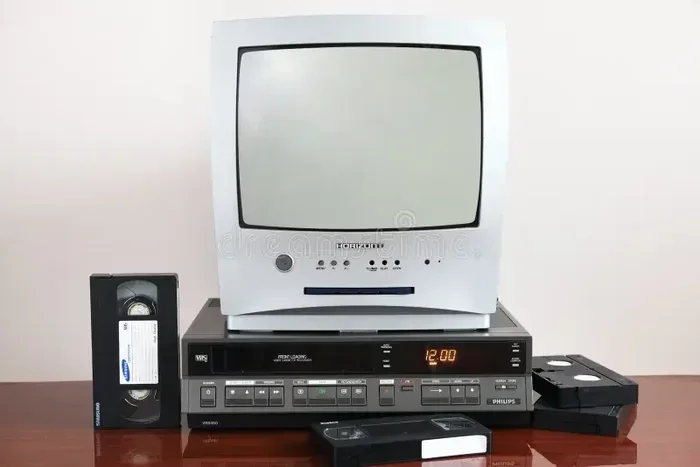
Beyond nostalgia, some people simply prefer the look and feel of vintage electronics. The warm glow of a CRT television paired with a chunky VCR player creates a retro aesthetic that many find comforting. If you love the idea of a home theater setup that feels timeless, keeping your VCR connected to a new TV is a great way to blend old and new.
Saving Your VHS Collection
Many people have boxes of VHS tapes sitting in closets or attics. These tapes might contain family weddings, birthday parties, or beloved movies that are no longer available for purchase digitally. If you want to preserve these memories, keeping your VCR working and connected to a modern TV is essential.
Some people even convert their VHS tapes to digital files. But before you can do that, you need a working connection between your VCR and a television or capture device. This is where knowing how to connect an old VCR to a new TV becomes really valuable. Without the right setup, you cannot even begin the digitization process.
In fact, having the right gadgets that make life easier around the house can make this whole process much smoother. Check out our list of 10 Gadgets To Make Moms Life Easier for more ideas on simplifying your tech setup at home.
Understanding Your New TV’s Inputs and Ports
Before you grab any cables, you need to know what inputs your new television has. This is the most important first step in connecting an old VCR to a new TV. Different TVs have different ports, and the type of port you have determines which cables and adapters you will need.
HDMI Ports and Modern Displays
Most modern TVs made in the last decade only have HDMI ports. These ports are designed for digital signals. A VCR, on the other hand, outputs an analog signal. This mismatch is the biggest challenge when you want to connect an old VCR to a new TV.
HDMI ports carry high-definition audio and video through a single cable. They are small, rectangular, and easy to recognize. If your television only has HDMI inputs, you will need a converter to make the connection work. Do not worry, though. The solutions are simple and affordable.
What About Analog Inputs on New TVs
Some newer televisions still include analog inputs like composite or component ports. These look like round color-coded holes on the back of the TV. If your modern TV has these ports, connecting your VCR becomes much easier. You can use standard RCA cables to link the two devices directly.
However, many budget and mid-range TVs have dropped analog inputs entirely. Before shopping for cables, flip your television around and check the back panel. Take a photo if it helps you remember what ports are available. This small step saves a lot of time and frustration later on.
How to Connect An Old VCR To A New TV Step by Step
Now let us get into the actual process of connecting an old VCR to a new TV. The method you choose depends on the ports available on your television and the quality of picture you want. Below, we cover the most common connection methods in detail.
What You Will Need
Before you start, gather the right equipment. Here is a basic checklist of what you might need:
- RCA composite cables (red, white, and yellow plugs)
- An HDMI adapter or converter box (if your TV only has HDMI)
- S-Video cable (for better quality than composite)
- Component video cables (for the best analog picture quality)
- A power strip or wall outlet for both devices
You do not need every item on this list. Start by checking your TV’s ports and choose the method that matches. Most people only need one or two cables and possibly a small converter box.
The Connection Process
Here is the general process for connecting an old VCR to a new TV. Follow these steps and you will have your tapes playing in minutes.
Step 1: Place your VCR near the television. Make sure both devices are plugged in and turned off. You want to set up the cables while everything is powered down for safety.
Step 2: Connect the cables from the VCR’s output ports to your chosen adapter or directly to the TV’s input ports. Match the colors: yellow goes to video, white goes to left audio, and red goes to right audio. This color-coding makes it hard to mess up.
Step 3: If you are using an HDMI converter, connect the VCR end to the converter using RCA cables. Then use a short HDMI cable to connect the converter to the modern TV.
Step 4: Turn on the television and switch to the correct input source. Use your remote to select HDMI 1, HDMI 2, AV, or whatever port you plugged into. You should see a picture from the VCR on the screen.
Step 5: Insert a tape and press play. Adjust the tracking if the image looks wavy or unstable. Most VCRs have a tracking knob or auto-tracking button for this purpose.
That is really all there is to it. The whole process takes about ten minutes once you have your cables ready. The hardest part is figuring out which connection method matches your television’s ports.
Having a few extra gadgets that make life easier around the entertainment area can really streamline this process. A cable management box, for instance, keeps all your wires neat and organized so you are not dealing with a tangled mess every time you want to watch a tape.
Best Cables and Adapters for the Job
Not all cables are created equal. The type of cable you choose affects both the setup process and the picture quality you get from your VCR. Let us break down the best options for connecting an old VCR to a new TV.
RCA Composite Cables
RCA composite cables are the most common and affordable option. They come in a set of three color-coded plugs: yellow for video, white for left audio, and red for right audio. These cables have been the standard for analog audio-visual connections for decades.
The advantage of composite cables is simplicity. They are cheap, widely available, and work with almost any VCR and television combination. The downside is that the picture quality is limited. You will get a standard definition image that looks fine on smaller screens but may appear fuzzy on larger modern TVs.
S-Video Connections
S-Video cables offer a step up from composite connections. They split the video signal into two separate channels, which reduces interference and improves picture clarity. If your VCR has an S-Video output port, this is a great option to consider.
However, S-Video still only carries video, not audio. You will need a separate set of RCA cables for the sound. This means more cables running between your VCR and television. For many people, the slight improvement in picture quality is worth the extra cables, though.
Component Video Connections
Component video is the best analog connection available. It splits the video signal into three separate channels for even better image quality than S-Video or composite. The cables use red, green, and blue plugs for video, plus white and red for audio.
Not all VCRs have component outputs, but many higher-end models do. If your VCR supports it and your television has component inputs, this is the way to go for the best analog picture. You will notice sharper text, smoother colors, and less ghosting on the screen.
HDMI Converters and Adapter Boxes
If your modern TV only has HDMI ports, an analog-to-digital converter is your best friend. These small boxes take the analog signal from your VCR and convert it to a digital HDMI output that any television can display.
You plug your RCA or S-Video cables into the converter box, then run a single HDMI cable from the box to the TV. The picture quality is noticeably better than a direct composite connection because the converter processes the signal digitally. Look for a converter that supports at least 720p or 1080p output for the best results.
Some people also use a DVD recorder or a capture card as an intermediary device. These can help you both improve the signal and archive your VHS tapes to digital format at the same time. It is a two-for-one solution that many home theater enthusiasts appreciate.
Common Problems When Connecting a VCR to a New TV
Even with the right cables, you might run into some issues when connecting an old VCR to a new TV. Most of these problems are easy to fix. Here are the most common ones and how to solve them.
No Picture or Signal
If you turn everything on and see a blank screen, do not panic. This is the most common issue and it usually has a simple fix. First, check that all cables are firmly plugged in. A loose connection is the culprit more often than not.
Next, make sure your television is set to the correct input source. Press the input or source button on your remote and cycle through the options. If you are using an HDMI converter, try a different HDMI port on the TV. Sometimes the first port you try is not the one the TV recognizes.
Also verify that the VCR is powered on and a tape is inserted. It sounds obvious, but it is an easy thing to overlook. If none of these steps work, try swapping out a cable. A damaged cable can completely block the signal.
Poor Image Quality
A fuzzy or distorted picture is another frequent complaint. This often happens because the VCR heads need cleaning. Over time, dust and oxide buildup on the playback heads degrades the picture quality. A VCR head cleaning cassette is inexpensive and easy to use. Just pop it in and let the machine run through a quick cleaning cycle.
Another cause of poor quality is using the wrong type of cable. If you are using composite cables on a large modern TV, the image may look soft or pixelated. Upgrading to an S-Video or component video connection can make a dramatic difference. And if you really want the best results, an analog-to-digital converter will give you a much cleaner picture than any direct cable connection.
Audio and Video Sync Issues
Sometimes the sound and picture get out of sync. The voices do not match the lip movements, or you hear the audio before the action happens. This is more common with older VCRs and can be caused by a few different factors.
First, check that all your cables are securely connected. A partially plugged-in cable can cause timing delays. Second, if you are using a converter box, the processing delay might be the issue. Some converters add a slight lag. Try adjusting the audio delay settings on your television if it has that option.
Finally, the VCR itself might be wearing out. Mechanical parts inside the machine degrade over time, and this can affect playback speed. If your VCR is very old, it might be time to consider replacing it or getting it serviced by a professional.
Tips for Getting the Best Picture Quality from Your VCR
Once you have connected an old VCR to a new TV, you want to make sure you are getting the best possible picture. Here are some practical tips to improve your viewing experience.
Cleaning Your VCR Heads Regularly
Clean your VCR heads at least once every few months if you watch tapes regularly. A dirty head causes static, tracking problems, and poor color reproduction. A head cleaning cassette costs just a few dollars and takes minutes to use. Make it part of your regular maintenance routine.
Also, handle your VHS tapes with care. Avoid touching the tape surface, and store tapes upright in a cool, dry place. Proper storage extends the life of your tapes and keeps the picture quality high for years to come.
Adjusting Your TV Settings
Most modern TVs have picture settings that are optimized for digital content. When you watch an analog VCR signal, you may want to adjust these settings. Try turning down the sharpness setting, which can make the analog picture look smoother and more natural.
You can also adjust the brightness and contrast to suit the look of VHS tapes. Many people find that a slightly warmer color temperature enhances the nostalgic feel of watching old tapes. Experiment with the settings until you find a look you enjoy.
Using a Surge Protector
Vintage electronics can be sensitive to power fluctuations. Plug both your VCR and television into a surge protector to guard against electrical spikes. This protects your equipment and helps ensure consistent playback quality every time you watch a tape.
Considering a Retro Gaming or Media Setup
If you enjoy retro gaming or collecting vintage electronics, you might consider building a dedicated media station. A single modern TV can host a VCR, a DVD player, and even a retro console all at once. This creates a versatile entertainment hub that honors both old and new technology.
Organize your cables neatly and label each one so you know which device it connects to. A clean setup makes switching between devices effortless and keeps your entertainment area looking great. With a little planning, your VCR becomes a seamless part of your home theater rather than an awkward afterthought.
Final Thoughts on Watching VHS in the Modern Era
Connecting an old VCR to a new TV is a rewarding project that brings your vintage movie collection back to life. Whether you want to relive childhood memories, watch old family recordings, or simply enjoy the unique charm of VHS tapes, the process is straightforward and accessible to anyone.
The key is choosing the right connection method for your television’s ports. If you have HDMI-only inputs, grab an analog-to-digital converter. If your TV still has composite or component inputs, a simple set of RCA cables will do the job. Either way, you will be watching your favorite tapes on a big, beautiful screen in no time.
Do not let your VCR and VHS tapes gather dust in a forgotten closet. With the right setup, these classic devices still have plenty of life left in them. The combination of vintage electronics and modern TV technology creates a unique viewing experience that no streaming service can match. So dust off that old machine, plug in the cables, and enjoy the magic of watching your favorite tapes the way they were meant to be seen.
Remember, taking care of your equipment and keeping your cables organized makes a huge difference. A clean setup ensures reliable playback and protects your investment in vintage electronics. Once you get the hang of it, connecting an old VCR to a new TV becomes second nature.
Frequently Asked Questions
Can I connect a VCR directly to an HDMI-only TV without any extra equipment?
No, you cannot connect a VCR directly to an HDMI-only TV without additional equipment. VCRs output an analog signal, while HDMI ports only accept digital signals. You will need an analog-to-digital converter or adapter box to bridge the gap between the two devices.
What is the best cable to use when connecting a VCR to a new TV?
The best cable depends on your TV’s inputs. For the best analog quality, use component video cables. For the simplest setup, use RCA composite cables. If your TV only has HDMI, use an HDMI converter box with RCA cables connecting the VCR to the converter.
Will a new TV display VHS content in high definition?
No, VHS tapes have a maximum resolution of about 240p, which is standard definition. A new TV can display this content, but it will not look high definition. Using an HDMI converter can improve the clarity slightly, but the source material from a VHS tape has inherent limitations.
How do I clean my VCR heads to improve picture quality?
Use a VCR head cleaning cassette, which is available at most electronics stores for a few dollars. Simply insert the cassette into your VCR and press play. The cassette cleans the playback heads as the tape runs. Clean your heads every few months if you watch tapes regularly.
Can I use a VCR with a smart TV?
Yes, you can use a VCR with a smart TV. Smart TVs have the same input ports as regular TVs, so the connection process is identical. You will still need the appropriate cables and possibly a converter box, depending on the TV’s available inputs.
Is it worth converting VHS tapes to digital format instead of keeping the VCR?
Converting VHS tapes to digital format is a great way to preserve your recordings long-term. Digital files do not degrade over time like magnetic tapes do. However, keeping your VCR allows you to watch tapes anytime without extra equipment, and many people enjoy the experience of watching on the original format.
=== CONCLUSION ===
Can I connect an old VCR to a new TV and watch shows? Absolutely yes. The process is simpler than most people assume, and the results are well worth the effort. Whether you use RCA composite cables, an S-Video connection, or an HDMI converter box, you can bring your VHS tape collection back to life on a modern television.
Start by checking your TV’s input ports, gather the right cables and adapters, and follow the step-by-step connection process outlined in this guide. Take care of your VCR by cleaning the heads regularly and storing tapes properly. With these simple steps, you will enjoy your favorite movies and home videos with great picture quality for years to come.