Can Any Projector Be Ceiling Mounted Without Hassle
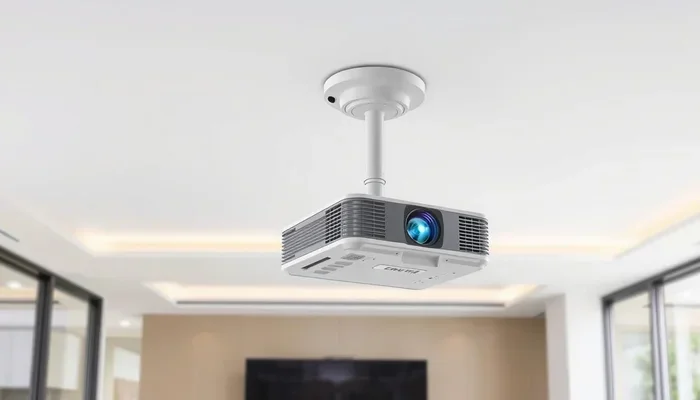
Can any projector be ceiling mounted? The short answer is no — not every projector works for ceiling installation. Some need special brackets, while others need a projector lift or specific placement. Your projector type, throw distance, weight, and room setup all matter. In this guide, we break down exactly which projectors work, what you need, and how to avoid common mistakes.
Key Takeaways
- Not all projectors are ceiling-mount friendly: Ultra-short throw and some portable projectors have limited mounting options.
- The right ceiling mount bracket is essential: Match the bracket to your projector’s VESA pattern and weight.
- Throw distance changes with ceiling height: A higher ceiling may require a longer throw lens or a projector lift.
- Keystone correction helps fix alignment issues: But it’s best to get the angle right from the start.
- Cable management matters for a clean look: Use in-wall rated cables and plan your routing early.
- Professional installation can save headaches: Especially for heavy ceiling projectors or complex setups.
📑 Table of Contents
Can Any Projector Be Ceiling Mounted Without Hassle?
You bought a projector. You want to mount it on the ceiling. It sounds simple, right? But here is the thing — not every projector works well when you hang it from above. Some projectors are built for tabletop use. Others need specific angles. And some just will not work at all on a ceiling mount without extra gear.
So, can any projector be ceiling mounted? Let us break it down. In this article, we will cover every type of projector, the mounting hardware you need, and the mistakes most people make. By the end, you will know exactly what works for your setup and what does not.
Whether you are building a home theater or setting up a conference room, this guide has you covered. We will talk about throw distance, projector weight, ceiling height, and more. No fluff. Just clear, practical advice you can use right away.
Why Ceiling Mounting Is Popular
Ceiling mounting a projector saves floor space. It keeps the projector out of the way. It also gives you a cleaner, more professional look. Many people prefer a ceiling mounted projector because it frees up their table or shelf. Plus, it reduces the risk of someone bumping into the device during a movie night.
But popularity does not mean compatibility. Just because a setup looks great in a showroom does not mean it will work in your room. The devil is in the details. And those details start with understanding your projector type.
Understanding Your Projector Type
The first step to a successful ceiling mount is knowing what kind of projector you have. Different projectors have different needs. Let us look at the most common types.
DLP Projectors
DLP projectors use tiny mirrors to create images. They are popular for home theaters because they deliver sharp contrast and deep blacks. Most DLP projectors can be ceiling mounted without issues. They are lightweight and usually have standard VESA mounting holes.
However, some DLP models generate heat. When mounted on the ceiling, airflow matters. Make sure your projector has good ventilation. A projector that overheats will shut down or lose brightness over time.
LCD Projectors
LCD projectors use liquid crystal panels to produce bright, colorful images. They tend to run cooler than DLP models. This makes them great candidates for ceiling mounting. Most LCD projectors are also light enough for standard ceiling brackets.
The one thing to watch for is weight. Some large LCD projectors can be heavy. Always check the weight before buying a mount. A mount that cannot handle the weight will fail — and that is a costly mistake.
LED Projectors
LED projectors use LED light sources instead of traditional bulbs. They are compact, energy efficient, and last a long time. Many LED projectors are small enough to mount almost anywhere. But their small size can be a problem too.
Some LED projectors are designed for tabletop use only. They may lack standard VESA mounting holes. Always check the specs before assuming an LED projector can go on the ceiling.
Laser Projectors
Laser projectors are the premium choice. They deliver outstanding brightness and color accuracy. They also last longer than lamp-based models. Most laser projectors are built for permanent installation, which makes them excellent for ceiling mounting.
But here is the catch — laser projectors are often expensive and heavy. You will need a sturdy ceiling mount bracket. A basic plastic bracket will not cut it. Invest in a metal mount rated for the projector weight.
Ultra-Short Throw Projectors
Ultra-short throw projectors sit very close to the screen. They project a large image from just a few inches away. These projectors are tricky to ceiling mount. In most cases, they are designed to sit on a table or shelf directly below the screen.
Mounting an ultra-short throw projector on the ceiling will usually ruin the image size and focus. The throw distance is simply too short for a ceiling installation. If you want an ultra-short throw projector, keep it on a low table or use a specialized projector lift designed for ultra-short throw models.
Portable Projectors
Portable projectors are small, lightweight, and easy to carry around. They are great for camping trips or business presentations. But they are not always ideal for ceiling mounting.
Many portable projectors lack VESA mounting holes. They also tend to have weak built-in speakers and limited brightness. If you want to ceiling mount a portable projector, make sure it has mounting holes and enough brightness for your room size.
What You Need for a Ceiling Mount Setup
Once you know your projector type, it is time to gather the right equipment. A ceiling mount is not just a bracket and a screw. There is more to it than that.
Ceiling Mount Bracket
The bracket is the most important piece of hardware. It connects your projector to the ceiling. Not all brackets fit all projectors. You need to match the bracket to your projector VESA pattern.
VESA pattern refers to the spacing of the mounting holes on the back of the projector. Common patterns include 75x75mm and 100x100mm. Check your projector manual or the manufacturer website for this information.
Here is what to look for in a bracket:
- Weight capacity: The bracket should support your projector weight with room to spare.
- VESA compatibility: Match the hole pattern exactly.
- Tilt and swivel: These help you adjust the image angle after installation.
- Material: Steel and aluminum are stronger than plastic.
- Ceiling type compatibility: Some brackets work only on drywall, while others suit concrete or wood ceilings.
Projector Lift (Optional but Recommended)
A projector lift is a motorized or manual device that lowers the projector from the ceiling. It is perfect for rooms where the projector needs to be hidden when not in use. You can lower it to table height for maintenance or lens changes.
Projector lifts are especially useful for ceiling mounted projectors that need to be positioned at a specific height. They also add a clean, modern look to any room. The downside? They cost more than a basic bracket. But for a permanent home theater setup, they are worth every penny.
Mounting Hardware
Beyond the bracket, you need the right screws, anchors, and tools. Most projectors come with mounting screws. But you may need longer screws if your ceiling is thick. Use anchors for drywall installations to ensure a secure hold.
Quick tip: Always use a stud finder. Mounting into a ceiling joist or stud gives you the strongest hold. If you cannot reach a stud, use heavy-duty toggle anchors instead.
Cables and Cable Management
You will need an HDMI cable to connect your projector to your source device. For a ceiling mounted setup, use in-wall rated cables. These cables are safer and meet building codes for hidden installations.
Cable management is often overlooked. Loose cables hanging from the ceiling look messy and can be a safety hazard. Use cable channels, raceways, or in-wall conduits to keep things tidy. Some people also use a projector ceiling mount with built-in cable routing for a cleaner look.
Throw Distance and Ceiling Height
Throw distance is the distance between the projector lens and the screen. This number changes depending on where you mount the projector. A ceiling mounted projector sits higher than a table-mounted one. That extra height affects the image size and focus.
Before you mount anything, measure your ceiling height. Then check your projector throw ratio. The throw ratio tells you how far the projector needs to be from the screen to produce a specific image size.
Here is a simple way to think about it:
- Measure your ceiling height in feet.
- Measure the distance from the projector to the screen.
- Compare that distance to your projector throw ratio.
- Adjust the mount position if the image is too large or too small.
If your ceiling is very high, you may need a long throw projector or a projector with a zoom lens. Short throw projectors work well in rooms with lower ceilings. And ultra-short throw projectors? They are best left on a table, as we discussed above.
How Ceiling Height Affects Image Quality
A projector mounted too high can create a distorted image. The light hits the screen at a steep angle, which causes keystone distortion. Keystone correction fixes this digitally, but it reduces image quality.
The best approach is to position the projector so the light hits the screen straight on. A projector mount with tilt adjustment helps you fine-tune the angle. Some mounts allow you to adjust the tilt by several degrees, which makes a big difference in image quality.
Common Mistakes to Avoid
Ceiling mounting a projector sounds easy, but people make mistakes all the time. Here are the most common ones — and how to avoid them.
Using the Wrong Bracket
The wrong bracket is the number one mistake. People buy a universal mount without checking the VESA pattern. Then the projector wobbles or, worse, falls. Always match the bracket to your specific projector model.
Ignoring Ventilation
Projectors need airflow to stay cool. When you mount a projector on the ceiling, it may sit in a tight space with limited air circulation. This causes overheating and reduces the projector lifespan. Leave space around the projector for air to flow freely.
Forgetting About Weight
Heavy projectors need strong mounts. A flimsy bracket will sag over time. Check the weight rating of your mount and compare it to your projector weight. Choose a mount rated for at least double the projector weight for safety.
Skipping Cable Planning
Running cables to a ceiling mounted projector is harder than running them to a table-mounted one. If you do not plan your cable route before installation, you will end up with messy, exposed wires. Plan the cable path before you drill any holes.
Not Testing Before Final Installation
Always do a test run before you permanently secure everything. Turn on the projector, check the image focus, and adjust the tilt. Fixing issues after the mount is bolted to the ceiling is much harder than fixing them before.
Expert Tips for a Perfect Ceiling Mount Setup
Want your ceiling mounted projector to look professional? Follow these tips from experienced installers and AV experts.
Tip 1: Use a projector with a lens shift feature. Lens shift lets you adjust the image vertically or horizontally without moving the projector. This is incredibly useful for ceiling mounted setups where the projector sits directly above the screen.
Tip 2: Paint your ceiling mount bracket black. A visible silver bracket on a white ceiling looks out of place. A coat of black paint helps the bracket blend in.
Tip 3: Choose a motorized projector lift for premium setups. A motorized lift hides the projector completely when not in use. It also makes it easy to access the projector for cleaning or maintenance.
Tip 4: Consider ambient light. Ceiling mounted projectors can face glare from windows or ceiling lights. Use a projector screen with high gain to combat ambient light. Or position the projector away from direct light sources.
Tip 5: Get help with the install. Ceiling mounting a projector means working at height. If you are not comfortable on a ladder, hire a professional. A safe install is always better than a risky DIY job.
Quick Tips for First-Time Installers
- Turn off the breaker before drilling into the ceiling.
- Use a laser level to ensure the bracket is perfectly straight.
- Label your cables so you know which one connects to what.
- Keep a flashlight handy to check connections in a dark room.
- Clean the projector lens before you mount it — it is harder to clean once it is on the ceiling.
When to Call a Professional
Not everyone is comfortable mounting something on the ceiling. And that is okay. There are times when hiring a professional makes sense. If your projector is heavy, your ceiling is concrete, or your setup involves a projector lift, professional installation is a smart choice.
Professionals also know local building codes. They can ensure your wiring meets safety standards. This is especially important for in-wall cable runs. A licensed AV installer can handle all of this for you, giving you peace of mind.
On the other hand, if you have a lightweight projector and a standard drywall ceiling, a DIY install is very doable. Just take your time, follow the instructions, and do not rush. A careful install lasts for years.
Conclusion
So, can any projector be ceiling mounted? The answer is no — not without checking your projector type, weight, VESA pattern, and throw distance. Some projectors work perfectly on a ceiling mount. Others need special equipment or should stay on a table.
The key is to do your homework before you buy a mount. Know your projector specs. Choose the right bracket. Plan your cables. And always test before you finalize the install. A ceiling mounted projector can transform your home theater or office space. But only if you set it up correctly.
Take the time to get it right. Your future self — sitting in a dark room with a perfect, big-screen image — will thank you. Now go mount that projector and enjoy the show.
FAQs
Can I ceiling mount any projector regardless of its weight?
No. Projector weight matters a lot. A ceiling mount bracket must be rated for the weight of your projector. Check the projector specs and choose a bracket that supports at least double that weight. A bracket that cannot handle the weight will fail over time.
Do I need a special mount for an ultra-short throw projector?
Yes. Ultra-short throw projectors are designed to sit close to the screen. Ceiling mounting them usually causes image distortion. If you must ceiling mount one, use a projector lift designed for ultra-short throw models and check the throw distance carefully.
Can I use a table projector mount upside down on the ceiling?
Some projectors have a ceiling mount mode in their settings. This flips the image so it projects right-side up. But not all projectors support this feature. Check your manual before you try mounting a table projector upside down on the ceiling.
What VESA pattern do most projectors use?
The most common VESA patterns for projectors are 75x75mm and 100x100mm. Some larger projectors use 200x200mm or custom patterns. Always check your projector manual or the manufacturer website for the exact VESA pattern before buying a mount.
Is it hard to run cables to a ceiling mounted projector?
It can be tricky, but it is manageable with planning. Use in-wall rated HDMI cables and run them through cable channels or conduits. If you are not comfortable with wiring, hire an AV professional. A clean, hidden cable run makes the whole setup look much better.
Do I need a projector lift for ceiling mounting?
A projector lift is not required, but it is very helpful. A lift lets you lower the projector for maintenance or lens changes. It also hides the projector when not in use. For permanent home theater setups, a motorized projector lift is a great investment.