Can Any Car Use Bluetooth and How to Get It Working
Can Any Car Use Bluetooth? The short answer is yes, with the right tools and setup. Whether you drive a classic sedan or a brand-new SUV, you can add Bluetooth connectivity to almost any vehicle. This guide walks you through everything from understanding how Bluetooth works in cars to troubleshooting common issues. You will learn about adapters, built-in systems, and simple tips to improve your car audio experience.
Can Any Car Use Bluetooth and How to Get It Working? This is a question many drivers ask, especially if they own an older vehicle. The good news is that Bluetooth technology has become incredibly accessible. You do not need a fancy new car to enjoy wireless audio and hands-free calling. In this guide, we will walk you through everything you need to know. From understanding how Bluetooth connectivity works to adding it to your car step by step, we have you covered. By the end, you will feel confident about setting up in-car connectivity in any vehicle you drive.
Bluetooth has changed the way we use our phones in the car. It lets you stream music playback, make hands-free calling, and even use navigation apps without touching your phone. But not every car comes with this feature built in. If your car lacks Bluetooth capability, do not worry. There are plenty of affordable solutions. Let us dive into the details and answer the big question: Can Any Car Use Bluetooth?
Key Takeaways
- Almost any car can use Bluetooth: With an adapter or aftermarket receiver, even older vehicles gain wireless connectivity.
- Built-in Bluetooth is common in newer cars: Most vehicles made after 2012 come with Bluetooth already installed.
- Adding Bluetooth is affordable: Options range from simple FM transmitters to full Bluetooth receivers under $100.
- Pairing is usually straightforward: Follow a few simple steps and your phone connects in seconds.
- Common issues have easy fixes: Resetting connections and updating firmware solve most problems.
- Hands-free calling keeps you safe: Bluetooth lets you answer calls without taking your hands off the wheel.
📑 Table of Contents
What Is Bluetooth and Why Does It Matter in Your Car?
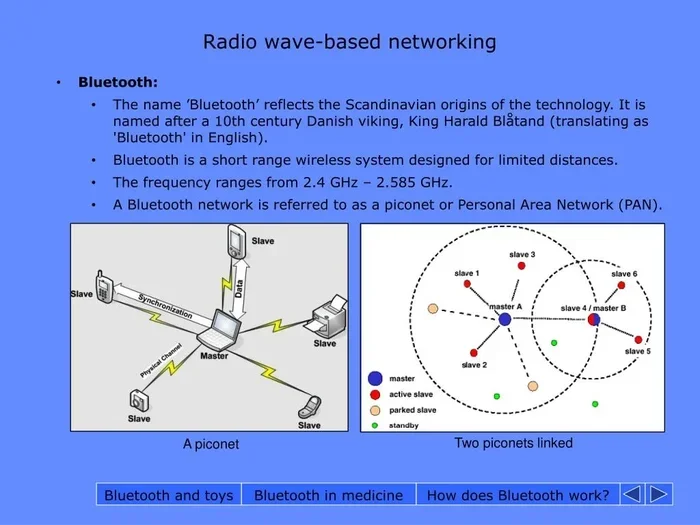
Bluetooth is a wireless technology that lets devices talk to each other over short distances. It uses radio waves to send data like audio and files between gadgets. You probably use Bluetooth every day with your headphones or smart speaker. But Bluetooth in cars serves a bigger purpose. It connects your phone to your car audio system so you can enjoy a safer and more convenient driving experience.
Here is why Bluetooth connectivity matters so much in a vehicle:
- Hands-free calling: You can answer phone calls without picking up your phone. This keeps your hands on the wheel and your eyes on the road.
- Wireless music streaming: Play your favorite playlists, podcasts, and audiobooks through your car speakers.
- Voice commands: Many Bluetooth systems let you control your phone using voice prompts. This adds another layer of safety.
- Seamless pairing: Once paired, your phone connects automatically when you get in the car.
- Reduced distractions: Less fumbling with cables and buttons means a safer drive.
The technology has evolved a lot over the years. Bluetooth version matters because newer versions offer better range, faster connections, and lower power use. Most modern cars use Bluetooth 4.0 or higher. But even older Bluetooth versions work fine for basic audio streaming and calls. The key is making sure your devices are compatible.
Can Any Car Use Bluetooth?
The honest answer is yes, almost any car can use Bluetooth. Whether you drive a classic car from the 1990s or a brand-new model from 2024, there is a way to get Bluetooth working in your car. The method you choose depends on your vehicle type, budget, and how much work you want to do. Let us break it down by car type so you can find the best fit.
Cars With Built-In Bluetooth
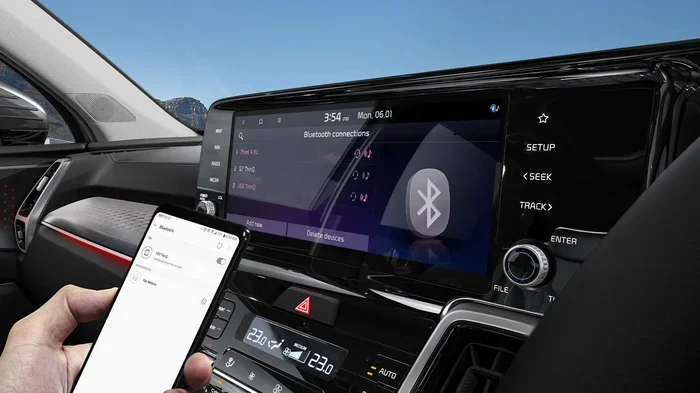
Most cars made after 2012 come with built-in Bluetooth as a standard feature. If your car has a screen on the dashboard or a car stereo with smart features, it likely supports Bluetooth already. You just need to turn it on and pair your phone. Here is how to check:
- Go to your car’s settings menu on the infotainment screen.
- Look for a section called “Bluetooth,” “Connections,” or “Phone.”
- Turn on Bluetooth and make your car visible to other devices.
- On your phone, go to Bluetooth settings and search for available devices.
- Select your car’s name and confirm the pairing.
Once paired, you should be able to make calls and stream music right away. If your car has a hands-free calling button on the steering wheel, you are in great shape. Can Any Car Use Bluetooth if it is already built in? Absolutely. You just need to activate it.
Cars Without Built-In Bluetooth
Older vehicles and some budget models may not have Bluetooth at all. But that does not mean you are stuck. There are several easy ways to add Bluetooth connectivity to any car. These solutions work with almost every vehicle, from trucks to sedans to SUVs.
How to Add Bluetooth to Any Car
Adding Bluetooth to your car is easier than you might think. There are several devices designed for this exact purpose. Each option has its pros and cons, so let us look at the most popular ones.
Bluetooth Adapter or Receiver
A Bluetooth receiver is one of the best ways to add wireless connectivity to your car. This small device plugs into your car’s auxiliary input or cigarette lighter. It receives audio from your phone over Bluetooth and sends it to your car speakers. Here is why this option works so well:
- Simple setup: Plug it in, pair your phone, and you are done.
- Great sound quality: Most receivers offer clear, crisp audio.
- Affordable: You can find a solid Bluetooth adapter for under $50.
- Portable: Many receivers are small enough to move between cars.
Popular brands like Belkin, TaoTronics, and AUXlink make reliable Bluetooth receivers. Look for one that supports the latest Bluetooth version for the best performance. A receiver with a built-in microphone also lets you take calls hands-free.
FM Transmitter
An FM transmitter is another popular choice for adding Bluetooth to older cars. This device plugs into your cigarette lighter and broadcasts audio over an FM frequency. You tune your car radio to that frequency, and the sound comes through your speakers. Here are some quick facts:
- Budget-friendly: FM transmitters are often the cheapest option.
- No installation needed: Just plug it in and go.
- Works with any car: Even cars without an auxiliary port can use one.
- Sound quality varies: FM signals can sometimes pick up interference.
If you live in a busy area with lots of radio stations, you might notice some static. But for most drivers, an FM transmitter gets the job done just fine. It is a great entry-level option for anyone asking Can Any Car Use Bluetooth on a tight budget.
Bluetooth Car Kit
A Bluetooth car kit is a more permanent solution. These kits usually include a speaker, microphone, and mounting hardware. They mount to your dashboard or windshield and connect to your phone via Bluetooth. Some kits also support voice commands and hands-free calling. This is a solid choice if you want a dedicated car entertainment system without replacing your entire stereo.
Replace Your Car Stereo
If you want a full upgrade, consider replacing your car stereo with a new unit that has built-in Bluetooth. Modern stereos offer crisp sound, touchscreen displays, and seamless phone integration. Brands like Pioneer, Kenwood, and Sony make excellent options. This is the most expensive route, but it also gives you the best long-term results.
| Option | Price Range | Sound Quality | Ease of Setup | Best For |
|---|---|---|---|---|
| Bluetooth Receiver | $15 – $50 | Excellent | Very Easy | Most cars with aux input |
| FM Transmitter | $10 – $30 | Good | Very Easy | Cars without aux input |
| Bluetooth Car Kit | $30 – $80 | Very Good | Easy | Hands-free calling focus |
| New Car Stereo | $100 – $400+ | Outstanding | Moderate | Full audio upgrade |
Setting Up Bluetooth in Your Car
Once you have chosen your Bluetooth device, setting it up is fairly simple. Follow these steps for a smooth phone pairing experience.
Step-by-Step Setup Guide
- Charge your device: Make sure your Bluetooth adapter or receiver is fully charged or plugged in.
- Turn on Bluetooth: Enable Bluetooth on both your phone and your car device.
- Put devices in pairing mode: Most devices have a pairing button. Press it and wait for the light to flash.
- Search for devices on your phone: Go to your phone’s Bluetooth settings and look for the device name.
- Select and pair: Tap on the device name and enter the PIN if prompted. The default PIN is often 0000 or 1234.
- Test the connection: Play some music or make a test call to make sure everything works.
Once paired, your devices should remember each other. You will not need to go through the setup process every time you get in the car. This is one of the best things about Bluetooth connectivity. It just works in the background.
Quick Tips for a Better Setup
- Keep your phone within 10 feet of the device during initial pairing.
- Turn off other Bluetooth devices nearby to avoid interference.
- Restart both devices if the pairing fails the first time.
- Update your phone’s software for the best compatibility.
Common Bluetooth Problems and How to Fix Them
Even with the best setup, you might run into issues with Bluetooth in your car. Most problems are easy to fix. Here are the most common ones and their solutions.
Bluetooth Keeps Disconnecting
This is the most common complaint among drivers. If your Bluetooth connection drops frequently, try these fixes:
- Move closer to the device: Bluetooth range is typically about 30 feet. Stay within that distance.
- Check for interference: Other wireless devices can disrupt the signal. Turn off unused electronics.
- Update firmware: Check the manufacturer’s app for any firmware updates for your Bluetooth device.
- Forget and re-pair: Delete the device from your phone’s Bluetooth list and pair it again fresh.
No Sound or Poor Audio Quality
If you can connect but the sound is weak or distorted, try these steps:
- Check the volume on both your phone and your car stereo.
- Make sure the audio is routing to the Bluetooth device and not your phone’s speaker.
- Try a different audio source or cable if you are using an auxiliary input.
- Reset the Bluetooth device by holding the power button for 10 seconds.
Phone Will Not Pair
Sometimes the pairing process just will not work. This can happen for several reasons:
- The device is not in pairing mode. Make sure the light is flashing.
- Your phone’s Bluetooth is turned off or glitching. Turn it off and back on.
- The device has reached its pairing limit. Some devices only remember a few phones at a time.
- Restart both devices and try again.
Expert Insights on Bluetooth Troubleshooting
According to automotive tech experts, most Bluetooth issues come from outdated software or interference. Keeping your devices updated solves about 80 percent of problems. Another expert tip is to clear old paired devices from your Bluetooth list regularly. This keeps the connection clean and fast.
Tips for Getting the Most Out of Bluetooth in Your Car
Now that you have Bluetooth working in your car, here are some tips to get the most out of it.
Use Voice Commands
Most Bluetooth systems support voice commands. You can ask your phone to make calls, send texts, or play music without touching it. This is one of the safest features of in-car connectivity. Practice a few voice commands so you can use them naturally while driving.
Keep Your Phone Charged
Bluetooth uses battery power on your phone. If you stream music for hours, your battery will drain faster. Plug your phone into a car charger while using Bluetooth for long trips. This keeps your phone healthy and your music flowing.
Update Your Devices Regularly
Software updates improve Bluetooth performance and fix bugs. Check for updates on your phone and your Bluetooth device every few weeks. This is a quick step that prevents many common problems.
Explore Your Car’s Audio Settings
Most car stereos have settings that let you adjust how Bluetooth audio sounds. You can tweak bass, treble, and balance to get the best sound. Spend a few minutes exploring these settings. Small adjustments can make a big difference in your audio streaming experience.
Is It Safe to Use Bluetooth While Driving?
Many drivers worry about the safety of using Bluetooth in cars. The good news is that hands-free calling is much safer than holding your phone. Studies show that voice-operated devices reduce distracted driving significantly. However, no technology is completely risk-free. Here are some safety tips:
- Keep your eyes on the road and your hands on the wheel at all times.
- Use voice commands instead of tapping on your phone screen.
- Pull over if you need to make a complex call or adjust settings.
- Set up your Bluetooth connectivity before you start driving.
The bottom line is that Bluetooth makes driving safer compared to using your phone directly. It is one of the best upgrades you can make to any vehicle. So if you have been wondering Can Any Car Use Bluetooth for safety reasons, the answer is a clear yes.
Conclusion
So, Can Any Car Use Bluetooth? The answer is a resounding yes. Whether your car has built-in Bluetooth capability or not, you have options. From simple Bluetooth receivers to full stereo replacements, there is a solution for every vehicle and every budget. The setup process is straightforward, and the benefits are huge. You get safer hands-free calling, better music playback, and a more enjoyable driving experience.
Do not let an older car hold you back from modern car entertainment. Adding Bluetooth connectivity is one of the easiest and most affordable upgrades you can make. Start with the option that fits your needs and budget. Follow the setup steps in this guide, and you will be streaming music and making calls wirelessly in no time. Your next drive will feel more connected, more convenient, and more enjoyable. So go ahead, get your Bluetooth working in your car, and enjoy the ride.
Frequently Asked Questions
Do I need special equipment to use Bluetooth in my car?
It depends on your vehicle. If your car already has built-in Bluetooth, you only need your phone. If not, you will need a Bluetooth adapter, receiver, or FM transmitter. These devices are affordable and easy to use. Most options cost between $10 and $50, making it a budget-friendly upgrade for any driver.
Can I use Bluetooth in a car that does not have an auxiliary port?
Yes, you can. An FM transmitter is the best option for cars without an aux input. It broadcasts audio over an FM frequency, which you tune into on your car radio. This method works in almost any vehicle regardless of its audio inputs. You can also consider a Bluetooth car kit that mounts to your dashboard.
Is Bluetooth safe to use while driving?
Absolutely. Hands-free calling via Bluetooth is much safer than holding your phone while driving. It keeps your hands on the wheel and your eyes on the road. Most modern Bluetooth systems also support voice commands, which reduces distractions even further. Always remember that the safest option is to pull over if you need to make a complex call.
What is the range of Bluetooth in a car?
Standard Bluetooth has a range of about 30 feet. In a car, this is more than enough since your phone will be nearby. Some newer devices with Bluetooth 5.0 offer a range of up to 80 feet. As long as your phone is inside the vehicle, you should not experience any signal issues during your drive.
Can I connect multiple phones to my car’s Bluetooth?
Most car stereos and Bluetooth adapters can remember multiple paired devices. However, only one device can be actively connected at a time. When a new phone enters the car, the system may switch to it automatically if it was previously paired. This feature makes Bluetooth connectivity convenient for families who share a car.
Why does my Bluetooth keep disconnecting in the car?
Interference and distance are the most common causes. Other wireless devices, metal surfaces, and even your phone case can disrupt the Bluetooth signal. Try moving your phone closer to the Bluetooth device, turning off nearby electronics, or resetting the connection. Updating your device firmware also helps fix frequent disconnection issues.