How Do Car Bluetooth Adapters Work A Complete Guide
A car bluetooth adapter lets you stream music and make hands-free calls wirelessly through your vehicle’s speakers. It connects your phone to your car audio system using bluetooth technology, turning any stereo into a wireless receiver. This guide covers how these devices work, the different types available, setup steps, and tips to get the best audio quality.
Key Takeaways
- Bluetooth adapters use wireless radio signals to connect your phone to your car stereo without any cables or complex wiring.
- There are several types of car bluetooth adapters, including FM transmitters, AUX-based receivers, and built-in module kits for different vehicle setups.
- Bluetooth codecs like aptX and AAC affect audio quality, so choosing the right adapter matters for music lovers.
- Setting up a car bluetooth adapter is simple and usually takes less than 10 minutes with no professional help needed.
- Hands-free calling and wireless audio streaming are the two main benefits that make car bluetooth adapters worth installing.
📑 Table of Contents
- How Do Car Bluetooth Adapters Work A Complete Guide
- What Is a Car Bluetooth Adapter
- Types of Car Bluetooth Adapters
- The Technology Behind Car Bluetooth Adapters
- Benefits of Using a Car Bluetooth Adapter
- How to Set Up a Car Bluetooth Adapter
- Common Mistakes to Avoid
- Expert Tips for Best Audio Quality
- Frequently Asked Questions
- Conclusion
How Do Car Bluetooth Adapters Work A Complete Guide
You love your music. You also love the convenience of taking calls without fumbling with wires. A car bluetooth adapter brings both of those things together in your vehicle. But have you ever wondered what is actually happening behind the scenes? How does a small device turn your car speakers into a wireless audio hub?
This guide breaks it all down. You will learn the core technology, the different types of adapters, how to set one up, and how to get the best sound quality. Whether you drive a classic car with an old stereo or a modern ride with built-in features, there is a bluetooth solution for you.
The idea is simple. Your phone sends audio signals wirelessly. The adapter receives those signals. Your car speakers play the music. No cables. No hassle. But the technology that makes this possible is fascinating. Let us dive in.
What Is a Car Bluetooth Adapter
A car bluetooth adapter is a small device that bridges your phone and your car stereo. It uses bluetooth wireless technology to send audio from your phone to your speakers. Think of it as a translator between two devices that were never designed to talk to each other.
Most adapters are plug-and-play. You connect them to your car’s audio input. Then you pair your phone. That is it. You are streaming music or taking calls through your car speakers in minutes.
These devices have become incredibly popular. People want wireless audio in their cars without spending hundreds on a new stereo system. A bluetooth adapter gives you that freedom at a fraction of the cost.
How Bluetooth Technology Works in Cars
Bluetooth uses short-range radio waves to transfer data between devices. When you pair your phone with a car bluetooth adapter, the two devices exchange a secure connection. Once paired, audio data flows wirelessly from your phone to the adapter.
The adapter then converts that digital data into an analog audio signal. Your car stereo amplifies that signal. Your speakers produce the sound. All of this happens in milliseconds. You barely notice any delay.
The connection range is typically around 30 feet. So as long as your phone stays in the car, the connection stays strong. If you leave your phone in your pocket on a walk, the connection may drop. But inside the vehicle, you will not have issues.
Types of Car Bluetooth Adapters
Not all bluetooth adapters are the same. Different cars need different solutions. Let us look at the main types and how each one works.
FM Transmitter Adapters
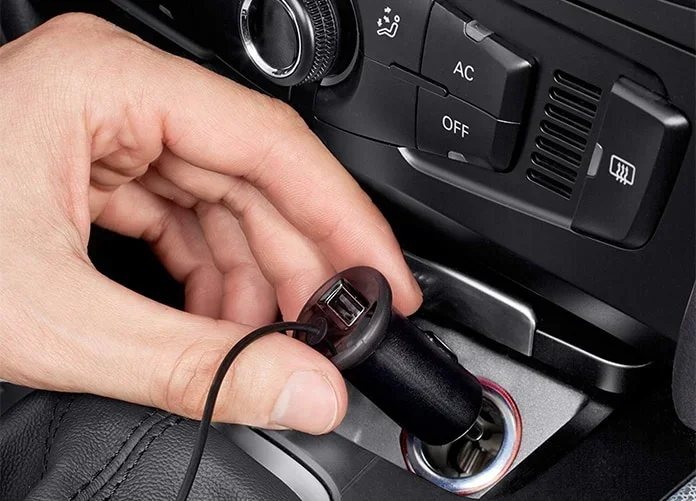
An FM transmitter adapter is one of the most popular options. It plugs into your car’s cigarette lighter or USB port. The adapter broadcasts your phone’s audio over an open FM radio frequency. Your car stereo tunes into that frequency and plays the audio.
These adapters are easy to use. They work with almost any car that has a radio. The downside is that FM signals can sometimes pick up interference. Static or nearby radio stations may cause audio issues. But for most drivers, the convenience outweighs this minor drawback.
AUX Input Bluetooth Receivers
If your car has an AUX port, an AUX Bluetooth receiver is a great choice. This small device plugs directly into the AUX input. It receives bluetooth audio from your phone and sends it through the AUX cable to your stereo.
These receivers are compact and often portable. You can use them in multiple cars. They provide cleaner audio than FM transmitters because there is no radio signal involved. Many people prefer this option for its reliable wireless connectivity and simple setup.
Built-In Bluetooth Car Kits
Some adapters are designed to replace your entire car stereo or integrate with your existing system. These built-in kits offer the most features. They often include hands-free calling, voice control, and audio streaming capabilities.
These kits require more installation work. You may need to remove your old stereo and wire in the new unit. But the result is a seamless, factory-like experience. Your car feels like it came with bluetooth from the factory.
USB Bluetooth Audio Adapters
Many modern cars have USB ports that do more than just charge your phone. Some USB ports support audio input. A USB bluetooth audio adapter plugs into these ports and delivers wireless audio directly to your car’s sound system.
These adapters offer excellent sound quality. They also charge your phone while you drive, which is a nice bonus. Check your car’s manual to see if your USB port supports audio input before buying one of these.
The Technology Behind Car Bluetooth Adapters
Understanding the tech inside a car bluetooth adapter helps you appreciate why some sound better than others. The key components are the bluetooth chip, the codec, the antenna, and the amplifier.
Bluetooth Versions and Their Impact
Bluetooth has evolved over the years. Older versions like Bluetooth 2.0 and 3.0 are slower and offer lower audio quality. Newer versions like Bluetooth 4.0, 5.0, and 5.3 provide faster data transfer, better range, and improved battery efficiency.
When shopping for an adapter, look for Bluetooth 4.0 or higher. These versions support advanced bluetooth codecs that dramatically improve sound quality. If your adapter uses an older version, you may notice audio lag or lower fidelity.
Bluetooth Codecs Explained
A codec is a program that compresses and decompresses audio data. Different codecs deliver different levels of quality. The most common codecs in car bluetooth adapters include SBC, aptX, AAC, and LDAC.
SBC is the standard codec. It works with almost all devices but offers average sound quality. aptX provides much better audio fidelity. It is great for music lovers who want rich, detailed sound. AAC is Apple’s preferred codec and works well with iPhones. LDAC offers the highest quality but requires compatible devices on both ends.
If you care about audio quality, choose an adapter that supports aptX or AAC. The difference is noticeable, especially with higher-bitrate music files.
Antenna Design and Signal Strength
The antenna in your adapter plays a big role in connection stability. Internal antennas are built into the device and are compact. External antennas stick out and offer stronger signal reception.
Most car adapters use internal antennas because they are sleek and unobtrusive. However, if you drive an older car with lots of electronic interference, an adapter with a stronger antenna design will perform better. Look for adapters that advertise extended bluetooth range for the most reliable connection.
Benefits of Using a Car Bluetooth Adapter
Why should you consider adding a car bluetooth adapter to your vehicle? The benefits go beyond just playing music wirelessly.
Hands-Free Calling
One of the biggest advantages is hands-free calling. When a call comes in, the adapter pauses your music. You answer through your car’s speakers and microphone. This keeps your hands on the wheel and your eyes on the road.
Many adapters also support voice assistant integration. You can use Siri, Google Assistant, or Alexa to make calls, send texts, or get directions without touching your phone. It is a huge safety upgrade for any driver.
Wireless Audio Streaming
Streaming music wirelessly is the main draw. You can play Spotify, Apple Music, podcasts, or any audio app through your car speakers. No more aux cables tangled in your steering wheel. No more swapping USB drives.
The convenience is hard to beat. You just pair your phone once. Every time you get in the car, your audio connects automatically. It is a seamless experience that makes every drive more enjoyable.
Cost-Effective Car Audio Upgrade
Replacing a car stereo can cost $200 to $500 or more. A bluetooth adapter costs a fraction of that. For under $50, you can add wireless audio capabilities to your existing system. It is the most affordable way to upgrade your car entertainment system.
If you have an older vehicle with a great speaker system but no bluetooth, an adapter is a no-brainer. You get modern wireless features without replacing your entire audio setup.
Compatibility Across Devices
Bluetooth adapters work with virtually all smartphones. Whether you use an iPhone or an Android device, the connection process is the same. You also can connect tablets and laptops in a pinch.
Many adapters also work with other devices. You can connect a portable music player or even a gaming console. If you have ever wondered can I pair bluetooth headphones to Xbox One, the same bluetooth pairing logic applies here. The adapter works as a universal wireless bridge for any audio source.
How to Set Up a Car Bluetooth Adapter
Setting up a car bluetooth adapter is straightforward. Most devices follow the same basic process. Here is a step-by-step walkthrough.
Step 1: Choose the Right Adapter for Your Car
Start by identifying what audio inputs your car has. Do you have an AUX port? A USB port? An FM radio? Your answer determines which type of adapter you need.
If your car has none of these options, an FM transmitter is your best bet. If you have an AUX port, grab an AUX Bluetooth receiver. If you want a full upgrade, consider a built-in car kit.
Step 2: Connect the Adapter to Your Car
Plug the adapter into the appropriate port. For FM transmitters, plug into the cigarette lighter. For AUX receivers, plug into the AUX input. For USB adapters, connect to the USB port.
Make sure the connection is secure. A loose connection causes audio dropouts and static. If your adapter has a built-in microphone, position it where it can pick up your voice clearly during calls.
Step 3: Pair Your Phone
Turn on bluetooth on your phone. Put the adapter into pairing mode. Look for the adapter name on your phone’s bluetooth menu. Tap to connect.
Once paired, your phone will automatically connect to the adapter when bluetooth is turned on and you are within range. This saves you from pairing every time you get in the car.
Step 4: Test and Adjust
Play some music and check the audio quality. Adjust your car stereo’s volume and equalizer settings. If you hear static or interference, try switching to a different FM frequency or moving the adapter to a different location in the car.
For the best results, keep your phone within a few feet of the adapter. Close the car door to minimize external interference. And if your adapter supports a higher-quality codec like aptX, make sure it is enabled in your phone’s bluetooth settings.
Common Mistakes to Avoid
Even though setup is easy, some common mistakes can hurt your experience. Here is what to watch out for.
- Choosing the wrong adapter type for your car’s inputs. Always check what ports your car has before buying.
- Ignoring bluetooth codec support. If you want great sound, an adapter without aptX or AAC will leave you wanting more.
- Placing the adapter near electronic interference. Keep it away from other wireless devices and power sources that can cause static.
- Forgetting to update firmware. Some adapters have software updates that improve performance and fix bugs. Check the manufacturer’s app or website.
- Overloading the adapter with too many paired devices. Most adapters work best with one or two paired devices. Too many connections can slow things down.
Expert Tips for Best Audio Quality
Want to get the most out of your car bluetooth adapter? These expert tips will help you squeeze out every bit of performance.
First, invest in a higher-quality adapter if you are an audiophile. Cheap adapters often use older bluetooth chips and basic codecs. Spending a little more gets you better sound and a more stable connection.
Second, keep your phone charged and close to the adapter. Low battery can cause your phone to reduce bluetooth power output, which weakens the signal and degrades audio quality.
Third, use high-quality audio files when possible. Streaming services like Spotify use compression that limits sound quality. If you have downloaded music in higher quality formats, your adapter and car speakers will reproduce it more faithfully.
Fourth, if you use your adapter for calls, position the microphone properly. A poorly placed mic picks up road noise and wind, making your voice hard to hear on the other end.
Finally, if you want to explore more about wireless audio setups, you might find it helpful to learn how to turn regular speakers into bluetooth for your home setup. The same principles apply to making any speaker system wireless.
Also, if you use a bluetooth headset for calls while driving, you may wonder can I use my bluetooth headset as a mic for hands-free calling. Many adapters support external microphone inputs, so you can use your headset as a backup mic if needed.
For those who want a more integrated experience, consider how Alexa works as a bluetooth speaker. The same wireless audio principles apply. Understanding how bluetooth streaming works across devices gives you a deeper appreciation of what your car adapter is doing every time you hit play.
Frequently Asked Questions
Do car bluetooth adapters affect audio quality?
They can, but it depends on the adapter. Basic FM transmitters may introduce some static or lower fidelity. Higher-quality AUX receivers and USB adapters deliver near-lossless audio. Choosing an adapter that supports advanced codecs like aptX makes a big difference in sound quality.
Can I use a car bluetooth adapter with any phone?
Yes. Bluetooth is a universal standard. Any smartphone, tablet, or laptop with bluetooth can connect to a car bluetooth adapter. It does not matter if you use iPhone or Android. The pairing process is the same for all devices.
How far can my phone be from the adapter?
Most car bluetooth adapters have a range of about 30 feet. Inside a car, this is more than enough. Your phone can sit in your pocket, on the seat, or in a mount. As long as it stays within range, the connection remains stable.
Is it hard to remove a car bluetooth adapter?
Not at all. Most adapters are designed for easy removal. FM transmitters unplug from the lighter. AUX receivers pull straight out of the port. USB adapters disconnect from the USB port. You can take them out in seconds and use them in another car.
Can I connect multiple devices to one car bluetooth adapter?
Most adapters support one or two paired devices. You can switch between them by selecting the device from your phone’s bluetooth menu. However, connecting too many devices can cause connection issues and slower performance.
Do car bluetooth adapters work in older cars without modern features?
Absolutely. That is one of the best things about these adapters. Even if your car has no modern audio features, an FM transmitter or AUX receiver can add wireless bluetooth capability. You do not need a fancy new stereo to enjoy wireless audio.
Conclusion
A car bluetooth adapter is one of the simplest and most affordable ways to bring wireless audio to your vehicle. Whether you choose an FM transmitter, an AUX receiver, or a full built-in kit, the technology works the same way. Your phone sends audio wirelessly. The adapter receives it. Your car speakers play it. It is that easy.
The benefits are clear. Hands-free calling keeps you safe. Wireless streaming keeps your music playing without cables. And the cost is a tiny fraction of replacing your entire car stereo. With the right adapter and a little setup knowledge, you can transform your driving experience in under 10 minutes.
Now that you understand how car bluetooth adapters work, you can choose the right one for your needs with confidence. Pick the type that fits your car, follow the setup steps, and enjoy wireless audio on every drive. Your ears will thank you.