Does SDI Carry Sound Here Is Everything You Need to Know
Yes, SDI does carry sound. SDI cables transmit both video and audio signals together, making them a reliable choice for professional broadcasting and production. This guide breaks down how SDI handles audio, what formats it supports, and why it remains a top pick for video pros.
Key Takeaways
- SDI carries both video and audio: SDI cables embed audio within the video signal, so you get both in one cable run.
- Multiple SDI versions exist: SD-SDI, HD-SDI, 3G-SDI, 6G-SDI, and 12G-SDI each support different resolutions and audio capabilities.
- Embedded audio is standard: Most SDI setups use embedded audio, which keeps your signal clean and simple.
- SDI works over long distances: Unlike HDMI, SDI can carry signals hundreds of feet without degradation.
- Professional gear relies on SDI: Broadcast studios, live events, and film sets all use SDI for its rock-solid performance.
- You can extract or add audio: SDI signals can be converted, split, and mixed using dedicated equipment.
📑 Table of Contents
- Does SDI Carry Sound Here Is Everything You Need to Know
- How SDI Carries Audio Along With Video
- The Different SDI Standards and Their Audio Capabilities
- Why SDI Is Great for Audio and Video Together
- SDI vs Other Connections for Audio and Video
- How to Set Up SDI Audio in Your Workflow
- Common SDI Audio Problems and How to Fix Them
- Expert Insights on SDI Audio
- Final Thoughts
Does SDI Carry Sound Here Is Everything You Need to Know
If you work with video gear, you have probably seen SDI cables everywhere. They are thick, sturdy, and often used in professional settings. But here is the question that keeps coming up: does SDI carry sound? The short answer is yes. SDI cables are designed to carry both video and audio signals at the same time. This makes them incredibly useful for anyone who wants a clean, reliable setup.
Whether you are setting up a broadcast studio, working on a live event, or just curious about how digital video signals work, this guide has you covered. We will walk through exactly how SDI handles audio, what versions you should know about, and why so many pros choose SDI over other options. By the end, you will have a clear picture of what SDI can do and why it matters for your setup.
SDI stands for Serial Digital Interface. It is a standard for transmitting digital video and audio over a single coaxial cable. Unlike HDMI, which is common in home setups, SDI is built for professional environments. It can handle long cable runs without losing signal quality. This makes it the go-to choice for broadcasters, filmmakers, and live event crews.
How SDI Carries Audio Along With Video
One of the biggest advantages of SDI is that it bundles audio and video into one signal. This is called embedded audio. Instead of running separate cables for sound and picture, SDI sends both through a single cable. This simplifies your setup and reduces cable clutter on set or in a control room.
When a video signal travels through an SDI cable, the audio samples are inserted into the video data stream. This happens at specific intervals that match the video frame rate. The receiving equipment then separates the audio from the video. This process is seamless and happens in real time.
What Types of Audio Does SDI Support
SDI supports several audio formats. Most commonly, it handles uncompressed digital audio. The standard configuration includes up to 16 channels of audio embedded in a single SDI stream. Here are the most common audio formats you will encounter:
- PCM (Pulse Code Modulation): This is the most widely used audio format in SDI. It delivers high-quality, uncompressed sound.
- Linear PCM: A variation of PCM that offers excellent clarity and is standard in broadcast workflows.
- Dolby Digital: Some SDI implementations support compressed audio formats like Dolby Digital for specific broadcast needs.
- AES/EBU: While not embedded in the SDI stream itself, AES audio can be transmitted alongside SDI using separate wiring in professional setups.
The number of audio channels depends on the SDI standard you are using. For example, SD-SDI typically supports fewer channels than 12G-SDI. Always check your equipment specs to know exactly what audio formats and channel counts your setup supports.
The Different SDI Standards and Their Audio Capabilities
Not all SDI cables are the same. Over the years, the SDI standard has evolved to support higher video resolutions and more audio channels. Each version builds on the last. Here is a breakdown of the main SDI standards you will encounter.
SD-SDI (Standard Definition)
This is the original SDI standard. It handles standard definition video at 270 Mbps. SD-SDI can carry up to 4 channels of embedded audio. It is still used in some legacy systems and basic broadcast setups. If you are working with older equipment, SD-SDI is likely what you will see.
HD-SDI (High Definition)
HD-SDI boosted the data rate to 1.485 Gbps. It supports high definition video at 1080i and 720p resolutions. HD-SDI can carry up to 16 channels of embedded audio. This made it a huge step forward for professional video production. Many broadcast facilities still rely on HD-SDI today.
3G-SDI
3G-SDI pushed the data rate to 2.97 Gbps. It supports full HD video at 1080p. The audio capabilities remain similar to HD-SDI, with up to 16 channels of embedded audio. 3G-SDI is a popular choice for high-end production environments.
6G-SDI and 12G-SDI
These newer standards support 4K video. 6G-SDI runs at 5.94 Gbps and handles 4K at 30 frames per second. 12G-SDI doubles that at 11.88 Gbps and supports 4K at 60 frames per second. Both can carry up to 16 channels of embedded audio. These standards are becoming the new normal in top-tier production facilities.
| SDI Standard | Data Rate | Video Resolution | Max Audio Channels |
|---|---|---|---|
| SD-SDI | 270 Mbps | 480i/576i | 4 |
| HD-SDI | 1.485 Gbps | 720p/1080i | 16 |
| 3G-SDI | 2.97 Gbps | 1080p | 16 |
| 6G-SDI | 5.94 Gbps | 4K @ 30fps | 16 |
| 12G-SDI | 11.88 Gbps | 4K @ 60fps | 16 |
Why SDI Is Great for Audio and Video Together
There are several reasons why professionals prefer SDI for carrying both sound and picture. Let us look at the key benefits that make SDI stand out from other connection types.
Long Cable Runs Without Signal Loss
One of the biggest strengths of SDI is distance. SDI cables can run up to 300 feet or more without needing a repeater. Compare this to HDMI, which often struggles past 50 feet. For large venues, broadcast trucks, and film sets, this distance capability is a game changer. You can run cables across a stadium or a large studio floor without worrying about signal degradation.
Reliable and Robust Signal
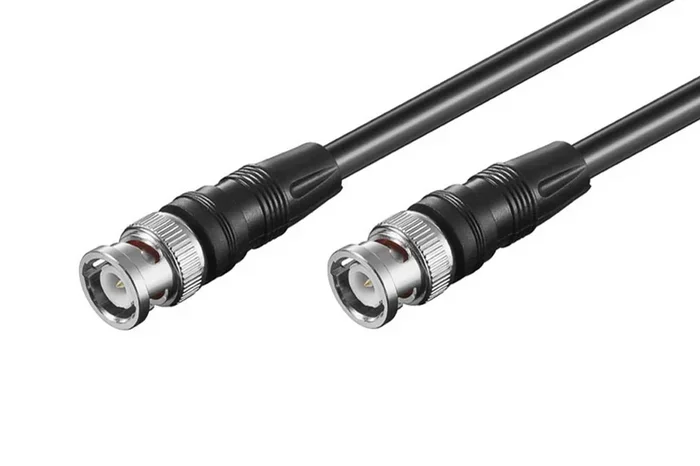
SDI uses coaxial cable with BNC connectors. These are built to withstand tough environments. They resist interference from electromagnetic noise, which is common in professional settings with lots of electronic equipment. This means your audio and video stay clean and synchronized throughout the signal chain.
Embedded Audio Keeps Things Simple
With SDI, you do not need separate audio cables running alongside your video. The embedded audio feature means one cable handles everything. This reduces setup time, cuts down on cable management headaches, and minimizes potential points of failure. For live events where reliability is everything, this simplicity is invaluable.
Industry Standard for Broadcast
SDI is the backbone of the broadcast industry. Nearly every television station, production facility, and live event setup uses SDI. This means your gear will be compatible with the widest range of professional equipment. If you are building a setup that needs to integrate with existing broadcast infrastructure, SDI is the way to go.
SDI vs Other Connections for Audio and Video
How does SDI compare to other common audio and video connection types? Let us look at the most popular alternatives and see where SDI shines.
SDI vs HDMI
HDMI is the most common consumer connection. It carries both audio and video, just like SDI. However, HDMI has limitations when it comes to distance and professional use. HDMI cables tend to lose signal quality beyond 50 feet. SDI can go much further. HDMI is also more susceptible to electromagnetic interference. For professional environments, SDI wins on reliability and range.
SDI vs XLR (Audio Only)
XLR cables are the standard for professional audio. They carry high-quality audio signals over long distances. But XLR only carries audio, not video. If you need both, you would still need a separate video cable. SDI gives you both in one run, which is a huge advantage for video production setups.
SDI vs Network-Based AV (like Dante or AVB)
Modern networked audio systems like Dante can transmit audio over standard Ethernet cables. These systems are flexible and scalable. However, they do not carry video. For setups that need synchronized audio and video, SDI provides a simpler, all-in-one solution. Some professionals use both SDI for video and Dante for audio, but that adds complexity.
How to Set Up SDI Audio in Your Workflow
Setting up SDI audio is straightforward once you understand the basics. Here is a practical guide to getting sound through your SDI setup.
Step 1: Choose the Right SDI Cable
Start by selecting the right SDI cable for your needs. Match the cable standard to your video resolution. If you are running 4K content, you need at least a 6G-SDI or 12G-SDI cable. For HD content, HD-SDI or 3G-SDI will work fine. Always use high-quality cables from reputable brands to ensure reliable signal transmission.
Step 2: Check Your Equipment Compatibility
Make sure your cameras, switchers, and monitors support the SDI standard you plan to use. Not all equipment supports every SDI version. Check the specs on each piece of gear. If you are mixing different SDI standards, you may need a converter.
Step 3: Configure Embedded Audio on Your Source
On your camera or video switcher, set the audio input to embed into the SDI signal. Most professional cameras have menu options for this. You can usually choose how many audio channels to embed and which input source to use. Common inputs include built-in microphones, external XLR inputs, and line-level feeds.
Step 4: Extract Audio at the Destination
At the receiving end, your monitor, recorder, or streaming device will extract the audio from the SDI signal. Many professional monitors have built-in speakers and audio outputs. You can also use an SDI splitter or converter to pull the audio out separately. This is useful if you need to route audio to a mixing board or recording device.
Quick Tips for SDI Audio Setup
- Always test your audio levels before going live. Embedded audio can sometimes be too hot or too quiet.
- Use quality BNC connectors. Loose connections are a common source of audio dropouts.
- Label your cables clearly. In a complex setup, it is easy to lose track of which cable carries what.
- Keep SDI cables away from power cables to minimize interference.
- If you need to run SDI over very long distances, consider using a fiber optic SDI converter.
Common SDI Audio Problems and How to Fix Them
Even with SDI, you can run into audio issues. Here are the most common problems and their solutions.
No Audio Coming Through
If you have video but no sound, check your audio embed settings first. The source device may not be configured to send audio through the SDI output. Also verify that the receiving device has the correct audio output selected. Sometimes the audio is set to a different channel or output that is not currently active.
Audio and Video Are Out of Sync
Audio sync issues can happen when using SDI converters or long cable runs. This is more common when converting between SDI and other formats like HDMI. To fix this, try using a higher quality converter. Make sure all your equipment is set to the same frame rate. Some devices have a built-in audio delay adjustment that can help align sound with picture.
Interference or Noise in the Audio
If you hear buzzing or humming in your SDI audio, check your cable routing. SDI cables running near power cables or fluorescent lights can pick up interference. Use shielded cables and keep them away from power sources. If the problem persists, try a different cable or connector. Sometimes a damaged BNC connector is the culprit.
Audio Dropouts During Live Use
Intermittent audio dropouts are often caused by loose connections. Check all BNC connectors and make sure they are tight. If you are using SDI over long runs, a signal booster or repeater can help maintain a clean connection. Also verify that your cable meets the specification for the SDI standard you are using.
Expert Insights on SDI Audio
Professional audio and video engineers have long trusted SDI for its reliability. The ability to carry embedded audio over long distances without degradation is a key reason broadcast professionals choose SDI day after day. According to industry standards, SDI remains the most widely used professional video interface worldwide. Its audio capabilities continue to keep pace with evolving production needs.
One thing to keep in mind is that while SDI is excellent for embedded audio, it is not the only option in a modern production. Many professionals use a combination of SDI for video and dedicated audio networks for more complex sound setups. The key is understanding your specific needs and choosing the right tools for the job.
If you are exploring how different technologies handle audio transmission, you might also want to learn about how walkie talkie apps handle audio over distance, as this can give you a broader perspective on digital audio transmission methods. Similarly, understanding how devices like the FM transmitter on your phone work can help you appreciate the different ways audio signals are carried and transmitted.
For those working with display setups, it is also worth noting how audio sync works across different connections. The way Hue Sync Box handles audio and video with Netflix is a great example of how consumer devices manage audio-video synchronization, which shares some principles with professional SDI workflows.
Final Thoughts
So, does SDI carry sound? Absolutely. SDI is a powerful and reliable way to transmit both video and audio in a single cable. From embedded audio support to long-distance capability, SDI offers features that make it ideal for professional use. Whether you are a broadcaster, a filmmaker, or a live event technician, understanding how SDI handles audio is essential for building a solid production setup.
The key is to match your SDI standard to your resolution and audio needs. Choose the right cables, configure your equipment properly, and always test before you go live. With the right setup, SDI will deliver clean, synchronized audio and video every time. It is a technology that has stood the test of time and continues to evolve alongside the demands of modern production.
If you are just getting started with SDI, begin with the basics. Learn what your equipment supports, invest in quality cables, and focus on getting a clean signal. As you grow more comfortable, you can explore advanced topics like audio embedding, SDI conversion, and multi-channel audio routing. The world of SDI is vast, but it is built on a simple principle: carry the best possible signal with the fewest cables and the least amount of hassle.
Take the time to understand your specific workflow needs. Whether you are running a simple two-camera setup or managing a full broadcast control room, SDI has a place in your toolkit. It is a technology that rewards attention to detail and delivers consistent, professional results every single time.
Frequently Asked Questions
Does SDI carry uncompressed audio?
Yes, SDI typically carries uncompressed audio in the form of PCM or Linear PCM. This ensures high-quality sound that matches the professional video standards SDI is known for. The audio remains uncompressed throughout the signal chain, preserving every detail.
Can I use SDI for both audio and video in a home studio?
You can, but SDI is primarily designed for professional environments. Home studios often use HDMI or DisplayPort instead. However, if you are working with broadcast-grade equipment, SDI is an excellent choice for both audio and video in any setting.
How far can SDI carry audio and video?
A standard SDI cable can run up to 300 feet without signal loss. With fiber optic SDI converters, you can extend that distance to several miles. This makes SDI ideal for large venues, outdoor events, and distributed production setups.
Do I need special equipment to extract audio from SDI?
Most professional monitors and recorders can extract embedded audio automatically. If you need to route audio separately, you can use an SDI splitter or converter. These devices are widely available and relatively affordable for professional setups.
Is SDI better than HDMI for audio?
For professional use, yes. SDI offers longer cable runs, better interference resistance, and embedded audio support. HDMI is more common for consumer devices and shorter connections. Your choice depends on your specific needs and environment.
What audio formats work with SDI?
SDI supports PCM, Linear PCM, and in some cases Dolby Digital. Most modern SDI equipment handles up to 16 channels of embedded audio. Always check your specific gear to confirm which audio formats it supports.