Does A Bluetooth Adapter Give You Bluetooth Streaming
A Bluetooth adapter absolutely gives you Bluetooth streaming, but the results depend on the adapter type, your device, and what you want to stream. Whether you want to wireless audio from a TV, car stereo, or old laptop, the right adapter unlocks Bluetooth connectivity in seconds. This guide breaks down exactly how adapters work and what you can expect.
Let us say you have a great pair of wireless headphones. You also have a TV or a car stereo that does not have Bluetooth built in. You want to stream audio wirelessly, but you are not sure if a little Bluetooth adapter can make that happen. The short answer is yes. A Bluetooth adapter gives you Bluetooth streaming in most cases. But the full story is a bit more interesting than that.
In this article, we will walk through everything you need to know about Bluetooth adapters. We will cover how they work, the different types available, what to look for when buying one, and common pitfalls to avoid. By the end, you will know exactly whether a Bluetooth adapter is the right solution for your setup.
Bluetooth streaming has become a huge part of how we listen to music, watch shows, and take calls. More and more devices come with Bluetooth built in, but plenty of older gadgets still do not. That is where a Bluetooth adapter steps in. It fills the gap and gives your devices wireless audio capability without needing expensive replacements.
Key Takeaways
- A Bluetooth adapter adds wireless streaming to devices that lack built-in Bluetooth.
- Receiver adapters pull audio in, while transmitter adapters send audio out.
- Bluetooth 5.0 adapters offer better range and less audio lag than older versions.
- Setting up most adapters takes under five minutes with no software needed.
- Not all adapters support codecs like aptX or LDAC, which affects audio quality.
- Common mistakes include buying the wrong adapter type and ignoring firmware updates.
- Bluetooth adapters work great for speakers, headphones, car stereos, and TVs.
📑 Table of Contents
- What Exactly Is a Bluetooth Adapter
- Does a Bluetooth Adapter Give You Full Bluetooth Streaming
- Types of Devices That Benefit From Bluetooth Adapters
- How to Choose the Right Bluetooth Adapter
- Setting Up Your Bluetooth Adapter
- Common Mistakes People Make With Bluetooth Adapters
- Expert Tips for Better Bluetooth Streaming
- Can You Use a Bluetooth Adapter for More Than Audio
- Final Thoughts
What Exactly Is a Bluetooth Adapter
A Bluetooth adapter is a small device that adds Bluetooth connectivity to a device that does not have it. Think of it as a tiny bridge between your non-Bluetooth gadget and your wireless headphones, speakers, or phone. It is a simple plug-and-play solution for wireless streaming.
Most adapters are small USB dongles or 3.5mm jacks. You plug them in, pair them with your device, and you are streaming wireless audio in minutes. They do not require complicated setup or special software in most cases.
How Bluetooth Adapters Work
A Bluetooth adapter contains a tiny chip that sends and receives Bluetooth signals. When you pair it with your phone or laptop, it creates a wireless connection between the source device and your speaker or headphones. The adapter handles all the Bluetooth pairing and data transfer behind the scenes.
The adapter receives audio data from one device and sends it as a wireless signal to another device. This process happens in milliseconds. You barely notice any delay in most everyday situations.
Receiver vs. Transmitter Adapters
Not all Bluetooth adapters do the same thing. There are two main types you should know about:
- Bluetooth Receiver: This type receives Bluetooth signals and sends audio to your device. You use it when your TV or speaker does not have Bluetooth but you want to stream from your phone.
- Bluetooth Transmitter: This type sends Bluetooth signals from a non-Bluetooth device to wireless headphones or speakers. You use it when your source device lacks Bluetooth but your headphones do have it.
Getting the right type matters a lot. If you buy a receiver when you need a transmitter, it simply will not work the way you want. Always check what your setup requires before purchasing.
If you are curious about using Bluetooth speakers in different situations, check out can you use a Bluetooth speaker without Bluetooth for some interesting insights.
Does a Bluetooth Adapter Give You Full Bluetooth Streaming
The short answer is yes. A Bluetooth adapter gives you Bluetooth streaming capability. But “full” streaming comes with some caveats. The audio quality, range, and latency all depend on the adapter you choose and the Bluetooth version it supports.
What Streaming Means in This Context
When we talk about Bluetooth streaming, we mean sending audio wirelessly from one device to another in real time. A good adapter lets you listen to music, watch videos, and take calls without any wires. The experience feels almost identical to using a device with built-in Bluetooth.
However, not every adapter delivers the same experience. Cheap adapters may drop connections or introduce audio lag. Higher-quality adapters with Bluetooth 5.0 or newer offer much better performance.
Audio Quality and Codecs
Not all adapters support advanced Bluetooth codecs. Codecs are compression formats that affect audio quality. Here is a quick look at what to expect:
- SBC: The default codec. Works on almost all adapters. Good quality for most listening.
- aptX: Better audio quality with lower latency. Found on mid-range and premium adapters.
- aptX HD / LDAC: Near-lossless audio quality. Only available on high-end adapters.
- AAC: Common on Apple devices. Some adapters support it, others do not.
If you care about audio quality, look for an adapter that supports aptX or LDAC. Standard SBC is fine for casual listening, but audiophiles will notice the difference.
Range and Latency Considerations
Bluetooth range typically spans 30 feet for Class 2 devices, which is the most common type. Some adapters claim longer ranges, but real-world performance is often shorter due to walls and interference.
Audio latency is the delay between the source and the output. For music, this barely matters. For watching videos or gaming, even a small delay can be annoying. Look for adapters that advertise low-latency performance, especially if you plan to use them for video or gaming.
Want to learn more about using Bluetooth headphones for gaming? Check out can I use Bluetooth headphones for gaming to see how adapters fit into the gaming setup.
Types of Devices That Benefit From Bluetooth Adapters
A Bluetooth adapter works with many different devices. Here are the most common ones where people use them to gain wireless connectivity.
Televisions
Many older TVs do not have Bluetooth. A Bluetooth receiver adapter plugged into the audio output lets you stream TV audio to your wireless headphones or speakers. This is especially helpful for late-night watching or for people with hearing difficulties.
Car Stereos
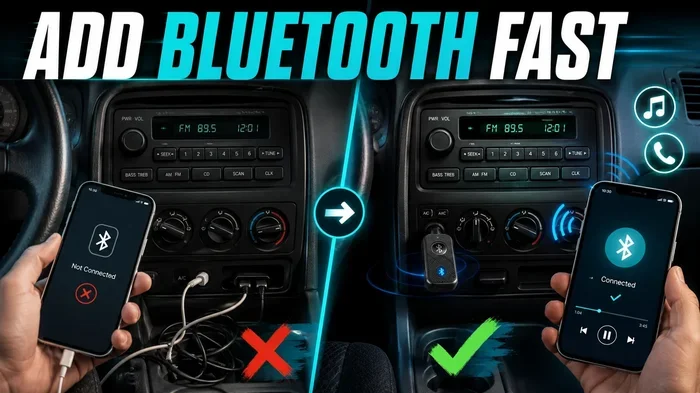
Want to stream music from your phone through your car speakers without a cable? A Bluetooth car adapter makes this possible. You plug it into your car’s aux input or cigarette lighter, pair it with your phone, and enjoy wireless music on the road.
If you are considering upgrading your car audio system, you might also want to read about upgrading your car stereo to Bluetooth for a deeper look at your options.
Desktop Computers and Laptops
Some desktop computers and older laptops do not include Bluetooth. A simple USB Bluetooth adapter solves this problem instantly. You can connect wireless headphones, speakers, and even your phone for file transfers.
Gaming Consoles
Most gaming consoles do not support Bluetooth for audio output natively. A Bluetooth transmitter adapter lets you connect wireless headphones to consoles like the Nintendo Switch, PlayStation, or Xbox. This is a game-changer for late-night gaming sessions without disturbing others.
Looking for more on using Bluetooth with Switch? See can I use Bluetooth headphones with Switch for more details.
Home Audio Systems
If you have a great pair of wired speakers, a Bluetooth adapter can turn them into wireless speakers. This is one of the easiest and most affordable ways to add Bluetooth streaming to your home audio setup.
For those interested in converting regular wired speakers, check out can I turn regular speakers into Bluetooth for helpful tips and product ideas.
How to Choose the Right Bluetooth Adapter
Not all adapters are created equal. Picking the right one depends on what you want to do. Here is a breakdown of the key factors to consider.
Check the Bluetooth Version
The Bluetooth version matters more than most people realize. Bluetooth 5.0 offers twice the speed and four times the range of Bluetooth 4.2. If you want the best performance, go with an adapter that supports Bluetooth 5.0 or newer.
Here is a quick comparison of the most common versions:
- Bluetooth 4.0: Basic streaming. Decent range. Most common in budget adapters.
- Bluetooth 4.2: Slightly better speed and stability than 4.0.
- Bluetooth 5.0: Longer range, faster data transfer, lower power consumption.
- Bluetooth 5.2+: Supports the newest codecs and LE Audio for even better quality.
Consider Your Use Case
Think about what you want to do with the adapter. Are you streaming music to a speaker? Watching TV with wireless headphones? Making calls in the car? Each use case may require a different type of adapter or specific features.
- For music streaming: Look for aptX support and good range.
- For TV watching: Prioritize low latency to avoid audio-video sync issues.
- For car use: Choose an adapter with a strong signal and easy pairing.
- For gaming: Low latency is critical. Look for gaming-specific adapters.
Read Reviews and Check Compatibility
Before buying any adapter, read user reviews. Look for feedback on connection stability, audio quality, and ease of setup. Make sure the adapter is compatible with your device’s operating system and audio output type.
Price vs. Performance
You do not need to spend a fortune to get a good adapter. Budget adapters in the $10 to $20 range work well for basic streaming. Mid-range adapters ($25 to $50) offer better codecs and lower latency. Premium adapters ($50+) deliver the best audio quality and features like multipoint pairing.
| Budget | $10 – $20 | Basic SBC codec, decent range |
| Mid-Range | $25 – $50 | aptX support, low latency, good range |
| Premium | $50+ | LDAC/aptX HD, multipoint, longest range |
Setting Up Your Bluetooth Adapter
Setting up a Bluetooth adapter is usually straightforward. Here is a general step-by-step process that works for most adapters.
- Plug in the adapter to the appropriate port on your device. This could be a USB port, a 3.5mm audio jack, or an HDMI port depending on the adapter type.
- Turn on the adapter if it has a power switch. Some USB adapters power on automatically.
- Put your headphones or speaker into pairing mode. Most devices have a dedicated pairing button or flashing LED indicator.
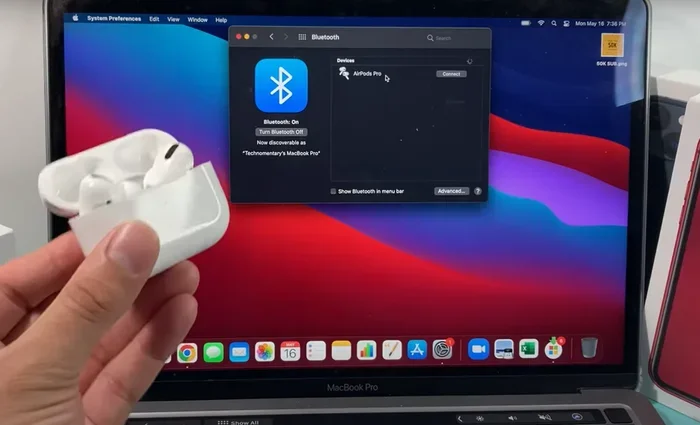
- Search for available devices on your source device. The adapter should appear in the list of available Bluetooth devices.
- Select the adapter and wait for the connection to establish. You should hear a confirmation tone or see a solid LED light.
- Start streaming. Play music or a video and enjoy your wireless audio.
The whole process usually takes less than five minutes. If you run into issues, try moving closer to the adapter or restarting both devices.
Common Mistakes People Make With Bluetooth Adapters
Even though adapters are simple, people still make mistakes that cause frustration. Here are the most common ones to avoid.
- Buying the wrong type: Getting a receiver when you need a transmitter, or vice versa. Always double-check your setup requirements.
- Ignoring the Bluetooth version: Older Bluetooth versions mean shorter range and worse audio quality. Always check the spec before buying.
- Placing the adapter too far away: Bluetooth signals weaken through walls and obstacles. Keep the adapter close to the source device for best results.
- Skipping firmware updates: Some adapters have firmware that can be updated for better performance. Check the manufacturer’s website.
- Overlooking interference: Wi-Fi routers and other wireless devices can interfere with Bluetooth signals. If you experience dropouts, move away from other wireless sources.
Expert Tips for Better Bluetooth Streaming
Want to get the most out of your Bluetooth adapter? Here are some expert tips that make a real difference.
Keep your adapter updated. Firmware updates often improve connection stability and audio quality. Check for updates from the manufacturer every few months.
Use a powered USB hub if needed. Some adapters draw too much power from a laptop’s USB port, causing connection issues. A powered USB hub solves this problem easily.
Restart devices regularly. Just like any wireless device, Bluetooth adapters benefit from occasional restarts. This clears the cache and refreshes the connection.
Keep firmware and drivers current. For USB adapters on computers, make sure you install the latest drivers from the manufacturer’s website. This ensures the best compatibility and performance.
Experiment with placement. Sometimes just moving the adapter a few inches can dramatically improve signal strength and reduce dropouts.
Can You Use a Bluetooth Adapter for More Than Audio
Most Bluetooth adapters are designed specifically for audio streaming. However, some adapters support file transfers and other Bluetooth functions. The capabilities depend on the adapter’s chip and firmware.
For pure audio streaming, any decent adapter will work well. If you need data transfer capabilities, look for adapters that explicitly advertise this feature. In most cases, though, people buy Bluetooth adapters for one reason: wireless audio streaming.
The beauty of a Bluetooth adapter is how simple it makes your life. You do not need to buy new speakers, headphones, or a new car stereo. A small adapter unlocks wireless freedom for all your existing devices.
Final Thoughts
So, does a Bluetooth adapter give you Bluetooth streaming? Absolutely. A Bluetooth adapter transforms any device with a 3.5mm jack or USB port into a Bluetooth-capable device. You get wireless audio for your TV, car, computer, or speakers without spending a fortune on new equipment.
The key is choosing the right adapter for your needs. Consider the Bluetooth version, codec support, range, and latency. Avoid the common mistakes that trip up most buyers. And follow the setup tips for the best experience.
Whether you are a casual listener or an audiophile, there is a Bluetooth adapter out there that fits your needs and budget. The technology has come a long way, and modern adapters deliver excellent wireless streaming with minimal hassle. Give it a try, and you will wonder how you ever lived without it.
Frequently Asked Questions
Can a Bluetooth adapter work with any device?
Most Bluetooth adapters work with any device that has a USB port, 3.5mm audio jack, or auxiliary input. However, you should always check compatibility before purchasing. Some adapters work best with specific operating systems or audio outputs.
Do Bluetooth adapters lose audio quality compared to wired connections?
High-quality Bluetooth adapters with aptX or LDAC support deliver audio quality that is very close to wired connections. Standard adapters using the SBC codec may have a slight reduction in quality, but most listeners will not notice it in everyday use.
How far can a Bluetooth adapter reach?
Most Bluetooth adapters have a range of about 30 feet in open spaces. Walls, furniture, and other obstacles can reduce this range. Bluetooth 5.0 adapters offer longer range than older versions, making them a better choice for larger rooms.
Can I use a Bluetooth adapter with my car?
Yes, Bluetooth car adapters are very popular. You plug them into your car’s aux input or cigarette lighter, pair them with your phone, and stream music wirelessly. They are an affordable way to add Bluetooth capability to any car stereo.
Do Bluetooth adapters need drivers or software?
Most Bluetooth adapters are plug-and-play and do not require any software. However, USB adapters for computers sometimes need drivers for optimal performance. Always check the manufacturer’s website for the latest drivers if you experience issues.
Is a Bluetooth adapter the same as a Bluetooth transmitter?
Not exactly. A Bluetooth adapter is a general term that can refer to both receivers and transmitters. A receiver pulls Bluetooth audio into your device, while a transmitter sends Bluetooth audio out from your device. Make sure you buy the right type for your setup.