Do Wireless Earbuds Need Bluetooth to Work Properly
Do wireless earbuds need Bluetooth? Yes, nearly all wireless earbuds rely on Bluetooth technology to transmit audio wirelessly from your device to your ears. Without Bluetooth, most wireless earbuds cannot produce sound. Understanding how Bluetooth works helps you choose better earbuds and fix common connection issues.
Key Takeaways
- Bluetooth is essential: Almost all wireless earbuds depend on Bluetooth for audio transmission and wireless connectivity.
- Bluetooth versions matter: Newer versions like Bluetooth 5.0 offer better range, lower latency, and improved audio quality.
- Workarounds exist: Some wireless earbuds can work with a cable, and adapters can add Bluetooth to wired headphones.
- Interference affects performance: Wi-Fi routers, microwaves, and physical obstacles can weaken your Bluetooth signal.
- Codec choice impacts sound: Higher-quality Bluetooth codecs deliver richer audio and reduce latency.
- Regular maintenance helps: Firmware updates, resets, and proper charging keep your Bluetooth connection strong.
📑 Table of Contents
- Do Wireless Earbuds Need Bluetooth to Work Properly?
- How Bluetooth Technology Powers Wireless Earbuds
- What Happens If You Use Earbuds Without Bluetooth?
- Types of Wireless Earbuds and Their Bluetooth Needs
- Factors That Affect Bluetooth Performance in Earbuds
- Can You Add Bluetooth to Non-Bluetooth Earbuds?
- How to Get the Best Bluetooth Experience With Your Earbuds
- Common Bluetooth Problems With Wireless Earbuds and How to Fix Them
- Conclusion
Do Wireless Earbuds Need Bluetooth to Work Properly?
If you have been shopping for wireless earbuds, you have probably asked yourself a simple question. Do wireless earbuds need Bluetooth to work properly? The answer is almost always yes. Bluetooth is the invisible technology that connects your audio source to your ears. Without it, most wireless earbuds are just small plastic objects that cannot produce sound.
Bluetooth handles more than just sending music to your ears. It manages wireless connectivity, audio streaming, playback controls, and even battery management. When you tap play on your phone, Bluetooth carries that command and the audio data to your earbuds almost instantly. Understanding this technology helps you make smarter buying choices. It also helps you solve common connection problems.
In this guide, we will explore everything you need to know about Bluetooth and wireless earbuds. We will cover how Bluetooth works, what happens without it, and how to get the best performance. Whether you listen to music, take calls, or game on the go, this article has you covered. Let us dive into the world of wireless audio.
How Bluetooth Technology Powers Wireless Earbuds
Bluetooth is a wireless communication standard that uses radio waves to transfer data between devices. For wireless earbuds, this means your phone sends audio signals directly to each earbud without any cables. The entire process happens in milliseconds. You press play, and the music starts flowing through the air.
Modern Bluetooth technology has come a long way. Early versions had limited range and poor battery life. Today, Bluetooth 5.0 and newer versions offer impressive improvements. They support longer range, faster data transfer, and lower power consumption. This is why modern wireless earbuds can last for hours on a single charge while maintaining a strong connection.
Understanding Bluetooth Pairing
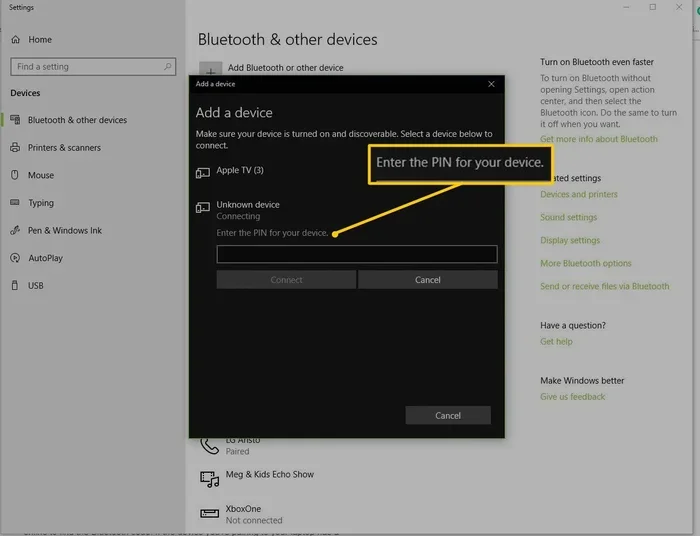
When you first connect your earbuds to your phone, that is called Bluetooth pairing. Your earbuds broadcast a discoverable signal. Your phone detects it and shows it on your screen. You tap “Connect,” and the two devices form a secure wireless link. After that, they remember each other and reconnect automatically.
The pairing process follows a set of rules called a Bluetooth protocol. This protocol ensures that different devices from different manufacturers can communicate. Your Apple earbuds can connect to an Android phone because they both follow the same Bluetooth standard. This universal compatibility is one of the greatest strengths of Bluetooth technology.
Most wireless earbuds support multipoint pairing. This means they can connect to two devices at the same time. You might have your earbuds paired to both your phone and your laptop. When a call comes in on your phone, the earbuds switch automatically. This seamless switching makes wireless audio incredibly convenient for daily use.
The Role of Bluetooth Codecs in Audio Quality
A Bluetooth codec is the method used to compress and send audio data between devices. Think of it as a shared language between your phone and your earbuds. Common codecs include SBC, AAC, aptX, and LDAC. Each codec handles audio compression differently, which affects your listening experience.
Higher-quality codecs deliver richer, more detailed sound. They preserve more of the original audio data during transmission. Some codecs also reduce Bluetooth latency. Latency is the tiny delay between when audio is sent and when you hear it. For music listening, this delay is barely noticeable. But for video watching or gaming, even a small delay can be frustrating.
If you enjoy gaming with wireless audio, you may have wondered can I use Bluetooth headphones for gaming. The answer is yes, but you need earbuds that support low-latency codecs and fast Bluetooth versions. The right setup makes a huge difference in audio response time.
What Happens If You Use Earbuds Without Bluetooth?
Most wireless earbuds simply cannot function without Bluetooth. The entire design is built around wireless connectivity. There is no wired input jack, no auxiliary port, and no alternative connection method. Remove Bluetooth, and you have removed the only way audio reaches your ears.
However, there are a few exceptions and creative workarounds. Some wireless earbuds come with a charging cable that doubles as an audio cable. In this mode, the Bluetooth module is turned off, and audio flows through the wire. It is a useful backup option, but it defeats the purpose of going wireless.
Can You Use Wireless Earbuds With a Cable?
Some models include a cable that lets you use your earbuds in wired mode. When connected this way, the Bluetooth radio is disabled. This saves battery and avoids wireless interference. The trade-off is that you are no longer free to move around. You are tethered to your device by the cable.
Using a cable mode is helpful in specific situations. If your Bluetooth battery is running low, cable mode keeps you listening. If you are on a flight with limited USB ports, it can also work. But for everyday use, Bluetooth is the way to go.
The Charging Case Is Not an Audio Source
A common misconception is that the charging case can play music. It cannot. The case stores and charges your earbuds. It does not have a speaker or an audio output. You still need a Bluetooth-enabled device to stream audio to your earbuds. Without a phone, tablet, or computer nearby, your earbuds will stay silent.
This is why it is important to understand that wireless earbuds are not standalone devices. They need a source device. That source device uses Bluetooth to send audio. No Bluetooth means no audio. It is that simple.
Types of Wireless Earbuds and Their Bluetooth Needs
Not all wireless earbuds are built the same way. Different types have different Bluetooth requirements and capabilities. Understanding these differences helps you choose the right pair for your lifestyle.
True Wireless Stereo Earbuds
True wireless stereo earbuds are the most popular type on the market today. Each earbud connects to your phone independently. There is no cable connecting the left and right buds. Both earbuds receive audio through Bluetooth transmission from your source device.
TWS earbuds rely entirely on Bluetooth for everything. They need a strong Bluetooth signal to maintain a stable connection. If the signal weakens, audio stutters or cuts out. This is why keeping your phone within Bluetooth range matters. Most modern TWS earbuds offer a reliable range of about 30 feet in open spaces.
Battery life varies widely among TWS earbuds. Some last 5 hours on a single charge. Others reach 8 hours or more. The Bluetooth version plays a big role in battery efficiency. Bluetooth 5.0 and newer versions use less power, which means longer listening sessions between charges.
Neckband and Over-Ear Wireless Earphones
Neckband earbuds connect the two earpieces with a flexible band that rests under your chin. Over-ear wireless earphones cover your entire ear like traditional headphones. Both types use Bluetooth for wireless audio playback. The design difference affects comfort, battery life, and sound isolation.
Neckband models often have slightly better Bluetooth battery life. The larger body can house a bigger battery. Over-ear models may offer superior noise isolation and richer bass. Both types support various Bluetooth codecs for different levels of audio quality.
Bone Conduction Earbuds
Bone conduction earbuds are a unique category that sits on your cheekbones rather than inside your ears. They vibrate to send audio through your bones directly to your inner ear. Despite the different design, they still use Bluetooth for connectivity. The wireless listening experience is the same at its core.
Bone conduction earbuds are popular among runners and outdoor athletes. They let you hear your surroundings while enjoying your playlist. They still need Bluetooth to function, just like every other wireless earbud type. The Bluetooth range and codec support vary by model.
Factors That Affect Bluetooth Performance in Earbuds
Bluetooth performance is not always consistent. Several factors can weaken your connection or reduce audio quality. Understanding these factors helps you troubleshoot problems and optimize your setup.
Distance and Physical Obstacles
Distance is the biggest factor in Bluetooth performance. The farther you move from your phone, the weaker the Bluetooth signal becomes. Walls, furniture, doors, and even your own body can block or weaken the signal. This is why you might notice audio stuttering when you walk into another room.
For the best wireless listening experience, stay within 30 feet of your source device. A clear line of sight between your phone and earbuds helps maintain a strong connection. Avoid placing your phone in a drawer, behind a thick wall, or in another room during important calls or music sessions.
Interference From Other Wireless Devices
Bluetooth operates on the 2.4 GHz frequency band. This is the same frequency used by Wi-Fi routers, microwaves, and some other wireless devices. When many devices share this frequency, wireless connectivity can suffer. You might experience choppy audio, connection drops, or reduced range.
To minimize interference, turn off unused Bluetooth devices nearby. Also, keep your earbuds away from crowded Wi-Fi zones. If you are at a busy coffee shop or airport, the signal congestion can affect your Bluetooth audio streaming. Moving to a less crowded area often fixes the problem quickly.
Software and Firmware Updates
Both your earbuds and your phone run software. Manufacturers release updates to fix bugs, improve Bluetooth connectivity, and enhance audio quality. Outdated firmware can cause pairing problems, poor sound quality, and unexpected disconnections. Always keep your devices updated whenever possible.
Many earbud brands offer companion apps. These apps let you check for firmware updates, adjust settings, and manage Bluetooth pairing. Using the official app ensures your earbuds are running the latest software. This simple habit can solve many connection issues before they start.
Can You Add Bluetooth to Non-Bluetooth Earbuds?
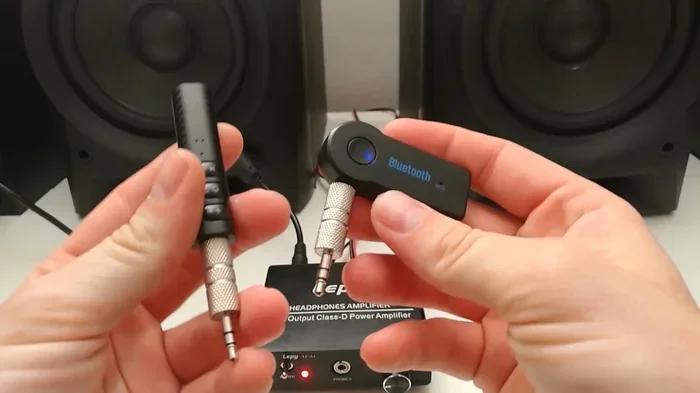
If you own a pair of wired headphones, you can add Bluetooth functionality. A small Bluetooth adapter plugs into the headphone jack or connects via USB. This adapter turns your regular wired headphones into wireless ones. It is a simple and affordable way to enjoy wireless audio without buying new headphones.
Many people ask can I make my wired headphones Bluetooth. The answer is yes. You simply need a compatible Bluetooth adapter. These adapters support most Bluetooth versions and codecs. They let you enjoy wireless audio streaming from any device with a headphone jack or USB port.
Keep in mind that adapters add a small amount of Bluetooth latency. The audio delay is usually unnoticeable for listening to music. For fast-paced gaming or video calls, you may notice a slight lag between the audio and the action. For most everyday uses, the difference is minimal and easy to ignore.
If you are looking for a budget-friendly way to go wireless, a Bluetooth adapter is a great option. It extends the life of your favorite wired headphones. You get the freedom of wireless listening without spending money on a brand-new pair of earbuds.
How to Get the Best Bluetooth Experience With Your Earbuds
You can take several simple steps to improve your Bluetooth experience. These tips help you enjoy clearer sound, stronger connections, and fewer interruptions. Follow these guidelines to get the most out of your wireless earbuds.
Keep Your Earbuds Charged
Low Bluetooth battery can cause connection issues and poor audio quality. When the battery drops below 20 percent, the Bluetooth module may struggle to maintain a stable link. Make it a habit to charge your earbuds after each use. A full charge ensures reliable wireless connectivity throughout the day.
Also, keep your charging case charged. The case powers your earbuds between uses. If the case battery is dead, your earbuds cannot recharge. This means no Bluetooth connection the next time you want to listen to music.
Stay Close to Your Source Device
Proximity matters for Bluetooth performance. The closer your phone is to your earbuds, the stronger the Bluetooth signal. Avoid placing your phone in another room during calls or music sessions. A clear path between your devices leads to uninterrupted audio streaming.
Use the Official App for Your Earbuds
Many earbud brands offer companion apps. These apps let you customize equalizer settings, update firmware, and manage Bluetooth pairing. Using the official app often improves performance and unlocks features. You can also switch between Bluetooth codecs for different use cases.
Reset Your Earbuds When Needed
If your earbuds refuse to connect, try resetting them. Most models have a simple reset process. Usually, you hold down a button for several seconds until a light flashes. A reset clears old pairings and fixes many connection issues. After resetting, pair your earbuds fresh with your device for the best results.
Match Your Earbuds to Your Use Case
Different activities demand different Bluetooth features. For casual music listening, standard Bluetooth works perfectly. For gaming, you need low latency and fast response times. For calls, you need a stable wireless connection with good noise cancellation. Matching your earbuds to your primary use case ensures the best experience every time.
For console gaming setups, you might want to check whether can I pair Bluetooth headphones to Xbox One. The right pairing method and compatible earbuds make all the difference in audio quality and response time during gameplay.
For those who use smart home devices, you might also enjoy using Alexa as a Bluetooth speaker to explore how Bluetooth connects across different devices in your home setup.
Common Bluetooth Problems With Wireless Earbuds and How to Fix Them
Even the best wireless earbuds can experience Bluetooth issues. Most problems are easy to fix with simple troubleshooting steps. Here are the most common issues and their solutions.
Earbuds Won’t Pair With Your Device
If your earbuds will not pair, start with the basics. Make sure Bluetooth is turned on your phone. Reset your earbuds by holding the power button for several seconds. Delete old pairings from your phone’s Bluetooth settings. Then try pairing again from scratch. This solves the issue in most cases.
Audio Keeps Cutting Out or Stuttering
Dropping audio usually means a weak Bluetooth signal. Move closer to your phone and remove obstacles between the devices. Check if other wireless devices are causing interference. Switching to a less crowded Wi-Fi channel can also help. A clean signal path leads to smooth and uninterrupted audio streaming.
Poor Audio Quality or Muffled Sound
If the sound sounds muffled or compressed, check your Bluetooth codec settings. Some phones let you choose the codec in developer options. Switching to a higher-quality codec can improve audio quality significantly. Also, make sure your earbuds are fully charged. Low battery can reduce sound performance and weaken the Bluetooth connection.
One Earbud Connects but the Other Does Not
This is a common issue with true wireless stereo earbuds. Try resetting both earbuds and pairing them together as a set. Also, check that both buds are at the same charge level. A low battery in one bud can cause asymmetric connections. Placing both buds in the case and resetting often fixes this problem.
Conclusion
So, do wireless earbuds need Bluetooth to work properly? The answer is a definitive yes. Bluetooth is the backbone of wireless audio. It handles everything from audio streaming to playback controls, from pairing to battery management. Without Bluetooth, most wireless earbuds simply cannot function.
Understanding how Bluetooth works helps you get more from your wireless earbuds. You can troubleshoot issues faster. You can choose the right pair for your specific needs. And you can enjoy a smoother, more reliable wireless listening experience every single day.
Whether you use earbuds for music, calls, or gaming, Bluetooth is the technology that makes it all possible. Keep your devices updated, stay within range, and charge your earbuds regularly. These simple habits go a long way. With the right setup and a little knowledge, your wireless earbuds will deliver excellent audio quality for years to come.
The world of wireless audio is constantly evolving. New Bluetooth versions bring better range, faster speeds, and improved battery efficiency. Stay informed and keep up with these developments. Your future earbuds will thank you for it. Embrace the wireless revolution and enjoy the freedom that Bluetooth brings to your daily listening routine.
Frequently Asked Questions
Can wireless earbuds work without Bluetooth?
Most wireless earbuds cannot work without Bluetooth. Bluetooth is the only way they receive audio from your device. Some models include a cable that lets you use them in wired mode, but this disables the wireless feature. Without any Bluetooth connection, your earbuds will not produce sound.
How far can Bluetooth earbuds be from your phone?
Most wireless earbuds work reliably within 30 feet of your phone. This range can vary based on obstacles, interference, and the Bluetooth version. Bluetooth 5.0 offers better range than older versions. Walls and other physical barriers can reduce the effective distance significantly.
Does Bluetooth affect audio quality in wireless earbuds?
Yes, Bluetooth affects audio quality. The codec used for transmission determines how much audio detail is preserved. Higher-quality codecs like aptX and LDAC deliver better sound than basic codecs like SBC. Bluetooth version also plays a role in maintaining consistent audio quality during playback.
Why do my wireless earbuds keep disconnecting?
Frequent disconnections are usually caused by weak Bluetooth signal or interference. Move closer to your source device and remove obstacles between them. Other wireless devices on the same frequency can also cause drops. Updating firmware and resetting your earbuds often resolves persistent disconnection issues.
Can I use Bluetooth earbuds for phone calls?
Yes, Bluetooth earbuds work great for phone calls. Most wireless earbuds have built-in microphones that transmit your voice back to the caller. Bluetooth handles both the incoming audio and the outgoing voice transmission. For best call quality, stay within range and ensure your earbuds are fully charged.
Do all Bluetooth earbuds support the same codecs?
No, not all Bluetooth earbuds support the same codecs. Basic earbuds typically support SBC. Higher-end models may support AAC, aptX, or even LDAC. The supported codecs depend on both the earbuds and your source device. Check the specifications before buying if audio quality is important to you.
=== END ===