Can More Than One Phone Connect To Your Traeger Grill
Yes, more than one phone can connect to a Traeger grill using the Traeger app and Wi-Fi or Bluetooth features. You can share your grill with friends and family by allowing multiple devices to link to the same Traeger controller. This guide covers setup steps, limitations, and expert tips for connecting multiple phones to your Traeger grill seamlessly.
If you love grilling with a Traeger pellet grill, you have probably wondered whether your friends or family members can also check the temperature or adjust settings from their phones. The short answer is yes. More than one phone can connect to your Traeger grill, and it is easier than you might think.
Traeger grills come equipped with Wi-Fi and Bluetooth technology that allows you to connect your phone to the grill controller. This means you can monitor temperatures, adjust smoke settings, and even turn the grill on or off from across the yard. But what happens when you want to share that convenience with someone else? Can they jump in and use their phone too? The answer is a resounding yes, and in this article, we will walk you through exactly how it works.
Whether you are hosting a backyard barbecue, cooking for a large family gathering, or just want someone else to handle the grilling while you relax, knowing how to connect multiple phones to your Traeger grill is a game changer. Let us dive into everything you need to know about Traeger Wi-Fi setup, app connectivity, and sharing your grill with others.
Key Takeaways
- Multiple phones can connect: You can link more than one phone to your Traeger grill for shared control and monitoring.
- Wi-Fi and Bluetooth both work: Traeger grills support both connection methods for phone pairing.
- The Traeger app handles it: The official Traeger app lets you manage connections and monitor temperature from any linked device.
- There are some limits: Only a certain number of devices can connect at the same time depending on your grill model.
- Setup is simple: Connecting a second phone takes just a few minutes using the Wi-Fi setup process.
- Troubleshooting is straightforward: Most connection issues can be fixed with basic steps like restarting the grill or app.
📑 Table of Contents
- How Traeger Grill Phone Connection Works
- Can More Than One Phone Connect To Traeger Grill at the Same Time?
- Step by Step Guide to Connecting Multiple Phones
- Benefits of Connecting Multiple Phones to Your Traeger Grill
- Common Problems When Connecting Multiple Phones
- Expert Tips for Managing Multiple Phone Connections
- Comparing Traeger Models for Multi Phone Connectivity
- Key Takeaways
- Conclusion
How Traeger Grill Phone Connection Works
Before we get into connecting multiple phones, it helps to understand how the Traeger grill phone connection works in the first place. Traeger grills use a built-in controller that acts as the brain of the grill. This controller manages temperature, auger speed, and fan settings. It also has a Wi-Fi module that communicates with the Traeger app on your phone.
The Role of the Traeger App
The Traeger app is the bridge between your phone and your grill. When you connect your phone to the grill, the app sends and receives data in real time. You can see the current temperature, set your desired cook temperature, and monitor the cooking progress. The app also gives you access to built-in recipes and grilling guides.
Here is how the basic connection process works:
- Turn on your Traeger grill and make sure the Wi-Fi module is active.
- Open the Traeger app on your phone.
- The app will search for nearby Traeger grills.
- Select your grill from the list of available devices.
- Follow the on-screen prompts to complete the pairing.
Once paired, your phone stays connected to the grill as long as you are within Wi-Fi range. This is the foundation for understanding how multiple phones can connect to the same grill.
Wi-Fi vs Bluetooth for Traeger Connectivity
Traeger grills offer two main ways to connect your phone: Wi-Fi and Bluetooth. Each has its own strengths and limitations.
Wi-Fi connection allows your phone to connect to the grill even when you are farther away. As long as your phone has internet access, you can monitor and control your Traeger grill from anywhere. This is the best option for connecting multiple phones because it does not require every device to be right next to the grill.
Bluetooth connection works over a shorter range, usually about 30 feet. It is useful when you are standing right next to the grill and do not need internet access. However, Bluetooth is less ideal for multiple phone connections because it typically only pairs with one device at a time.
For connecting more than one phone to your Traeger grill, Wi-Fi is the clear winner. It allows multiple devices to stay connected simultaneously without interference.
Can More Than One Phone Connect To Traeger Grill at the Same Time?
This is the question most Traeger owners want answered, and the answer is yes. More than one phone can connect to a Traeger grill at the same time. Traeger designed their grills to support multiple device connections through the Wi-Fi network built into the controller.
When you connect your phone to a Traeger grill over Wi-Fi, your phone joins the grill’s local network. This means that other phones can also join that same network and connect to the grill. Each person can open the Traeger app on their device and see the same data. They can monitor temperatures, adjust settings, and receive notifications about the cook.
Here is what this looks like in a real-world scenario. Imagine you are hosting a weekend cookout. You are the one who set up the Traeger grill and started the cook. Your spouse wants to check the temperature from inside the house. Your teenager wants to see how much time is left on the cook from the backyard. With multiple phone connectivity, everyone can check the grill from their own device without any problems.
How Many Phones Can Connect at Once?
The number of phones that can connect depends on your Traeger grill model and its Wi-Fi module. Most modern Traeger grills with Wi-Fi capability can support between 5 and 10 connected devices at the same time. This includes phones, tablets, and even laptops.
Keep in mind that each person will need to download the Traeger app and create an account or log in. The app allows multiple user accounts to connect to the same grill without conflicts. Each user can save their own preferences and monitoring settings.
Step by Step Guide to Connecting Multiple Phones
Now that you know it is possible, let us walk through the actual process of connecting more than one phone to your Traeger grill. The steps are simple and should only take a few minutes.
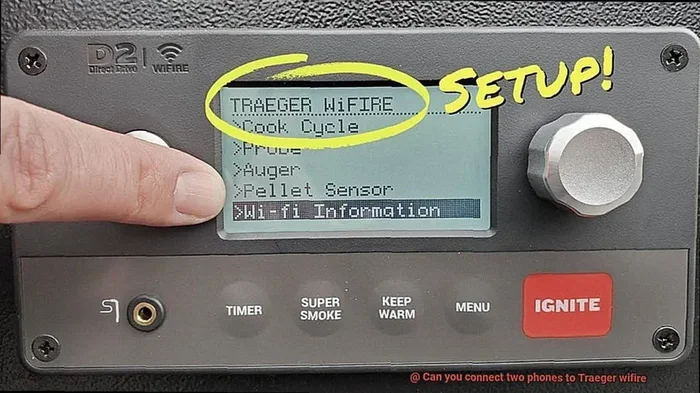
Step 1: Set Up Your Traeger Grill Wi-Fi
Before anyone else can connect, you need to make sure the grill Wi-Fi is properly set up. Here is how:
- Turn on your Traeger grill and let it power up fully.
- On your primary phone, open the Traeger app.
- Go to the settings menu and select Wi-Fi setup.
- Follow the prompts to connect the grill to your home Wi-Fi network.
- Once connected, the Wi-Fi light on the grill controller should be solid.
After this initial setup, your Traeger grill will broadcast its own Wi-Fi network. Other phones can connect to this network to access the grill controller.
Step 2: Connect the Second Phone
Now let us add the second phone to the mix.
- Have the second person open the Traeger app.
- Make sure their phone Wi-Fi is turned on.
- The app should detect the Traeger grill automatically.
- If it does not, go to the app settings and select “Add Grill.”
- Choose your Traeger grill from the list.
- Log in or create a new account if prompted.
- The second phone is now connected to the Traeger grill.
Step 3: Repeat for Additional Phones
You can repeat the same process for any additional phones. Each person simply needs to download the app, find the grill, and log in. There is no limit to how many times you can repeat this process, as long as you stay within the maximum device limit for your grill model.
Quick Tips for Smooth Connectivity
- Keep the grill firmware updated: Regular updates improve Wi-Fi performance and device compatibility.
- Use the same Traeger app version: Make sure all connected phones have the latest version of the app installed.
- Stay within range: While Wi-Fi extends your range, staying relatively close helps maintain a strong signal.
- Restart the app if needed: Sometimes simply closing and reopening the app refreshes the connection.
Benefits of Connecting Multiple Phones to Your Traeger Grill
Connecting more than one phone to your Traeger grill opens up a lot of practical benefits. Let us look at why this feature is so valuable for Traeger owners.
Shared Monitoring and Control
The biggest benefit is that everyone can share the monitoring duties. When you are cooking a long brisket or smoking ribs overnight, it helps to have more than one person keeping an eye on things. With multiple phones connected, anyone in the group can check the temperature at any time.
This is especially helpful during events like tailgating or camping trips. One person can manage the grill settings while others handle food prep or entertain guests. Everyone stays in the loop without needing to gather around the grill constantly.
Better Temperature Management
When multiple people can access the Traeger app, temperature management becomes easier. One person can monitor the meat probe while another adjusts the grill temperature. This teamwork approach leads to better cooking results and less stress for the person doing the actual grilling.
Guest and Family Friendly
If you often cook for friends and family, connecting their phones makes them feel more involved. They can watch the cook progress in real time, get notifications when the food is done, and even adjust settings if needed. It turns the grilling experience into a shared activity rather than a solo task.
Remote Monitoring for Large Gatherings
For larger gatherings, having multiple phones connected means you can assign someone to watch the grill from inside the house. They can send updates to the person tending the grill or adjust settings remotely. This is a great way to keep the cook going without constantly stepping away from your guests.
Common Problems When Connecting Multiple Phones
While connecting multiple phones to a Traeger grill is straightforward, you may run into some issues along the way. Here are the most common problems and how to fix them.
Phone Cannot Find the Traeger Grill
If a second phone cannot detect the Traeger grill, the first thing to check is the Wi-Fi connection. Make sure the grill Wi-Fi module is active and broadcasting. You can also try restarting the grill controller by turning it off and back on.
Another common cause is that the phone is connected to a different Wi-Fi network. The phone needs to be on the same network as the grill or connected to the grill’s local Wi-Fi. Check the phone settings to confirm which network it is using.
App Freezes or Lags During Connection
If the Traeger app freezes when trying to connect a second phone, it may be a signal strength issue. Move closer to the grill and try again. You can also try clearing the app cache or reinstalling the Traeger app on the second phone.
Sometimes too many devices connected at once can slow things down. If you have more than 8 or 10 devices connected, try disconnecting the ones that are not actively being used. This frees up bandwidth and keeps the app running smoothly.
Temperature Readings Are Inconsistent
When multiple phones are connected, you might notice slight differences in temperature readings between devices. This usually happens because of minor delays in data syncing. The readings are typically accurate enough for grilling purposes. If the difference is large, check that all devices are using the same Traeger app version and that the grill firmware is up to date.
One Phone Disconnects Frequently
If one phone keeps losing its connection, it could be a Wi-Fi signal issue. Walls, distance, and other electronic devices can interfere with the grill Wi-Fi signal. Try moving the phone closer to the grill or reducing the number of connected devices temporarily.
Expert Tips for Managing Multiple Phone Connections
Getting multiple phones connected to your Traeger grill is one thing. Keeping everything running smoothly is another. Here are some expert tips from experienced Traeger users and grill enthusiasts.
Create a Dedicated Grill Network
For the best experience, set up your Traeger grill on its own dedicated network rather than sharing your home Wi-Fi. This prevents other household devices from interfering with the grill connection. It also makes it easier for guests to find and connect to the grill.
Assign Roles During Cooks
When multiple people are monitoring the grill, assign roles to avoid confusion. One person can be in charge of temperature adjustments. Another can monitor the meat probe. A third person can handle the Traeger app notifications and alerts. This division of labor keeps things organized and ensures nothing gets missed.
Use the Traeger App Notifications
The Traeger app sends push notifications when the grill reaches target temperature or when there is a problem. Make sure all connected phones have notifications enabled. This way, everyone gets alerted if something needs attention during the cook.
Keep a Backup Phone Charged
If you are planning a long cook with multiple people taking turns monitoring, make sure all phones are fully charged. A dead phone means a lost connection. Consider bringing a portable charger to keep backup phones powered throughout the cook.
Update the App Before Big Cooks
Before any major cookout or gathering, update the Traeger app on all connected phones. Updates often include bug fixes and performance improvements that make multi-device connections more reliable. It is a small step that can save you a lot of frustration.
Comparing Traeger Models for Multi Phone Connectivity
Not all Traeger grills are created equal when it comes to supporting multiple phone connections. Here is a quick comparison of popular Traeger models and their multi device capabilities.
- Traeger Pro Series: These grills feature advanced Wi-Fi modules that support up to 10 connected devices. They are ideal for families and frequent entertainers.
- Traeger Ironwood Series: The Ironwood models support up to 8 simultaneous connections and include enhanced Wi-Fi range for larger yards.
- Traeger Timberline Series: These premium grills offer the best Wi-Fi performance and can handle 10 or more connected devices with ease.
- Traeger Tailgater: A more portable option that supports up to 5 connected devices. Great for smaller gatherings and camping trips.
- Older Traeger Models: Some older models may have limited Wi-Fi capabilities and support fewer simultaneous connections. Check your specific model for details.
If you plan to connect many phones regularly, investing in a newer Traeger model with a stronger Wi-Fi module is worth considering. The improved connectivity makes a noticeable difference in performance.
Key Takeaways
- Multiple phones can connect: More than one phone can connect to your Traeger grill using Wi-Fi and the Traeger app.
- Wi-Fi is the best method: Wi-Fi allows multiple devices to connect simultaneously, unlike Bluetooth which is limited to one device.
- Setup is quick and easy: Connecting a second or third phone takes just a few minutes following simple steps.
- Most models support 5 to 10 devices: Check your specific Traeger grill model for the exact device limit.
- Common issues are easy to fix: Most connection problems can be resolved with basic troubleshooting like restarting the grill or app.
- Teamwork improves your cook: Multiple phone connections let everyone share monitoring duties for better results.
- Keep apps updated: Regular updates ensure smooth multi device performance and fix known bugs.
Conclusion
The ability to connect more than one phone to your Traeger grill is a fantastic feature that enhances the entire grilling experience. Whether you are cooking for your family, hosting a backyard party, or simply want someone else to keep an eye on the grill while you take a break, multi phone connectivity makes it all possible.
Setting up multiple phone connections is straightforward. You just need to ensure the Traeger grill Wi-Fi is active, download the Traeger app on each phone, and follow the simple pairing steps. Once connected, everyone can monitor temperatures, adjust settings, and receive real-time notifications about the cook.
Remember that each Traeger model has its own device limits, so check your grill specifications before expecting a large number of connections. Keep the app updated, manage your Wi-Fi signal wisely, and assign roles during cooks for the best experience.
With the right setup, connecting multiple phones to your Traeger grill becomes second nature. You will wonder how you ever grilled without this convenient feature. Fire up your Traeger, connect your devices, and enjoy the shared experience of great pellet grilling with the people you care about.