How Can I Increase Speaker Volume and Get Louder Sound
Want to make your speaker louder? You can boost speaker volume using simple software settings, better placement, external amplifiers, and volume booster apps. This guide covers every method from free phone tricks to hardware upgrades that deliver real results.
There is nothing more frustrating than a speaker that just will not get loud enough. Whether you are hosting a party, watching a movie, or trying to hear a presentation, weak sound ruins the experience. The good news is that how can I increase speaker volume is a question with many practical answers. You do not need expensive gear to get started. Most solutions are free, quick, and surprisingly effective.
This guide walks you through every method that actually works. We cover software tricks, hardware upgrades, placement hacks, and device-specific tips. By the end, you will know exactly how to make any speaker louder and clearer. Let us get into it.
Key Takeaways
- Software tweaks like volume boosters and equalizer settings can noticeably increase loudness without extra cost.
- Speaker placement matters a lot — wall placement and corner positioning amplify sound naturally.
- External amplifiers and docks provide the biggest volume jump for serious listening.
- Bluetooth speaker users can pair devices or use phone-based tricks to get more output.
- Common mistakes like blocking vents or using low-quality files silently kill your volume potential.
- Device-specific settings on phones, laptops, and TVs often hide hidden volume controls.
- Regular maintenance like cleaning dust from speakers keeps them performing at peak levels.
📑 Table of Contents
- Understanding Why Your Speaker Volume Might Be Low
- Free Software Tricks to Boost Speaker Volume
- Hardware Solutions for Louder Sound
- Placement and Positioning Hacks for Maximum Volume
- Device-Specific Tips for Louder Sound
- Common Mistakes That Keep Your Speaker Quiet
- Quick Tips for Instant Volume Gains
- Expert Insights on Getting the Best Speaker Volume
- Conclusion
Understanding Why Your Speaker Volume Might Be Low
Before jumping into solutions, it helps to understand why your speaker sounds quiet in the first place. Several factors play a role, and knowing them helps you pick the right fix.
Built-In Volume Limits
Many devices have a volume limit set by default. Manufacturers do this to protect your hearing and prevent speaker damage. Your phone, laptop, or tablet may cap output at 80 or 85 percent. This hidden cap keeps things safe but limits your loudness.
Audio File Quality
Not all audio files are created equal. A low-bitrate MP3 sounds much quieter than a high-quality FLAC file. If you are playing compressed music, your speaker has less data to work with. The result is flat, weak sound even at full volume.
Speaker Placement and Environment
Where you put your speaker changes everything. Placing it on a soft surface like a bed or couch absorbs sound. Corners and walls reflect sound back, making it louder. Even the room size affects how loud things sound. A small room naturally feels louder than a large open space.
Dust and Debris Buildup
This one is easy to overlook. Dust clogs speaker grilles over time. It blocks the tiny movements that create sound. A dirty speaker simply cannot produce the volume it was designed for. A quick clean can make a surprising difference.
Free Software Tricks to Boost Speaker Volume
You do not need to buy anything to get louder sound. Your device already has built-in tools that can help. Here are the best free software tricks.
Use a Volume Booster App
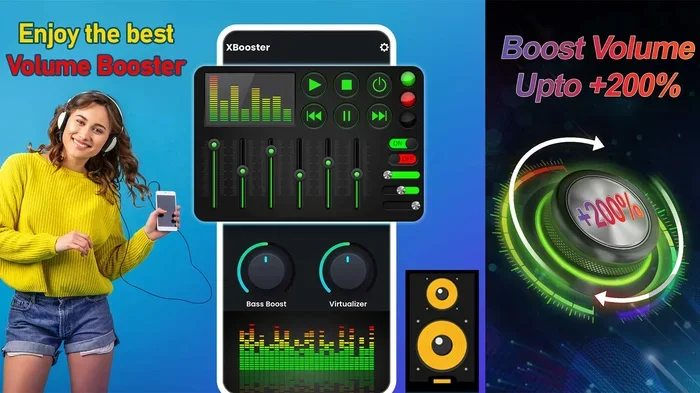
Volume booster apps are a popular way to push past default limits. Apps like Volume Booster or Boom Player amplify audio output beyond normal levels. They work by increasing the digital gain on your device. On Android, you can find many free options in the Google Play Store. iPhone users have fewer choices due to Apple’s strict software limits, but apps like Boom 3D still help.
Quick Tip: Do not set booster apps to maximum all the time. Pushing too hard causes distortion and can damage speakers over time. Keep it at 110 to 120 percent for safe loudness.
Adjust Your Equalizer Settings
Your device’s audio equalizer can make a big difference. Boosting the bass and midrange frequencies makes sound feel louder and fuller. Most phones and computers have built-in EQ settings. On Windows, use the Windows Sonic or Realtek Audio Console. On Mac, check out Boom 2 or the built-in equalizer in iTunes.
Here are the best frequency adjustments for louder sound:
- Bass (60-250 Hz): Boost slightly for a fuller, louder feel
- Midrange (250-2000 Hz): Boost for clearer vocals and instruments
- Treble (2000-20000 Hz): Keep flat or slightly boosted for brightness
Disable Volume Limiters
Many devices have a volume limiter hidden in settings. On Android, go to Settings > Sound > Volume and look for a limiter option. On iPhone, check Settings > Music > Volume Limit. On Windows, right-click the speaker icon and open Spatial Sound settings. Turning these off lets you push volume higher.
Use Audio Enhancement Software
Programs like Equalizer APO for Windows or Boom 3D for Mac offer advanced audio enhancement. These tools let you customize every frequency band. They also add features like surround sound and loudness normalization. The result is noticeably louder and richer audio from your existing setup.
Hardware Solutions for Louder Sound
Software tricks help, but sometimes you need physical solutions. Hardware upgrades deliver the biggest volume jumps. Here are the best options.
Add an External Amplifier
An external amplifier is the most effective way to increase speaker volume. Amps take the audio signal and boost it before sending it to your speaker. This gives you much more power and much louder output. You can find small desktop amps for under $50 that make a huge difference.
When choosing an amplifier, match it to your speaker’s wattage rating. A 20-watt speaker works well with a 20 to 40-watt amp. Going too high can damage your speaker, so always check compatibility first.
Use a Speaker Dock or Charging Stand
Speaker docks do more than charge your device. Many docks have built-in amplifiers that boost output. They also position your phone or tablet at the optimal angle for sound projection. If you have ever wondered can I turn my phone into a Bluetooth speaker, the answer is yes — and a dock makes it even louder.
Upgrade to a Higher-Powered Speaker
Sometimes the best solution is a better speaker. Look for speakers with higher wattage ratings. A 30-watt speaker will always be louder than a 10-watt speaker. If you need portability, consider a Bluetooth speaker with at least 10 watts of power. For home use, a 20 to 50-watt smart speaker gives excellent volume.
If you are looking for even louder setups, you might explore options like can I use any speaker for DJ — DJ speakers are designed for high-output scenarios and can deliver powerful sound for large spaces.
Try a Soundbar for TV Audio
If your TV speaker is too quiet, a soundbar is an affordable upgrade. Soundbars have built-in amplifiers and multiple drivers. They produce much louder and clearer audio than built-in TV speakers. Many soundbars also support HDMI audio out and Bluetooth connectivity, giving you flexible options for routing sound.
Placement and Positioning Hacks for Maximum Volume
Where you put your speaker matters more than most people realize. A few simple positioning changes can boost volume without touching a single setting.
Place Your Speaker Near a Wall
Sound bounces off walls and comes back to you. Placing your speaker near a wall adds natural reflection and volume. Corner placement works even better because sound reflects off two surfaces. Just make sure the speaker is not completely flush against the wall, or you will muffle the bass.
Elevate Your Speaker
Sound travels better when it has a clear path. Placing your speaker on a table or shelf at ear level gives the best projection. Avoid putting it on the floor where soft surfaces absorb the sound. Even a few inches of elevation makes a noticeable difference.
Remove Obstacles Between You and the Speaker
Furniture, curtains, and even people absorb sound waves. The more obstacles in the path, the quieter your speaker sounds. Try to create a clear line between the speaker and your listening position. Open rooms with hard floors work best for loud, clear audio.
Face the Speaker Toward the Room
Many speakers have a front-facing driver. Make sure this driver points toward the room, not at a wall. Angling the speaker slightly upward can also help distribute sound more evenly. This simple trick improves both volume and clarity.
Device-Specific Tips for Louder Sound
Different devices have different volume-boosting features. Here are tips for the most common devices people use with speakers.
Smartphones and Tablets
Phones and tablets have several hidden volume controls. First, check your media volume separately from ringer volume. On Android, use the volume booster app mentioned earlier. On iPhone, try lowering the volume limit in settings and then raising the media volume above it. You can also use the Ring/AirPlay trick — set ringtone volume to max, then play media, and the speaker often outputs louder.
For a portable setup, you can explore can I use a Bluetooth speaker to amplify my voice — this works great for outdoor gatherings and presentations where you need extra projection.
Laptops and Desktops
Computer speakers are often the weakest link in your audio chain. Start by checking your sound settings. On Windows, go to Settings > System > Sound and select your speaker as the default output. On Mac, use System Preferences > Sound. Then check the volume mixer and make sure no individual app is limiting output.
For better results, connect your laptop to an external speaker via USB or audio jack. Many USB speakers have their own amplification, which means they are always louder than built-in laptop speakers. You can also check can I get audio out from HDMI if you are using an external monitor — routing audio through HDMI can sometimes provide cleaner, louder output.
Smart Speakers Like Alexa and Google Home
Smart speakers like Amazon Echo and Google Nest have volume commands built in. Simply say “Alexa, volume up” or “Hey Google, turn it up.” You can also adjust volume through their companion apps. Some smart speakers support multi-room audio, which means linking multiple speakers together for louder overall output.
For those exploring smart speaker versatility, you might also check can I use Alexa as a Bluetooth speaker — this lets you pair Alexa with other Bluetooth devices for expanded audio coverage.
Televisions
TV speakers are notoriously quiet. Start by going into your TV settings and turning off any “night mode” or “dynamic range” features. These modes compress audio and reduce loudness. Next, check if your TV supports audio out via optical, HDMI ARC, or Bluetooth. Connecting to an external sound system instantly solves low TV volume.
Common Mistakes That Keep Your Speaker Quiet
Avoid these common mistakes that silently reduce your speaker volume.
- Playing low-quality audio files: Compressed MP3s at 128 kbps sound much quieter than 320 kbps files. Always use the highest quality audio you can access.
- Blocking speaker grilles: Cases, covers, and objects placed over speakers muffle sound. Always remove protective covers during use.
- Ignoring firmware updates: Speaker manufacturers often release updates that improve audio performance. Check for updates regularly.
- Using the wrong cable or connection: A loose or low-quality cable reduces signal strength. Use high-quality aux cords or Bluetooth 5.0 for best results.
- Setting volume to max from the start: Gradually increasing volume prevents distortion. Start low and work your way up to find the sweet spot.
- Ignoring battery level: Many speakers reduce output when the battery is low. Keep your speaker charged for maximum volume.
Quick Tips for Instant Volume Gains
Need louder sound right now? Try these quick fixes that take less than a minute:
- Turn off any night mode or quiet mode on your device
- Move your speaker closer to a wall or corner
- Remove any case or cover from the speaker
- Check that your audio file or stream is set to the highest quality
- Use a free volume booster app on your phone or computer
- Clean the speaker grilles with a soft brush
- Restart your device — this often resets volume limits
Expert Insights on Getting the Best Speaker Volume
Audio engineers agree that the best volume comes from a combination of factors working together. No single trick works perfectly on its own. The real secret is stacking multiple methods for cumulative gains.
Start with software optimization. Adjust your equalizer and disable volume limiters. Then focus on placement. A well-placed speaker in a corner near a wall will sound louder than the same speaker in the middle of an open room. Finally, consider hardware upgrades if you need even more power. A small amplifier or a higher-powered speaker makes a dramatic difference.
Remember that louder does not always mean better. Your goal should be clear, distortion-free volume. If your speaker crackles or sounds fuzzy at high levels, back the volume down. Pushing speakers beyond their limits causes permanent damage and ruins the listening experience.
For those who want to experiment further with speaker setups, consider exploring can I use a Bluetooth speaker without Bluetooth — sometimes wired connections through an aux cable or USB provide cleaner, louder output than wireless pairing.
Conclusion
Increasing speaker volume does not have to be complicated or expensive. You have many options ranging from free software tweaks to hardware upgrades. Start with the simple fixes like adjusting settings and improving placement. Then move to apps and external amplifiers if you need more. The key is to experiment and find what works best for your specific setup.
Now you know exactly how can I increase speaker volume and get the loud, clear sound you want. Try a few of these tips today and enjoy your audio at full power. Your ears — and your guests — will thank you.
Frequently Asked Questions
Why is my speaker so quiet even at full volume?
Your speaker may have a built-in volume limiter or your device might be capping output. Check your settings for volume limits, night mode, or audio enhancements that reduce loudness. Also, low-quality audio files can sound quieter even at maximum volume.
Can I make my Bluetooth speaker louder without an amplifier?
Yes. Try using a volume booster app, adjusting your equalizer settings, and placing the speaker near a wall. You can also check can I use a Bluetooth speaker to amplify my voice for additional projection tricks that work with most Bluetooth speakers.
Do volume booster apps damage speakers?
Using volume booster apps at moderate levels (110 to 120 percent) is generally safe. However, pushing them to maximum can cause distortion and potentially damage speaker drivers over time. Always use these apps responsibly and keep an eye on sound quality.
What is the best placement for a louder speaker setup?
Place your speaker near a wall or in a corner for natural sound reflection. Elevate it to ear level and remove obstacles between the speaker and your listening area. Avoid soft surfaces like beds and couches that absorb sound.
How can I get louder sound from my TV speakers?
Turn off night mode and dynamic range in your TV settings. Connect your TV to an external soundbar or speaker system using HDMI ARC or an optical cable. You can also check can I get audio out from HDMI to explore additional audio routing options.
Is a higher-wattage speaker always louder?
Generally yes. Wattage measures the power a speaker can handle, and higher wattage usually means louder output. However, speaker efficiency and design also matter. A well-designed 20-watt speaker can outperform a poorly designed 50-watt speaker in real-world listening.