Does Google Have A Wi Fi 6 Mesh Router Worth Buying
Google does offer a Wi-Fi 6 mesh router in the Nest WiFi Pro line, delivering fast wireless speeds and whole-home coverage. This system works well for most households, but it may not be the best choice for every user or budget. Let us break down whether the Google Wi-Fi 6 mesh router is truly worth your money.
Key Takeaways
- Google offers a Wi-Fi 6 mesh router: The Nest WiFi Pro supports the latest Wi-Fi 6 (802.11ax) standard with tri-band speeds up to 5400 Mbps.
- Easy setup and management: Google’s mesh system is beginner-friendly with a simple app and intuitive controls.
- Great for smart homes: It integrates well with Google Home and supports numerous smart devices.
- Not ideal for extreme gamers: While solid for most uses, dedicated gaming routers may offer better performance.
- Price is competitive: Google’s mesh routers sit in the mid-range, offering good value for the features included.
- Consider alternatives: Brands like Eero, ASUS, and Netgear also offer strong Wi-Fi 6 mesh options worth comparing.
📑 Table of Contents
- Does Google Have A Wi-Fi 6 Mesh Router?
- Google Nest WiFi Pro: Features and Specifications
- Setting Up Your Google Mesh Router
- Pros and Cons of the Google Wi-Fi 6 Mesh Router
- How Does It Compare to Other Wi-Fi 6 Mesh Routers?
- Who Should Buy the Google Wi-Fi 6 Mesh Router?
- Common Mistakes to Avoid When Setting Up a Mesh Router
- Final Verdict: Is the Google Wi-Fi 6 Mesh Router Worth Buying?
- Frequently Asked Questions
Does Google Have A Wi-Fi 6 Mesh Router?
Yes, Google does have a Wi-Fi 6 mesh router. The company released the Nest WiFi Pro as its flagship mesh system supporting the latest wireless standard. This router brings fast speeds, reliable coverage, and smart home integration into one package.
If you are shopping for a new wireless router and keep seeing ads for mesh systems, you are not alone. More homeowners are switching from traditional single routers to mesh networks. A mesh network uses multiple nodes or points to spread your internet signal evenly throughout your home. This eliminates dead zones and keeps your connection strong in every room.
Google entered the mesh router market a few years ago with the original Google WiFi. Since then, the company has updated its lineup to include Wi-Fi 6 technology. But does that mean you should buy one? That is exactly what we will explore in this guide. We will look at the features, performance, pros and cons, and whether the Google Wi-Fi 6 mesh router fits your needs better than other options on the market.
What Makes Wi-Fi 6 Special?
Wi-Fi 6 is the latest wireless standard, also known as 802.11ax. It offers faster speeds, better efficiency, and improved performance in crowded environments. If you have many devices connected at once, Wi-Fi 6 handles the load much better than older standards.
Here are some key benefits of Wi-Fi 6 technology:
- Faster speeds: Wi-Fi 6 can deliver up to 9.6 Gbps in theory, though real-world speeds are lower.
- Better device handling: It supports more simultaneous connections without slowing down.
- Lower latency: This means smoother video calls, gaming, and streaming.
- Improved battery life: Wi-Fi 6 includes features that help connected devices conserve battery.
- Greater range: The new standard improves signal penetration through walls and obstacles.
Google’s Nest WiFi Pro takes advantage of these Wi-Fi 6 improvements. It uses a tri-band setup, meaning it broadcasts on three frequency bands. This gives your home network more bandwidth and reduces congestion. If you are tired of your current internet router slowing down during peak hours, Wi-Fi 6 is a meaningful upgrade.
Google Nest WiFi Pro: Features and Specifications
The Nest WiFi Pro is Google’s most advanced mesh router to date. It combines the functions of a router and a smart speaker into one sleek device. Each point in the mesh system acts as both a wireless router and a Google Assistant-enabled speaker.
Speed and Performance
The Nest WiFi Pro offers tri-band speeds with a combined throughput of up to 5400 Mbps. The primary band operates on the 6 GHz frequency, which is new and less crowded. This means fewer interference issues from neighboring networks. The 5 GHz and 2.4 GHz bands handle older devices and IoT gadgets.
In real-world testing, users report excellent speeds for streaming 4K video, video conferencing, and general browsing. The mesh system uses seamless roaming, which means your devices automatically switch to the strongest node without dropping the connection. This is especially helpful if you walk around your home while on a call or streaming a movie.
Coverage and Range
Each Nest WiFi Pro point covers up to 2,200 square feet. A two-pack covers roughly 4,400 square feet, and a three-pack covers up to 6,600 square feet. For most average-sized homes, a two-pack is sufficient. Larger homes may need three or even four points for full coverage.
One of the standout features of Google’s mesh system is how easy it is to expand. You can add mesh Wi-Fi to existing router setups, though the Nest WiFi Pro works best as a full replacement. If you already have a router and want to extend its range, you might also consider whether you can connect mesh to an existing router without replacing everything.
Smart Home Integration
Google built smart assistant functionality directly into every Nest WiFi Pro point. This means each node doubles as a smart speaker. You can ask Google to play music, set timers, control smart home devices, and answer questions. It is a convenient two-in-one solution that saves space and reduces clutter.
The system works seamlessly with Google Home, giving you centralized control over all your smart devices. From smart lights to thermostats, the Nest WiFi Pro acts as a hub for your connected home ecosystem.
Setting Up Your Google Mesh Router
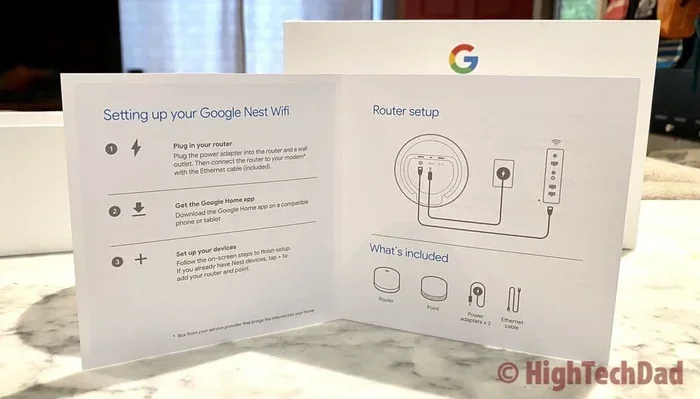
One of the biggest advantages of Google’s mesh system is how simple it is to set up. You do not need to be a tech expert to get it running. The Google Home app walks you through every step with clear instructions and visual prompts.
Here is what the setup process typically looks like:
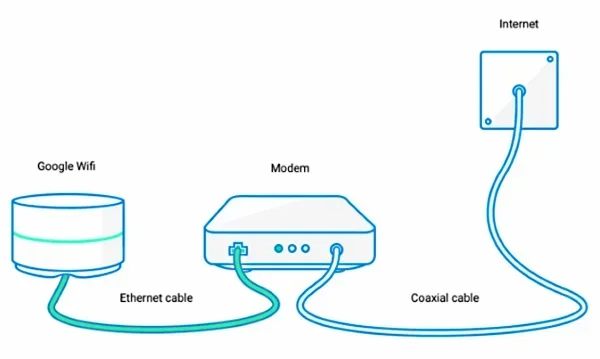
- Plug in your primary Nest WiFi Pro point and connect it to your modem using an ethernet cable.
- Download the Google Home app on your phone.
- Follow the on-screen prompts to create or sign into your Google account.
- Place your additional points in the rooms that need coverage.
- The app will guide you through optimal placement and test your connection.
The entire process usually takes about 15 to 20 minutes. If you have ever wondered whether you can buy a router and install it yourself, the answer is absolutely yes with Google’s mesh system. The app does most of the heavy lifting for you.
You can also manage your network from the app. This includes setting parental controls, pausing internet access for specific devices, running speed tests, and updating firmware. The interface is clean and user-friendly, making network management accessible to everyone.
Pros and Cons of the Google Wi-Fi 6 Mesh Router
Every product has strengths and weaknesses. Here is an honest look at what the Google Nest WiFi Pro does well and where it falls short.
Pros
- Excellent Wi-Fi 6 performance: Fast speeds and efficient handling of multiple devices.
- Simple setup: The Google Home app makes installation effortless for beginners.
- Built-in smart speaker: Each node doubles as a Google Assistant device.
- Sleek design: The compact, fabric-covered points look good in any room.
- Seamless roaming: Devices switch between nodes without interruption.
- Strong smart home compatibility: Works with thousands of Google Home devices and routines.
Cons
- Limited advanced settings: Power users may find the app lacks deep customization options.
- No dedicated gaming port: Unlike some gaming-focused routers, it does not prioritize traffic for consoles or PCs.
- 6 GHz band limitations: Not all devices currently support the 6 GHz frequency, so you may not get the full benefit right away.
- Price point: It costs more than basic routers, though it is competitive for a mesh system.
- Dependency on Google ecosystem: Some features work best if you are already in the Google Home environment.
How Does It Compare to Other Wi-Fi 6 Mesh Routers?
Google is not the only player in the mesh router market. To understand whether the Nest WiFi Pro is worth buying, it helps to compare it with other popular options.
| Feature | Google Nest WiFi Pro | Eero Pro 6 | ASUS ZenWiFi AX |
|---|---|---|---|
| Wi-Fi Standard | Wi-Fi 6 | Wi-Fi 6 | Wi-Fi 6 |
| Max Speed | 5400 Mbps | 5300 Mbps | 5400 Mbps |
| Bands | Tri-band | Dual-band | Tri-band |
| Smart Speaker | Yes | No | No |
| Setup App | Google Home | Eero App | ASUS Router App |
| Price (2-pack) | $$ | $$$ | $$ |
| Advanced Features | Basic | Moderate | Advanced |
As you can see, Google’s system stands out for its combination of mesh routing and smart speaker functionality. The Eero Pro 6 offers strong performance but lacks the built-in assistant. ASUS provides more advanced settings for power users but has a steeper learning curve.
If you are a casual user who wants a reliable, attractive mesh system with smart home features, Google’s offering is hard to beat. However, if you are a serious gamer or need deep network customization, you might want to explore options like buying a faster router from a brand that specializes in gaming and performance features.
Who Should Buy the Google Wi-Fi 6 Mesh Router?
This system is a great fit for many different types of users. Let us break down who will benefit most from the Nest WiFi Pro.
Families with multiple devices: If your household has smartphones, tablets, laptops, smart TVs, and IoT gadgets all competing for bandwidth, Wi-Fi 6 handles the load beautifully. You will notice fewer buffering events and faster load times.
Smart home enthusiasts: The built-in Google Assistant makes controlling your smart devices effortless. You can create routines, control lights, adjust thermostats, and check security cameras using voice commands from any room.
Casual streamers and remote workers: If your main activities involve Netflix, Zoom calls, and general browsing, the Nest WiFi Pro delivers more than enough speed and reliability.
People who value simplicity: The setup process is among the easiest in the industry. You do not need technical knowledge to get a strong, reliable network up and running.
On the other hand, if you are a competitive gamer who needs the lowest possible latency, you might want to look elsewhere. While the Google mesh system handles casual gaming well, serious esports players may notice a difference compared to dedicated gaming routers. If you are wondering whether you can game on your Wi-Fi without issues, the answer is yes for most games, but competitive titles might benefit from a wired connection or a more specialized router.
Common Mistakes to Avoid When Setting Up a Mesh Router
Even with an easy setup system like Google’s, some common mistakes can hurt your performance. Here are a few pitfalls to watch out for.
- Placing nodes too far apart: Each mesh point needs to be within good range of the next one. If you space them too far apart, the signal weakens between nodes.
- Hiding nodes in closets: While the Nest WiFi Pro looks nice, placing it inside a closed cabinet blocks the signal. Keep nodes in open, central locations.
- Not updating firmware: Google pushes regular updates that improve performance and security. Make sure your system stays current.
- Ignoring the 6 GHz band: If your devices support it, use the 6 GHz band for the fastest speeds. Older devices will fall back to 5 GHz or 2.4 GHz automatically.
- Using outdated ethernet cables: The cable connecting your primary node to your modem matters. Use a Cat 6 or higher cable for the best performance.
Taking a few minutes to place your nodes correctly and keep your system updated will make a huge difference in your daily experience. A well-set-up mesh network feels invisible. You just get fast, reliable internet everywhere in your home.
Final Verdict: Is the Google Wi-Fi 6 Mesh Router Worth Buying?
After reviewing all the features, performance benchmarks, and user experiences, the answer is clear. The Google Nest WiFi Pro is a solid Wi-Fi 6 mesh router that delivers excellent value for most households. Its combination of fast wireless speeds, easy setup, smart speaker integration, and attractive design makes it a compelling choice.
It may not be the best option for hardcore gamers or networking enthusiasts who want every advanced setting under the sun. But for the average home user, it hits the sweet spot between performance, simplicity, and price.
If you are still using an older router or dealing with Wi-Fi dead zones in your home, upgrading to a mesh system like the Nest WiFi Pro can be a game-changer. You will enjoy faster speeds, better coverage, and a more reliable connection throughout your entire living space.
Before you make your final decision, consider your home size, the number of devices you have, and what you use your network for most. For most people, the Google Wi-Fi 6 mesh router is absolutely worth the investment.
Frequently Asked Questions
Does Google still make mesh routers?
Yes, Google continues to sell and support the Nest WiFi Pro mesh router system. The company has not discontinued its mesh router line and continues to offer updates and support through the Google Home app.
Can I use Google Nest WiFi Pro as a regular router without mesh?
Yes, you can use a single Nest WiFi Pro point as a standalone router. However, you will get the full benefit of mesh coverage by adding additional points throughout your home.
Is Wi-Fi 6 worth the upgrade over Wi-Fi 5?
For most users, yes. Wi-Fi 6 offers faster speeds, better performance with multiple devices, and improved efficiency. If you have a newer smartphone, laptop, or smart TV, Wi-Fi 6 will take full advantage of those faster wireless capabilities.
How many Nest WiFi Pro points do I need?
A general rule is one point per 1,000 to 2,000 square feet. For a typical 2,000-square-foot home, a two-pack works well. Larger homes should consider a three-pack or more depending on wall thickness and layout.
Can I replace my current router with Google Nest WiFi Pro?
Absolutely. The Nest WiFi Pro replaces your existing router entirely. You simply connect it to your modem, and it handles all routing, DHCP, and security functions for your home network.
Does Google’s mesh router work with all internet service providers?
Yes, Google Nest WiFi Pro works with virtually all ISPs. It is compatible with cable, DSL, fiber, and satellite internet connections. You just need a modem and an ethernet cable to get started.