Do I Need A Bluetooth Transmitter Or Receiver Guide
A Bluetooth transmitter sends audio from a device to a Bluetooth-enabled speaker or headphones, while a Bluetooth receiver pulls wireless audio into a non-Bluetooth device. You need a transmitter when your source device lacks Bluetooth and a receiver when your speaker or headphones don’t have it. Choosing the right one depends on your setup, your audio quality needs, and your budget.
Have you ever wanted to go wireless but got stuck wondering whether you need a Bluetooth transmitter or receiver? You are not alone. This question confuses a lot of people, and the answer is simpler than you might think.
A Bluetooth transmitter or receiver solves one core problem: it adds wireless audio capability to devices that were never designed for it. The transmitter pushes sound out wirelessly from your source device. The receiver pulls that wireless sound into your speakers or headphones. Once you understand this basic difference, everything else falls into place.
In this guide, we break down exactly what each device does, when you need one, and how to pick the right option for your setup. We also cover setup tips, common mistakes, and features to look for. By the end, you will know exactly which device fits your needs and why.
Key Takeaways
- A Bluetooth transmitter sends audio out: It connects to a source device and beams sound to Bluetooth headphones, speakers, or car stereos.
- A Bluetooth receiver pulls audio in: It takes a Bluetooth signal and feeds it into older speakers, TVs, or stereos that lack wireless capability.
- You need a transmitter when your source device has no Bluetooth: Think older TVs, desktops, or music players without wireless support.
- You need a receiver when your speaker or headphones lack Bluetooth: This upgrades wired speakers to wireless without buying new ones.
- Key features to compare include Bluetooth version, codec support, latency, and range: These factors affect sound quality and usability.
- Setting up either device is simple: Most units pair in under two minutes with basic plug-and-play steps.
- Some devices do both: A few transmitters also act as receivers, giving you flexibility for different setups.
📑 Table of Contents
- What Is A Bluetooth Transmitter And What Is A Receiver
- When You Need A Bluetooth Transmitter
- When You Need A Bluetooth Receiver
- Bluetooth Transmitter Vs Receiver: Key Differences
- How To Choose The Right Bluetooth Device For Your Needs
- Setting Up Your Bluetooth Transmitter Or Receiver
- Final Thoughts On Bluetooth Transmitter Or Receiver
What Is A Bluetooth Transmitter And What Is A Receiver
Before you buy anything, you need to understand the basic roles of each device. The names tell you a lot, but let us break it down completely.
How A Bluetooth Transmitter Works
A Bluetooth transmitter takes an audio signal from a source device and converts it into a wireless Bluetooth signal. It then sends that signal to a Bluetooth-enabled device like headphones, a wireless speaker, or a car stereo.
Think of it like a radio station. The transmitter is the broadcast tower. It sends the signal out so any receiver tuned to the right frequency can pick it up. You plug the transmitter into your source device using a cable, and it handles the rest.
Common source devices that use transmitters include:
- Older TVs without Bluetooth built in
- Desktop computers with only a headphone jack
- Home stereo systems that rely on wired connections
- Gaming consoles without wireless audio support
When you use a Bluetooth transmitter, you are essentially upgrading a non-wireless device to send audio over Bluetooth. This is incredibly useful when you want to listen to music or watch movies without tangled cables.
How A Bluetooth Receiver Works
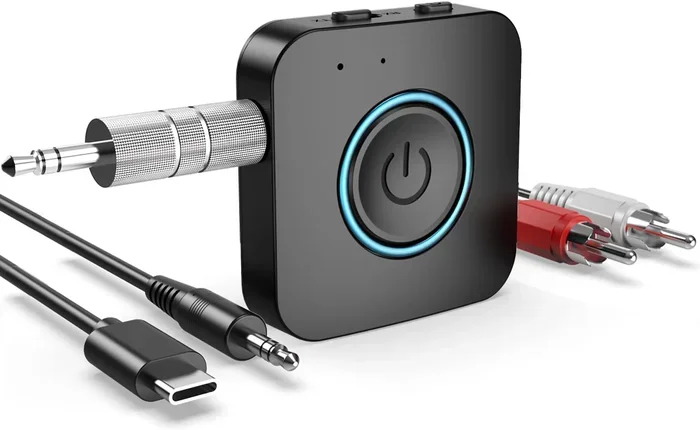
A Bluetooth receiver does the opposite. It picks up a Bluetooth signal from your phone, tablet, or laptop and converts it back into an audio signal that your wired device can play.
Think of the receiver as the listening end. It connects to your speaker or headphones using an AUX cable, RCA cable, or optical cable. Then it receives the Bluetooth signal and turns it into sound. Your wired device suddenly becomes wireless-capable without any expensive replacement.
Common devices that benefit from a receiver include:
- Older bookshelf speakers with only an AUX input
- Wired car audio systems
- Desktop speakers that lack Bluetooth
- Studio monitors or professional audio gear
If you have a great pair of wired headphones or a solid speaker setup, a receiver lets you keep them while adding Bluetooth connectivity. This saves you money and reduces e-waste.
When You Need A Bluetooth Transmitter
Knowing when a transmitter is the right choice is straightforward. You need one whenever your source device does not have Bluetooth and you want to send audio wirelessly to a Bluetooth-enabled output device.
Common Scenarios Where A Transmitter Helps
Here are the most common situations where a Bluetooth transmitter or receiver setup requires a transmitter specifically:
- Your TV has no Bluetooth. Many older or budget TVs still rely on wired audio output. A transmitter plugs into the TV’s audio port and sends sound to your Bluetooth headphones or wireless speaker. This is perfect for late-night watching without disturbing anyone.
- You want wireless gaming audio. If your PC or console does not support Bluetooth natively, a transmitter can send game audio to your wireless headphones. Just keep in mind that audio latency can affect your experience, so look for a transmitter with low-latency support.
- You want to stream from a non-Bluetooth audio source. Maybe you have a vintage turntable or a CD player. A transmitter lets you beam that audio to any Bluetooth speaker in the room.
Best Devices That Need A Transmitter
Not all devices need a transmitter. Here is a quick checklist of devices that typically benefit from one:
- CRT or older flat-screen TVs
- Desktop PCs without built-in Bluetooth
- Home theater receivers with no wireless support
- MP3 players or portable music players
- Tablets or laptops without Bluetooth capability
One thing to keep in mind is that Bluetooth transmitter for TV setups are extremely popular. Many people buy a small transmitter, plug it into their TV’s audio output, and pair it with their wireless headphones. It is one of the easiest and most affordable ways to add wireless audio to any television.
Also, if you want to use Bluetooth headphones for gaming on a device that does not support Bluetooth natively, a transmitter is your best friend. Just make sure you pick one that supports a low-latency codec to keep your audio in sync with what you see on screen.
When You Need A Bluetooth Receiver
A receiver is what you need when your output device (your speaker or headphones) lacks Bluetooth but your source device has it. The receiver bridges the gap between the two.
Common Scenarios Where A Receiver Helps
Here are the most common situations where a receiver makes sense:
- You have great wired speakers but no Bluetooth. Maybe you invested in a quality pair of bookshelf speakers or a stereo system. A receiver lets you stream music from your phone to those speakers without buying a whole new setup.
- Your car stereo does not have Bluetooth. Instead of replacing your entire car audio system, you can plug a receiver into your auxiliary input. This gives you wireless streaming from your phone. If you are looking for a car-specific solution, check out whether Can I Upgrade My Car Stereo To Bluetooth for more options.
- You want to use wired headphones with a phone. Some people prefer the sound quality of wired headphones but still want the convenience of Bluetooth streaming from their device. A receiver connects to the headphones and picks up the Bluetooth signal.
- You need to connect a non-Bluetooth speaker to a smart home setup. If you use Alexa or Google Home but your speaker is wired, a receiver can make that connection seamless.
Best Devices That Need A Receiver
Here is a list of devices that commonly use a receiver to gain Bluetooth capability:
- Wired bookshelf speakers
- Car stereos with AUX input
- Desktop speakers without wireless support
- Wired over-ear headphones
- Home theater systems with analog inputs
If you have a pair of reliable wired speakers, there is no need to throw them away. A simple receiver can breathe new life into them. You can even turn regular wired speakers into a wireless speaker setup for a fraction of the cost of buying new wireless ones. Check out our guide on Can I Turn Regular Speakers Into Bluetooth for more tips on this.
Bluetooth Transmitter Vs Receiver: Key Differences
Now that you understand what each device does, let us put them side by side. This comparison makes it even easier to decide which one you need.
| Feature | Bluetooth Transmitter | Bluetooth Receiver |
|---|---|---|
| Primary Function | Sends audio wirelessly from a source device | Receives wireless audio and feeds it to a wired device |
| Plugs Into | Source device (TV, PC, player) | Output device (speaker, headphones, stereo) |
| Connection Type | Audio output (3.5mm, optical, RCA) | Audio input (AUX, RCA, optical) |
| Direction of Signal | Outgoing | Incoming |
| Typical Use Case | Wireless headphones from a TV | Wireless streaming to wired speakers |
| Common Devices | Older TVs, desktops, gaming consoles | Wired speakers, car stereos, headphones |
| Key Feature to Look For | Low latency, multipoint pairing | Codec support, battery life |
The simplest way to remember the difference is this: transmitter sends, receiver gets. If you want to send audio from a device that has no Bluetooth, get a transmitter. If you want to receive Bluetooth audio on a device that has no Bluetooth, get a receiver.
Some devices can do both. These are called transmitter-receiver combos or dual-mode devices. They give you flexibility, but they often cost more. If you only need one function, buying a dedicated device is usually the better value.
How To Choose The Right Bluetooth Device For Your Needs
Not all transmitters and receivers are created equal. There are several features you should compare before making a purchase. Here is what matters most.
Features To Look For
When shopping for a Bluetooth transmitter or receiver, pay attention to these key features:
- Bluetooth version: Look for Bluetooth 5.0 or newer. Newer versions offer better range, lower power consumption, and improved stability. Bluetooth low energy versions help preserve battery life in portable devices.
- Codec support: Codecs like aptX, aptX HD, LDAC, and AAC affect audio quality. If you care about sound fidelity, choose a device that supports high-quality codecs. Bluetooth aptX is a popular choice for balanced quality and range.
- Range: Most devices offer a range of 30 to 100 feet. If you plan to move around your home freely, go for a longer range.
- Latency: This is the delay between the audio source and what you hear. Lower latency is crucial for gaming and video watching. Look for devices that advertise low-latency or aptX Low Latency support.
- Multipoint pairing: This lets you connect to two source devices at once. It is a handy feature if you switch between your TV and phone frequently.
- Battery life (for receivers): If you buy a wireless receiver, battery life matters. Some last 8 to 10 hours on a single charge, while others go longer.
Budget Considerations
You do not need to spend a fortune to get a good Bluetooth adapter or transmitter. Basic models start around $15 to $30 and handle everyday tasks well. Mid-range options between $30 and $70 offer better codecs, lower latency, and longer range.
Premium models above $70 are worth it if you are an audiophile or need professional-grade audio streaming. They often support the latest codecs and deliver the best sound quality. But for most casual users, a mid-range device hits the sweet spot between price and performance.
Keep in mind that Bluetooth connectivity has improved a lot over the years. Even budget-friendly options today sound much better than what was available just a few years ago. You can find reliable devices without breaking the bank.
Setting Up Your Bluetooth Transmitter Or Receiver
The good news is that setting up either device is usually very simple. Most products follow a similar plug-and-play process. Here is a general walkthrough.
Pairing Tips For The Best Connection
- Plug in the device. Connect your transmitter or receiver to the appropriate port on your source or output device. Use the right cable for the job — a 3.5mm cable, an RCA cable, or an optical cable depending on your ports.
- Power it on. Many transmitters and receivers need a USB power source. Plug the USB cable into a wall adapter or a USB port on your TV or computer.
- Put your Bluetooth device in pairing mode. On your headphones, speaker, or car stereo, activate pairing mode. This is usually done by holding down the Bluetooth button for a few seconds.
- Select the device from your source. On the transmitter or receiver, navigate the Bluetooth menu and select your audio device from the list of available devices.
- Confirm the connection. Once paired, you should hear audio flowing through your Bluetooth device. Test it by playing music or a video.
If you run into issues, try these quick fixes:
- Make sure both devices are within range (ideally within 30 feet)
- Turn Bluetooth off and back on
- Remove the device from the paired list and re-pair
- Check for firmware updates on your transmitter or receiver
For more tips on using Bluetooth devices in different scenarios, check out Can I Use Bluetooth Headphones For Gaming and Can I Use A Smart Speaker In My Car for setup ideas in specific environments.
Troubleshooting Common Issues
Even with a simple setup, you might encounter a few hiccups. Here are the most common problems and how to fix them:
- No sound: Check that the audio cable is firmly connected. Also make sure the source device is not muted and the volume is turned up.
- Audio delay or lag: This is usually a latency issue. Switch to a codec that supports low latency, like aptX Low Latency, if your device supports it.
- Intermittent connection: Move closer to the source device. Walls, furniture, and other electronics can weaken the Bluetooth range.
- Device will not pair: Delete the pairing history on both devices and try again. Also make sure the firmware is up to date.
Most of these issues are easy to resolve and do not require any technical expertise. A little patience and these simple steps will get you back to enjoying wireless audio in no time.
Final Thoughts On Bluetooth Transmitter Or Receiver
Choosing between a Bluetooth transmitter or receiver comes down to one simple question: are you sending audio or receiving it?
If your source device lacks Bluetooth and you want to beam sound to wireless headphones or speakers, you need a transmitter. If your speaker or headphones lack Bluetooth and you want to stream wirelessly from your phone or tablet, you need a receiver.
Both devices are affordable, easy to set up, and incredibly useful. They extend the life of your existing gear and let you enjoy wireless audio streaming without spending hundreds of dollars on new equipment.
Take a moment to assess your setup. Identify which device in your chain is missing Bluetooth. Then pick the right transmitter or receiver based on the features that matter most to you. With the right choice, you will be listening to wireless audio in minutes.
Whether you are upgrading your home entertainment, improving your car audio, or simply cutting the cord on your desk setup, a Bluetooth transmitter or receiver is one of the most practical and cost-effective upgrades you can make.
Frequently Asked Questions
Can I Use A Bluetooth Transmitter And Receiver At The Same Time?
Yes, you can use both devices together. The transmitter sends audio from a source device, and the receiver picks it up on the output end. This is common in setups where both the source and the output device lack Bluetooth. You simply pair the transmitter with the receiver, and the audio flows wirelessly between them.
Is A Bluetooth Transmitter Or Receiver Better For Gaming?
A transmitter is usually better for gaming because it sends audio from your PC or console to wireless headphones. Look for a transmitter with low-latency support to keep your audio in sync with gameplay. Some receivers can also work for gaming if you want to send audio to a wired speaker setup, but transmitters are the more common choice for gamers.
Do All Bluetooth Transmitters Support aptX?
No, not all transmitters support aptX. Budget models may only support basic SBC codecs, which offer lower audio quality. If sound quality matters to you, look for a transmitter that supports aptX, aptX HD, or LDAC. These codecs deliver much better audio fidelity and are well worth the extra cost.
Can I Use A Bluetooth Receiver With My Car Stereo?
Absolutely. A Bluetooth receiver plugs into your car’s AUX input or RCA ports and lets you stream music wirelessly from your phone. This is a great way to add Bluetooth to an older car without replacing the stereo system. Just make sure the receiver you buy has a cable length that reaches from your dashboard to your phone’s location.
How Far Can A Bluetooth Transmitter Reach?
Most Bluetooth transmitters have a range of 30 to 100 feet, depending on the Bluetooth version and environmental factors. Bluetooth 5.0 offers the longest range and best stability. Walls, furniture, and other electronics can reduce the effective range, so keep your source and output devices within a clear line of sight when possible.
Do I Need Any Special Cables To Set Up A Transmitter Or Receiver?
It depends on your devices. Most transmitters and receivers come with a 3.5mm audio cable, but you may also need an RCA cable, an optical cable, or a USB cable depending on your setup. Check the ports on your source and output devices before purchasing, and buy any additional cables you need separately.
=== CONCLUSION ===
Understanding whether you need a Bluetooth transmitter or receiver is the first step to upgrading your audio setup without spending a fortune. A transmitter sends audio from non-Bluetooth source devices to wireless outputs, while a receiver pulls Bluetooth audio into wired devices that lack wireless capability.
Both devices are simple to set up, affordable, and incredibly practical. They let you keep your existing gear while adding the convenience of wireless audio. Whether you are looking to wirelessly listen to your TV through headphones, stream music to your old speakers, or upgrade your car audio, the right Bluetooth device makes all the difference.
Take a close look at your setup, identify the gap in Bluetooth support, and choose the device that fills it. With the right Bluetooth transmitter or receiver, you will enjoy seamless wireless audio in no time.