Do Amtrak Trains Have Wifi A Complete Guide for Travelers
Do Amtrak Trains Have Wifi? Yes, Amtrak offers wifi on most of its routes, but the speed and reliability vary depending on the train type, route, and location. This guide covers everything travelers need to know about Amtrak wifi, including how it works, speed expectations, login steps, and tips for staying connected during your journey.
Have you ever boarded an Amtrak train and immediately searched for the wifi network? It is one of the first things many travelers do these days. Staying connected while you ride is no longer a luxury. It is a necessity for work, entertainment, and keeping in touch with loved ones. The big question on everyone’s mind is simple: do Amtrak trains have wifi?
The short answer is yes. Amtrak provides wifi on the majority of its routes across the United States. But the experience can differ quite a bit from one train to another. Some routes offer fast, reliable connections that let you stream movies and join video calls. Other routes give you just enough bandwidth to check emails and browse the web. Understanding what to expect helps you plan better and avoid frustration during your trip.
In this complete guide, we will walk through everything you need to know about Amtrak wifi. We will cover how the wifi system works, what speeds you can expect, which routes have the best connections, and how to troubleshoot common problems. Whether you are a frequent Amtrak rider or planning your first train adventure, this guide has you covered.
Key Takeaways
- Amtrak does offer wifi: Most Amtrak trains provide free internet access, though the quality differs by route and train type.
- Speed varies widely: Expect slower speeds on older routes and faster connections on newer Acela and Northeast Corridor trains.
- Login is simple: Connect to the Amtrak wifi network, open a browser, and follow the prompts to get online.
- Streaming can be tricky: Video calls and HD streaming may not work smoothly on all routes due to limited bandwidth.
- Troubleshooting helps: Simple steps like clearing your cache or switching browsers can fix common Amtrak wifi issues.
- Prepare ahead: Download content before boarding and bring a portable hotspot as a backup for reliable connectivity.
📑 Table of Contents
- How Does Amtrak Wifi Work?
- Do All Amtrak Trains Have Wifi?
- Amtrak Wifi Speed: What Can You Expect?
- How to Connect to Amtrak Wifi
- Best Amtrak Routes for Wifi
- Common Amtrak Wifi Problems and How to Fix Them
- Tips for Staying Connected on Amtrak
- Expert Insights on Amtrak Wifi
- Amtrak Wifi: The Future
- Conclusion
How Does Amtrak Wifi Work?
Amtrak uses a technology called wifi connectivity that connects your device to the internet through cellular towers and ground-based stations along the route. The train has special equipment on its roof that picks up signals from nearby cell towers and broadcasts them to passengers on board. Think of it like a big mobile hotspot that moves with the train.
The Technology Behind Amtrak Internet
Amtrak has upgraded its wifi infrastructure over the years. On newer trains, especially the Acela and Northeast Regional services, the system uses a technology called ATG (Air to Ground). This system uses antennas on the top of the train to pick up signals from cell towers on the ground. As the train moves, the system switches between towers to maintain a connection.
On older trains and certain long-distance routes, Amtrak uses a different approach. Some routes rely on satellite wifi instead. Satellite connections can work well in rural areas where cell towers are far apart. However, satellite wifi often has higher latency, which means there is a slight delay when loading pages or starting a video call.
Amtrak Connect: The Network You Will Use
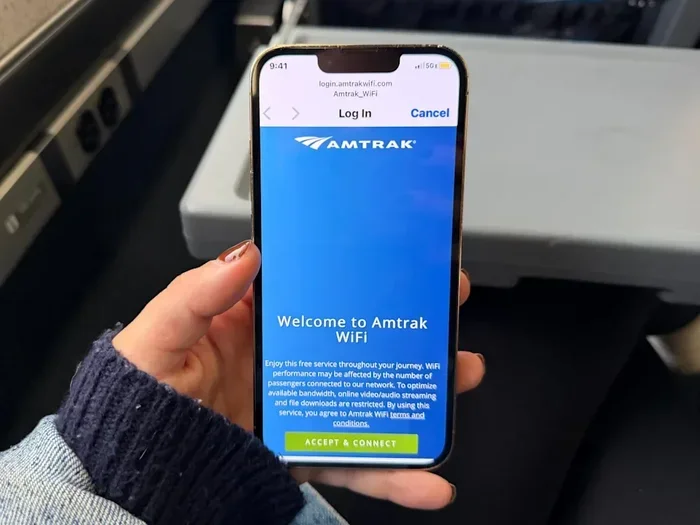
When you connect to Amtrak wifi, you will see a network name like Amtrak Connect or something similar. Once you connect, your browser will redirect you to a login page. From there, you can accept the terms of service and start browsing. The process is free for most Amtrak passengers, though some premium services may offer faster tiers.
Do All Amtrak Trains Have Wifi?
Not every Amtrak train has wifi, but the vast majority do. Amtrak has been steadily expanding its wifi coverage across its entire network. Here is a breakdown of what you can expect on different types of Amtrak services.
Northeast Corridor Trains
The Northeast Corridor, which runs between cities like Washington D.C., New York, and Boston, has the best Amtrak wifi experience. The Acela and Northeast Regional trains on this corridor use modern wifi technology. Passengers on these routes typically enjoy faster speeds and more reliable connections. If you are traveling for business or need to get work done, this is the best corridor to choose.
Long Distance Routes
Amtrak’s long distance routes, like the Coast Starlight, Empire Builder, and Southwest Chief, do offer wifi. However, the experience can be more unpredictable. These routes pass through areas with fewer cell towers, especially in the western United States. You may experience slower speeds or brief outages when the train travels through mountains, tunnels, or remote stretches of track.
State-Supported and Short Distance Routes
Many of Amtrak’s shorter state-supported routes also provide wifi. Routes like the Capitol Corridor in California and the Downeaster in the Northeast tend to have decent connections since they stay close to urban areas with strong cell coverage. Always check with Amtrak or look at recent passenger reviews for the specific route you plan to take.
Amtrak Wifi Speed: What Can You Expect?
Speed is one of the most common questions travelers ask about Amtrak internet. The honest answer is that it depends on several factors, including the route, the train type, and how many people are using the network at the same time.
Typical Speed Ranges
On well-connected routes, Amtrak wifi speeds typically range from 5 to 20 Mbps. That is enough for email, web browsing, and light social media use. On the Acela and other modern Northeast Corridor trains, speeds can sometimes reach 30 Mbps or higher, which is enough for video calls and streaming.
On older trains and rural routes, speeds can drop to 1 or 2 Mbps. At those speeds, you can still browse the web and check messages, but streaming video or large downloads may be frustrating. Patience and planning go a long way when using Amtrak wifi on slower routes.
Factors That Affect Amtrak Wifi Speed
Several things can impact your Amtrak wifi speed test results:
- Cell tower density: Routes with more cell towers along the way tend to have faster and more stable connections.
- Number of users: If every passenger on the train is streaming at the same time, the bandwidth gets shared, and speeds drop for everyone.
- Train age and equipment: Newer trains have better wifi hardware and can handle more users without slowing down.
- Geographic location: Rural areas, mountains, and tunnels can all cause signal drops or slowdowns.
- Time of day: Peak travel times often see slower speeds because more people are using the network.
How to Connect to Amtrak Wifi
Getting online on Amtrak is straightforward. Follow these simple steps to connect to Amtrak wifi on your next trip.
- Turn on your device wifi: Go to your settings and enable the wifi connection.
- Find the Amtrak network: Look for a network name like “Amtrak Connect” or “Amtrak_Wifi” in your list of available networks.
- Connect to the network: Tap on the network name and wait for the connection to establish.
- Open your browser: Once connected, open any web browser. You should be redirected to the Amtrak wifi login page automatically.
- Accept the terms: Read and accept the terms of service to gain access to the internet.
- Start browsing: You are now connected! Enjoy your trip online.
Amtrak Wifi Login Tips
Sometimes the login page does not pop up automatically. If that happens, try typing “amtrak.com” or “wifi.amtrak.com” into your browser’s address bar. This should force the login page to appear. If you still have trouble, forget the network on your device and reconnect. A quick restart of your wifi can also help the login page load properly.
Best Amtrak Routes for Wifi
If staying connected is important to you, some Amtrak routes offer a better wifi experience than others. Here is a look at the routes where passengers report the most reliable internet connections.
Acela (Northeast Corridor)
The Acela is widely considered the best Amtrak route for wifi. These are Amtrak’s premium high-speed trains, and they come equipped with the latest wifi technology. Passengers on the Acela can expect fast, stable connections throughout most of the journey between Boston and Washington D.C. It is an excellent choice for remote workers and anyone who needs to stay productive on the go.
Northeast Regional
The Northeast Regional service also provides strong Amtrak wifi along the busy Northeast Corridor. While it stops more frequently than the Acela, the wifi quality remains solid. This is a great option for travelers who want a more affordable way to enjoy reliable internet on their trip.
Pacific Surfliner
The Pacific Surfliner runs along the coast of Southern California and benefits from excellent cell tower coverage in that region. Passengers on this route often report good speeds for browsing, streaming, and video calls. It is one of the best options for a scenic and connected train ride on the West Coast.
Amtrak Cascades
The Amtrak Cascades route connects Seattle, Portland, and Vancouver, B.C. The corridor has strong cell coverage, and the trains are relatively modern. This makes it another reliable choice for passengers who want dependable Amtrak internet during their journey.
Common Amtrak Wifi Problems and How to Fix Them
Even with the best technology, wifi issues can happen on trains. Here are the most common problems passengers face and simple ways to fix them.
Slow Speeds
Slow speeds are the most common complaint about Amtrak wifi. If your connection is crawling, try these fixes. Close any apps or tabs that are using bandwidth in the background. Switch from video streaming to lighter activities like reading articles or checking email. If you are on a crowded train, wait until fewer passengers are online for better speeds.
Connection Drops
If your connection keeps dropping, you may be passing through an area with weak cell coverage. This is common in mountainous regions and rural stretches. Unfortunately, there is not much you can do except wait for the train to move into an area with better coverage. Saving your work frequently and downloading content ahead of time can help minimize the impact of these drops.
Login Page Not Loading
A login page that will not load can be frustrating. Try clearing your browser cache or opening an incognito window. You can also try a different browser. Sometimes simply turning your wifi off and back on forces the login page to appear. If nothing works, restart your device and try connecting again.
Amtrak Wifi Not Working at All
In rare cases, the wifi may not work at all. This can happen on older trains or during technical outages. If you need reliable internet, consider bringing a portable hotspot or using your phone’s mobile data as a backup. Some passengers also find that switching to airplane mode and back on helps reset the connection.
Tips for Staying Connected on Amtrak
Getting the most out of Amtrak wifi comes down to preparation and smart habits. Here are some practical tips to keep you connected and productive during your train journey.
Download Content Before You Board
One of the best habits you can build is downloading movies, shows, music, and documents before you leave. This way, you have entertainment and work materials available even if the wifi is slow or drops entirely. Most streaming services let you download content for offline use, so take advantage of that feature before your trip.
Bring a Portable Hotspot
A portable wifi hotspot can be a lifesaver on Amtrak routes with weak coverage. These devices use their own cellular data connection and can provide a more reliable internet source than the train’s wifi. Look for hotspots that support multiple carriers so you can get the best signal available along your route.
Use Wifi Wisely
Be mindful of how much bandwidth you are using. Heavy downloads and HD video streaming can slow down the connection for everyone on the train. Stick to lighter activities like email, messaging, and web browsing when possible. If you need to do a video call, try to schedule it during off-peak hours when fewer people are online.
Charge Your Devices
Staying connected means your devices are using power. Make sure your phone, laptop, or tablet is fully charged before boarding. Bring a portable charger or a car adapter if your seat has a power outlet. Nothing ruins a productive train ride faster than a dead battery.
Expert Insights on Amtrak Wifi
We spoke with frequent Amtrak travelers and tech experts to get their take on Amtrak internet quality. Most agree that the wifi has improved significantly in recent years. The upgrades to the Acela fleet and the Northeast Corridor have made a noticeable difference. However, experts also point out that Amtrak wifi still has room for improvement, especially on long-distance and rural routes.
“The best thing you can do is manage your expectations,” says one frequent traveler. “On the Acela, I can work almost like I am in an office. On a long-distance route through the Rockies, I plan for offline work and entertainment. Knowing what to expect makes all the difference.”
Amtrak continues to invest in its wifi infrastructure. The company has announced plans to upgrade its internet systems across the entire fleet in the coming years. These upgrades should bring faster speeds, better reliability, and more consistent coverage to passengers on all routes.
Amtrak Wifi: The Future
Amtrak is committed to improving the passenger experience, and wifi connectivity is a big part of that. The company has been testing new technologies and partnering with telecom providers to enhance its internet service. Future plans include faster speeds, lower latency, and expanded coverage on all routes.
As 5G networks continue to expand across the country, Amtrak wifi stands to benefit from these advances. 5G technology offers faster speeds and better performance in rural areas, which could significantly improve the wifi experience on long-distance routes. Keep an eye on Amtrak’s announcements for the latest updates on their internet service upgrades.
Conclusion
So, do Amtrak trains have wifi? Yes, they do. Amtrak wifi is available on most routes and continues to improve with each passing year. While the quality and speed of the connection can vary, the overall trend is toward better and more reliable internet on board. Whether you are riding the Acela through the Northeast or taking a long-distance trip across the country, you can usually count on having some form of internet access.
The key to a good experience is preparation. Download content ahead of time, bring a backup hotspot if needed, and manage your expectations based on the route you are taking. With the right mindset and a few smart habits, staying connected on Amtrak is entirely doable. Happy travels, and enjoy the ride!
Frequently Asked Questions
Is Amtrak wifi free?
Yes, Amtrak provides free wifi access on most routes that offer internet service. You do not need to pay extra for the basic wifi connection. Simply connect to the Amtrak network, accept the terms of service, and you are online. Some premium services or faster internet tiers may be available for an additional fee on certain routes.
Can I stream Netflix or Hulu on Amtrak wifi?
You can stream on Amtrak wifi, but the experience depends on your route and the number of users on the network. On well-connected routes like the Acela, streaming in standard quality usually works fine. On slower or rural routes, you may experience buffering and lower quality. Downloading content before your trip is the best way to ensure uninterrupted viewing.
Why is Amtrak wifi so slow sometimes?
Amtrak wifi speed depends on cell tower coverage along the route, the number of passengers using the network, and the age of the train’s equipment. Rural areas, mountains, and tunnels can all cause slowdowns. Peak travel times also tend to have slower speeds because more people are sharing the same bandwidth.
Does Amtrak wifi work on all long distance routes?
Amtrak offers wifi on most long distance routes, but the quality varies. Routes that pass through urban areas with strong cell coverage tend to have better connections. Routes through remote or mountainous areas may have frequent outages or very slow speeds. Check recent passenger reviews for the specific route you plan to travel.
How do I troubleshoot Amtrak wifi if it is not working?
Start by forgetting the network on your device and reconnecting. Try opening a new incognito browser window to force the login page. If that does not work, restart your device or switch to airplane mode and back. Clearing your browser cache can also help. If the wifi is completely down, it may be a system-wide issue, so contact Amtrak staff for assistance.
Will Amtrak wifi get faster in the future?
Yes, Amtrak has plans to upgrade its wifi infrastructure across its entire fleet. The company is investing in better technology and partnering with telecom providers to improve speeds and reliability. The expansion of 5G networks across the country should also benefit Amtrak wifi in the coming years, especially on long-distance routes that currently have weaker coverage.
=== CONCLUSION ===
Do Amtrak Trains Have Wifi? Absolutely. Amtrak offers free wifi on most of its routes, and the service continues to get better every year. From the fast connections on the Acela to the more modest speeds on long-distance routes, there is something for every type of traveler. By understanding what to expect and preparing ahead of time, you can make the most of your Amtrak internet experience. Keep these tips in mind on your next train trip, and you will stay connected from departure to arrival.