Parallel Port vs Serial Port Key Differences Explained
The parallel port vs serial port debate matters for anyone working with older hardware or legacy devices. A parallel port sends multiple bits at once for faster data transfer, while a serial port transmits data one bit at a time over longer distances. Understanding these differences helps you choose the right connection for printers, modems, and other peripheral devices.
If you have ever looked at the back of an older computer, you might have noticed two very different types of ports sitting side by side. One is wide and has many pins. The other is small and compact. These are the parallel port and the serial port. They both serve the same basic purpose. They connect your computer to external devices. But they do it in completely different ways.
The difference between parallel port and serial port comes down to how data moves. A parallel port sends many bits of data at the same time. Think of it like a highway with multiple lanes. A serial port sends data one bit at a time. Think of it like a single-lane road. Each approach has its own strengths. Each also has its own weaknesses. Understanding these differences helps you make better decisions when working with older hardware or legacy equipment.
In this guide, we will break down everything you need to know. We will compare speeds, connectors, and real-world uses. By the end, you will understand exactly how these two communication interfaces differ. You will also know when each one makes sense. Let us dive in.
Key Takeaways
- Parallel ports transfer data faster: They send multiple bits simultaneously, making them ideal for printers and large file transfers.
- Serial ports excel at long-distance communication: Data travels one bit at a time, reducing signal loss over longer cables.
- Connectors differ significantly: Parallel ports use a 25-pin DB-25 connector, while serial ports use a 9-pin DB-9 connector.
- Both are legacy technologies now: USB and Ethernet have largely replaced both port types in modern computers.
- RS-232 and IEEE 1284 are the key standards: Serial ports follow RS-232, and parallel ports follow IEEE 1284 specifications.
- Baud rate and data transfer rate measure performance: Serial ports are measured in baud rate, while parallel ports use bytes per second.
- Legacy devices still need these ports: Industrial equipment, older printers, and serial peripherals may still require these interfaces today.
📑 Table of Contents
What Is a Parallel Port?
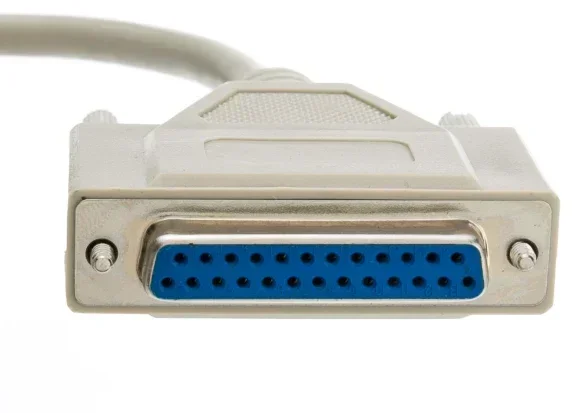
A parallel port is a type of hardware interface found on computers. It is also called an LPT port. The most common version is the IEEE 1284 standard. This port has 25 pins arranged in a large connector. It was designed primarily for printers. But it can connect other peripheral devices too.
How Does a Parallel Port Work?
A parallel port sends data in parallel. This means multiple bits travel at the same time. The port uses several data lines side by side. Each line carries one bit of information. A typical parallel port can send 8 bits at once. That is one byte per clock cycle. This makes it much faster than serial communication for short distances.
The data transfer rate of a parallel port depends on the standard. The original standard ran at about 150 kilobytes per second. Later versions pushed this higher. The IEEE 1284 standard supports speeds up to 2 megabytes per second in bi-directional mode. This means data can flow in both directions.
Common Uses for Parallel Ports
Parallel ports were everywhere in the 1990s and early 2000s. Here are the most common uses:
- Printers: This was the #1 use. Almost every printer used a parallel cable.
- Scanners: Flatbed scanners connected through parallel ports.
- External storage: Some zip drives and backup devices used parallel connections.
- Networking: Parallel ports could create simple network links between two PCs.
- Embedded systems: Engineers used parallel ports for custom hardware projects.
Today, parallel ports are rare. Most printers now use USB connection or wireless technology. But if you have an older printer or industrial machine, you may still need one.
What Is a Serial Port?
A serial port is another type of hardware interface. It is also known as a COM port. Serial ports follow the RS-232 standard. The connector is much smaller than a parallel port. The most common version is the DB-9 connector with 9 pins. Some older devices use a 25-pin DB-25 connector instead.
How Does a Serial Port Work?
A serial port sends data one bit at a time. It uses a single data line. Each bit follows the previous one in sequence. This is called serial communication. Because data travels one bit at a time, it might seem slow. But serial ports have advantages that parallel ports do not.
The speed of a serial port is measured in baud rate. Baud rate tells you how many signal changes happen per second. Common baud rates include 9600, 19200, 38400, 57600, and 115200. A higher baud rate means faster data transfer. But serial ports are generally slower than parallel ports for bulk data.
Common Uses for Serial Ports
Serial ports have many uses, even today. Here are some of the most common ones:
- Modems: Dial-up internet connections relied on serial ports.
- Industrial equipment: Sensors, controllers, and PLCs often use serial connections.
- GPS devices: Many GPS receivers connect through serial ports.
- Medical devices: Some medical instruments use serial communication.
- Networking equipment: Routers and switches often have serial console ports.
- Arduino and embedded systems: Hobbyists use serial ports for programming microcontrollers.
Serial ports are still relevant because they work well over long cable lengths. A parallel port cable should be no longer than 15 feet. A serial port cable can run up to 50 feet or more without signal degradation. This makes serial ports ideal for industrial and remote setups.
Parallel Port vs Serial Port: Speed and Data Transfer
This is where the difference between parallel port and serial port becomes most obvious. Speed is a major factor when choosing between these two interfaces.
Parallel Port Speed
A parallel port sends multiple bits at once. This gives it a clear speed advantage for short distances. The IEEE 1284 standard supports up to 2 megabytes per second. That is about 16 megabits per second. For printing documents and sending large files, this was more than enough.
However, parallel ports have a problem called signal timing issues. When data travels on multiple lines at once, the lines must stay perfectly synchronized. At longer distances, the signals start to drift. This causes errors. The result is that parallel ports only work well over short cable runs.
Serial Port Speed
A serial port sends data one bit at a time. Its maximum speed is lower than a parallel port. Most RS-232 serial ports top out at 115,200 bits per second. That is about 14 kilobytes per second. This is much slower than a parallel port.
But serial ports compensate in other ways. The signal stays clean over longer distances. There are fewer timing issues. And the simple design makes serial communication very reliable. For devices that do not need huge amounts of data fast, serial ports are perfect.
Speed Comparison Table
| Feature | Parallel Port | Serial Port |
|---|---|---|
| Data Transfer Rate | Up to 2 MB/s (IEEE 1284) | Up to 115.2 kbps (RS-232) |
| Bits at Once | 8 bits (1 byte) | 1 bit |
| Max Cable Length | About 15 feet | Up to 50 feet |
| Signal Integrity | Degrades with distance | Stays stable over distance |
| Direction | Bi-directional (IEEE 1284) | Full duplex possible |
| Error Rate | Higher over long distances | Lower overall |
As you can see, the parallel port vs serial port speed comparison depends on what you need. Fast short-range transfers favor parallel. Reliable long-range transfers favor serial.
Connectors and Physical Differences
The physical appearance of these ports tells you a lot. You can usually tell them apart just by looking at the back of your computer.
Parallel Port Connector
A parallel port connector is large and wide. The standard is a DB-25 connector with 25 pins. It is about 1 inch tall and 0.7 inches wide. The connector is usually colored pink or purple on older computers. Some manufacturers used blue for bi-directional parallel ports.
The pin layout is complex. Pins handle data, status signals, and control signals. Pin 1 carries a strobe signal. Pins 2 through 9 carry the actual data bits. Other pins manage handshaking and error checking. This complexity allows parallel ports to be fast and reliable at short range.
Serial Port Connector
A serial port connector is much smaller. The standard is a DB-9 connector with 9 pins. It is compact and easy to spot. On older equipment, you might find a DB-25 serial connector instead. The pin functions are simpler than a parallel port.
Pin 1 is the Data Carrier Detect signal. Pin 2 receives data (RXD). Pin 3 sends data (TXD). Pin 5 is the ground reference. The remaining pins handle flow control and other signals. This simpler design makes serial ports easy to implement and troubleshoot.
Quick Tips: Identifying Your Ports
- Look for the color: Pink or purple ports are usually parallel. Green or dark ports are often serial.
- Check the size: A wide 25-pin connector is parallel. A small 9-pin connector is serial.
- Check the label: Some motherboards label ports as LPT or COM.
- Use Device Manager: On Windows, check under Ports (COM & LPT) for confirmation.
Common Uses and Real-World Applications
Both ports found homes in different niches. Let us explore where each one shines in the real world.
When to Use a Parallel Port
Parallel ports are best for devices that need speed over short distances. Here are the top scenarios:
- Connecting printers: If you have an old printer without USB, a parallel cable is your best bet.
- Zip drives and backup devices: These removable storage devices often used parallel connections.
- Legacy scanners: Older flatbed scanners typically had parallel port cables.
- Embedded development: Some engineers still use parallel ports for custom hardware projects.
The key advantage is throughput. When you need to move a large file quickly to a nearby device, parallel wins.
When to Use a Serial Port
Serial ports excel in situations requiring reliability and distance. Here are the best use cases:
- Industrial automation: Sensors and controllers in factory settings use serial connections.
- GPS navigation: Marine and outdoor GPS devices often connect via serial ports.
- Network equipment management: Routers and switches use serial console ports for configuration.
- Medical instruments: Many medical devices rely on serial communication for accuracy.
- Microcontroller programming: Arduino and similar boards use serial connections for firmware uploads.
The key advantage is reliability. Serial connections hold up well over distance and in electrically noisy environments.
Legacy Ports in the Modern World
You might wonder why we still talk about these ports. After all, USB has been around for decades now. Ethernet is standard on every computer. So why do parallel and serial ports matter?
The Rise of USB and Ethernet
USB changed everything. It offered speeds that dwarfed both parallel and serial ports. USB 2.0 can transfer data at 480 megabits per second. That is thousands of times faster than a parallel port. USB 3.0 goes even higher. Ethernet provides network speeds of 1 gigabit per second or more.
Because of these newer technologies, most computers dropped parallel and serial ports by the mid-2000s. Today, very few new computers include them. This makes them true legacy ports.
Why Legacy Ports Still Matter
Despite being outdated, these ports are not useless. Here is why they still matter:
- Industrial equipment: Many factory machines still use serial connections. Replacing them is expensive.
- Older printers: Schools, libraries, and small offices may still have parallel-only printers.
- Specialized hardware: Some scientific and medical devices only support serial or parallel interfaces.
- Hobbyist projects: Electronics enthusiasts use Arduino boards and other microcontrollers that rely on serial communication.
- Network management: IT professionals still use serial console ports for router and switch configuration.
If you encounter a device that only has a parallel or serial port, do not panic. You can buy USB-to-parallel or USB-to-serial adapters. These adapters bridge the gap between old and new technology. They are affordable and widely available.
Common Mistakes to Avoid
Here are some mistakes people make when working with legacy ports:
- Using cables that are too long: Parallel cables over 15 feet often cause errors. Keep them short.
- Mixing up DB-9 and DB-25: Not all serial connectors are the same. Make sure your cable matches the port.
- Ignoring handshaking signals: Proper handshaking prevents data loss. Make sure your cable supports it.
- Using outdated drivers: If you use an adapter, install the latest drivers for best performance.
- Assuming all parallel ports are the same: Some are bi-directional and some are not. Check your port capabilities.
Expert Insights: The Future of Legacy Ports
Industry experts agree that parallel and serial ports will continue to fade. USB and wireless technology will replace them completely. However, the transition takes time. Many industries move slowly when it comes to replacing reliable equipment. If you work with legacy devices, learning about these ports is still valuable. It gives you the skills to troubleshoot and maintain older systems. It also helps you understand the foundations of modern data transfer technology.
The difference between parallel port and serial port teaches us an important lesson about interface design. Speed, distance, reliability, and cost all play a role. Engineers must balance these factors when choosing a connection type. Even today, these same principles guide decisions about USB, Ethernet, and wireless protocols.
Key Takeaways
- Parallel ports send data faster over short distances: They use multiple data lines to transfer bytes at once. This makes them great for printers and nearby devices.
- Serial ports are more reliable over long distances: They send data one bit at a time, which reduces signal errors and timing issues.
- The connectors look very different: Parallel ports use a large DB-25 connector. Serial ports use a smaller DB-9 connector.
- Speed and distance trade off: Parallel is fast but limited in range. Serial is slower but works over longer cables.
- Both are legacy technologies today: USB and Ethernet have replaced them in most consumer devices. But they still appear in industrial and specialized equipment.
- Adapters can help bridge the gap: USB-to-parallel and USB-to-serial adapters let you connect old devices to modern computers.
- Understanding these ports builds foundational knowledge: The principles behind parallel and serial communication apply to many modern interfaces too.
Conclusion
The parallel port vs serial port comparison shows us two very different approaches to data transfer. A parallel port pushes many bits at once for speed. It works best over short cable runs. A serial port sends data one bit at a time. It shines when reliability and distance matter more than raw speed.
Both interfaces shaped the technology world for decades. Parallel ports connected millions of printers. Serial ports linked modems, industrial machines, and embedded devices. Even though USB and Ethernet have taken over, these legacy ports still play important roles. They appear in factories, hospitals, labs, and hobbyist workshops around the world.
If you ever need to connect an older device, knowing the difference between these ports saves time and frustration. You will know which cable to buy. You will understand why a connection might fail. And you will be better equipped to solve problems when they arise.
Take what you have learned here and apply it. Whether you are setting up a legacy printer, troubleshooting industrial equipment, or just curious about how computers connect to devices, the difference between parallel port and serial port is foundational knowledge. It is simple to understand once you see the big picture. And it remains useful even in our modern world of wireless and high-speed USB connections.
Frequently Asked Questions
Can I still buy a computer with a parallel or serial port?
Most new computers no longer include these ports. However, some industrial and specialized computers still offer them. You can also add them through expansion cards or USB adapters. These adapters are affordable and widely available online.
What is the main difference between a parallel port and a serial port?
A parallel port sends multiple bits of data at the same time over several wires. A serial port sends data one bit at a time over a single wire. This makes parallel ports faster for short distances and serial ports more reliable over longer distances.
Are parallel ports faster than serial ports?
Yes, for short cable runs. A parallel port can transfer data at up to 2 megabytes per second. A serial port typically maxes out around 115 kilobits per second. But parallel ports lose their speed advantage over longer cables due to signal timing issues.
What does RS-232 stand for in relation to serial ports?
RS-232 is the standard that defines serial port communication. It specifies voltage levels, connector types, and signal timing. RS-232 serial ports are still used in industrial equipment, networking gear, and embedded systems today.
Do USB adapters work well for parallel and serial devices?
Yes, USB-to-parallel and USB-to-serial adapters work well for most legacy devices. They are easy to use and affordable. Just make sure to install the correct drivers for your adapter. Some very old or specialized devices may not work perfectly with adapters.
Why did computers stop including parallel and serial ports?
USB and Ethernet offered faster speeds, smaller connectors, and more versatility. Manufacturers dropped legacy ports to make computers thinner and simpler. Most devices that used parallel or serial ports now have USB or wireless alternatives available.