Can You Watch Television On A Projector Screen Today
Yes, you can absolutely watch television on a projector screen. A projector transforms any room into a cinematic viewing space, letting you enjoy your favorite shows and movies on a big screen. You will need the right cables, a compatible projector, and a few simple setup steps. This guide covers everything from equipment choices to troubleshooting common issues.
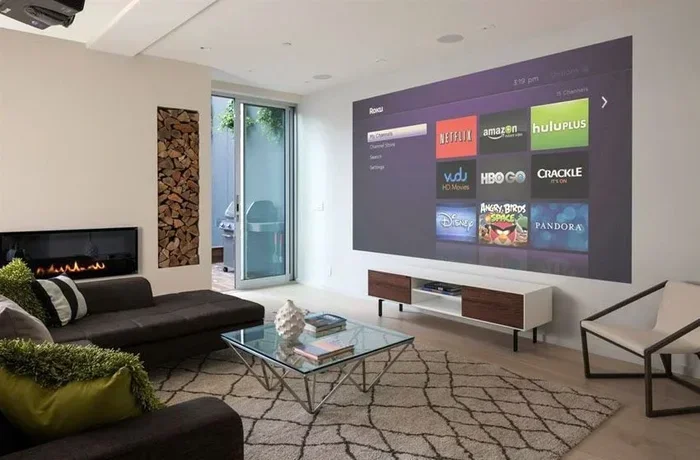
Have you ever thought about turning your living room into a home theater? Watching television on a projector screen is one of the best upgrades you can make to your entertainment setup. It gives you a big picture experience that makes you feel like you are sitting in a movie theater right from your couch.
The idea of using a projector for TV might sound complicated, but it is actually quite simple. Whether you want to watch your favorite cable shows, stream content, or even play games on a giant screen, a projector can do it all. In this guide, we will walk you through everything you need to know about watching TV on a projector. You will learn about equipment, setup steps, and tips to get the best picture quality every time.
Many people are switching from traditional TVs to projectors, and for good reason. A projector screen can be 100 inches or more, while even the largest TVs rarely exceed 85 inches. That extra screen size makes a huge difference in how you experience content. Let us dive into the details and help you get started.
Key Takeaways
- Projectors work great for TV watching: They deliver a large, immersive screen experience that standard TVs cannot match.
- Multiple connection options exist: HDMI, VGA, and wireless streaming let you connect almost any device to a projector.
- Brightness and resolution matter: Choosing the right projector specs ensures a clear picture even in rooms with some light.
- Setup is simple: Most people can set up a projector TV system in under 30 minutes with basic equipment.
- Sound quality can be enhanced: External speakers or soundbars improve the audio experience significantly.
- Streaming devices add versatility: Devices like Fire Sticks and Chromecast make watching TV on a projector effortless.
📑 Table of Contents
- Why Watch Television on a Projector Screen?
- Types of Projectors for Watching TV
- What You Need to Watch TV on a Projector
- How to Set Up Your Projector for TV Watching
- Tips for Getting the Best Picture Quality
- Common Mistakes to Avoid
- Can You Use a Streaming Device with a Projector?
- Projector vs TV for Watching Television
- Final Thoughts
Why Watch Television on a Projector Screen?
There are many reasons why people choose a projector over a traditional TV. The biggest advantage is the screen size. A projector can display images well over 100 inches diagonally, which is far larger than any consumer TV you can buy today.
Here are some of the top benefits of using a projector for television:
- Bigger screen size: Projectors can create images between 80 and 150 inches, giving you a truly cinematic experience.
- Cost efficiency: Large projector screens are often cheaper than buying a big-screen TV of the same size.
- Flexibility: You can move a projector to different rooms or even set it up outdoors for movie nights.
- Eye comfort: Projectors use reflected light, which is easier on the eyes than the direct light emitted by TVs.
- Space saving: A projector takes up less room than a large TV, especially if you mount it on the ceiling.
If you have ever wondered whether a projector can replace your TV, the answer is yes. Many people use their projectors as their primary television and never look back. For more details on using a projector as a TV, check out our guide on Can I Use A Projector As A Tv.
Types of Projectors for Watching TV
Not all projectors are created equal. Different types of projectors serve different needs, and choosing the right one is key to enjoying your TV watching experience. Let us look at the most common types available.
Home Theater Projectors
Home theater projectors are designed specifically for movie and TV watching. They offer high resolution, excellent color accuracy, and strong brightness levels. These projectors work best in rooms where you can control the lighting. If you want the most immersive projector TV setup, a home theater model is the way to go.
Portable Projectors
Portable projectors are compact and lightweight. They are perfect for people who want flexibility. You can carry a portable projector to a friend’s house, set it up in a bedroom, or even use it outside. The trade-off is that portable models usually have lower brightness and smaller image sizes compared to home theater units.
Smart Projectors
Smart projectors come with built-in operating systems and apps. You can stream content directly from the projector without needing an external device. Some smart projectors support apps like Netflix, YouTube, and Hulu right out of the box. They are a great option for people who want a simple, all-in-one home theater projector solution.
Short-Throw and Ultra-Short-Throw Projectors
These projectors can create a large image from a very short distance. You do not need a long throw distance like traditional projectors. This makes them ideal for small rooms or apartments where space is limited. They also reduce shadows on the screen, which is a nice bonus.
What You Need to Watch TV on a Projector
Setting up a projector for TV watching requires a few key pieces of equipment. The good news is that you probably already own most of these items. Here is a list of what you will need to get started.
1. A Projector
This is the most obvious requirement. Your projector should have enough brightness for your room and support the resolution you want. For watching TV, a minimum of 1080p resolution is recommended. If you can afford it, a 4K projector will give you stunning picture quality.
2. A Screen or Wall
You can project onto a dedicated projector screen or even a blank wall. A screen will give you better image quality and color accuracy. However, a clean white wall works perfectly fine for casual viewing. If you are using a wall, make sure it is smooth and free of imperfections.
3. A Source Device
You need a device that outputs the TV signal. This could be a cable box, a streaming stick, a laptop, or even a gaming console. Most modern devices connect to a projector using an HDMI cable. If your source device does not have HDMI, you can use a converter. For example, if you need to convert older connections, check out our guide on Can I Convert A Vga To Hdmi.
4. Cables and Adapters
An HDMI cable is the standard for connecting devices to projectors. Make sure you get a high-quality cable that supports the resolution you need. In some cases, you might also need adapters to connect different devices. Having the right cables ready will save you a lot of frustration during setup.
5. Speakers or Audio Setup
Most projectors have built-in speakers, but they are usually not very powerful. For a better audio experience, consider connecting external speakers or a soundbar. Your TV watching experience will be much more enjoyable with clear, full sound to match the big picture.
How to Set Up Your Projector for TV Watching
Setting up a projector for television is easier than you might think. Follow these steps to get your system running in no time.
Step 1: Choose the Right Location
Place your projector on a stable surface or mount it on the ceiling. The location should allow the projector to throw the image squarely onto the screen. Make sure there are no obstructions between the projector and the screen. The throw distance depends on your projector model, so check the manufacturer’s specifications.
Step 2: Connect Your Source Device
Use an HDMI cable to connect your cable box, streaming device, or laptop to the projector. Plug one end into the source device and the other into the projector’s HDMI port. If you are connecting a phone or tablet, you might need a special adapter. For tips on connecting mobile devices, see our guide on Can I Connect My Phone To Projector With Hdmi.
Step 3: Adjust the Image
Turn on the projector and your source device. Use the projector’s menu settings to adjust the image size, focus, and keystone correction. Keystone correction helps fix any distortion if the projector is not perfectly aligned with the screen. Take your time with this step to get the sharpest picture possible.
Step 4: Set Up the Audio
Connect your speakers or soundbar to the projector or source device. Most projectors have a 3.5mm audio output or Bluetooth capability. Test the sound levels and adjust them to your preference. Good audio makes a huge difference in how much you enjoy watching TV on a projector.
Step 5: Control the Lighting
Dim the room lights for the best picture quality. Projectors work best in darker environments because the image is brighter and more vibrant. If you cannot darken the room completely, consider getting a projector with higher brightness. Ambient light can wash out the image, so managing light in your room is important.
Tips for Getting the Best Picture Quality
Once your projector is set up, you will want to fine-tune the picture for the best experience. Here are some practical tips to help you get the most out of your projector TV setup.
- Match the projector brightness to your room: For a dark room, 1,500 to 2,000 lumens is usually enough. For rooms with some light, aim for 3,000 lumens or higher.
- Use the right resolution: 108p resolution is the minimum for clear TV viewing. 4K resolution gives you the sharpest and most detailed picture.
- Clean the lens regularly: Dust on the lens can blur the image. Use a soft, lint-free cloth to gently clean the projector lens.
- Replace the lamp when needed: Projector lamps dim over time. Watch for brightness loss and replace the lamp to maintain picture quality.
- Use a high-quality HDMI cable: Cheap cables can cause signal issues. Invest in a certified HDMI cable for the best results.
- Position the projector correctly: Make sure the projector is level and centered on the screen for the best image geometry.
If you are using a phone or tablet as your source device, you will need a reliable way to connect it to the projector. Many modern phones support direct HDMI output with the right adapter. For more information on connecting phones with HDMI, check out our article on Can I Connect A Hdmi To My Phone.
Common Mistakes to Avoid
Even though setting up a projector is straightforward, some common mistakes can ruin your viewing experience. Here are a few pitfalls to watch out for.
- Choosing a projector that is too dim: A low-brightness projector will produce a washed-out image in any room with ambient light. Always check the lumens rating before buying.
- Ignoring the throw distance: Every projector has a specific throw ratio. If you place it too close or too far, the image will be too small or too blurry.
- Using the wrong cable: Not all cables support high resolutions. Using an old or cheap cable can limit your picture quality.
- Forgetting about ventilation: Projectors generate heat. Make sure there is enough airflow around the device to prevent overheating.
- Skipping keystone correction: A skewed image looks terrible. Always adjust the keystone settings to get a rectangular picture.
- Not testing before the big game: Set up and test your projector well before a movie night or big game. Do not wait until the last minute to troubleshoot.
Avoiding these mistakes will save you time and frustration. A little preparation goes a long way toward ensuring a great viewing experience every time you watch television on your projector screen.
Can You Use a Streaming Device with a Projector?
Yes, streaming devices work great with projectors. You can plug in a Fire Stick, Roku, Chromecast, or Apple TV just like you would with a TV. These devices turn your projector into a smart display with access to all your favorite streaming apps.
Using a streaming device with a projector is one of the easiest ways to watch TV. You do not need a cable subscription. You simply connect the streaming stick to the projector’s HDMI port, sign in to your streaming accounts, and start watching. If you are considering using a Fire Stick with your projector, our guide on Can I Use A Fire Stick On A Projector has helpful tips.
Most streaming devices support 1080p or 4K output, so they work well with modern projectors. The experience is smooth and responsive. You get access to Netflix, Disney+, Hulu, Amazon Prime Video, and many more services right on your big projector screen.
Projector vs TV for Watching Television
People often ask whether a projector is better than a TV for watching television. The answer depends on your preferences and viewing environment. Here is a quick comparison to help you decide.
| Feature | Projector | TV |
|---|---|---|
| Screen Size | 80-150 inches | 43-85 inches |
| Brightness | Varies (1,500-5,000 lumens) | Very high (300-1,000+ nits) |
| Portability | Easy to move | Heavy and fixed |
| Eye Comfort | Excellent (reflected light) | Good (direct light) |
| Cost for Large Screen | Lower | Higher |
| Setup Complexity | Moderate | Simple (plug and play) |
| Room Light Sensitivity | Affected by ambient light | Works in bright rooms |
As you can see, projectors have clear advantages in screen size and portability. TVs perform better in bright rooms and require less setup. If you have a dedicated viewing room or a space where you can control the lighting, a projector is hard to beat. For more on this topic, our article on Can I Use A Projector As A Tv goes deeper into this comparison.
Final Thoughts
Watching television on a projector screen is a fantastic way to upgrade your home entertainment. The large screen size, immersive viewing experience, and flexibility make projectors a great choice for TV lovers. Whether you are watching the news in the morning, streaming movies at night, or hosting a watch party with friends, a projector delivers a level of enjoyment that a standard TV simply cannot match.
The setup process is straightforward, and the equipment is more affordable than ever. You do not need a lot of technical knowledge to get started. With the right projector, a simple screen, and a source device, you can transform any room into your personal cinema. Start with the basics, follow the tips in this guide, and you will be enjoying your favorite shows on a big screen in no time.
Take your time choosing the right equipment, set up your system carefully, and enjoy the experience. Once you watch television on a projector screen, you will never want to go back to a small TV again. Happy watching!
Frequently Asked Questions
Can I watch regular cable TV on a projector?
Yes, you can watch regular cable TV on a projector. Simply connect your cable box to the projector using an HDMI cable, and you will see the same channels you would on a TV. Make sure your projector has an HDMI input and that the cable box supports HDMI output.
Do I need a special screen to watch TV on a projector?
A dedicated projector screen gives the best picture quality, but you can also project onto a clean white wall. A screen helps with color accuracy and brightness, but a wall works fine for casual viewing. Choose based on your budget and how much you care about image perfection.
Is it bad for your eyes to watch TV on a projector?
No, projectors are actually easier on the eyes than TVs. Projectors use reflected light, which is softer and less straining than the direct light emitted by TV screens. This makes projector viewing more comfortable, especially during long watching sessions.
What brightness do I need for a projector to watch TV?
For a dark room, 1,500 to 2,000 lumens is sufficient. If your room has some ambient light, look for a projector with 3,000 lumens or higher. Higher brightness ensures a clear and vibrant picture regardless of the lighting conditions in your room.
Can I use a projector outdoors to watch TV?
Yes, you can use a projector outdoors, but it works best at night or in shaded areas. Ambient sunlight can wash out the image, so a high-brightness projector is recommended for outdoor use. Set up a portable screen and enjoy your favorite shows under the stars.
Do I need a smart projector to stream TV?
No, you do not need a smart projector to stream TV. You can use an external streaming device like a Fire Stick, Roku, or Chromecast with any projector that has an HDMI port. This gives you access to all streaming apps without needing a built-in smart system.