Can You Watch Netflix On A Plane During Your Flight
Yes, you can watch Netflix on a plane, but how depends on your airline, Wi-Fi setup, and whether you download content beforehand. Streaming Netflix in the air is possible on select airlines with Wi-Fi, while offline downloads work on any flight. This guide covers everything from airplane mode settings to Netflix data usage so you never get bored at 30,000 feet.
You are settling into your seat on a long-haul flight. The cabin lights dim. The person next to you pulls out a tablet and starts binge-watching a series. You pull out your phone. Can you watch Netflix on a plane too? The short answer is yes. But the full story is more interesting than a simple yes or no.
Watching Netflix during a flight depends on a few key factors. Your airline’s Wi-Fi capabilities matter. Your device and Netflix plan matter. And whether you download content before you board can make or break your entertainment plans. Let us walk through everything you need to know about streaming Netflix on a plane in 2024 and beyond.
Key Takeaways
- Offline Downloads Work Everywhere: Download Netflix titles before your flight and watch them without any internet connection.
- In-Flight Wi-Fi Enables Streaming: Select airlines now offer Wi-Fi fast enough to stream Netflix directly during your trip.
- Airplane Mode Is Essential: You must toggle airplane mode and re-enable Wi-Fi to stream or download content safely.
- Data Usage Matters: Streaming Netflix uses significant data, so download over Wi-Fi before you board whenever possible.
- Not All Airlines Support It: Your ability to watch Netflix depends on the airline’s entertainment system and Wi-Fi provider.
- Battery Life Is a Factor: Long flights require a charged device or a portable power bank to keep streaming going.
- Download Limits Exist: Netflix allows a set number of downloads per title, so manage your storage wisely.
📑 Table of Contents
- How Netflix Works on Flights
- How to Watch Netflix on a Plane: Step by Step
- Which Airlines Allow Netflix Streaming?
- Netflix Download Limits and Storage
- Data Usage and Streaming Quality on Planes
- Common Mistakes People Make When Trying to Watch Netflix on Planes
- Expert Insights on Streaming Netflix During Flights
- Key Takeaways
- Conclusion
How Netflix Works on Flights
Watching Netflix in the air is not as simple as tapping play on your couch. The technology behind in-flight entertainment has evolved a lot over the years. Airlines now use different systems to let passengers stream content. Understanding these systems helps you plan better.
In-Flight Wi-Fi and Streaming
Many modern airlines offer Wi-Fi during flights. But not all Wi-Fi is created equal. Some airlines use ground-based connectivity that works when the plane is below a certain altitude. Others use satellite-based systems that provide coverage at all times. For Netflix streaming, you need a stable connection with decent speed.
Here is what you need to know about inflight Wi-Fi streaming:
- Ground-Based Wi-Fi: Works well below 10,000 feet. Once the plane reaches cruising altitude, the connection drops. This means you can download content before takeoff but may not stream during the main part of the flight.
- Satellite-Based Wi-Fi: Provides continuous coverage throughout the flight. Airlines like Delta and United use this on many routes. It supports Netflix streaming at acceptable quality.
- Hybrid Systems: Some airlines combine both methods. You get the best of both worlds for most of your journey.
Airline Entertainment Systems vs. Netflix
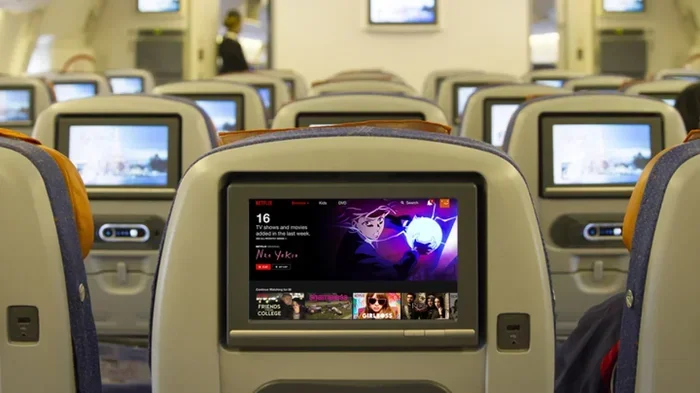
Some airlines have their own built-in entertainment systems. These systems offer movies, TV shows, and music. But they do not include Netflix. You cannot access your Netflix account through the seatback screen on most airlines. This is where Netflix offline downloads become your best friend.
Other airlines allow you to connect your own device to their Wi-Fi network. On these flights, you can open the Netflix app on your phone or laptop and stream directly. It feels almost like watching at home.
How to Watch Netflix on a Plane: Step by Step
The process of watching Netflix during a flight is straightforward once you know the steps. Here is exactly what to do before and during your trip.
Step 1: Download Content Before Your Flight
This is the most important step. Download Netflix movies and shows over Wi-Fi at home or at the airport before boarding. Open the Netflix app on your phone or tablet. Find the title you want. Tap the download icon. Wait for it to finish.
Downloading over Wi-Fi saves your mobile data. It also ensures the content is ready the moment you sit down. You do not need to worry about connection quality once the plane takes off.
Step 2: Enable Airplane Mode
Once the plane doors close, turn on airplane mode on your device. This disables cellular connections. But you can still turn Wi-Fi back on manually after the crew gives the okay. This is the standard procedure for using any wireless device on a plane.
Here is the sequence:
- Turn on airplane mode.
- Wait for the seatbelt sign to turn off.
- Re-enable Wi-Fi manually.
- Connect to the airline’s Wi-Fi network.
- Open Netflix and stream or watch your downloaded content.
Step 3: Adjust Streaming Quality
If you are streaming over airplane Wi-Fi, consider lowering the video quality. High-definition content uses more data and requires a stronger signal. Standard definition works perfectly fine on a small phone screen. You can change this setting in the Netflix app under App Settings.
Which Airlines Allow Netflix Streaming?
Not every airline supports Netflix streaming during flights. The availability depends on the in-flight Wi-Fi provider and the airline’s data policies. Here is a closer look at some major carriers.
Airlines With Netflix Streaming Support
Several major airlines now offer Wi-Fi fast enough for Netflix streaming. These include:
- Delta Air Lines: Delta offers Wi-Fi on most domestic flights. Their partnership with Netflix allows passengers to stream content on select routes.
- United Airlines: United provides Wi-Fi on many international and domestic flights. Streaming Netflix is possible on their faster Wi-Fi plans.
- American Airlines: American Airlines offers Wi-Fi on most flights. You can access Netflix through their in-flight portal on supported routes.
- Alaska Airlines: Alaska Airlines has been expanding Wi-Fi coverage. Netflix streaming is available on many of their flights.
Airlines Without Netflix Streaming
Some airlines still rely on traditional seatback entertainment systems. These do not support Netflix. However, you can still watch downloaded content offline. Always check with your airline before your flight to confirm Wi-Fi availability.
Comparison Table: Netflix Streaming by Airline
| Airline | In-Flight Wi-Fi | Netflix Streaming | Offline Downloads |
|---|---|---|---|
| Delta Air Lines | Yes (most routes) | Yes (select routes) | Yes |
| United Airlines | Yes (most routes) | Yes (faster plans) | Yes |
| American Airlines | Yes (most routes) | Yes (select routes) | Yes |
| Alaska Airlines | Yes (expanding) | Yes (many routes) | Yes |
| Southwest Airlines | No (traditional system) | No | Yes (offline only) |
| Spirit Airlines | Limited | Limited | Yes |
Keep in mind that airline Wi-Fi policies change frequently. Always verify current offerings on the airline’s website before booking.
Netflix Download Limits and Storage
One of the biggest advantages of watching Netflix offline on a plane is that it works without any internet. But Netflix does have limits on how many titles you can download and store.
Download Limits Per Title
Netflix allows you to download most titles for offline viewing. However, there is a limit. You can typically download a title on up to four devices. Once you reach that limit, you may need to remove a download from one device to download on another. This is tied to your Netflix subscription plan and account settings.
Storage Management Tips
Netflix downloads can take up a lot of space. A two-hour movie in high quality can use 1 to 3 GB of storage. Here are some tips to manage your device storage:
- Download over Wi-Fi at home: This avoids eating into your mobile data allowance.
- Lower the download quality: Netflix lets you choose standard or high quality for downloads. Standard quality uses less space.
- Delete watched downloads: Once you finish a show, delete it to free up room for new content.
- Use a device with ample storage: Tablets with 64 GB or more are ideal for long flights with multiple downloads.
Data Usage and Streaming Quality on Planes
If you plan to stream Netflix over airplane Wi-Fi, understanding data usage is critical. In-flight Wi-Fi is often slower than home connections. Streaming at full quality may buffer or fail entirely.
How Much Data Does Netflix Use?
Here is a quick breakdown of Netflix data usage:
- Low quality: About 0.3 GB per hour. Best for slow connections.
- Standard quality: About 0.7 GB per hour. Good balance of quality and data.
- High quality: About 3 GB per hour. Best for strong connections and larger screens.
On a typical 4-hour flight, streaming in standard quality would use about 2.8 GB. If your airline charges for Wi-Fi data, this can add up quickly. Downloading over Wi-Fi before the flight avoids these costs entirely.
Quick Tips for Better Streaming
Follow these quick tips to improve your Netflix experience at 35,000 feet:
- Download your content the night before the flight.
- Charge your device fully before boarding.
- Bring a portable power bank for long flights.
- Use earbuds or noise-cancelling headphones.
- Set your screen brightness to a comfortable level to save battery.
- Download a few extra titles in case your first choice does not work.
Common Mistakes People Make When Trying to Watch Netflix on Planes
Many travelers run into problems when trying to watch Netflix during flights. Avoid these common mistakes to have a smooth experience.
Forgetting to Download Before the Flight
This is the number one mistake. People assume they can stream Netflix once the Wi-Fi connects. But in-flight Wi-Fi can be slow or unreliable. If you have not downloaded content beforehand, you may end up with nothing to watch. Always download at least one or two titles before you leave for the airport.
Not Checking Airline Wi-Fi Availability
Not all flights have Wi-Fi. Budget airlines and short-haul flights are especially unlikely to offer it. Check your airline’s website or call their customer service to confirm Wi-Fi availability on your specific route.
Ignoring Data Costs
Some airlines charge for Wi-Fi access. Others offer it for free but limit data speeds. If you plan to stream, understand the costs involved. Sometimes paying for Wi-Fi and streaming is more expensive than simply downloading content for free beforehand.
Leaving Downloads on the Wrong Device
Netflix downloads are tied to your account, not your device. But you can only watch a download on the device where you downloaded it. If you download a movie on your phone, you cannot watch it on your tablet without re-downloading it. Plan your downloads carefully.
Forgetting Airplane Mode
You must enable airplane mode on your device during takeoff and landing. Forgetting to do so can result in warnings from the crew. It can also drain your battery as your phone searches for cellular signals. Always turn on airplane mode first, then re-enable Wi-Fi manually.
Expert Insights on Streaming Netflix During Flights
We spoke with frequent travelers and tech experts to get their best tips for watching Netflix on a plane. Here is what they recommend.
Download everything the night before. A seasoned traveler and software engineer recommends downloading your entire watchlist over home Wi-Fi the night before a flight. This way, you have multiple options ready to go. You do not need to rely on in-flight Wi-Fi at all.
Use a tablet over a phone. A tech reviewer suggests using a tablet for in-flight Netflix viewing. The larger screen makes a big difference on a long flight. Plus, tablets typically have better battery life than phones.
Check the Wi-Fi provider. Different airlines use different Wi-Fi providers. Some providers offer faster speeds than others. A quick search for your airline name plus Wi-Fi speed can give you a good idea of what to expect.
Have a backup plan. Even the best-prepared travelers encounter issues. Bring a downloaded podcast or two as a backup. If Netflix fails, you still have entertainment options.
Key Takeaways
- Download Before You Fly: Always download Netflix content over Wi-Fi before boarding. This is the most reliable way to watch Netflix on any flight.
- In-Flight Wi-Fi Enables Streaming: Airlines like Delta, United, and American offer Wi-Fi that supports Netflix streaming on select routes.
- Airplane Mode Is Required: Enable airplane mode during takeoff and landing, then re-enable Wi-Fi once the crew allows it.
- Manage Your Data and Storage: Netflix downloads use significant storage. Manage your downloads and device space wisely.
- Not All Airlines Support Netflix Streaming: Check with your airline before your flight to confirm Wi-Fi and streaming capabilities.
- Have a Backup Plan: Bring downloaded podcasts or other entertainment in case Netflix streaming or downloads do not work as expected.
Conclusion
Can you watch Netflix on a plane during your flight? Absolutely. Whether you download content beforehand or stream over in-flight Wi-Fi, Netflix offers great options for airborne entertainment. The key is preparation. Download your favorite shows and movies before you leave home. Check your airline’s Wi-Fi capabilities. And bring a fully charged device with enough storage for your downloads.
Watching Netflix during a flight has become easier than ever. Airlines continue to improve their Wi-Fi infrastructure. Netflix continues to expand its offline download features. Together, these developments make it possible to enjoy your favorite content at 35,000 feet. So next time you board a plane, pull out your device, and get ready for a movie marathon. With the right preparation, your flight will never feel long again.
Start planning your next flight entertainment today. Download a few titles tonight, charge your device, and get ready for a trip filled with great content. Happy streaming at 30,000 feet.
Frequently Asked Questions
Can I stream Netflix on a plane without Wi-Fi?
No, you cannot stream Netflix without an internet connection. However, you can watch downloaded Netflix content offline. Make sure to download your favorite titles over Wi-Fi before your flight. This works on any airline, even those without in-flight Wi-Fi.
Does Netflix cost extra to use on a plane?
Netflix itself does not cost extra. You need an active Netflix subscription. However, some airlines charge for Wi-Fi access. Streaming over their Wi-Fi may incur additional fees. Downloading content beforehand avoids these costs entirely.
How do I enable Netflix on airplane mode?
Turn on airplane mode first. Then manually re-enable Wi-Fi. Connect to the airline’s Wi-Fi network if available. Open the Netflix app and stream your downloaded content or browse for new titles if the connection allows it.
Can I watch Netflix on my laptop during a flight?
Yes, if the airline offers Wi-Fi and your laptop supports it. You can also watch downloaded Netflix content offline on your laptop. Make sure to download the content before the flight since laptops typically do not have cellular data options.
Why does Netflix buffering happen on planes?
Buffering happens when the in-flight Wi-Fi connection is slow or unstable. Satellite-based Wi-Fi can be slower than home internet. Lowering the streaming quality or downloading content beforehand helps avoid buffering issues during your flight.
How many Netflix downloads can I have at once?
Netflix allows you to download titles on up to four devices. You can download a limited number of titles per device based on your storage space. Once you reach the device limit, you need to remove a download from one device to add a new one.