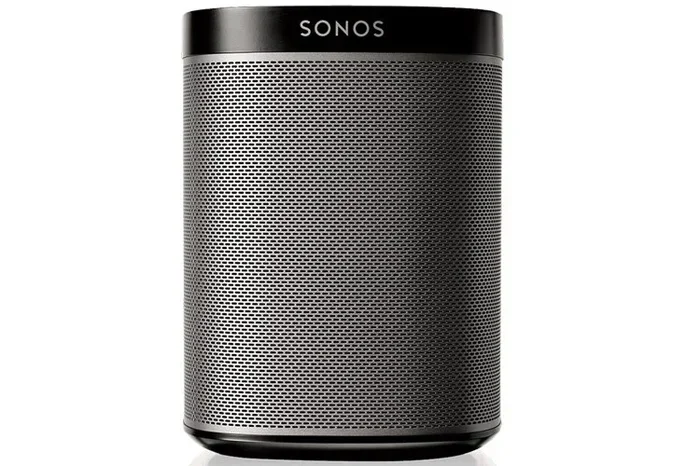
Can You Use Sonos Over Wifi And Stream Music Wirelessly
Yes, you can absolutely use Sonos over WiFi to stream music wirelessly throughout your home. Sonos wireless speakers connect to your home WiFi network and let you play music in any room without cables. This guide covers Sonos WiFi setup, range, speed needs, and tips to get the best wireless audio experience from your Sonos smart home speaker system.
Let us be straight with you. If you own a Sonos speaker or are thinking about buying one, you probably want to know if it works over WiFi. The short answer is yes. Sonos wireless speakers were built to connect to your home WiFi network and stream music without any fuss. You do not need cables running through your house or a special setup to get your favorite tunes playing. Whether you are in the kitchen, the bedroom, or the backyard, your Sonos speaker can pull music straight from the internet as long as it has a WiFi signal.
In this guide, we will walk you through everything you need to know about using Sonos over WiFi. We will cover how the setup works, what kind of WiFi speed you need, how far your signal can reach, and tips to keep your wireless audio flowing smoothly. By the end, you will feel confident setting up your Sonos system and streaming music wirelessly in every room of your home.
Key Takeaways
- Sonos speakers work over WiFi: All Sonos wireless speakers connect to your home WiFi network for streaming music without cables.
- Setup is simple: You can set up Sonos speakers using the Sonos app in just a few minutes with a WiFi connection.
- WiFi speed matters: A stable WiFi connection with at least 5 Mbps ensures smooth, buffer-free wireless music streaming.
- Range depends on your network: Sonos speakers work within your WiFi range, and a Sonos mesh system can extend coverage across large homes.
- Wired or wireless options: Sonos supports both WiFi streaming and optional Ethernet connections for a more stable setup.
- Multi-room audio works wirelessly: You can group Sonos speakers together and play synchronized music across different rooms over WiFi.
📑 Table of Contents
- What Is Sonos and How Does It Work with WiFi?
- Can You Use Sonos Over WiFi in Every Room?
- What WiFi Speed Do You Need for Sonos Streaming?
- Sonos WiFi vs. Ethernet: Which Connection Is Better?
- Multi-Room Music Streaming with Sonos Over WiFi
- Common Sonos WiFi Problems and How to Fix Them
- Expert Tips for the Best Sonos WiFi Experience
- Final Thoughts on Using Sonos Over WiFi
What Is Sonos and How Does It Work with WiFi?
Sonos is a brand of wireless speakers designed to make home audio simple. Instead of using Bluetooth or cables, Sonos speakers connect directly to your WiFi network. This means you can stream music from services like Spotify, Apple Music, Amazon Music, and Tidal right to your speaker without needing your phone nearby. Your phone becomes a remote control, while the speaker handles all the streaming through WiFi.
Here is how Sonos WiFi streaming works in simple terms:
- Your Sonos speaker connects to your home WiFi router.
- The speaker pulls music from the internet using that WiFi connection.
- You control playback from your phone, tablet, or voice assistant.
- Multiple Sonos speakers can connect to the same WiFi network and play together.
This setup is different from Bluetooth speakers. With Bluetooth, your phone must stay close to the speaker. With Sonos WiFi streaming, your phone can be in another room and the music keeps playing. The speaker handles the connection independently, which is a big advantage for wireless music streaming at home.
Sonos WiFi Setup: What You Need
Getting started with Sonos over WiFi is straightforward. You need three things: a WiFi router, a smartphone or tablet, and your Sonos speaker. Once you have those, follow these steps:
- Plug in your Sonos speaker and wait for the light to pulse.
- Download the Sonos app on your phone or tablet.
- Open the app and follow the on-screen instructions.
- The app will detect your Sonos speaker automatically.
- Connect the speaker to your WiFi network by selecting your network name and entering your password.
- Wait for the speaker to finish connecting. The light will turn solid when it is ready.
That is really it. The entire Sonos speaker setup takes about five minutes. You do not need any special technical skills. If you have ever connected a device to WiFi before, you can set up Sonos.
Can You Use Sonos Over WiFi in Every Room?
The short answer is yes, but with one important caveat. Sonos wireless speakers work anywhere within the range of your WiFi network. If your WiFi router reaches the room where you place the speaker, you are good to go. But if your WiFi signal is weak or does not reach certain areas of your home, you may run into problems.
Let us talk about WiFi range and Sonos speakers. Most home WiFi routers cover about 1,500 to 2,500 square feet indoors. If your home is smaller than that, you should have no trouble placing Sonos speakers in multiple rooms. If your home is larger, you might need to consider a WiFi extender or a mesh WiFi system to boost the signal.
How Far Can Sonos Speakers Be from the Router?
Sonos wireless speakers can typically connect to a WiFi router from about 50 to 150 feet away, depending on walls and obstacles. Here are some factors that affect WiFi range for Sonos:
- Walls and floors: Thick concrete walls block WiFi signals more than drywall.
- Distance from router: The farther the speaker, the weaker the signal.
- Other devices: Microwaves, baby monitors, and other electronics can interfere with WiFi.
- Router quality: A newer dual-band or tri-band router provides better coverage than an older model.
If you place a Sonos speaker too far from the router, you might experience buffering, slow loading times, or connection drops. This is where a Sonos mesh network or a WiFi extender comes in handy. You can also connect Sonos speakers to each other using SonosNet, which creates a mesh network among your speakers. This means each speaker helps extend the signal to the next one, even if the WiFi signal is weak in that spot.
Using SonosNet for Better Wireless Audio
SonosNet is a built-in mesh network feature that Sonos speakers use to talk to each other. When you have multiple Sonos speakers, they can form a SonosNet mesh. This is different from your home WiFi network. SonosNet uses a dedicated wireless signal to connect speakers together, which keeps your music flowing even if your home WiFi gets crowded.
Here is why SonosNet is useful:
- It reduces interference from other WiFi devices.
- It extends wireless coverage across your home.
- It keeps multi-room audio synced and stable.
- It works even if your internet goes down (for locally stored music).
So even if your WiFi signal is not perfect in every corner of your house, SonosNet can help bridge the gap. This is one of the biggest advantages of the Sonos wireless speaker ecosystem.
What WiFi Speed Do You Need for Sonos Streaming?
Not all WiFi connections are the same. Some are fast and stable, while others are slow and spotty. When it comes to streaming music over WiFi with Sonos, you do not need the fastest internet plan in the world, but you do need a decent connection.
Here is what you need to know about WiFi speed and Sonos wireless streaming:
- Minimum speed: About 2 to 5 Mbps is enough for standard music streaming.
- Recommended speed: 10 Mbps or more for high-quality audio and multi-room playback.
- For lossless audio: 20 Mbps or more if you stream in high-resolution formats.
Most modern home WiFi plans easily meet these requirements. If you have a standard internet plan from your provider, you should be fine streaming music on Sonos. The bigger concern is usually WiFi stability, not raw speed. A fast WiFi connection that drops often will cause more problems than a slightly slower but steady connection.
Tips to Improve WiFi for Sonos Streaming
If you notice your Sonos speaker buffering or pausing while streaming, your WiFi might need a little help. Here are some quick fixes:
- Move your router closer to the Sonos speaker. Even a few feet can make a big difference.
- Switch to the 5GHz band. Many modern routers offer two bands. The 5GHz band is faster and less crowded than the 2.4GHz band.
- Reduce interference. Keep your router away from microwaves, cordless phones, and other electronics.
- Restart your router. A simple reboot can fix many WiFi issues.
- Update your Sonos firmware. Sonos regularly releases updates that improve WiFi performance.
These small changes can dramatically improve your wireless music streaming experience with Sonos.
Sonos WiFi vs. Ethernet: Which Connection Is Better?
While Sonos speakers are designed for WiFi, you also have the option to connect them using an Ethernet cable. Some Sonos models, like the Sonos Amp and Sonos Port, have an Ethernet port built in. You can plug them directly into your router for a wired connection.
So which is better for Sonos wireless streaming? Let us compare:
| Feature | WiFi Connection | Ethernet Connection |
|---|---|---|
| Ease of Setup | Very easy, no cables needed | Requires running a cable |
| Portability | Move the speaker anywhere | Fixed in one location |
| Connection Stability | Good, but can fluctuate | Very stable and consistent |
| Audio Quality | Excellent for most users | Slightly more consistent |
| Best For | Most rooms and setups | Home theaters, dedicated audio rooms |
For most people, WiFi is the way to go. It is convenient, flexible, and works perfectly for streaming music. Ethernet is better if you want the most stable connection possible, especially for home theater setups where audio sync matters a lot. You can also use both. Connect your main speaker with Ethernet and place wireless Sonos speakers around the house using WiFi.
Multi-Room Music Streaming with Sonos Over WiFi
One of the best things about Sonos is multi-room audio. You can play different songs in different rooms or sync all your speakers to play the same song together. This all works over your WiFi network, and it is incredibly easy to set up.
Here is how multi-room wireless streaming works with Sonos:
- Open the Sonos app on your phone.
- Go to the “Rooms” section.
- Select the rooms where you want to play music.
- Choose to play the same song in all rooms or different songs in each room.
- Control the volume independently for each room.
You can also group Sonos speakers together for a bigger sound in one room. For example, you might pair two Sonos One speakers in your living room to create a stereo pair. Both speakers connect to WiFi and work together seamlessly. This is one of the standout features of the Sonos wireless speaker system.
Can You Use Sonos Without WiFi?
Sonos speakers are designed to work with WiFi, but there is a workaround if you lose internet connection. Sonos speakers can create a temporary local network called SonosNet. If your WiFi goes down but your speakers are still connected to each other, you can play music stored on your phone or a local network drive. However, you cannot stream from internet services like Spotify or Apple Music without an active WiFi connection. So WiFi is essential for the full Sonos experience.
Some people also wonder if they can use Sonos with a mobile hotspot. The answer is yes, you can. You can connect your Sonos speaker to a phone hotspot, but this uses your mobile data and is not ideal for long-term use. It works in a pinch, but a home WiFi network is always the better choice for wireless music streaming.
Common Sonos WiFi Problems and How to Fix Them
Even with the best setup, you might run into WiFi issues with your Sonos speakers from time to time. Here are the most common problems and how to solve them:
Sonos Speaker Keeps Disconnecting from WiFi
If your Sonos speaker drops off the WiFi network regularly, the first thing to check is your router. Is the router too far away? Are there too many devices on the network? Try moving the speaker closer to the router or reducing the number of connected devices. You can also try switching the speaker to the 5GHz WiFi band, which is less congested.
Music Keeps Buffering or Pausing
Buffering usually means your WiFi speed is not fast enough or the signal is weak. Check your internet speed using a speed test app. If it is below 5 Mbps, you may need to improve your WiFi coverage. Moving the router or adding a WiFi extender can help. Also, make sure your Sonos firmware is up to date, as updates often include WiFi performance improvements.
Sonos App Cannot Find the Speaker
If the Sonos app cannot detect your speaker during setup, make sure both your phone and the speaker are on the same WiFi network. Sometimes phone settings like “smart network switch” can cause your phone to jump between WiFi and mobile data, which confuses the setup process. Turn off that feature and try again.
Expert Tips for the Best Sonos WiFi Experience
Want to get the most out of your Sonos wireless speakers? Here are some expert-backed tips:
- Use a dual-band router. This gives you both 2.4GHz and 5GHz bands, letting you choose the best one for each speaker.
- Place your router centrally. A central router location provides the best WiFi coverage throughout your home.
- Keep Sonos firmware updated. Updates improve WiFi performance and fix bugs.
- Use SonosNet for multi-speaker setups. This creates a dedicated mesh that keeps your speakers connected even if your WiFi is spotty.
- Avoid placing speakers near metal objects. Metal can block WiFi signals and reduce wireless audio quality.
- Restart your Sonos system monthly. A simple restart clears minor glitches and keeps everything running smoothly.
These tips may seem small, but they add up. A well-optimized WiFi setup makes a huge difference in how your Sonos speakers sound and how reliably they stream music.
Final Thoughts on Using Sonos Over WiFi
So, can you use Sonos over WiFi? Absolutely. Sonos wireless speakers are built from the ground up to connect to your home WiFi network and stream music without any hassle. Whether you are setting up a single speaker in the kitchen or building a whole-home audio system with speakers in every room, WiFi is the backbone of the Sonos experience.
The setup is simple, the streaming is smooth, and the multi-room capabilities are unmatched in the wireless speaker market. As long as you have a decent WiFi connection and a good router, your Sonos speakers will deliver excellent wireless audio day after day.
If you are still on the fence about going Sonos, now is a great time to take the leap. The combination of easy setup, reliable WiFi streaming, and rich sound quality makes Sonos one of the best choices for a wireless home audio system. Just make sure your WiFi is solid, follow the tips in this guide, and you will be enjoying wireless music streaming in no time.
Your home sound system is one click away from being better. Grab your Sonos speaker, connect it to WiFi, and start streaming. You will wonder how you ever lived without it.
Frequently Asked Questions
Can you use Sonos without WiFi?
Sonos speakers need WiFi to stream music from internet services like Spotify or Apple Music. However, if your WiFi goes down, Sonos speakers can use SonosNet to play locally stored music or music from your phone. For the full experience with streaming services, WiFi is required.
How do I connect Sonos to my WiFi network?
Open the Sonos app on your phone, plug in your speaker, and follow the on-screen setup steps. The app will guide you through selecting your WiFi network and entering your password. The whole process takes about five minutes.
Can I use a mobile hotspot with Sonos?
Yes, you can connect Sonos to a mobile hotspot temporarily. Just select the hotspot name in the Sonos app and enter the password. Keep in mind that this uses your mobile data, so it is best for short-term use rather than everyday streaming.
What WiFi speed is needed for Sonos streaming?
A minimum of 2 to 5 Mbps is enough for standard music streaming on Sonos. For high-quality audio or multi-room playback, aim for 10 Mbps or more. Most modern home internet plans easily meet these requirements.
Can Sonos speakers connect to each other over WiFi?
Yes, Sonos speakers can connect to each other wirelessly over WiFi or through SonosNet. You can group speakers in the Sonos app to play the same music in multiple rooms or create stereo pairs for richer sound.
Does Sonos work better with Ethernet or WiFi?
WiFi is more convenient and works great for most setups. Ethernet provides a more stable connection and is ideal for home theater or dedicated audio rooms. You can use both in the same Sonos system, connecting some speakers with Ethernet and others over WiFi.
=== CONCLUSION ===
Using Sonos over WiFi is simple, reliable, and the best way to enjoy wireless music streaming at home. From the easy setup process to the powerful multi-room features, Sonos wireless speakers make it effortless to fill your home with great sound. Whether you are a casual listener or an audiophile, Sonos delivers a seamless wireless audio experience that fits into any lifestyle.
Remember, a good WiFi connection is the foundation of the entire Sonos system. Keep your router in a central location, use the 5GHz band when possible, and keep your Sonos firmware updated. With these basics in place, you will enjoy uninterrupted music streaming in every room. So go ahead, set up your Sonos speakers, connect to WiFi, and start enjoying the music your way.