Can You Connect To Bluetooth Without Pairing Today
Can you connect to Bluetooth without pairing? The short answer is yes, in certain cases. Bluetooth technology has evolved to allow quick connections and some devices can connect automatically without going through the traditional pairing process. Understanding how Bluetooth connection without pairing works can save you time and frustration when using wireless devices daily.
Key Takeaways
- Bluetooth can connect without pairing in specific scenarios like Bluetooth Low Energy and trusted device connections
- Bluetooth pairing mode is still required for most first-time device setups and new connections
- Wireless connection methods vary by device type, operating system, and Bluetooth version
- Bluetooth security is an important consideration when skipping the pairing process
- Bluetooth troubleshooting skills help you resolve common connectivity issues quickly
- Bluetooth enabled devices have different connection behaviors depending on their design and purpose
- Understanding Bluetooth discovery helps you manage which devices can find yours
📑 Table of Contents
- Can You Connect To Bluetooth Without Pairing?
- How Bluetooth Pairing Works
- Can You Connect To Bluetooth Without Pairing?
- Devices That Support Connection Without Pairing
- When Bluetooth Pairing Is Still Necessary
- Tips For Better Bluetooth Connectivity
- Bluetooth Security: What You Need To Know
- Troubleshooting Common Bluetooth Connection Issues
- Quick Tips For Everyday Bluetooth Use
- The Future of Bluetooth Connectivity
- Conclusion
Can You Connect To Bluetooth Without Pairing?
Bluetooth technology has changed the way we use our devices every day. From Bluetooth headphones to wireless speakers, we rely on Bluetooth connectivity for so many things. But here is a question many people ask: can you connect to Bluetooth without pairing? The answer is not a simple yes or no. It depends on the device, the Bluetooth version, and what you are trying to do.
In this guide, we will break down everything you need to know about connecting Bluetooth without pairing. We will look at how Bluetooth works, when you can skip pairing, and what to do when things do not go as planned. Whether you are trying to connect a Bluetooth speaker at a party or pair a new device for the first time, this article has you covered.
Many people think Bluetooth pairing is always required. That is not true. Some devices use Bluetooth Low Energy or BLE to connect instantly. Others remember trusted devices and reconnect automatically. Let us explore how this works and what it means for you.
If you are also looking for ways to make your tech life simpler, check out these 10 Gadgets To Make Moms Life Easier for some great ideas on wireless devices that work seamlessly.
Why Does This Matter?
Knowing how Bluetooth connection without pairing works can save you a lot of time. It can also help you troubleshoot when your Bluetooth device will not connect. Plus, understanding the difference between pairing and connecting helps you stay in control of your wireless connection security.
How Bluetooth Pairing Works
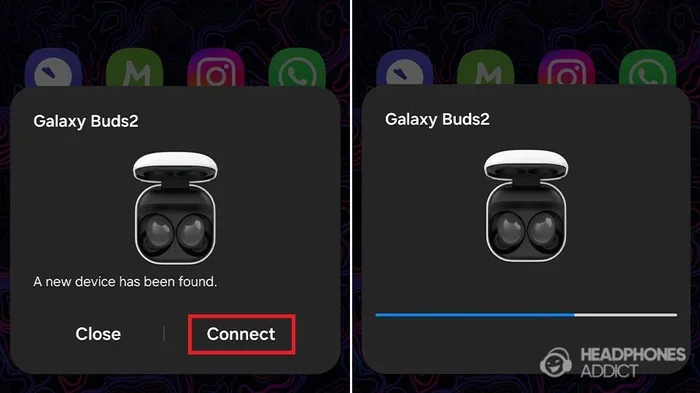
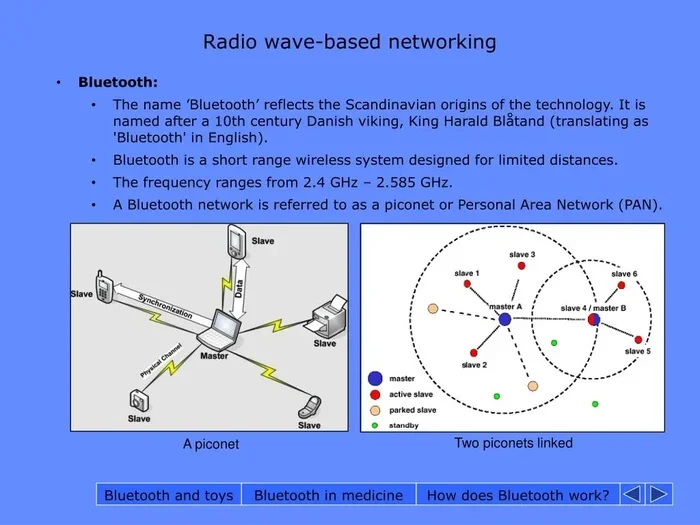
Before we answer the main question, let us understand what Bluetooth pairing actually means. Pairing is the process where two Bluetooth devices recognize each other and agree to share data. This creates a trusted relationship between them.
When you pair devices, they exchange something called a pairing key. This key is like a digital handshake. It ensures that only the two devices you want to connect can talk to each other. After pairing, the devices remember each other for future use.
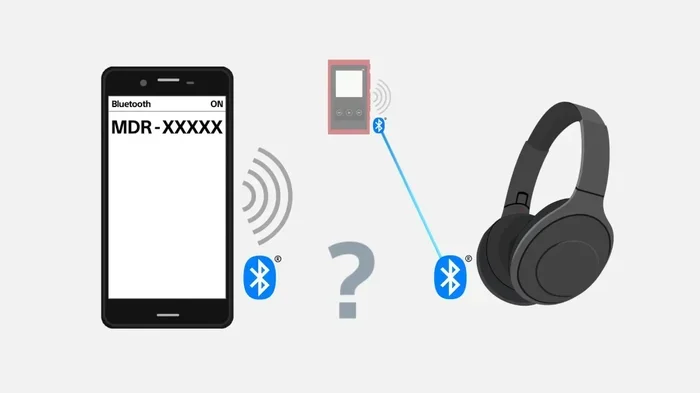
Here is how the typical Bluetooth pairing process works:
- You turn on Bluetooth on both devices
- One device becomes visible or discoverable
- The other device searches for available devices
- You select the device you want to connect to
- The devices exchange pairing information
- They connect and remember each other for future use
This process works great for most situations. But it is not always necessary. Some Bluetooth enabled devices skip parts of this process entirely.
The Role of Bluetooth Discovery
Bluetooth discovery is when a device scans the area for other Bluetooth devices that are visible. When a device is in discoverable mode, it broadcasts its presence. This is what allows you to see it on your phone or computer screen.
Not all devices stay discoverable all the time. Many devices only stay visible for a short window, usually around two minutes. After that, they go hidden to save battery and protect Bluetooth security. This is why timing matters when you are trying to pair new devices.
Can You Connect To Bluetooth Without Pairing?
Yes, you can connect to Bluetooth without going through the full pairing process in some situations. But it is not a universal rule. Let us look at the different scenarios where this happens.
Bluetooth Low Energy (BLE) Connections
Bluetooth Low Energy, or BLE, is a game changer. It was introduced in Bluetooth version 4.0 and has become very popular. BLE devices use much less power than traditional Bluetooth. This makes them perfect for fitness trackers, smart watches, and sensors.
One of the best things about BLE is that it can connect without the traditional pairing process. Some BLE devices use something called “connectionless communication.” This means they can send small bursts of data without first establishing a paired relationship.
Think of it like waving hello to someone versus shaking their hand. Waving is quick and does not require mutual agreement. Shaking hands is more formal and takes more effort. BLE is like waving, while traditional Bluetooth pairing is like shaking hands.
Auto-Connect and Trusted Devices
Many modern devices have an auto-connect feature. Once you have paired a device once, it will automatically reconnect whenever both devices have Bluetooth turned on and are within range.
For example, your Bluetooth headphones probably connect to your phone automatically every time you turn them on. You do not need to go through pairing again. This is because the devices already trust each other from the first pairing session.
Here are some devices that commonly use auto-connect:
- Wireless earbuds and headphones
- Smart watches and fitness trackers
- Car audio systems
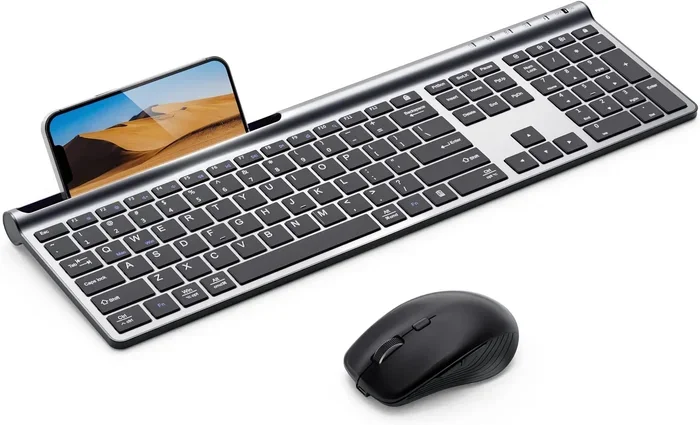
- Wireless keyboards and mice
- Bluetooth speakers
This auto-connect behavior makes it feel like you never paired the devices at all. But the truth is, pairing happened once in the background.
Bluetooth Classic vs BLE: Key Differences
| Feature | Bluetooth Classic | Bluetooth Low Energy |
|---|---|---|
| Connection Speed | Slower initial connection | Fast connection |
| Power Usage | Higher | Very low |
| Pairing Required | Usually yes | Often no |
| Data Transfer | Continuous stream | Small bursts |
| Range | Up to 30 feet | Up to 100 feet |
| Common Devices | Headphones, speakers | Sensors, trackers |
Understanding this difference helps you know what to expect when you try to connect without pairing. Bluetooth classic devices usually require pairing. BLE devices often do not.
Devices That Support Connection Without Pairing
Not all Bluetooth devices need pairing. Some are designed to connect instantly. Here are some common examples.
Bluetooth Beacons
Bluetooth beacons are small transmitters that broadcast signals. They do not need to pair with your phone. Instead, your phone detects the signal and responds. This technology powers things like store promotions, museum guides, and indoor navigation systems.
Beacons use BLE to send small packets of data. Your phone picks up these signals without any manual pairing. This is one of the clearest examples of Bluetooth connection without pairing in action.
Public Audio Systems
Some public venues use Bluetooth audio systems that allow quick connections. You might see this in cafes, airports, or museums. You simply select the system from your Bluetooth list and start streaming audio.
These systems often skip the pairing step entirely. They are designed for convenience and one-time or short-term use. This makes them perfect for temporary wireless connections in public spaces.
Smart Home Devices
Many smart home devices use BLE for initial setup. Smart bulbs, plugs, and sensors often connect to your phone without traditional pairing. The app on your phone discovers the device automatically and sets it up.
This seamless experience is becoming more common. It is part of why smart home technology feels so easy to use today. You do not need to fuss with codes or passkeys anymore.
When Bluetooth Pairing Is Still Necessary
While skipping pairing is convenient, there are many situations where you still need to pair devices the traditional way. Let us look at when pairing is essential.
First-Time Connections
The very first time you connect two Bluetooth devices, pairing is almost always required. This is true whether you are connecting Bluetooth headphones, a speaker, or a keyboard. The devices need to establish trust and exchange security keys.
During first-time pairing, you might see a passkey or PIN on one screen that you need to confirm on the other. This step ensures that no unauthorized device can connect to yours.
Audio Streaming Devices
Most audio devices like headphones, earbuds, and speakers use Bluetooth classic. These devices typically require full pairing before you can stream music or take calls. The continuous data stream needs a stable, trusted connection.
If you have ever wondered why your Bluetooth speaker needs pairing every time you take it to a new phone, this is why. It is not trying to be difficult. It is following Bluetooth protocol to keep your connection secure.
File Transfer Between Devices
When you want to send files between phones or computers, pairing is essential. Bluetooth file transfer requires a trusted connection. Skipping pairing would create security risks and unreliable transfers.
Some people also use Bluetooth for sharing photos, documents, or contacts. In all these cases, the pairing process ensures data integrity and privacy.
Tips For Better Bluetooth Connectivity
Even with all the advances in Bluetooth technology, connectivity issues still happen. Here are some practical tips to keep your Bluetooth connection strong and reliable.
Keep Your Devices Close
Bluetooth range matters. Most devices work best within 10 to 30 feet of each other. Walls, furniture, and even your body can weaken the signal. Keep devices in the same room for the best results.
If you are setting up a Bluetooth speaker for a party, place it in the center of the group. This reduces the chance of signal drops and keeps the audio quality high.
Restart Bluetooth When Needed
Sometimes the simplest fix works best. Turn Bluetooth off and back on. This clears temporary glitches and refreshes the connection list. You would be surprised how often this solves the problem.
On most phones, you can toggle Bluetooth off from the quick settings panel. On computers, you can go to the Bluetooth settings menu. A quick restart of both devices can also help resolve Bluetooth connectivity issues.
Keep Devices Updated
Software updates often include improvements for Bluetooth performance. Make sure your phone, tablet, and accessories are running the latest firmware or operating system. Updates fix bugs and improve compatibility between devices.
If you have an iPhone, you might also want to check how your device handles number formatting for Bluetooth-related settings. You can learn more about Adding Prefixes To Numbers On Iphone for helpful tips on managing your phone settings.
Forget Unused Devices
Your device might be trying to connect to old Bluetooth devices that are no longer nearby. This can slow things down or cause confusion. Go to your Bluetooth settings and remove devices you no longer use.
On most phones, you can tap on a saved device and select “Forget This Device.” This clears the connection history and gives you a fresh start.
Check Battery Levels
Low battery can affect Bluetooth performance. When a device’s battery is very low, it may reduce Bluetooth power to conserve energy. This can shorten the range and cause intermittent disconnections.
Keep your Bluetooth devices charged. A fully charged device will have a stronger and more stable signal. This is especially important for wireless earbuds and headphones.
Bluetooth Security: What You Need To Know
Skipping pairing might seem convenient, but it comes with security considerations. Let us talk about how to stay safe when using Bluetooth.
Risks of Unpaired Connections
When devices connect without pairing, there is less encryption involved. This means data can potentially be intercepted more easily. In public spaces, this is worth keeping in mind.
BLE devices that connect without pairing often use shorter encryption keys. While this is fine for small data packets, it is not ideal for sensitive information like personal files or payment data.
How To Stay Safe
- Turn off Bluetooth when you are not using it
- Avoid connecting to unknown devices in public places
- Use pairing for any device that handles sensitive data
- Keep your device software up to date
- Set your devices to non-discoverable when not in use
Following these simple steps helps you enjoy the convenience of Bluetooth connection without pairing while staying protected.
Bluetooth Visibility Settings
Most devices let you control whether other Bluetooth devices can see you. You can usually set your device to “Visible to All,” “Visible For A Limited Time,” or “Not Visible.”
Setting your device to not visible when you do not need to connect is a good habit. It reduces the chance of unwanted connection attempts from nearby devices. This is especially important in crowded areas like airports, cafes, or public transit.
Troubleshooting Common Bluetooth Connection Issues
Even when you follow all the best practices, Bluetooth problems can still happen. Here are some common issues and how to fix them.
Device Not Showing Up
If a device does not appear in your Bluetooth list, try these steps:
- Make sure the other device is in pairing mode or discoverable
- Turn Bluetooth off and back on
- Restart both devices
- Move closer to the other device
- Check if the device is already connected to another phone
Sometimes a device stays connected to a previous phone even when you cannot see it. This is a common reason it does not show up in your list.
Connection Keeps Dropping
If your Bluetooth device disconnects frequently, check the following:
- Battery level of both devices
- Distance between the devices
- Interference from Wi-Fi routers or other electronics
- Software updates on both devices
- Whether too many devices are connected at once
Interference from Wi-Fi is a common culprit. Both Bluetooth and Wi-Fi use the 2.4 GHz frequency band. When they overlap, one or both can experience weak signals.
Audio Quality Issues
If your audio sounds choppy or distorted, try moving closer to the source device. Walls and obstacles can weaken the Bluetooth signal and reduce audio quality.
Also check if the sending device is using too much processing power. Running many apps at once can affect Bluetooth audio performance. Closing unused apps can help improve the connection.
Quick Tips For Everyday Bluetooth Use
Here are some quick tips to make your daily Bluetooth experience smoother:
- Label your paired devices with easy-to-recognize names
- Use a dedicated Bluetooth adapter for your computer if it has weak Bluetooth
- Keep a list of your paired devices for quick reference
- Reset network settings if Bluetooth problems persist
- Use a Bluetooth range extender for larger spaces
These small steps can make a big difference in how reliably your devices connect. They take only a few minutes but save a lot of frustration over time.
The Future of Bluetooth Connectivity
Bluetooth technology keeps getting better. New versions bring faster speeds, longer range, and smarter connection features. Bluetooth 5.3 and the upcoming 6.0 standard are making wireless connections even more seamless.
Future Bluetooth versions may eliminate the need for pairing in even more scenarios. Imagine walking into a room and your devices connecting automatically without any setup. That future is closer than you might think.
Until then, understanding how Bluetooth connection without pairing works gives you a real advantage. You can troubleshoot faster, connect more efficiently, and make the most of your wireless devices every day.
Conclusion
So, can you connect to Bluetooth without pairing? Yes, you can in many cases. Bluetooth Low Energy devices, auto-connect features, and beacon technology all allow connections without the traditional pairing process. However, for most audio devices and first-time connections, pairing is still the standard way to go.
Understanding when and how Bluetooth connection without pairing works puts you in control. You can choose the right connection method for each situation. You can troubleshoot faster when issues arise. And you can keep your wireless connection both convenient and secure.
Take what you have learned here and apply it to your daily tech use. Your Bluetooth devices will work better, and you will spend less time frustrated with connectivity problems. Happy connecting!
Frequently Asked Questions
Can I connect to a Bluetooth speaker without pairing?
In most cases, you need to pair a Bluetooth speaker at least once before it will connect. However, some public Bluetooth audio systems allow quick connections without pairing. These are usually designed for temporary use in shared spaces like cafes or waiting areas.
Why does my Bluetooth keep disconnecting after pairing?
Bluetooth disconnections can happen for several reasons. Low battery, distance from the source device, and interference from Wi-Fi or other electronics are common causes. Try restarting both devices and moving closer together to improve stability.
Is Bluetooth connection without pairing safe?
It can be safe for casual, low-risk connections like beacons or auto-connecting trusted devices. However, skipping pairing reduces encryption, which can be a concern in public spaces. Always turn off Bluetooth when you are not using it and avoid connecting to unknown devices.
What is the difference between Bluetooth pairing and connecting?
Pairing is the initial setup process where two devices exchange security keys and establish trust. Connecting is the act of using that trusted relationship to share data or audio. Once paired, devices can connect automatically without repeating the pairing process.
Can Bluetooth Low Energy devices connect without pairing every time?
Yes, many BLE devices can connect without traditional pairing. They use a faster connection process that does not require exchanging pairing keys. This is why fitness trackers and smart watches often connect instantly when you open the companion app.
How do I make my Bluetooth device discoverable?
Go to your Bluetooth settings and look for an option to make the device visible or discoverable. On most phones, you can toggle this in the Bluetooth menu. Remember that discoverable mode usually only lasts for a few minutes to protect your Bluetooth security.