Can I Use Roku Without Subscription Everything You Need
Yes, you can absolutely use Roku without a subscription. The device works right out of the box with dozens of free channels, live TV options, and media playback features. You can stream free content, watch over-the-air broadcasts, and even play your own media files without ever opening your wallet. However, some premium features and channels do require paid subscriptions. This guide covers everything you need to know about using Roku for free.
Key Takeaways
- Roku works without any subscription: The device itself is free to use, and many channels cost nothing.
- Free channels are abundant: Roku offers hundreds of free channels including Pluto TV, Tubi, and The Roku Channel.
- You can watch live TV for free: Antenna inputs and free live streaming apps keep you entertained.
- Media playback is a big perk: You can play USB drives, SD cards, and screen mirror from your phone.
- Some limitations exist: Premium content from Netflix, Hulu, and Disney+ requires paid plans.
- Roku devices are affordable: Even if you want to buy one, models start under $30.
- Setting up free streaming is easy: No technical skills are needed to get started.
📑 Table of Contents
- Can I Use Roku Without Subscription? Everything You Need to Know
- Free Channels You Can Watch on Roku
- What You Can and Cannot Do Without a Subscription
- How to Set Up Roku for Free Streaming
- Using Roku as a Cable TV Replacement
- Can You Use Roku Without Internet?
- Is Roku Worth Buying If You Do Not Want Subscriptions?
- Common Mistakes People Make with Free Roku
- Expert Tips for Getting the Most Out of Roku Without Paying
- Conclusion
Can I Use Roku Without Subscription? Everything You Need to Know
Here is the short answer. Can I use Roku without subscription services? Yes, you can. Roku is a streaming device that lets you watch TV shows, movies, and live channels. Many of those options cost nothing at all. You do not need to pay a monthly fee to own or operate a Roku player or Roku streaming stick.
Roku is one of the most popular streaming devices in the world. Millions of households use it every day. But not everyone pays for subscriptions. A lot of people use Roku purely for free content. This guide will walk you through exactly what you can do, what you cannot do, and how to get the most out of your Roku without spending a single dollar on subscriptions.
Whether you are looking to cut the cord, save money, or just explore what Roku offers, you are in the right place. Let us dive in and break it all down.
What Exactly Is Roku?
Roku is a device that connects to your television and the internet. It gives you access to hundreds of streaming channels. Think of it like an app store for your TV. You browse, pick a channel, and start watching.
Roku makes several different models. The Roku Express is a basic option that costs around $30. The Roku Premiere is a step up. The Roku Ultra offers the most features. There is also the Roku Streaming Stick, which plugs directly into your TV’s HDMI port. All of these devices work the same way when it comes to free content.
The Roku operating system is simple and fast. Even older adults and kids can figure it out quickly. The home screen shows all your installed channels in a clean grid layout. You scroll through them and pick what you want to watch. It is that easy.
How Does Roku Work Without a Subscription?
When you set up a Roku device, you connect it to your Wi-Fi network. That is it. You do not need to enter any payment information. You do not need to sign up for any plan. The device is ready to use right away.
Once connected, you can browse the Roku Channel Store. This store has thousands of channels. Many of them are completely free. You just add them to your home screen and start watching. There is no trial period. There is no credit card required. It is free, period.
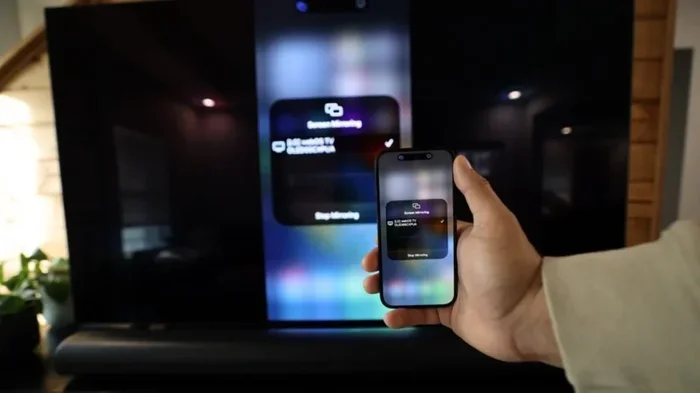
Roku also supports screen mirroring. This means you can send content from your phone or laptop to your TV. You can also plug in a USB drive or an SD card and play your own media files. All of this works without any subscription at all.
Free Channels You Can Watch on Roku
This is where Roku really shines. The number of free channels available is huge. You will find something for everyone. Here are some of the best free options.
The Roku Channel
The Roku Channel is Roku’s own built-in streaming service. It is free to use. It has a large library of movies and TV shows. Some content is ad-supported, which is how Roku keeps it free. You can find popular movies, classic TV series, and original Roku content there.
The Roku Channel also has live TV options. You can watch news, sports, and entertainment channels for free. It is a solid replacement for cable TV if you are on a budget.
Pluto TV
Pluto TV is one of the best free streaming services available. It is owned by Paramount. It offers hundreds of live TV channels. You can watch news, movies, sports, comedy, and more. There are also on-demand shows and films.
Pluto TV is completely free. There are no subscriptions. No sign-up is required. You just open the app on your Roku and start watching. The channel lineup changes often, so there is always something new to explore.
Tubi
Tubi is another excellent free option. It has a massive library of movies and TV shows. The content comes from major studios like Lionsgate, MGM, and Paramount. Tubi is ad-supported, so you will see some commercials. But the selection is really impressive.
Tubi organizes content by genre. You can browse action, comedy, drama, horror, and more. It is a great place to discover new movies without paying anything.
Other Free Channels Worth Trying
There are many more free channels on Roku. Here are some worth checking out:
- Plex: Offers free movies and TV shows with ads.
- Crackle: Has a good mix of original and licensed content.
- Samsung TV Plus: Provides live news and entertainment channels.
- Freevee: Amazon’s free streaming service with a solid library.
- Haystack TV: A news-focused free channel with short clips.
- Popcornflix: Offers free movies and TV shows on demand.
- Vudu: Has a free section with movies you can watch anytime.
With so many free channels, you can easily fill your Roku home screen without ever paying for a subscription. The variety is amazing.
What You Can and Cannot Do Without a Subscription
It is important to understand what works and what does not when you use Roku without a paid plan. Let me break it down clearly.
What You CAN Do for Free
- Watch free streaming channels: Pluto TV, Tubi, The Roku Channel, and many more.
- Play your own media files: Use USB drives or SD cards to watch your own videos and music.
- Screen mirror from devices: Cast content from your phone or computer to your TV.
- Watch over-the-air TV: Use an antenna with Roku to get local broadcast channels for free.
- Browse the Roku Channel Store: Explore and add any free channel you like.
- Use Roku as a media player: It works great for playing files from external storage.
- Access free live TV: Several apps offer live news, sports, and entertainment at no cost.
What You CANNOT Do Without a Subscription
- Watch Netflix originals: Netflix requires a paid plan to access its full library.
- Stream Hulu content: Hulu shows and movies need a subscription.
- Access Disney+: Disney’s streaming service requires a monthly or annual fee.
- Watch HBO Max: Warner Bros content is behind a paywall.
- Use premium sports packages: Some live sports require paid streaming add-ons.
- Remove all ads from free channels: Free content always includes advertisements.
So the bottom line is this. You can do a lot with Roku for free. But if you want access to premium streaming services, you will need to pay for those subscriptions separately.
How to Set Up Roku for Free Streaming
Setting up your Roku for free streaming is quick and simple. Follow these steps to get started.
Step 1: Connect Your Roku to Your TV
Plug your Roku device into your TV’s HDMI port. If you are using the Roku Express, use the included HDMI and composite cables. Turn on your TV and switch to the correct HDMI input.
Step 2: Connect to Wi-Fi
Follow the on-screen setup instructions. Choose your Wi-Fi network and enter the password. This is the only step that requires a bit of internet knowledge. Everything else is very straightforward.
Step 3: Skip the Subscription Prompts
During setup, Roku may ask you to link streaming services. You can skip all of these. There is no need to enter any payment information. Just click “Skip” or “Not Now” on every prompt.
Step 4: Add Free Channels
Go to the Roku Channel Store. Search for free channels like Pluto TV, Tubi, and The Roku Channel. Select “Add Channel” for each one. They will appear on your home screen, ready to use.
Step 5: Start Watching
That is it. You are now streaming free content on Roku. Browse your channels, pick something to watch, and enjoy. No subscription needed.
Using Roku as a Cable TV Replacement
One of the biggest reasons people buy Roku is to replace cable TV. The good news is that Roku can do this without a cable subscription. You just need to know which free options to use.
Over-the-Air TV with an Antenna
Roku has a feature called “Antenna TV.” This lets you connect a simple TV antenna to your Roku device. You can then watch local broadcast channels like ABC, NBC, CBS, and FOX for free. These channels include news, weather, sports, and popular shows.
You do not need an expensive antenna either. A basic indoor antenna works great for most areas. Just plug it into your Roku TV or Roku device and scan for channels. You will be surprised by how many free channels you can pick up.
Free Live TV Apps
Several apps on Roku offer live TV without a subscription. Pluto TV is the best example. It has live news, sports, and entertainment channels around the clock. Samsung TV Plus and Haystack TV are also great options.
These free live TV apps give you a cable-like experience without the cable bill. You can watch the news in the morning, sports during the day, and movies at night. All for free.
Sports Without a Subscription
Watching sports for free on Roku is possible. Many local sports broadcasts are available through free over-the-air channels. Apps like Pluto TV also have sports channels. You can watch live games without paying for a sports package.
Some sports leagues also offer free content directly through their apps. The NFL app, NBA app, and MLB app all have free sections on Roku. You can catch highlights, live games, and analysis without spending a dime.
Can You Use Roku Without Internet?
This is a common question. The short answer is no. Roku needs an internet connection to access streaming channels. Without Wi-Fi, you cannot browse the Roku Channel Store or stream online content.
However, there is a workaround. You can still use Roku to play media files from a USB drive or SD card without internet. This is a great option if you travel or if your internet is down. Just load your media files onto a USB drive, plug it into your Roku, and enjoy.
Some Roku models also support screen mirroring over a local network. If you have a mobile hotspot, you can connect both your phone and Roku to it. This lets you mirror content without a home Wi-Fi network.
Is Roku Worth Buying If You Do Not Want Subscriptions?
This is a fair question. If you are not going to pay for any streaming subscriptions, is Roku still worth buying? The answer is yes, and here is why.
Roku devices are very affordable. The Roku Express starts at around $30. The Roku Streaming Stick is about $50. These are one-time purchases. There are no monthly fees to use the device itself.
With free channels alone, you can watch hundreds of hours of content. Add in free over-the-air TV with an antenna, and your options grow even more. You truly can have a full entertainment setup without paying a recurring fee.
Roku also receives regular updates. The company adds new features and free channels all the time. Your device keeps getting better over time without you spending anything extra.
Common Mistakes People Make with Free Roku
There are a few mistakes that people make when trying to use Roku without subscriptions. Avoid these to get the best experience.
Installing “Roku Premium” or Paid Services by Accident
During setup, Roku may prompt you to try free trials of paid services. These trials automatically convert to paid subscriptions if you do not cancel. Always read the fine print and decline any trial offers you do not want.
Not Exploring the Free Channel Store Enough
Many people install a few channels and stop there. There are hundreds of free channels on Roku. Take time to explore. You will find hidden gems that you never knew existed.
Using Slow Internet for Streaming
Free streaming still needs a decent internet connection. If your Wi-Fi is slow, your videos will buffer or look blurry. Make sure you have at least a 10 Mbps connection for smooth streaming.
Forgetting About USB and SD Card Options
Some Roku models support USB and SD card playback. If you have movies or music saved on external drives, you can watch them on your TV for free. This is a feature many people overlook.
Expert Tips for Getting the Most Out of Roku Without Paying
Here are some expert tips that will help you maximize your free Roku experience.
- Use a VPN with free channels: Some free channels have region restrictions. A VPN can help you access more content.
- Regularly check the Roku Channel Store: New free channels are added frequently. Check back often.
- Use the Roku mobile app: It acts as a remote and lets you cast content from your phone.
- Set up parental controls for free: Roku has built-in parental controls that cost nothing.
- Optimize your Wi-Fi placement: Keep your Roku close to your router for the best streaming quality.
- Explore Roku’s “Featured Free” section: This section highlights the best free content available right now.
These tips will help you get more out of your Roku without spending a penny on subscriptions. Simple changes can make a big difference.
Conclusion
So, can I use Roku without subscription? Absolutely. Roku is one of the most flexible streaming devices on the market. You can use it fully without paying a single monthly fee. There are hundreds of free channels, free live TV options, and free media playback features.
You can watch movies, TV shows, news, sports, and more without ever opening a subscription. The key is knowing where to look and what to explore. The free content on Roku is more than enough to keep you entertained every day.
If you are thinking about cutting the cord or just saving money on entertainment, Roku is a fantastic choice. It is affordable, easy to use, and packed with free options. Give it a try and see for yourself how much you can enjoy without spending a dime.
Start with a basic Roku device, add some free channels, and connect an antenna if you want live TV. You will have a complete entertainment setup that costs nothing to run. That is the power of Roku without a subscription.
Frequently Asked Questions
Do I need to pay anything to use a Roku device?
No. The Roku device itself is a one-time purchase. There are no monthly fees to own or operate it. You can use it entirely for free by accessing the many free channels available on the platform.
Can I watch Netflix or Hulu on Roku without paying?
No. Streaming services like Netflix, Hulu, and Disney+ require paid subscriptions to access their content. However, you can still use Roku to watch hundreds of free channels without ever signing up for these services.
Is there a free version of Roku Channel?
Yes. The Roku Channel is completely free to use. It offers a large library of movies, TV shows, and live TV channels. The content is ad-supported, which is how Roku keeps it free for all users.
Can I watch live TV for free on Roku?
Yes. You can watch live TV for free using apps like Pluto TV, Tubi, and Samsung TV Plus. You can also connect an antenna to watch local broadcast channels for free. Both options give you plenty of live content without any subscription.
What is the cheapest Roku device?
The Roku Express is the most affordable option at around $30. It provides full access to all free channels and basic streaming features. It is a great entry point for anyone who wants to try Roku without a big investment.
Can I use Roku without internet?
Roku needs internet for streaming channels. However, you can still play media files from a USB drive or SD card without an internet connection. This makes Roku useful even when Wi-Fi is not available.