Can I Connect Micro Usb To Usb C Here Is Everything You Need
Yes, you can connect Micro USB to USB C using the right adapter or cable. This guide covers everything from connector types and compatibility to practical tips that save you time and money. You will learn how to choose the best adapter, avoid common mistakes, and get the most out of your charging setup.
Key Takeaways
- Micro USB and USB C are not the same: they use different connectors, shapes, and pin configurations.
- An adapter or cable is required: you cannot plug a Micro USB directly into a USB C port without an adapter converter.
- USB C offers faster charging and data transfer: upgrading from Micro USB to USB C brings real speed and convenience benefits.
- Not all adapters are equal: cheap adapters may cause slow charging, data loss, or even damage your device.
- Check compatibility first: always verify your device supports the cable and adapter you plan to use.
- Future-proof your setup: USB C is becoming the universal standard for most modern devices.
📑 Table of Contents
- Can I Connect Micro USB to USB C Here Is Everything You Need
- Understanding Micro USB and USB C
- Can You Connect Micro USB to USB C Directly?
- How to Connect Micro USB to USB C Step by Step
- Benefits of Upgrading from Micro USB to USB C
- Common Mistakes When Connecting Micro USB to USB C
- Expert Tips for Choosing the Right Adapter
- Quick Tips for Everyday Use
- Conclusion
Can I Connect Micro USB to USB C Here Is Everything You Need
If you have ever stared at a Micro USB cable and a USB C port and wondered whether they fit together, you are not alone. The short answer is yes, you can connect Micro USB to USB C, but not directly. You need the right adapter or a hybrid cable to make it work. In this guide, we will walk you through every detail you need to know.
Whether you are trying to charge an older device with a new port or just trying to simplify your cable collection, understanding connector compatibility matters. Micro USB has been around for years and still powers many gadgets. Meanwhile, USB C is quickly becoming the go-to standard for smartphones, laptops, and tablets. Knowing how to bridge the gap between these two connector types can save you time, money, and frustration.
This article covers everything from basic adapter types to real-world tips on choosing the right cable adapter for your needs. We will also share common mistakes to avoid and expert insights that make your life easier. By the end, you will feel confident connecting any Micro USB device to any USB C port.
Understanding Micro USB and USB C
Before we dive into how to connect these two connector types, let us understand what makes them different. Each connector has its own design, purpose, and history.
What Is Micro USB?
Micro USB is a small connector that has been the standard charging and data port for many devices since the mid-2000s. You will find it on older smartphones, Bluetooth speakers, fitness trackers, and portable chargers. It has a trapezoidal shape and only fits in one direction.
Micro USB comes in three main forms:
- Micro USB Type A: the standard rectangular plug.
- Micro USB Type B: a slightly squarer plug used for OTG (On-The-Go) connections.
- Micro USB 3.0: a larger plug with extra pins for faster data transfer.
While Micro USB served us well for a long time, it has limitations. The charging speed is slower compared to newer standards, and the connector wears out faster with frequent use. Many people still rely on Micro USB devices every day, though.
What Is USB C?
USB Type C is a newer, reversible connector that supports faster charging and higher data transfer speeds. It is small, oval-shaped, and can be plugged in either way. This reversible connector design is one of the biggest reasons people love USB C.
USB C supports several protocols including USB 3.0, USB 3.1, USB 3.2, and USB4. It can deliver up to 100 watts of power through USB Power Delivery (PD). This means it can charge laptops, tablets, and phones quickly and efficiently.
Here are some key features of USB C:
- Reversible design: no more flipping the cable to get the right orientation.
- Faster data transfer: speeds up to 40 Gbps with USB4.
- Higher power delivery: up to 100W with USB PD.
- Video output: can carry DisplayPort signals for external monitors.
- Universal compatibility: works with phones, laptops, tablets, and more.
Can You Connect Micro USB to USB C Directly?
No, you cannot plug a Micro USB cable directly into a USB C port. The shapes, sizes, and pin layouts are completely different. Micro USB has five pins arranged in a specific pattern, while USB C has 24 pins in a compact reversible design.
Attempting to force a connection will not work and could damage your device or cable. So what is the solution? You need an adapter or a hybrid cable.
The Role of an Adapter Converter
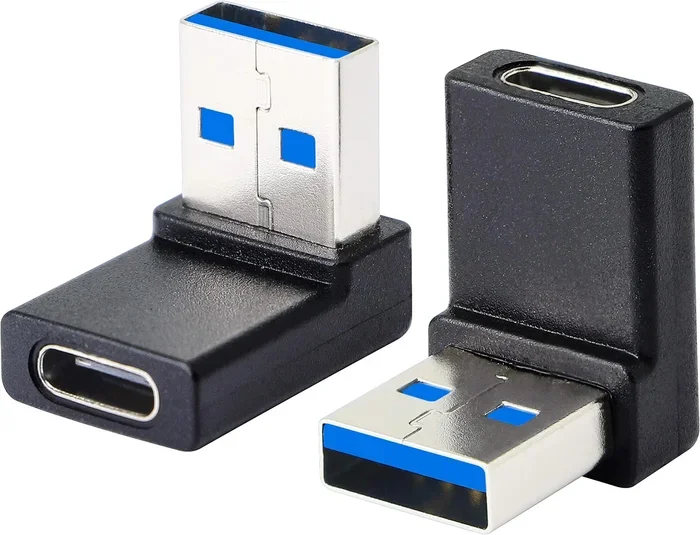
An adapter converter bridges the gap between Micro USB and USB C. It has a Micro USB plug on one end and a USB C plug on the other. This allows you to plug your existing Micro USB cable into a modern USB C device.
Adapters work as simple pass-through devices for charging and basic data transfer. They do not change the capabilities of your cable. If your Micro USB cable only supports 2.4 amps, the adapter will not magically boost it to 3 amps.
Using a Hybrid Cable
A hybrid cable is another option. These cables have a Micro USB plug on one end and a USB C plug on the other. They are convenient because you do not need a separate adapter. Just plug one end into your device and the other into the charger.
Hybrid cables are great for travel. They reduce the number of cables you need to carry. However, always check the cable specifications to ensure it supports the charging speed and data transfer rates you need.
How to Connect Micro USB to USB C Step by Step
Connecting a Micro USB device to a USB C port is simple once you have the right accessory. Follow these steps for a hassle-free setup.
Step 1: Identify Your Device Ports
Look at your device and identify the port type. Is it a Micro USB port or a USB C port? Check the device manual or look for the USB symbol next to the port. Micro USB ports are small and trapezoidal. USB C ports are oval and slightly larger.
Step 2: Choose the Right Adapter or Cable
Decide whether you want an adapter converter or a hybrid cable. Adapters are great if you already have a favorite Micro USB cable. Hybrid cables are better if you want a single cable solution.
When shopping, look for adapters that support your device’s charging requirements. A quality USB adapter should handle at least 2.4 amps for standard charging and 3 amps or more for fast charging.
Step 3: Plug in the Adapter
Insert the Micro USB plug into the adapter first. Then plug the USB C end into your device. Make sure both connections are firm and secure. A loose connection can cause intermittent charging or data transfer issues.
Step 4: Test the Connection
Once connected, check if your device starts charging. If you are transferring data, verify that the connection is stable. Some adapters may only support charging and not data transfer, so check the product description before purchasing.
Benefits of Upgrading from Micro USB to USB C
If you have been using Micro USB for years, switching to USB C brings several advantages. Here is why so many people are making the change.
Faster Charging Speeds
USB C charging is significantly faster than Micro USB. While a standard Micro USB cable delivers about 2.4 watts to 5 watts, USB C with Power Delivery can deliver up to 100 watts. This means your phone or tablet charges in a fraction of the time.
Even at lower power levels, USB C supports higher current ratings. A USB C cable can handle up to 3 amps at 5 volts, compared to Micro USB’s typical 2 amps. This translates to noticeably faster charging speed for your devices.
Better Data Transfer Rates
Micro USB 2.0 tops out at 480 Mbps for data transfer. USB C with USB 3.1 or USB 3.2 can reach speeds of 5 Gbps to 10 Gbps. If you regularly transfer large files like photos or videos, the difference is dramatic.
Even for everyday use, faster data transfer means less waiting. Syncing your phone to a computer or backing up files happens in seconds instead of minutes.
Reversible and Durable Design
The reversible design of USB C is a game-changer. No more fumbling to figure out which way the cable goes. This also reduces wear and tear on the port since you are less likely to force the connector the wrong way.
USB C connectors are also built to last longer. They are rated for 10,000 insertion cycles compared to Micro USB’s 5,000 cycles. Over time, this means fewer worn-out ports and cables.
Universal Compatibility
USB C is becoming the universal standard. Most new smartphones, laptops, tablets, and even gaming consoles now use USB C. Having one cable type for all your devices simplifies your life. You no longer need to keep track of multiple cable types and adapters.
Many people are also switching to universal charging setups. A single USB C charger can power your phone, tablet, earbuds, and even your laptop. This reduces cable clutter and makes travel much easier.
Common Mistakes When Connecting Micro USB to USB C
Even with the right adapter, people make mistakes that cause problems. Here are the most common ones to avoid.
Using Low-Quality Adapters
Cheap, unbranded adapters may seem like a good deal, but they can cause serious issues. Low-quality adapters often have poor wiring that leads to slow charging, overheating, or even device damage. Always buy from reputable brands and check for safety certifications.
Ignoring Power Delivery Ratings
Not all adapters support the same power levels. If your device needs 18 watts of fast charging and your adapter only supports 10 watts, you will not get the full speed. Always check the wattage and amperage ratings before purchasing an adapter.
Assuming All Adapters Support Data Transfer
Some adapters only support charging and do not transmit data. If you need to transfer files between devices, make sure the adapter explicitly supports data transfer. Look for products labeled as “charging and data” adapters.
Forcing the Connector
Never force a connector into a port. If it does not fit, something is wrong. Check that you are using the correct adapter and that the port is clean and free of debris. Forcing connections can bend pins and permanently damage your device.
Not Checking Cable Length and Quality
Longer cables can result in voltage drop, which reduces charging speed. If you need a long cable, choose one with thicker wiring to maintain power delivery. Also, avoid cables that are too thin or flimsy, as they may not handle the full current safely.
Expert Tips for Choosing the Right Adapter
Choosing the right USB C adapter can be overwhelming with so many options on the market. Here are some expert tips to help you make the best choice.
Check Your Device Requirements
Before buying anything, check what your device needs. Look at the manufacturer’s website or the original charger specifications. Note the voltage, amperage, and wattage requirements. This ensures you buy an adapter that matches your device’s capabilities.
Look for USB IF Certification
The USB Implementers Forum (USB IF) certifies adapters and cables that meet industry standards. Products with USB IF certification have been tested for safety and performance. Always look for this certification when shopping for adapters.
Consider Your Use Case
Think about how you will use the adapter. Do you need it for charging only? Or do you also need data transfer? Some adapters are designed specifically for charging, while others support both functions. Choose based on your needs.
Read Reviews and Ratings
Before purchasing, read user reviews and ratings. Real-world feedback helps you identify potential issues that product descriptions might not mention. Look for reviews that discuss long-term durability and real-world charging speeds.
Buy from Trusted Retailers
Purchase adapters from trusted retailers or directly from reputable brands. Avoid third-party sellers with questionable reputations. Quality adapters may cost a little more, but they protect your devices and deliver better performance.
Keep Your Cables Organized
Once you have the right setup, keep your cables organized. Use cable ties, a cable organizer bag, or a charging station. This prevents tangles and extends the life of your cables. If you travel often, a compact cable organizer is a lifesaver.
Quick Tips for Everyday Use
Here are some quick tips to keep in mind when using your Micro USB to USB C setup:
- Always unplug gently: pull the adapter out by the body, not the cable.
- Keep ports clean: use a soft brush or compressed air to remove dust from connectors.
- Store adapters properly: keep them in a dry, cool place to prevent damage.
- Label your cables: if you have multiple cables, use labels or color-coded tags to avoid confusion. You can even learn how to add prefixes to numbers on iPhone to organize your cable labels digitally.
- Carry a backup adapter: keep a spare adapter in your bag or at your desk for emergencies.
- Inspect cables regularly: check for fraying, bent pins, or loose connections. Replace damaged cables immediately.
For more gadget ideas that can simplify your daily tech routine, check out our 10 gadgets to make moms life easier guide. Many of these gadgets work great with USB C connections and can complement your adapter setup.
Conclusion
So, can I connect Micro USB to USB C? Absolutely yes, with the right adapter or hybrid cable. The process is straightforward, and the benefits of bridging these two connector types are well worth it. You get faster charging, better data transfer, and a more versatile setup.
Remember to choose quality adapters, check compatibility, and avoid common mistakes. A good USB C adapter is a small investment that pays off in convenience and device longevity. As USB Type C continues to become the universal standard, having the right adapter keeps your older devices relevant and functional.
Take a few minutes today to assess your cable setup. Identify which devices still use Micro USB and invest in the right adapters or cables. Your future self will thank you for the smoother, faster, and more organized charging experience. Connecting Micro USB to USB C is easy once you know how, and now you have everything you need to get it right.
Frequently Asked Questions
Can I plug a Micro USB cable directly into a USB C port?
No, you cannot plug a Micro USB cable directly into a USB C port. The shapes and pin configurations are completely different. You need an adapter converter or a hybrid cable that has a Micro USB plug on one end and a USB C plug on the other.
Will using an adapter slow down my charging speed?
A quality adapter should not significantly slow down your charging speed. However, cheap or low-quality adapters may not support the full amperage your device needs. Always choose adapters that match or exceed your device’s charging requirements to maintain optimal speed.
Can I transfer data using a Micro USB to USB C adapter?
Yes, many adapters support both charging and data transfer. However, not all adapters are the same. Check the product specifications to confirm that the adapter supports data transfer. Some adapters are designed for charging only and will not transmit data.
Is USB C better than Micro USB?
Yes, USB C is superior to Micro USB in almost every way. It offers faster charging speeds, higher data transfer rates, a reversible design, and better durability. USB C is also becoming the universal standard for most modern devices.
How do I know which adapter to buy?
Check your device’s charging requirements first. Look at the voltage, amperage, and wattage specifications. Choose an adapter that matches or exceeds these ratings. Also, look for USB IF certification and read user reviews to ensure you are getting a reliable product.
Are all Micro USB to USB C adapters the same?
No, adapters vary in quality, power delivery, and features. Some support only basic charging, while others handle fast charging and data transfer. Always check the specifications before buying to ensure the adapter meets your needs.