Can I Connect Airpods To United Flight During Travel
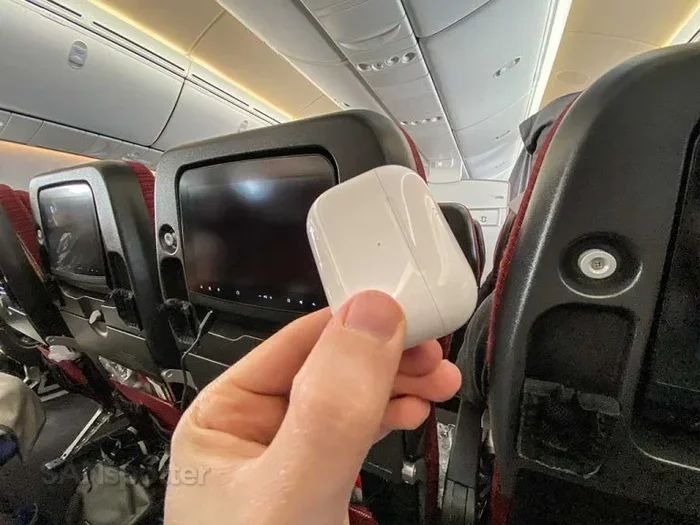
Yes, you can connect AirPods to United flights for a seamless wireless audio experience during your journey. United Airlines supports Bluetooth connectivity for inflight entertainment, and you can pair your AirPods with seatback screens or the United app. Whether you have standard AirPods, AirPods Pro, or AirPods Max, the setup process is simple and works across most United aircraft.
You have a long United flight ahead. Your AirPods are fully charged. You want to watch movies, listen to music, or catch up on a podcast. But the big question remains: can you actually connect AirPods to United flights?
The short answer is yes. Connecting your AirPods to United Airlines inflight entertainment is straightforward once you know the steps. This guide walks you through every method, every tip, and every common issue you might face. Let us get you set up for a pleasant flying experience.
Key Takeaways
- Bluetooth Pairing Works: United Airlines allows Bluetooth connections on most flights for inflight entertainment.
- Multiple Connection Methods: You can connect AirPods via Bluetooth directly to seatback screens or through the United app.
- AirPods Pro and Max Excel: Noise-cancelling AirPods make flights more comfortable and immersive.
- Airplane Mode Is Key: You must enable Airplane Mode but keep Bluetooth turned on for proper connectivity.
- WiFi Enhances Streaming: United Wi-Fi lets you stream content directly to your AirPods without seatback screens.
- Travel Gadgets Help: Carrying the right accessories makes inflight audio setups smoother and more reliable.
📑 Table of Contents
- Can I Connect Airpods To United Flight?
- How to Connect AirPods to United Inflight Entertainment
- Best AirPods for United Flights
- Common Problems and How to Fix Them
- United Airlines Bluetooth Policy and Rules
- Tips for the Best AirPods Experience on United Flights
- Can I Use AirPods with United First or Business Class?
- Final Thoughts
Can I Connect Airpods To United Flight?
The short answer is a resounding yes. United Airlines supports Bluetooth connectivity on most of its aircraft. This means your AirPods can pair with the inflight entertainment system on board. You can enjoy movies, TV shows, music, and games through your wireless earbuds without dealing with tangled wires or shared headphone jacks.
However, the exact method depends on the type of aircraft and the entertainment system installed. Some United planes use older seatback screens that require a direct Bluetooth pairing. Others let you stream content through the United app on your personal device. Both methods work beautifully with wireless earbuds like AirPods.
If you are a frequent flyer, you already know how much better the experience is when you can use your own noise-cancelling headphones. AirPods Pro and AirPods Max excel in this area. They block out engine noise and chatter so you can fully immerse yourself in your content. For moms traveling with kids, having reliable wireless earbuds can make the journey much more peaceful. Check out our 10 Gadgets To Make Moms Life Easier for more travel-friendly tech recommendations.
Which United Aircraft Support Bluetooth?
Most modern United aircraft come equipped with Bluetooth-enabled inflight entertainment. Here is a quick look at what you can expect:
- Boeing 737-700/800/900ER: These planes feature Bluetooth connectivity for personal devices.
- Boeing 787 Dreamliner: Full Bluetooth support with streaming capabilities through the United app.
- Airbus A319/A320/A321: Bluetooth pairing available on most domestic routes.
- Boeing 777-200/777-300ER: Supports both direct Bluetooth and app-based streaming.
Older aircraft or regional jets may not have Bluetooth support. In those cases, you can still use wired headphones with the seatback entertainment system. But for the best experience, Bluetooth-enabled AirPods are the way to go.
How to Connect AirPods to United Inflight Entertainment
Connecting your AirPods to United flights involves a few simple steps. The process is nearly identical whether you are using AirPods Pro, AirPods Max, or standard AirPods. Let us walk through each method in detail.
Method 1: Direct Bluetooth Pairing with Seatback Screens
This is the most common method on United flights equipped with Bluetooth. Here is how to do it:
- Put your AirPods in pairing mode. Open the case near your device and press and hold the setup button until the LED flashes white.
- Enable Airplane Mode on your phone or tablet. This is required by FAA regulations.
- Turn on Bluetooth while Airplane Mode is active. This is the key step many travelers miss.
- On the seatback screen, go to the Settings or Bluetooth menu.
- Select your AirPods from the list of available devices.
- Start playing content. Your audio will now stream directly to your AirPods.
Quick Tip: If your AirPods do not show up immediately, try turning Bluetooth off and back on. Sometimes the connection takes a moment to appear on the seatback screen.
Method 2: Using the United App with Inflight WiFi
Many newer United aircraft allow you to stream content directly through the United app on your phone or tablet. This method gives you more control over your viewing experience.
- Connect to United Wi-Fi. Once the plane reaches cruising altitude, the Wi-Fi option will appear in your settings.
- Open the United app and sign in with your MileagePlus account or booking reference.
- Browse the entertainment library. Select any movie, show, or music playlist.
- Play the content. Audio streams directly to your connected AirPods.
This method works especially well if you prefer watching on a smaller screen or if the seatback screen is occupied by another passenger. The inflight WiFi quality has improved significantly over the years, so streaming is smooth on most routes.
For travelers who want a complete tech setup for flying, consider exploring our 10 Gadgets To Make Moms Life Easier guide. It covers essential travel tech that pairs perfectly with AirPods for a smooth journey.
Best AirPods for United Flights
Not all AirPods are created equal when it comes to flying. Some models offer features that make the inflight experience significantly better. Here is a breakdown of the best options.
AirPods Pro (2nd Generation)
The AirPods Pro 2 are arguably the best choice for air travel. The active noise cancellation blocks out engine hum and cabin noise. The transparency mode lets you hear announcements without removing your earbuds. And the adaptive audio feature adjusts sound based on your environment.
Key benefits for United flights include:
- Excellent battery life (up to 6 hours per charge)
- Comfortable fit for long hours
- Seamless Apple device switching
- Spatial audio for an immersive movie experience
AirPods Max
If you want premium comfort and sound, the AirPods Max deliver. The over-ear design provides superior noise isolation. The built-in digital crown makes volume control easy without touching your phone. These are perfect for long-haul United flights where you want to fully relax.
The downside is weight. AirPods Max are heavier than in-ear models. Some travelers find them less comfortable for very long flights. But the sound quality and noise cancellation are top-notch.
Standard AirPods (3rd Generation)
The regular AirPods work perfectly fine for most United flights. They lack noise cancellation, but they are lightweight and easy to wear for hours. The spatial audio feature adds a nice touch when watching movies on the inflight system.
| Model | Noise Cancellation | Battery Life | Best For |
|---|---|---|---|
| AirPods Pro 2 | Yes (Active) | 6 hours | Long flights, noisy cabins |
| AirPods Max | Yes (Active) | 20 hours | Premium comfort, immersive audio |
| AirPods 3rd Gen | No | 6 hours | Lightweight, everyday use |
No matter which model you choose, all AirPods connect to United flights the same way. The Bluetooth pairing process is identical across all models.
Common Problems and How to Fix Them
Even with the simplest setup, things can go wrong at 35,000 feet. Here are the most common issues travelers face and how to solve them quickly.
AirPods Not Showing Up on Seatback Screen
This is the number one complaint among AirPods users on flights. The fix is usually simple. First, make sure your AirPods are in pairing mode. The LED on the case should flash white. Second, confirm that Bluetooth is turned on while Airplane Mode is enabled. Third, restart the seatback screen if possible. Sometimes a quick reboot resolves the connection issue.
Audio Delay or Lag
A slight delay between video and audio can be annoying. This usually happens when using inflight WiFi streaming. To reduce lag, try pausing the video for a few seconds to let it buffer. If you are using direct Bluetooth pairing with the seatback screen, lag is rarely an issue.
AirPods Disconnect Mid-Flight
Bluetooth signals can weaken during turbulence or when moving around the cabin. To prevent disconnections, keep your device in your seatback pocket or a secure location. Avoid placing your phone in the overhead bin, as the distance can weaken the Bluetooth signal.
Poor Audio Quality
If the sound seems muffled or unclear, check the seatback audio settings. Some systems have an equalizer or audio profile that affects sound quality. Also, make sure your AirPods are clean and the ear tips fit snugly. A loose fit can cause sound leakage and reduced bass response.
Quick Tip: Before your next trip, test your AirPods connection at home with Bluetooth enabled in Airplane Mode. This ensures everything works smoothly before you board.
United Airlines Bluetooth Policy and Rules
Understanding United Airlines rules about Bluetooth and wireless devices helps you avoid any surprises during your flight. Here is what you need to know.
When Can You Use Bluetooth?
United Airlines allows Bluetooth usage once the aircraft reaches cruising altitude. During takeoff and landing, all electronic devices must be in Airplane Mode or turned off. Once the captain turns off the seatbelt sign, you can enable Bluetooth and connect your AirPods.
Do You Need to Pay for WiFi?
Some United Wi-Fi plans are free for basic browsing. However, streaming content through the United app usually requires a paid Wi-Fi plan. Wi-Fi passes range from around $7 to $17 depending on the flight duration and data speed. You can purchase Wi-Fi directly through the United app or at the inflight portal.
Expert Insight: If you plan to stream movies or shows, consider purchasing a Wi-Fi pass before boarding. This saves time and ensures you are connected as soon as the WiFi becomes available.
Can You Use AirPods the Entire Flight?
Yes, you can use AirPods for the entire duration of the flight once Bluetooth is enabled. There are no United Airlines restrictions on using wireless earbuds. You can listen to music during takeoff (with Airplane Mode on and Bluetooth off), connect them once cruising altitude is reached, and use them until landing.
Tips for the Best AirPods Experience on United Flights
Getting your AirPods connected is only half the battle. These practical tips help you get the most out of your inflight audio experience.
- Charge your AirPods fully before the flight. A full charge gives you 4 to 6 hours of playback, which covers most domestic flights.
- Bring your charging case. A quick 10-minute charge in the case gives you several hours of additional playback.
- Use the right ear tips. Silicone or foam tips that fit snugly improve sound quality and noise isolation.
- Download content before the flight. If you plan to use the United app, download movies or shows in advance to avoid buffering issues.
- Pack a backup. Carry a pair of wired earbuds just in case Bluetooth does not work on your specific aircraft.
- Be courteous to fellow passengers. Keep your volume at a reasonable level so others are not disturbed.
Traveling with gadgets can be a game-changer for long flights. If you are looking for more travel-friendly devices, check out our guide on 10 Gadgets To Make Moms Life Easier for inspiration.
Can I Use AirPods with United First or Business Class?
Absolutely. First and Business Class passengers on United flights enjoy the same Bluetooth connectivity options. In fact, the experience is often even better because the seats are more spacious and the inflight entertainment systems are more advanced. Some United Polaris seats come with larger screens and faster WiFi, which enhances streaming to your AirPods.
Business class passengers also benefit from power outlets at every seat. This means you can charge your phone or tablet while using AirPods for hours of entertainment. The combination of premium seating and wireless audio creates a truly comfortable flying experience.
Are There Any Restrictions in Premium Cabins?
There are no special restrictions on using AirPods in First or Business Class. The same Bluetooth pairing process applies. The only difference is that premium cabins may offer additional entertainment options, such as premium channels or exclusive content that you can stream directly to your AirPods through the United app.
Final Thoughts
Connecting AirPods to United flights is simple, reliable, and totally worth it. Whether you are on a short domestic hop or a long international route, wireless earbuds transform the flying experience. You get freedom from tangled wires, better sound quality, and the comfort of your own noise-cancelling earbuds.
United Airlines has made great strides in supporting personal Bluetooth devices. The inflight entertainment systems are modern, the WiFi is faster than ever, and the United app makes streaming a breeze. All you need is a pair of AirPods and a little patience during the pairing process.
Remember to charge your AirPods before you fly, enable Airplane Mode with Bluetooth on, and choose the connection method that works best for your aircraft. With these steps, you will be watching your favorite movies and listening to your preferred playlists in no time.
Next time you board a United flight, leave the bulky headphones at home. Your AirPods are all you need for a comfortable, entertaining journey at 30,000 feet.
Frequently Asked Questions
Can I connect AirPods to United flights for free?
Yes, connecting AirPods via Bluetooth to the seatback entertainment system is completely free. You do not need to pay anything extra to pair your AirPods with the inflight system. However, if you want to stream content through the United app using WiFi, you may need to purchase a Wi-Fi pass depending on your fare type.
Why won’t my AirPods connect to the United seatback screen?
The most common reason is that Bluetooth is not enabled while Airplane Mode is active. Make sure Airplane Mode is on, then manually turn Bluetooth on. If your AirPods still do not appear, restart the seatback screen and put your AirPods back into pairing mode. Sometimes a simple reset of both devices solves the issue.
Can I use AirPods Pro on United international flights?
Yes, AirPods Pro work on international United flights just as well as domestic ones. Most long-haul United aircraft are equipped with Bluetooth-enabled entertainment systems. The connection process is identical to what you would do on a domestic flight.
Do I need the United app to use AirPods on flights?
No, the United app is not required. You can connect AirPods directly to the seatback entertainment screen via Bluetooth. The app is only necessary if you want to stream content through United Wi-Fi. Both methods work independently and offer a great audio experience.
How long do AirPods last on a United flight?
AirPods Pro and standard AirPods provide up to 6 hours of playback on a single charge. AirPods Max can last up to 20 hours. Most domestic United flights are under 5 hours, so a single charge is more than enough. For longer international flights, bring your charging case for a quick top-up during the journey.
Can I connect AirPods to United flights if I am using an Android phone?
Yes, you can. The Bluetooth pairing process works the same way regardless of your phone’s operating system. As long as your device supports Bluetooth and you have Airplane Mode enabled with Bluetooth turned on, your AirPods will connect to the United inflight system or stream through the United app.
=== CONCLUSION ===
Connecting AirPods to United flights is easy, practical, and makes every journey more enjoyable. You have learned the direct Bluetooth method, the United app streaming method, and how to troubleshoot common issues. You also know which AirPods models work best and what United Airlines policies apply to wireless audio on board.
The key takeaway is simple: yes, you can connect AirPods to United flights without any hassle. Enable Airplane Mode, turn on Bluetooth, pair your earbuds, and enjoy your inflight entertainment. With the right preparation, your next United flight will feel shorter, more comfortable, and far more entertaining.
So charge up those AirPods, download your favorite content, and head to the airport with confidence. Happy travels and happy listening.