Can I Charge My Laptop On My Car While On The Road
Yes, you can charge your laptop on your car using several methods like a car power inverter, a USB car charger, or a portable power station. Whether you are on a long road trip or stuck in traffic, keeping your laptop battery alive is totally doable. This guide covers every safe and practical way to power your laptop from your vehicle without damaging your car battery or your device.
Have you ever been stuck in your car and realized your laptop battery is about to die? Maybe you are on a long road trip. Maybe you are commuting to work and need to finish an urgent project. Or perhaps you are traveling for business and forgot your charger. Whatever the reason, the question can I charge my laptop on my car comes up a lot. And the short answer is yes. You absolutely can. But how you do it matters a lot. Using the wrong method can damage your laptop, drain your car battery, or even create safety risks. In this article, we will walk you through every safe and practical way to charge your laptop from your car. We will cover the tools you need, the mistakes to avoid, and the tips that make everything easier.
Charging a laptop in a vehicle is not as simple as plugging it into a wall outlet. Your car uses 12V DC power, while most laptops need AC power through a standard charger. This difference means you need the right adapter or inverter to make it work. Some methods are cheap and easy. Others cost more but offer better performance. We will break it all down so you can choose the best option for your needs. Whether you drive a sedan, an SUV, or a truck, there is a solution that fits your vehicle and your budget.
Key Takeaways
- Multiple Methods Available: You can use a 12V inverter, a DC adapter, a USB car charger, or a portable power station to charge your laptop on the go.
- Safety Matters: Always check your car battery health and avoid draining it completely, especially when the engine is off.
- Wattage Is Key: Match your inverter or charger wattage to your laptop power requirements for safe and efficient charging.
- Hybrid and Electric Vehicles: These offer unique charging options that differ from traditional gas-powered cars.
- Road Trip Ready: With the right setup, you can work, stream, or study from your car without any interruptions.
📑 Table of Contents
- Why You Might Need to Charge Your Laptop in Your Car
- Methods to Charge Your Laptop on Your Car
- How to Choose the Right Charger for Your Laptop and Car
- Common Mistakes People Make When Charging a Laptop in a Car
- Can You Charge a Laptop in Different Types of Vehicles?
- Expert Tips for Safe and Efficient Laptop Charging in Your Car
- Frequently Asked Questions
- Conclusion
Why You Might Need to Charge Your Laptop in Your Car
There are many reasons people need to power their laptop from a car. Remote work is more common than ever. Digital nomads travel constantly. Students study on long commutes. Freelancers often work from their vehicles between meetings. Road trips are a favorite way to explore, and staying connected makes them even better. Whatever your situation, having a working laptop while on the road can save you time and stress. You can answer emails, edit documents, attend video calls, or binge-watch your favorite shows during a long drive. The ability to keep your laptop charged in a car turns dead time into productive time.
The Rise of Mobile Work Culture
More people than ever work from their cars. Delivery drivers, rideshare operators, and sales professionals rely on laptops throughout the day. Even traditional office workers sometimes need to catch up on tasks during commutes. Having a reliable way to charge a laptop in a vehicle is no longer a luxury. It is a necessity for many professionals. The right charging setup gives you freedom and flexibility. You are not tied to a desk or a wall outlet anymore.
Students and Travelers on the Go
Students who commute long distances can use car charging time to study or complete assignments. Travelers who road trip across the country can stay connected with family, navigate with GPS, and edit photos or videos on the fly. The possibilities are endless when you know how to use your car as a power source for your laptop.
Methods to Charge Your Laptop on Your Car
There are several ways to charge a laptop from a car. Each method has its own pros and cons. Some are better for quick charges. Others work best for long trips. Let us explore each option in detail so you can pick what works for you.
Method 1: Using a Car Power Inverter
A 12V power inverter is one of the most popular ways to charge a laptop in a car. This device plugs into your car’s cigarette lighter socket or DC power outlet. It converts the 12V DC power from your car into 120V AC power, just like a wall outlet. You can then plug your laptop’s regular charger into the inverter.
Inverters come in different sizes. A 150W inverter works for most standard laptops. If you have a gaming laptop or a larger device, you may need a 300W or 400W inverter. Higher wattage inverters cost more but give you flexibility to charge multiple devices at once.
Here is what to look for when buying a car inverter:
- Wattage rating: Match it to your laptop’s power needs. Check your laptop charger label for the wattage.
- USB ports: Many modern inverters include USB-A and USB-C ports for phones and tablets too.
- Safety features: Look for inverters with built-in fan cooling, overcharge protection, and short-circuit protection.
- Pure sine wave vs. modified sine wave: Pure sine wave inverters provide cleaner power and are safer for sensitive electronics like laptops.
A pure sine wave inverter is the best choice for laptops. It delivers smooth, stable power that matches what your laptop needs. Modified sine wave inverters are cheaper but can cause humming or heat issues with some devices. For the safest and most reliable laptop charging in a car, go with a pure sine wave model.
Method 2: Using a DC-to-DC Adapter or Car Laptop Charger
Another great option is a DC-to-DC adapter, also called a car laptop charger. This device plugs directly into your car’s 12V outlet and connects to your laptop through the right tip or USB-C cable. Unlike an inverter, it does not convert DC to AC. Instead, it steps down the 12V DC to the exact voltage your laptop needs.
These adapters are more efficient than inverters. They waste less energy as heat. They are also smaller and lighter, making them perfect for travel. Many DC laptop car chargers come with interchangeable tips for different laptop brands like Dell, HP, Lenovo, and Apple.
Here are the benefits of using a DC-to-DC adapter:
- Higher efficiency: Less energy is lost during conversion, so your laptop charges faster.
- Compact size: These adapters are small and easy to store in your glove box or bag.
- Lower cost: Most DC car laptop chargers cost less than inverters.
- Direct connection: No bulky inverter box between your car outlet and your laptop.
The downside is that you need to buy the correct tip or cable for your specific laptop model. Make sure the adapter supports your laptop’s voltage and wattage requirements before purchasing.
Method 3: Using a USB Car Charger
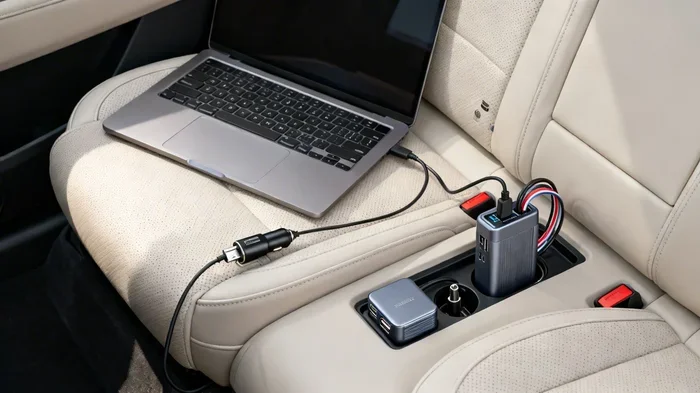
If your laptop supports USB-C charging, a high-wattage USB car charger is a simple and effective solution. Many modern laptops, including newer MacBook models and Chromebooks, can charge through a USB-C cable. You just plug a powerful USB-C car charger into your vehicle’s 12V outlet and connect your laptop with a USB-C cable.
Look for a car charger that delivers at least 65W or 100W through USB-C. GaN (Gallium Nitride) chargers are the best choice. They are small, fast, and run cool. A 65W GaN USB car charger can charge most standard laptops quickly and safely.
Here are some quick tips for using a USB car charger:
- Always use a high-quality USB-C cable rated for high wattage.
- Check that your car’s 12V outlet can supply enough power for the charger.
- Avoid using the charger while driving aggressively, as voltage fluctuations can affect charging speed.
- Keep the charger ventilated and do not block the car’s air vents.
Method 4: Using a Portable Power Station
A portable power station is a battery pack that you charge at home and then use to power your laptop anywhere. You can charge it from your car’s 12V outlet while driving, or plug it into a wall outlet at home. Then, when you need to charge your laptop on the road, you simply plug it in.
Portable power stations come in many sizes. Small ones with 100Wh to 200Wh capacity can charge a laptop several times. Larger models can power multiple devices for hours. Brands like Jackery, EcoFlow, and Anker make excellent car-compatible portable power stations.
This method is great for situations where your car is parked and the engine is off. You can charge your laptop in a picnic area, a campsite, or during a power outage. Just remember that you will need to recharge the power station from your car or a wall outlet eventually.
Method 5: Using Your Car’s Built-In USB Ports
Many modern cars come with built-in USB ports, especially in the rear seats and center console. These ports can sometimes charge a laptop, but there is a catch. Most car USB ports deliver only 2.1A to 2.4A of power, which is enough for phones but usually not enough for laptops.
Some newer vehicles have high-power USB-C ports that deliver 45W or more. These can charge laptops that support USB-C charging. Check your car’s manual or look for a lightning bolt symbol next to the USB port to see if it supports higher power output.
If your car does not have a high-power USB port, you can still use a USB car charger with a built-in AC outlet. This gives you the flexibility to charge your laptop through its standard charger while also charging your phone through USB.
How to Choose the Right Charger for Your Laptop and Car
Not all car laptop chargers are the same. Choosing the right one depends on your laptop model, your car, and how you plan to use it. Here are the key factors to consider.
Check Your Laptop’s Power Requirements
Look at your laptop charger label for the voltage (V) and wattage (W). Most standard laptops need 45W to 65W. Gaming laptops can need 90W to 130W or more. Your car charger or inverter must meet or exceed these requirements. If you use an inverter, make sure it can handle the continuous wattage your laptop draws.
Match the Connector Type
Laptops use different connector types. Some use barrel plugs, others use USB-C, and some use proprietary connectors. Make sure your DC car charger has the right tip or cable for your laptop. Many universal car chargers include multiple tips to fit different brands.
Consider Your Driving Habits
If you mostly charge while driving, a DC-to-DC adapter or a USB-C car charger works great. If you need to charge with the engine off, a portable power station is the safest option. If you need to charge multiple devices at once, a high-wattage inverter gives you the most flexibility.
Common Mistakes People Make When Charging a Laptop in a Car
Charging your laptop in a car is simple, but people make mistakes that can cause problems. Here are the most common ones and how to avoid them.
Draining the Car Battery
This is the biggest mistake people make. If you charge your laptop with the engine off, you drain your car battery. A laptop charger draws between 45W and 130W, which can drain a car battery in just a few hours. Always charge your laptop while the engine is running if you are using a direct connection like an inverter or DC adapter.
If you must charge with the engine off, use a portable power station instead. It keeps your car battery completely safe. Also, avoid charging other devices at the same time to reduce the load on your car battery.
Using the Wrong Wattage Inverter
Using an inverter that is too small for your laptop can cause overheating and charging failures. If your laptop needs 90W and you use a 60W inverter, the inverter will overload. This can damage both the inverter and your laptop. Always check the wattage requirements before buying an inverter.
Ignoring Heat Buildup
Inverters and car chargers generate heat, especially during long charging sessions. Placing them in enclosed spaces or covering them with objects can cause overheating. Keep your inverter in a well-ventilated area. Do not leave it under a seat or in a closed glove box while it is working.
Using Cheap, Low-Quality Chargers
Cheap chargers may seem like a good deal, but they often lack safety protections. They can deliver unstable voltage, which may damage your laptop’s battery or internal components. Always buy from reputable brands and look for certifications like UL or CE on the product.
Forgetting to Unplug When the Engine Is Off
It sounds simple, but many people forget to unplug their car laptop charger when they turn off the engine. Even a small draw from a USB charger can drain your car battery over time, especially if the car sits for days. Make it a habit to unplug everything when you park.
Can You Charge a Laptop in Different Types of Vehicles?
Not all vehicles are the same when it comes to charging a laptop on the road. The type of vehicle you drive affects your options and performance.
Gas-Powered Cars and Trucks
Most gas-powered cars have a 12V cigarette lighter socket or DC power outlet. These work well with inverters, DC adapters, and USB car chargers. Trucks often have multiple 12V outlets, including ones in the bed or cab, giving you more flexibility for laptop charging while driving.
If you drive a truck or SUV with a larger battery, you have more room to charge devices without worrying about battery drain. Smaller sedans have smaller batteries, so you should be more careful about how long you charge with the engine running.
Hybrid Vehicles
Hybrid cars have both a gas engine and an electric motor. They typically have 12V outlets for accessories, and some models offer higher-voltage ports for device charging. Hybrids are generally good for charging laptops in the car because their battery systems are designed for sustained power output.
Electric Vehicles (EVs)
Electric vehicles are a game-changer for laptop charging on the road. Many EVs have built-in 120V AC outlets, similar to what you would find in a home. This means you can plug your laptop charger directly into the car without any inverter or adapter. Some EVs even offer 240V outlets for faster charging of larger devices.
Tesla vehicles, for example, have 12V and 110V outlets in some models. Ford and GM electric trucks are also adding more power outlets for accessories and device charging. If you drive an EV, charging your laptop is as easy as plugging into a wall outlet.
RVs and Campers
Recreational vehicles often have built-in inverters that convert 12V DC battery power to 120V AC. This means you can charge your laptop just like you would at home. Many RV owners also add portable power stations for extra capacity during off-grid camping trips.
Expert Tips for Safe and Efficient Laptop Charging in Your Car
Now that you know the methods and common mistakes, here are some expert tips to make your car laptop charging experience smooth and safe.
Keep Your Car Engine Running While Charging
Always charge your laptop with the engine running whenever possible. The alternator keeps the battery topped up while generating power for your devices. This prevents battery drain and ensures a steady power supply to your laptop.
Monitor Your Battery Levels
Keep an eye on both your car battery and your laptop battery. If your car battery is low, reduce the load by unplugging non-essential devices. If your laptop is almost full, unplug it to avoid overcharging, which can reduce battery life over time.
Use a Surge Protector
Car electrical systems can experience voltage spikes, especially when the engine starts or when you use heavy accessories. A small car surge protector can protect your laptop from power surges and fluctuations. These are inexpensive and easy to use.
Plan Your Charging Stops
If you are on a long road trip, plan your charging stops ahead of time. Know where you can pull over to recharge your car battery or your portable power station. This is especially important if you rely on your laptop for work during the trip.
Invest in Quality Cables and Adapters
Good cables and adapters make a big difference. Cheap cables can overheat, have high resistance, or fail to deliver the full wattage your laptop needs. Invest in certified cables and adapters from trusted brands. Your laptop and your car will thank you.
Frequently Asked Questions
Can I charge my laptop on my car with the engine off?
You can, but it is not recommended. Charging your laptop with the engine off drains your car battery. A laptop charger draws significant power, and your car battery may not be able to handle it for long. If you must charge with the engine off, use a portable power station instead, as it keeps your car battery safe and untouched.
Will charging my laptop drain my car battery?
Yes, if you charge for a long time with the engine off. The alternator recharges your car battery while the engine runs, so charging with the engine on is safe. If you charge with the engine off, limit the time to 30 minutes or less to avoid a dead battery. For longer sessions, use a portable power station.
What size inverter do I need to charge a laptop?
Most standard laptops need 45W to 65W, so a 150W inverter works well. Gaming laptops or high-performance models may need 90W to 130W, so look for a 300W inverter. Always choose an inverter that exceeds your laptop’s wattage by at least 20% to handle power surges safely.
Can I use a regular USB car charger to charge my laptop?
Only if your laptop supports USB-C charging and your car charger delivers enough wattage. Standard USB car chargers output 2.1A to 2.4A, which is not enough for most laptops. You need a high-wattage USB-C car charger that delivers at least 65W or more for laptop charging.
Is it safe to leave a laptop charging in the car overnight?
No, it is not safe. Leaving a laptop charging overnight with the engine off can completely drain your car battery. Even with the engine running, it is not a good practice. Unplug your laptop when you leave the car, and never leave charging devices unattended for long periods.
Can I charge my laptop in an electric vehicle?
Yes, and it is often the easiest method. Many electric vehicles have built-in 120V AC outlets that let you plug in your laptop charger directly. No inverter or adapter is needed in most cases. Just check your EV’s manual for the available outlet types and power ratings.
Conclusion
Charging your laptop on your car is completely possible and easier than you might think. Whether you use a 12V power inverter, a DC-to-DC car adapter, a USB-C car charger, or a portable power station, you have plenty of options to keep your laptop powered on the road. The key is choosing the right method for your vehicle, your laptop, and your needs.
Always remember to charge with the engine running when using direct car power sources. Avoid draining your car battery by using a portable power station when the engine is off. Invest in quality equipment, follow safety tips, and you will never have to worry about a dead laptop battery again. With the right setup, your car becomes a mobile office, a study space, and an entertainment hub. Charge your laptop on your car with confidence and enjoy the freedom of staying connected wherever the road takes you.