How Can I Get Good Free Wi Fi Working In My Area Right Now
Finding good free Wi-Fi in your area is easier than you think. With the right tools and know-how, you can connect to free internet almost anywhere. This guide covers everything from locating public hotspots to boosting your signal at home. You will learn practical tips that actually work in 2024.
Let’s face it. We all need free Wi-Fi now more than ever. Whether you are working from home, streaming your favorite shows, or just browsing the web, a solid connection is essential. But paying for internet every month can really add up. That is why so many people search for ways to get good free Wi-Fi working in their area right now.
The good news is that you have more options than you might think. From public hotspots to clever workarounds, there are real solutions that can get you online without opening your wallet. In this guide, we will walk you through every method that actually works. You will learn where to find free networks, how to boost your signal, and how to stay safe while browsing. Let us dive in and get you connected.
Key Takeaways
- Free Wi-Fi hotspots are everywhere: Libraries, cafes, and public spaces often offer strong free connections you can use daily.
- Your phone can become a Wi-Fi tool: Apps like Wi-Fi Finder help you locate open networks near you in seconds.
- You can extend free Wi-Fi range: Simple tricks like repositioning your router or using a Wi-Fi extender improve coverage.
- Security matters with free networks: Always use a VPN when connecting to public Wi-Fi to protect your personal data.
- Community programs offer free internet: Many cities and nonprofits provide free broadband access to residents in need.
📑 Table of Contents
- Why Free Wi-Fi Matters More Than Ever
- Where to Find Free Wi-Fi Hotspots Near You
- How to Use Apps to Locate Free Wi-Fi
- Can You Get Wi-Fi Without a Password or Special Equipment?
- How to Boost Your Free Wi-Fi Signal
- Staying Safe on Free Wi-Fi Networks
- Community Programs That Offer Free Internet
- Quick Tips for Getting the Best Free Wi-Fi Experience
- Common Mistakes People Make with Free Wi-Fi
- What If There Is No Free Wi-Fi in Your Area?
- Final Thoughts
Why Free Wi-Fi Matters More Than Ever
Internet access is no longer a luxury. It is a necessity. People use Wi-Fi for work, school, healthcare, and staying in touch with loved ones. When you cannot connect, it can hold you back in many areas of life. Free Wi-Fi helps bridge that gap for millions of people.
Here are some reasons why free internet access is so important:
- Cost savings: Free Wi-Fi helps you avoid expensive monthly bills.
- Emergency connectivity: You can reach help or loved ones when you need it most.
- Learning and growth: Students and job seekers rely on free internet for research and applications.
- Entertainment: Streaming movies, music, and games keeps you entertained without extra costs.
- Community connection: Free networks help people stay involved in their neighborhoods online.
Where to Find Free Wi-Fi Hotspots Near You
The easiest way to get free Wi-Fi is to find existing hotspots in your area. Many businesses and public spaces offer free internet to customers and visitors. You just need to know where to look.
Public Libraries
Libraries are one of the best kept secrets for free internet. Almost every public library offers free Wi-Fi to visitors. You can sit down, connect, and browse for as long as the library is open. Some libraries even let you use their computers for free. It is a quiet, safe, and reliable place to get online.
Coffee Shops and Cafes
Most coffee shops and cafes offer free Wi-Fi to customers. Chains like Starbucks, McDonald’s, and Dunkin often have strong open networks. You do not even need to buy anything in some cases, though purchasing a drink is always a nice gesture. Just walk in, ask for the password, and connect.
Shopping Malls and Retail Stores
Many malls and large retail stores provide free Wi-Fi for shoppers. These networks are usually strong and cover large areas. You can browse the web while resting between stores. Some malls even have dedicated Wi-Fi zones near food courts and seating areas.
Parks and Public Spaces
City parks and public squares are increasingly offering free internet access. Many municipalities have invested in outdoor Wi-Fi networks for residents. These hotspots are perfect for a quick check-in or email while enjoying the fresh air. Check your city’s website to see if this service is available near you.
How to Use Apps to Locate Free Wi-Fi
Technology makes finding free Wi-Fi easier than ever. Several apps are designed specifically to help you locate open networks in your area. These tools scan for available hotspots and show you a map of options nearby.
Top Apps for Finding Free Wi-Fi
Here are some of the best apps you can use right now:
- Wi-Fi Map: This app shows millions of free hotspots worldwide. Users share passwords and connection details. It is one of the most popular options available.
- Wifiman: A simple and fast tool that scans for open networks in your area. It works well on both Android and iOS devices.
- Free Wi-Fi Finder: This app focuses specifically on free networks. It filters out paid options and shows only open connections.
- Instabridge: Users share Wi-Fi passwords through this community-driven app. It also works offline, so you can find networks even without a connection.
Using Google Maps for Wi-Fi Discovery
You can also use Google Maps to find free Wi-Fi. Simply open the app, search for “free Wi-Fi,” and it will show you nearby options. This is a quick and easy method that works well when you are traveling or exploring a new area. Many cafes, libraries, and public spaces are already listed on Google Maps with their Wi-Fi details.
Can You Get Wi-Fi Without a Password or Special Equipment?
A common question people ask is whether they can get free Wi-Fi without a password or special equipment. The answer is yes, in many cases. Open networks do not require passwords, and many public spaces broadcast them for anyone to use.
If your device does not have built-in Wi-Fi capability, you might wonder if there is another way. You can check if Can I Get Wi-Fi Without A Password is possible in your area. Many open networks are completely unsecured, which makes them easy to join. You simply select the network and connect. No password needed.
For those who want to connect at home without a traditional setup, you might explore whether Can I Get Just Wi-Fi At Home without a full internet package. Some providers offer standalone Wi-Fi plans that are more affordable than bundled packages. This can be a great way to save money while staying connected.
If you are using a PC and wondering about wireless options, you might ask yourself Can I Connect My PC To Wi-Fi Without Ethernet. The answer is absolutely yes. Many modern laptops and desktops come with built-in wireless adapters. For older devices, a simple USB Wi-Fi adapter can do the trick. These cost very little and open up a world of free network possibilities.
How to Boost Your Free Wi-Fi Signal
Finding a free network is only half the battle. You also need a strong signal to actually use it. A weak connection can be frustrating, especially when you are trying to work or stream content. Here are some proven ways to boost your free Wi-Fi signal.
Position Yourself Close to the Source
The simplest trick is to move closer to the router or hotspot. Walls, furniture, and other obstacles can weaken your signal significantly. If you are in a cafe, try sitting near the front window or closer to the router. Even moving a few feet can make a big difference in your connection quality.
Use a Wi-Fi Extender or Repeater
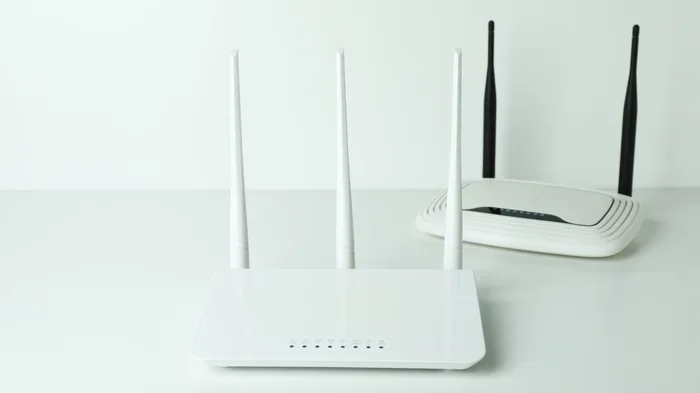
A Wi-Fi extender can amplify a weak signal and spread it to a wider area. These devices are affordable and easy to set up. You place the extender halfway between the router and your device. It picks up the existing signal and rebroadcasts it with more power. This is especially helpful in large homes or outdoor spaces.
Switch to the Right Frequency Band
Many routers broadcast on two frequency bands: 2.4 GHz and 5 GHz. The 2.4 GHz band has a longer range but slower speeds. The 5 GHz band is faster but has a shorter range. For free public networks, the 2.4 GHz band often works better because it reaches farther. If you control the router, try switching bands to see which one gives you the best results.
Keep Your Device Updated
Outdated software can hurt your Wi-Fi performance. Make sure your phone, tablet, or computer has the latest updates installed. Updates often include improvements to wireless connectivity and network handling. A simple restart can also clear up temporary connection issues and refresh your signal.
Staying Safe on Free Wi-Fi Networks
Free Wi-Fi is wonderful, but it comes with risks. Open networks are not always secure. Hackers can potentially intercept your data on public connections. That is why you need to take precautions every time you connect to a free network.
Use a Virtual Private Network (VPN)
A VPN encrypts your internet traffic and keeps your data safe. It creates a secure tunnel between your device and the internet. Even on an open network, your information stays protected. Many VPN services are free or very affordable. Using one is one of the best habits you can build when connecting to public networks.
Avoid Sensitive Transactions
Try to avoid banking or shopping on free public Wi-Fi. If you must do so, make sure the website uses HTTPS. Look for the padlock icon in your browser bar. This indicates a secure connection. Still, it is always safer to wait until you are on a trusted network for sensitive tasks.
Turn Off Auto-Connect
Many devices automatically connect to open networks they have used before. This can be a security risk. You might connect to a fake network set up by a hacker without even realizing it. Turn off auto-connect in your Wi-Fi settings and manually choose which networks to join.
Keep Your Firewall Enabled
Your device’s firewall acts as a shield against unwanted connections. Make sure it is turned on whenever you use a public network. Most operating systems have built-in firewalls that are easy to enable. This simple step adds an extra layer of protection to your browsing session.
Community Programs That Offer Free Internet
Did you know that many communities offer free internet programs for residents? These initiatives aim to close the digital divide and provide access to everyone. They are often funded by local governments, nonprofits, or tech companies.
Municipal Wi-Fi Programs
Some cities have built their own free Wi-Fi networks for residents. These municipal networks cover parks, downtown areas, and public buildings. They are completely free to use and often provide strong, reliable connections. Check your city government’s website to see if a program exists in your area.
Nonprofit and Government Initiatives
Several organizations work to provide free internet access to underserved communities. Programs like Affordable Connectivity Program (ACP) help low-income households get connected. Some internet providers also offer discounted or free plans for eligible families. These programs can make a huge difference for people who cannot afford traditional broadband.
School and Library Programs
Many schools and libraries lend mobile hotspots to students and community members. These devices connect to cellular networks and provide free internet access. They are a fantastic resource for families who need connectivity at home. Contact your local library or school district to learn more about these programs.
Quick Tips for Getting the Best Free Wi-Fi Experience
Here are some quick tips to help you get the most out of free Wi-Fi:
- Always ask for the password: Even open networks sometimes require a password for access. Asking staff is the fastest way to get connected.
- Bring your own device: A laptop, tablet, or phone with a good Wi-Fi antenna will give you a stronger connection.
- Check for hidden networks: Some businesses do not broadcast their network name. Ask staff for the exact network name and password.
- Use offline apps when possible: Download maps, documents, and entertainment before you go online. This saves data and keeps you productive even with a weak signal.
- Clear your browser cache regularly: This helps your device connect faster to new networks and keeps things running smoothly.
- Turn off background apps: Apps running in the background can slow down your connection. Close them for a faster, more stable experience.
Common Mistakes People Make with Free Wi-Fi
Avoid these common pitfalls when using free networks:
- Connecting to any open network: Not all open networks are safe. Some are set up by hackers to steal your data. Always verify the network name with the business or venue.
- Ignoring security warnings: If your device warns you about an insecure connection, pay attention. These warnings exist to protect you from potential threats.
- Leaving Wi-Fi on all the time: Your phone constantly searching for networks drains your battery. Turn off Wi-Fi when you are not using it to save power.
- Not reading the terms of use: Some free networks require you to agree to terms before connecting. These may include data collection or usage limits. Always read the fine print.
What If There Is No Free Wi-Fi in Your Area?
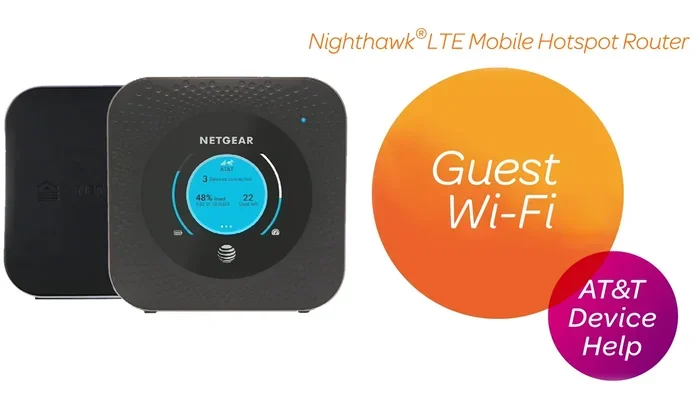
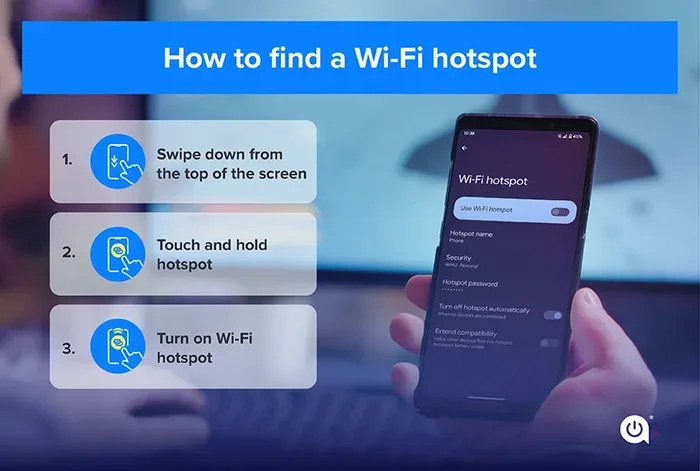
Sometimes, free Wi-Fi simply is not available where you live or work. In that case, you have a few alternatives worth exploring. One option is to use your phone as a hotspot. Many cell phone plans include hotspot data that you can share with other devices. You can also check whether Can I Get A Hotspot Instead Of Wi-Fi through your mobile carrier. Some carriers offer dedicated hotspot devices with generous data allowances at low monthly costs.
Another approach is to look into satellite internet options. New satellite services are making it possible to get internet in almost any location. While these are not always free, some offer low-cost plans that are much cheaper than traditional broadband. You can also explore whether Can I Connect To Wifi Without Wifi Adapter if your device lacks wireless capability. In some cases, USB adapters or Bluetooth tethering can fill the gap.
Final Thoughts
Getting good free Wi-Fi working in your area right now is absolutely achievable. You have many tools and options at your fingertips. From public hotspots to community programs, the resources are out there waiting for you. Use the apps and tips in this guide to find and connect to free networks with confidence.
Remember to stay safe online. Use a VPN, avoid sensitive transactions on public networks, and keep your devices updated. With the right approach, you can enjoy reliable internet access without spending a single dollar. Start exploring the free Wi-Fi options in your area today and stay connected no matter where you go.
Share this guide with friends and family who might benefit from it. Everyone deserves access to the internet, and now you have the knowledge to help them get connected for free. Stay curious, stay connected, and enjoy the world of free Wi-Fi at your fingertips.
Frequently Asked Questions
How do I find free Wi-Fi near me right now?
Use apps like Wi-Fi Map, Wifiman, or Free Wi-Fi Finder to locate open networks nearby. Google Maps also works well for finding free Wi-Fi spots. Libraries, cafes, and shopping malls are great places to start.
Is it safe to use free public Wi-Fi?
Free public Wi-Fi can be risky because open networks are not always secure. Always use a VPN to encrypt your data and avoid logging into sensitive accounts. Stick to HTTPS websites and turn off auto-connect features for safer browsing.
Can I get free Wi-Fi at home without paying for internet?
Yes, you can explore community programs, municipal Wi-Fi networks, and nonprofit initiatives that offer free internet to residents. Some libraries also lend mobile hotspots for home use. Check with your local government and library for available options.
What is the best app for finding free Wi-Fi?
Wi-Fi Map is one of the most popular and reliable apps for finding free networks. It has millions of user-shared hotspots worldwide. Instabridge and Wifiman are also excellent alternatives that work well on both Android and iOS devices.
How can I boost a weak free Wi-Fi signal?
Move closer to the router, switch to the 2.4 GHz frequency band, and use a Wi-Fi extender for better coverage. Keep your device updated and close background apps for a stronger connection. Positioning yourself in open spaces also helps reduce signal interference.
Can I use my phone to get free Wi-Fi for my laptop?
Yes, you can use your phone as a mobile hotspot to share internet with your laptop. Check your cell plan for hotspot data allowances. You can also explore whether Can I Get A Hotspot Instead Of Wi-Fi through your carrier for a dedicated solution.
=== CONCLUSION ===
Getting good free Wi-Fi working in your area right now is within your reach. You have learned where to find hotspots, how to boost your signal, and how to stay safe online. Use these tips every day to enjoy free internet without the hassle. The world is more connected than ever, and you now have the tools to tap into it for free. Start today and never worry about running out of internet again.