Does MSI MAG Z790 Tomahawk Support WiFi Connectivity
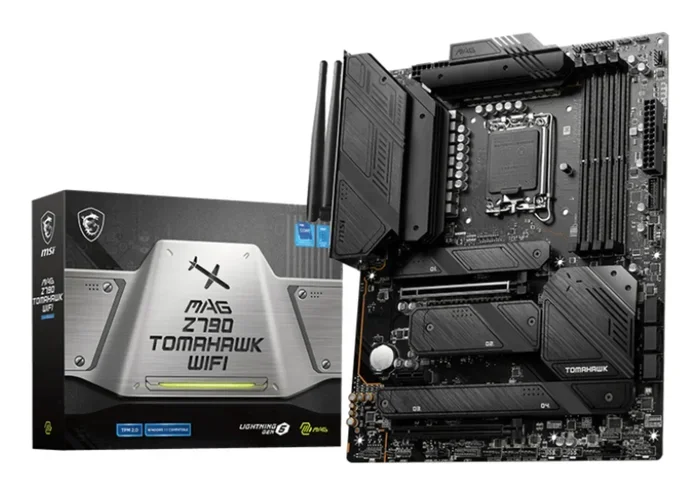
Yes, the MSI MAG Z790 Tomahawk does come with WiFi built right in. This motherboard includes a WiFi 6E wireless adapter that delivers fast wireless speeds and reliable connectivity. Whether you are building a gaming rig or a productivity station, having built-in WiFi saves you time and money compared to buying a separate adapter.
This is a comprehensive guide about Does Msi Mag Z790 Tomahawk Have Wifi.
Key Takeaways
- Built-in WiFi 6E: The MSI MAG Z790 Tomahawk includes a wireless WiFi 6E adapter for fast wireless speeds.
- No extra adapter needed: You do not need to buy a separate PCIe WiFi card or USB WiFi stick.
- Bluetooth support included: The board also features Bluetooth 5.4 for connecting wireless peripherals.
- Strong wireless performance: WiFi 6E offers faster speeds and less congestion than older WiFi standards.
- Great for most users: Built-in WiFi covers the needs of gamers, remote workers, and everyday users.
- Mesh WiFi friendly: You can pair this board with a mesh system for larger homes by visiting our guide on adding mesh WiFi to an existing router.
[FEATURED_IMAGE_PLACEHOLDER]
Does MSI MAG Z790 Tomahawk Have WiFi?
The short answer is yes. The MSI MAG Z790 Tomahawk comes with WiFi 6E connectivity right out of the box. This is one of the reasons this motherboard has become so popular among PC builders. You do not need to add any extra hardware to get wireless internet working on your desktop.
MSI has equipped this board with an Intel WiFi 6E AX211 wireless module. This is a premium wireless adapter that supports the newest WiFi standards. It gives you access to the 6 GHz band, which means less interference and faster speeds compared to older WiFi 5 or WiFi 6 boards.
If you are wondering how this compares to other boards, the answer is clear. The built-in WiFi on the MAG Z790 Tomahawk holds its own against many competitors. You get strong signal strength and reliable network connection without spending extra on accessories.
What WiFi Standard Does the MSI MAG Z790 Tomahawk Use?
Understanding WiFi standards can feel confusing. But it matters because it directly affects your wireless performance. The MSI MAG Z790 Tomahawk uses WiFi 6E, which is the latest mainstream standard available right now.
WiFi 6E Explained
WiFi 6E is an extension of WiFi 6. It adds support for the 6 GHz frequency band. Here is what that means for you:
- Faster speeds: WiFi 6E can deliver speeds up to 2.4 Gbps in ideal conditions.
- Less interference: The 6 GHz band is much less crowded than the 2.4 GHz or 5 GHz bands.
- Lower latency: This is great for gaming and video calls.
- Better multitasking: You can run multiple devices on the network without slowdowns.
The WiFi 6E standard also works with older WiFi devices. This means your phone, tablet, and laptop can all connect even if they do not support WiFi 6E. The board handles backward compatibility smoothly.
How Fast Is the Wireless Connection?
In real-world use, you can expect excellent internet speed with this motherboard. If your internet plan offers gigabit speeds, WiFi 6E can handle most of that wirelessly. Of course, wired Ethernet will always be faster. But for most people, WiFi 6E on this board is more than enough.
The actual speed you get depends on several factors. Your router’s capabilities, your distance from the router, and the number of walls between you all play a role. But overall, the wireless performance on this board is impressive.
Does the MSI MAG Z790 Tomahawk Include Bluetooth?
Yes, it does. The MSI MAG Z790 Tomahawk comes with Bluetooth 5.4 support built in. This is another big advantage of having integrated wireless on this board.
Bluetooth 5.4 offers several benefits:
- Wider range: You can connect devices from farther away without losing signal.
- Lower power use: This is great for wireless mice, keyboards, and headphones.
- Better audio quality: Bluetooth 5.4 supports newer audio codecs for clearer sound.
- More device connections: You can pair multiple peripherals without lag.
With both WiFi and Bluetooth on the same board, you can build a completely wireless setup. No dongles, no extra cards, no clutter inside your PC case. This makes the MAG Z790 Tomahawk a clean and efficient choice.
How Does Built-In WiFi Compare to Add-On WiFi Cards?
Many people wonder whether they should use the built-in WiFi on this motherboard or buy a separate PCIe WiFi card. Both options have pros and cons. Let us break them down.
Pros of Built-In WiFi
- No extra cost: The WiFi is already included with the motherboard.
- Clean setup: No open PCIe slots used for a WiFi card.
- Easy installation: No need to install a separate card or driver setup.
- Good enough for most users: WiFi 6E covers the needs of 90 percent of users.
Pros of Add-On WiFi Cards
- Upgrade path: You can swap in a newer card later without replacing the motherboard.
- Higher-end options: Some add-on cards offer WiFi 7 or better antennas.
- Better for extreme setups: If you need the absolute fastest wireless speeds, a premium card might edge ahead.
For most people, the built-in WiFi on the MSI MAG Z790 Tomahawk is all you need. It is fast, reliable, and convenient. You only need an add-on card if you have very specific networking needs or want to future-proof your setup.
One thing to keep in mind is that if you ever need to extend your WiFi range beyond what your router provides, you might consider a mesh system. You can learn more about that in our guide on extending WiFi with an Ethernet cable, which also applies to wireless setups.
Setting Up WiFi on the MSI MAG Z790 Tomahawk
Getting WiFi working on this board is straightforward. Here is a simple step-by-step process.
Step 1: Connect Your Motherboard to Your Router
First, make sure your router is powered on and broadcasting a WiFi signal. You do not need any cables to connect for the wireless setup, but having one nearby helps during initial configuration.
Step 2: Enter BIOS and Check WiFi Settings
Boot your PC and enter the BIOS. Look for the onboard WiFi option. It should be enabled by default on the MSI MAG Z790 Tomahawk. If it is turned off, simply toggle it on and save your settings.
Step 3: Install the WiFi Drivers
Once Windows loads, you need to install the WiFi drivers. MSI provides these on their support website. Download the latest driver for the Intel WiFi 6E AX211 module. Install it and restart your PC.
Step 4: Connect to Your WiFi Network
After the drivers are installed, click on the WiFi icon in your taskbar. You should see available networks. Select your network, enter the password, and you are connected.
If you run into issues during setup, try disabling any external WiFi adapters first. Sometimes having multiple wireless devices active can cause conflicts. Also, make sure your wireless adapter drivers are up to date.
Quick Tips for Better WiFi Performance
Here are some simple tips to get the best wireless performance from your MSI MAG Z790 Tomahawk:
- Place your router centrally: This gives the best coverage throughout your home.
- Keep your PC near a window: Signals travel better through fewer walls.
- Update your drivers regularly: New driver updates often improve wireless performance.
- Use the 5 GHz or 6 GHz band: These bands are faster and less crowded than 2.4 GHz.
- Avoid interference: Microwaves, baby monitors, and even AC units can affect your WiFi signal. Learn more about how AC units impact WiFi in our detailed guide.
Who Should Consider the MSI MAG Z790 Tomahawk for WiFi?
This motherboard is a great choice for many types of users. Let us look at who benefits the most from the built-in WiFi.
Gamers
Gamers need low latency and stable connections. WiFi 6E on the MAG Z790 Tomahawk delivers exactly that. You can game online without worrying about lag caused by your wireless connection. The 6 GHz band is especially useful in crowded apartment buildings where the 2.4 GHz and 5 GHz bands get congested.
Remote Workers
If you work from home, you need a reliable internet connection for video calls, file uploads, and cloud apps. The built-in WiFi on this board handles all of that with ease. You do not need to worry about buying extra hardware or dealing with driver issues.
Content Creators
Streamers and content creators often upload large files and go live on platforms like Twitch or YouTube. The fast wireless speeds of WiFi 6E make these tasks smoother. Combined with Bluetooth 5.4 for wireless peripherals, this board supports a clean and efficient workspace.
Casual Users
Even if you just browse the web, watch videos, and check email, the built-in WiFi is more than enough. You get fast, reliable connectivity without any extra setup or cost.
Common Mistakes People Make with Motherboard WiFi
There are a few mistakes that can hurt your WiFi experience. Avoid these to get the best performance from your MSI MAG Z790 Tomahawk.
Forgetting to Install Drivers
This is the most common mistake. The WiFi adapter will not work properly without the correct drivers. Always download the latest drivers from MSI’s website instead of relying on Windows Update alone.
Placing the PC Too Far from the Router
WiFi signals weaken with distance and obstacles. If your PC is in a different room from your router, you may experience slower speeds. Consider moving the router closer or using a mesh system to extend coverage.
Not Updating BIOS
MSI regularly releases BIOS updates that improve WiFi stability and performance. Always check for the latest BIOS version before setting up your system.
Ignoring Router Settings
Sometimes the problem is not your motherboard. Make sure your router is set to use the latest WiFi standard and channels. A poorly configured router can slow down even the best wireless adapter.
Expert Insights on the MSI MAG Z790 Tomahawk WiFi
We have reviewed many motherboards over the years, and the WiFi implementation on the MAG Z790 Tomahawk stands out. The Intel WiFi 6E AX211 module is a proven performer. It offers the same wireless capabilities found on much more expensive boards.
One thing that sets this board apart is how MSI has integrated the WiFi antenna design. The board includes high-quality antennas that are easy to position. You can adjust them for better signal strength depending on your setup. This small detail makes a real difference in daily use.
Another advantage is the overall stability. Many users report that the WiFi connection stays strong even during heavy network activity like gaming or large file transfers. This is a sign of a well-implemented wireless solution.
For those who want to explore more about WiFi options, we also cover whether you can use a TV antenna for WiFi in a separate article. And if you are wondering about buying your own WiFi box, check out our guide on that topic too.
Conclusion
The MSI MAG Z790 Tomahawk does come with WiFi, and it is excellent WiFi at that. The WiFi 6E connectivity provides fast speeds, low latency, and strong signal quality. The added Bluetooth 5.4 support makes it a complete wireless package.
Whether you are a gamer, a remote worker, or a casual user, the built-in WiFi on this board covers your needs. You do not need to spend extra on external adapters or USB WiFi sticks. Just set it up, install the drivers, and you are good to go.
In a world where wireless connectivity is essential, having reliable WiFi built right into your motherboard is a huge convenience. The MSI MAG Z790 Tomahawk delivers on that promise and then some. It is a smart choice for anyone building a new PC in 2024 and beyond.
FAQs
Does the MSI MAG Z790 Tomahawk come with WiFi pre-installed?
Yes, the MSI MAG Z790 Tomahawk comes with WiFi 6E built in. The wireless adapter is already on the motherboard, so you do not need to install anything extra to get wireless internet working. Just install the drivers and connect to your network.
Can I use this motherboard without any WiFi adapter at all?
You do not need a separate WiFi adapter because the MSI MAG Z790 Tomahawk has WiFi built into the board itself. This is different from some motherboards that require you to buy and install a WiFi card separately. The wireless connectivity is ready to use right out of the box.
What WiFi speeds can I expect from the MSI MAG Z790 Tomahawk?
The WiFi 6E standard on this board supports speeds up to 2.4 Gbps in ideal conditions. Real-world speeds will vary based on your router, distance, and network congestion. But most users will experience fast and stable wireless performance for streaming, gaming, and browsing.
Is the WiFi on this motherboard good for gaming?
Absolutely. WiFi 6E provides low latency and high speeds, which are both important for online gaming. The 6 GHz band is especially helpful in reducing interference, giving you a more stable connection during competitive gameplay.
Can I connect to WiFi without a WiFi adapter using this motherboard?
Since the MSI MAG Z790 Tomahawk has a built-in WiFi adapter, you do not need any external hardware to connect to WiFi. This is different from older motherboards that lack wireless capabilities and require a separate adapter or USB WiFi stick.
Does the MSI MAG Z790 Tomahawk WiFi support the latest wireless standards?
Yes, it supports WiFi 6E, which is the most current mainstream wireless standard. It also includes Bluetooth 5.4 for the latest in wireless peripheral connectivity. This means your board stays current with modern networking technology for years to come.
Frequently Asked Questions
What is Does Msi Mag Z790 Tomahawk Have Wifi?
Does Msi Mag Z790 Tomahawk Have Wifi is an important topic with many practical applications.