Does Your Govee Thermometer Really Work Without Wifi
Yes, your Govee thermometer can still work without WiFi. The device uses Bluetooth to connect directly to your phone and store temperature data locally. You can monitor readings, set alerts, and log data even when your internet is off. However, some advanced features like remote access and smart home integration require an active WiFi connection.
Let’s talk about something that surprises a lot of people. You just bought a Govee thermometer, and you set it up. Everything works great. Then the WiFi goes down. Maybe there’s a storm. Maybe your router just needs a restart. And suddenly you wonder, does my Govee thermometer really work without WiFi?
The short answer is yes. But the full answer is a bit more interesting than that. Your Govee thermometer has more tricks up its sleeve than you might think. It can keep track of temperatures, store readings, and even send alerts without ever touching your WiFi network. Let’s dig into exactly how this works and what you can expect when the internet goes away.
Understanding how your Govee thermometer connects is the first step. Most Govee thermometers use a combination of Bluetooth and WiFi. The Bluetooth connection links the sensor to your phone directly. The WiFi connection lets you access data from anywhere and sync with smart home systems. When WiFi disappears, Bluetooth takes over. The device doesn’t stop working. It just shifts gears.
Now, if you have trouble connecting your thermometer to WiFi in the first place, that’s a different story. You might want to check out this guide on can I connect to WiFi without WiFi adapter for some helpful troubleshooting tips.
## What Is a Govee Thermometer and How Does It Connect?
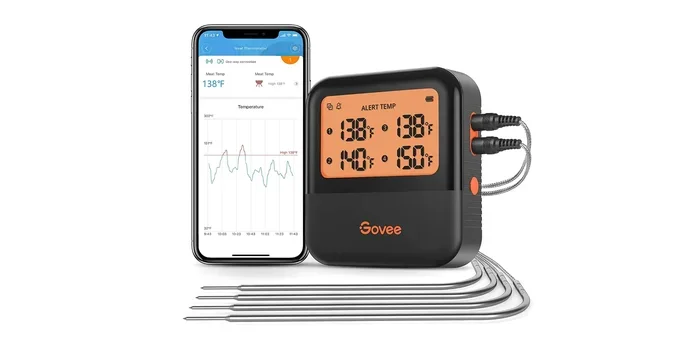
Govee thermometers are smart temperature monitoring devices designed for home use. They come in several models, each with different features. The most popular ones include the Govee H5075 and the Govee H5100. These sensors measure temperature and humidity and send the data to your phone through the Govee Home app.
The connection process usually goes like this. You download the Govee Home app. You pair the thermometer using Bluetooth. Then you enter your WiFi credentials so the device can sync data to the cloud. This two-step connection is important because it means your thermometer has two ways to communicate. One is local through Bluetooth. The other is remote through WiFi.
### Understanding Govee Thermometer Models
Not all Govee thermometers are created equal. Some models lean heavily on WiFi for their smart features. Others rely mostly on Bluetooth and only use WiFi for syncing. Here is a quick look at how the models differ.
The Govee H5075 uses Bluetooth 5.0 for direct phone connection. It stores data on the device itself and on your phone. The WiFi connection is mainly for pushing data to the cloud and enabling remote access. The Govee H5100 follows a similar pattern but adds a larger screen and more advanced alert options.
When you want to understand more about how devices maintain connections without traditional WiFi setups, you can read this helpful article about can a hidden camera work without internet which explores similar offline functionality principles.
### How WiFi and Bluetooth Work Together
Think of it like this. Bluetooth is your thermometer’s local language. It talks directly to your phone when you are nearby. WiFi is the long-distance version. It lets your data travel to the cloud and reach you from anywhere.
When both connections are active, your thermometer runs at full power. You get real-time updates on your phone. You can check readings from work or while you are on vacation. You get push notifications if the temperature goes too high or too low. But when WiFi drops, Bluetooth keeps the core functions alive.
## Can a Govee Thermometer Work Without WiFi?
This is the big question. And the answer is a clear yes. Your Govee thermometer does not need WiFi to measure temperature. It does not need WiFi to store readings. And it does not need WiFi to send alerts to your phone through the app.
The Bluetooth connection handles all of this. When you open the Govee Home app, it searches for nearby sensors. It finds your thermometer through Bluetooth. It pulls the latest readings. It updates the display. All of this happens without a single WiFi packet being sent.
### Offline Mode Explained
Offline mode is what happens when your Govee thermometer loses its WiFi connection. The device does not shut down. It does not stop recording. It simply switches to Bluetooth-only communication.
In offline mode, your thermometer continues to take readings at regular intervals. It stores these readings in its internal memory. It also sends them to your phone through the Bluetooth link. The Govee Home app displays the current temperature and humidity just like it would with WiFi.
The main difference is what you cannot do. You cannot access your data from a different location. You cannot share readings with family members remotely. And you cannot connect the thermometer to voice assistants like Alexa or Google Home. Those features all need the internet.
### Bluetooth-Only Operation
Bluetooth-only operation is surprisingly capable. Your Govee thermometer can maintain a connection range of about 260 feet in open space. That means you can walk around your house and still see live readings on your phone. You can set custom alerts for temperature and humidity thresholds. And you can view historical data that has been stored on the device.
One thing to keep in mind. Bluetooth range can be affected by walls and other obstacles. If you are on a different floor from your thermometer, the signal might weaken. But for most home setups, Bluetooth-only works just fine.
If you are curious about how other devices handle connectivity without traditional setups, check out this piece on can a TV antenna be used for WiFi which explores creative connectivity alternatives.
## What Happens When You Lose WiFi Connection?
So WiFi drops. What actually changes on your end? Not as much as you might fear. Let me walk you through exactly what happens step by step.
First, your thermometer keeps recording data. It has been doing this since the moment you set it up. WiFi is not required for the sensor to take measurements. The sensor works independently of any network connection.
Second, the data stays stored. Your Govee thermometer has built-in memory. It holds days or even weeks of readings depending on the model. When WiFi comes back, the device syncs all that stored data to the cloud. You do not lose anything.
Third, your phone still shows live readings. As long as the Govee Home app is open and Bluetooth is enabled, you see real-time data. The app pulls the information directly from the thermometer sensor. No WiFi needed for this exchange.
### Data Storage and Sync
Data storage is one of the strongest features of Govee thermometers. The internal memory can hold a significant amount of historical data. When WiFi is restored, the app automatically syncs everything to the cloud. You can then view charts, export data, and share reports.
The sync process is seamless. You do not need to do anything special. The app handles it in the background. Just make sure your phone is within Bluetooth range of the thermometer when WiFi returns. This ensures the latest data gets transferred properly.
### Alert Notifications Without WiFi
Here is something that catches people off guard. Your alerts still work without WiFi. The Govee Home app can push notifications to your phone through the Bluetooth connection. If the temperature goes above or below your set threshold, you get an alert.
These alerts are local, meaning they only work when your phone is near the thermometer. You will not get a push notification if you are at the grocery store and your WiFi is down. But if you are home and the temperature spikes, you will know about it immediately.
## How to Use Your Govee Thermometer Without WiFi
Using your Govee thermometer without WiFi is straightforward. You do not need to change any settings or do any special setup. The device automatically falls back to Bluetooth when it detects no internet connection.
### Step-by-Step Setup
Here is how to make sure everything is ready for offline use.
First, download the Govee Home app on your phone. Make sure it is updated to the latest version.
Second, turn on Bluetooth on your phone. Open the app and add your thermometer by following the on-screen instructions.
Third, place your thermometer in the location where you want to monitor temperature. Keep it away from direct sunlight and heat sources.
Fourth, set your alert thresholds. Go to the settings in the app and define your high and low temperature limits.
Fifth, make sure your phone stays within Bluetooth range. This is the only real requirement for offline use.
That is it. You are ready. Your thermometer will work even if you never connect it to WiFi or if your WiFi goes down later.
### Tips for Best Performance
A few simple tips can make your offline experience even better.
Keep your phone’s Bluetooth turned on at all times if you want live updates.
Check the app regularly to make sure data is being recorded properly.
Place the thermometer in a central location for the best Bluetooth range.
Avoid placing the sensor near metal objects that can interfere with the signal.
Restart the app occasionally to refresh the Bluetooth connection.
If you want to learn more about keeping your devices connected without traditional WiFi, this article on can I connect to a WiFi without password covers some useful connectivity tips.
## Comparing WiFi vs Bluetooth-Only Govee Models
Not sure which Govee thermometer is right for you? Let us compare the WiFi-dependent models with the Bluetooth-focused ones. This will help you understand what you gain and what you might lose without an internet connection.
### Feature Comparison Table
| Feature | WiFi Model | Bluetooth-Only Model |
|—|—|—|
| Real-time phone alerts | Yes | Yes |
| Remote access from anywhere | Yes | No |
| Cloud data sync | Yes | No (local only) |
| Smart home integration | Yes | No |
| Offline data storage | Yes | Yes |
| Bluetooth range | N/A | Up to 260 feet |
| Setup complexity | Higher | Lower |
| Price | Higher | Lower |
The comparison shows something important. Bluetooth-only models actually cover the core functions very well. You get accurate temperature readings, local alerts, and data storage. What you miss is the remote access and smart home integration.
If remote access is important to you, make sure your WiFi connection stays stable. If you just want to monitor temperature at home, a Bluetooth-focused model might be all you need.
## Common Problems When Govee Thermometer Loses WiFi
Even though your thermometer works without WiFi, you might run into some hiccups. Let us talk about the most common issues and how to fix them.
### Troubleshooting Tips
Problem one: The app cannot find the thermometer. This usually happens when Bluetooth gets turned off or the phone is too far away. Turn Bluetooth back on and move closer to the device.
Problem two: Readings are not updating. Try closing the app completely and reopening it. Also check that your phone’s Bluetooth is actively connected to the thermometer.
Problem three: Historical data is missing. If the thermometer lost power or the battery died during the WiFi outage, some data may have been lost. Make sure the device stays powered on at all times.
Problem four: Alerts are not coming through. Check your phone notification settings. Make sure the Govee Home app has permission to send notifications.
Problem five: The thermometer will not reconnect to WiFi after it comes back. Go into the Govee Home app settings and re-enter your WiFi password. This usually forces a fresh connection.
Most of these problems have simple fixes. The key is to keep your Bluetooth connection strong and your app updated.
## Expert Insights on Govee Thermometer Connectivity
Many users assume that a smart device is useless without the internet. This is not true for Govee thermometers. The Bluetooth-first design philosophy means these devices are built to work independently.
Experts in smart home technology point out that local connectivity is actually more reliable than cloud-dependent devices. When your WiFi goes down, your Govee thermometer keeps working. When your internet service provider has an outage, your temperature monitoring continues uninterrupted.
This design choice makes Govee thermometers a solid choice for people who want reliable monitoring without being tied to an always-on internet connection. Whether you are in a rural area with spotty WiFi or you just want a dependable backup during outages, these devices deliver.
## Final Thoughts
So does your Govee thermometer really work without WiFi? Absolutely. The Bluetooth connection keeps your temperature monitoring running even when the internet is completely down. You get live readings, stored data, and local alerts. You just lose the remote access and smart home features.
This makes Govee thermometers a smart choice for anyone who wants reliable temperature monitoring without being dependent on a stable internet connection. Whether you are using the device in your home, garage, greenhouse, or server room, it will keep doing its job.
The next time your WiFi goes down, do not worry. Your Govee thermometer has you covered. Just open the app, check your readings, and rest easy knowing your temperature monitoring is still running strong.
Key Takeaways
- Govee thermometers work offline: Bluetooth connectivity allows basic temperature monitoring without WiFi.
- Data is stored locally: Your readings save on the device and your phone until WiFi returns.
- Alerts still function: You can set high and low temperature alerts that work in offline mode.
- Remote access needs WiFi: Checking your thermometer from another location requires an internet connection.
- Setup is simple: Using your Govee thermometer without WiFi takes just a few minutes.
- Some models differ: Not all Govee thermometers support the same offline features.
Frequently Asked Questions
Can I still see temperature history if my Govee thermometer loses WiFi?
Yes, your Govee thermometer stores historical data locally in its internal memory. When WiFi returns, the app syncs everything to the cloud. You do not lose any readings during an outage.
How far can I be from my Govee thermometer when using Bluetooth only?
You can be up to 260 feet away from your Govee thermometer in open space. Walls and obstacles can reduce this range, but for most home setups, you can move freely and still see live readings.
Will my Govee thermometer work without a phone nearby?
The thermometer will continue to take and store readings on its own. However, you need your phone nearby via Bluetooth to view the data in real time and receive alerts. Without your phone, the readings are still saved but you cannot access them until you reconnect.
Do all Govee thermometer models support offline mode?
Most Govee thermometers support Bluetooth-based offline operation. However, some models rely more heavily on WiFi for core features. Always check the product specifications before purchasing if offline capability is important to you.
Can I use my Govee thermometer with Alexa or Google Home without WiFi?
No, smart home integration with Alexa or Google Home requires an active WiFi connection. Without WiFi, these voice assistants cannot communicate with your Govee thermometer. Bluetooth-only mode does not support voice control.
What should I do if my Govee thermometer will not reconnect to WiFi after an outage?
Go to the Govee Home app settings and re-enter your WiFi password. This forces the device to create a fresh connection. If that does not work, restart your router and power cycle the thermometer. The device should reconnect within a few minutes.