Can I Charge My Acer Laptop With Usb And How To Do It
Yes, you can charge your Acer laptop with USB if your model supports USB-C Power Delivery. This method works on many modern Acer laptops and offers a convenient alternative when your original charger is unavailable. You will need a compatible USB-C cable, a power delivery adapter, or a portable power bank to make it work safely and effectively.
Have you ever found yourself in a situation where your Acer laptop charger is missing or broken? It is a frustrating moment, especially when you need your laptop the most. The good news is that you might be able to charge your Acer laptop with USB. Many modern Acer laptops come with USB-C ports that support power delivery. This means you can use a USB cable and a compatible adapter to keep your laptop running. In this guide, we will walk you through everything you need to know about charging your Acer laptop with USB. We will cover which models support it, what equipment you need, how to do it step by step, and what common mistakes to avoid. By the end, you will feel confident about using USB charging as a reliable backup or even a primary method.
The world of laptop charging has changed a lot in recent years. Traditional barrel chargers are slowly being replaced by USB-C connections. This shift brings more convenience and flexibility. You can now charge your laptop using the same cable you use for your phone or tablet. However, not all USB ports deliver power. Not all Acer laptops support USB charging. So it is important to understand how this works before you try it. This article will give you clear, practical answers. You will learn exactly what to look for and how to charge safely.
Key Takeaways
- USB-C Charging Is Possible: Many newer Acer laptops support USB-C charging through Power Delivery technology.
- Check Compatibility First: Not all Acer models support USB charging. Verify your laptop model before attempting.
- You Need the Right Equipment: A USB-C cable rated for power delivery and a compatible adapter are essential.
- Charging Speed Varies: USB-C charging may be slower than a traditional charger depending on the adapter wattage.
- Safety Matters: Always use certified chargers and cables to protect your laptop battery.
- Alternative Methods Exist: Power banks and docking stations can also charge your Acer laptop via USB.
📑 Table of Contents
- Understanding USB Charging for Acer Laptops
- How To Charge Your Acer Laptop With USB
- USB-C Charging vs Traditional Acer Charger
- Best USB Chargers and Accessories for Acer Laptops
- Common Problems and How To Fix Them
- Expert Tips for Safe USB Charging
- Can I Charge My Acer Laptop With USB: The Final Verdict
Understanding USB Charging for Acer Laptops
What Is USB-C Power Delivery?
USB-C Power Delivery, also known as USB PD, is a charging standard that allows devices to receive power through a USB-C port. It is different from regular USB data transfer. USB PD can deliver significantly more power. Standard USB 3.0 ports usually provide about 5 watts of power. USB PD can deliver up to 100 watts or more. This is enough to charge most laptops, including Acer models. The key is that both the charger and the laptop must support USB PD. Without this support, the port will only transfer data or provide a tiny amount of power.
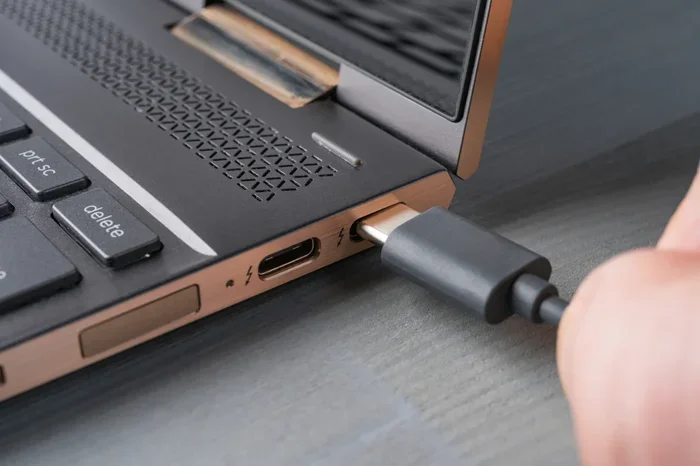
USB-C refers to the shape of the connector. It is a small, oval-shaped port. Many people confuse USB-C with USB 3.0 or USB 2.0. These are data standards, not power standards. A USB-C port does not automatically mean it can charge a laptop. The port must support USB Power Delivery. Look for a lightning bolt icon next to the USB-C port on your Acer laptop. This symbol indicates that the port supports charging.
Which Acer Laptops Support USB Charging?
Not every Acer laptop can charge via USB. The capability depends on the model and the year it was released. Most Acer laptops made after 2018 with USB-C ports have a good chance of supporting USB charging. Here are some popular Acer lines that commonly support USB-C charging:
- Acer Aspire 5 and Acer Aspire 7 models with USB-C ports
- Acer Swift 3 and Acer Swift 5 ultrabooks
- Acer Predator Helios gaming laptops with USB-C
- Acer Spin convertible models
- Acer TravelMate business series with USB-C
To check if your specific Acer laptop supports USB charging, look at the original charger specifications. If it uses a USB-C connector, your laptop supports USB charging. You can also check the Acer support website. Enter your laptop model number and look for charging specifications. Another way is to check the USB-C port on your laptop. A lightning bolt symbol means the port can charge the laptop. If the port only has a data transfer symbol, it may not support charging.
How To Charge Your Acer Laptop With USB
Step-by-Step Charging Process
Charging your Acer laptop with USB is straightforward once you have the right equipment. Follow these steps carefully to ensure a safe and effective charging experience.
- Check your laptop for a USB-C port. Look at the sides of your laptop. Identify a USB-C port that has a lightning bolt icon. This is your charging port.
- Get a USB-C cable that supports power delivery. Not all USB-C cables are the same. Some only transfer data. You need a cable rated for USB Power Delivery. Look for cables that mention PD or support higher wattages.
- Connect the USB-C cable to your laptop. Plug the cable firmly into the USB-C charging port on your Acer laptop.
- Connect the other end to a USB PD power adapter. Plug the cable into a USB-C wall adapter or a USB-C power bank that supports Power Delivery. Make sure the adapter provides enough wattage. Most Acer laptops need at least 45 watts to charge properly.
- Plug the adapter into a wall outlet. Turn on the outlet and wait for your laptop to recognize the power source.
- Check the charging indicator. Look for a charging icon on your screen or a light on your laptop. Your laptop should start charging within a few seconds.
That is it. The process is simple and similar to charging a smartphone. The main difference is the power requirement. Laptops need more wattage than phones, so the adapter matters a lot.
What Equipment Do You Need?
To charge your Acer laptop with USB successfully, you need the right equipment. Using the wrong gear can lead to slow charging or no charging at all. Here is what you need:
- A USB-C cable rated for power delivery: This is the most important item. A cheap or incompatible cable will not deliver enough power. Look for cables that support at least 45 watts or 60 watts of power delivery.
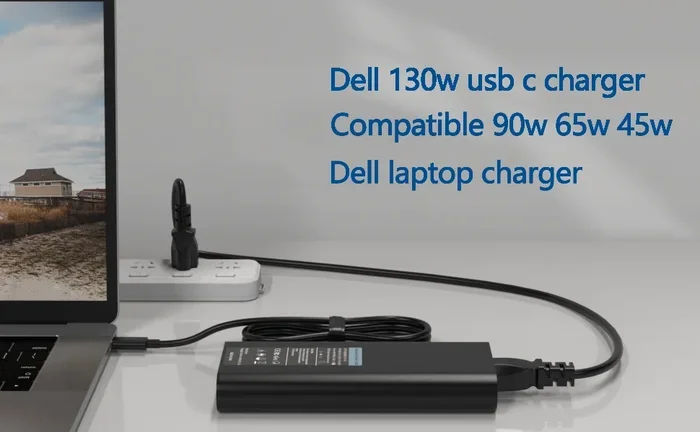
- A USB-C power adapter: This is the wall plug that connects to your outlet. Choose an adapter that matches or exceeds your laptop’s wattage requirement. Most Acer laptops need a 45W, 65W, or 100W USB-C adapter.
- A USB-C power bank (optional): If you want to charge on the go, a high-wattage power bank works well. Look for power banks that support USB PD and offer at least 45 watts of output.
- A USB-C docking station (optional): Some docking stations have USB-C ports that can charge laptops. This is a great option if you use a docking station at your desk.
Using a low-quality cable or an adapter that does not support power delivery is the most common mistake people make. Always check the specifications before you buy. A 5-watt phone charger will not charge your laptop effectively. It might not charge at all.
USB-C Charging vs Traditional Acer Charger
Many people wonder how USB-C charging compares to using the original Acer charger. Both methods have pros and cons. Understanding the differences helps you decide which method works best for your situation.
Charging Speed Comparison
Traditional Acer chargers are designed specifically for your laptop model. They deliver the exact wattage your laptop needs. A standard Acer charger might provide 45W, 65W, or 90W depending on the model. USB-C charging can deliver similar power if you use a quality USB PD adapter. However, the charging speed depends on several factors.
- Adapter wattage: A 65W USB-C adapter will charge your laptop at the same speed as a 65W traditional charger.
- Cable quality: A poor-quality USB-C cable can limit the power delivery and slow down charging.
- Laptop usage while charging: Using your laptop for demanding tasks while charging slows down the charging speed regardless of the method.
- Battery health: Older batteries charge more slowly, whether you use USB or a traditional charger.
In most cases, USB-C charging with a proper adapter will match the speed of your original charger. The key is using the right wattage adapter and a quality cable.
Convenience and Portability
USB-C charging wins when it comes to convenience. You can carry one cable for your laptop, phone, and tablet. You do not need to carry a bulky, model-specific charger anymore. This is especially helpful for travelers and students. A single USB-C adapter can power multiple devices. It reduces clutter in your bag and makes your daily routine simpler.
However, traditional chargers still have an advantage in reliability. They are specifically designed for your laptop. There is no guesswork involved. If you rely on USB charging as your primary method, always carry a backup adapter and a spare cable. You never know when you might need it.
Best USB Chargers and Accessories for Acer Laptops
Choosing the right charger makes a big difference. Not all USB-C chargers are created equal. Some deliver more power than others. Some are more portable. Here are some options to consider when looking for a USB charger for your Acer laptop.
- Acer USB-C Adapter (official): Acer sells its own USB-C chargers designed for their laptops. These are guaranteed to be compatible and safe. They are the best choice if you want peace of mind.
- GaN USB-C chargers: Gallium Nitride (GaN) chargers are compact and powerful. They deliver high wattage in a small size. Brands like Anker, Belkin, and Baseus make excellent GaN chargers that work well with Acer laptops.
- Universal USB-C chargers: These chargers come with interchangeable tips and USB-C ports. They support multiple devices and offer flexible wattage options.
- USB-C power banks: For on-the-go charging, look for power banks with USB PD output of at least 45W. The Anker PowerCore and RAVPower brands are popular choices.
When shopping, always check the wattage output. Your Acer laptop needs a minimum of 45 watts for effective charging. Higher wattage adapters are fine too. Your laptop will only draw the power it needs. Using a 100W adapter with a 45W laptop is completely safe.
Common Problems and How To Fix Them
Laptop Not Recognizing the USB-C Charger
If your Acer laptop does not recognize the USB charger, do not panic. This is a common issue and usually easy to fix. First, check your cable. A damaged or incompatible USB-C cable is the most common cause. Try a different cable that is rated for power delivery. Next, check the adapter. Make sure it supports USB PD and provides enough wattage. If both the cable and adapter are fine, try a different USB-C port on your laptop. Some laptops have multiple USB-C ports, and only one might support charging. Finally, restart your laptop. Sometimes a simple reboot fixes connection issues.
Slow Charging Issues
Slow USB charging can be frustrating. If your Acer laptop charges slowly via USB, check a few things first. Make sure your adapter provides enough wattage. A 30W adapter might charge a laptop that needs 65W very slowly. Check if you are using the laptop while it charges. Running demanding applications slows down charging significantly. Close unnecessary programs and let the laptop charge without heavy use. Also, check the cable length. Longer USB-C cables can reduce power delivery. Use a shorter cable if possible. Finally, check the battery health in your laptop settings. An old or degraded battery will charge more slowly no matter what method you use.
Charging Stops When Laptop Wakes From Sleep
Some Acer laptops stop charging via USB when they wake from sleep mode. This is a known issue with certain USB-C power delivery implementations. To fix this, try unplugging the USB-C cable and plugging it back in after waking the laptop. You can also check your BIOS settings. Some Acer laptops have USB charging settings in the BIOS that allow charging even when the laptop is off or in sleep mode. Access the BIOS by pressing F2 or Del during startup and look for USB configuration options.
Expert Tips for Safe USB Charging
Charging your Acer laptop with USB is safe when you follow a few guidelines. Here are some expert tips to keep your laptop and battery healthy.
- Always use certified chargers and cables: Look for USB-IF certification on your cables and chargers. Certified products meet safety standards and deliver the promised power output. Avoid cheap, uncertified chargers from unknown brands.
- Do not use a phone charger: Phone chargers typically deliver only 5 to 15 watts. This is not enough to charge a laptop. You need a charger that provides at least 45 watts of USB PD output.
- Monitor your laptop temperature: USB-C charging should not make your laptop excessively hot. If your laptop gets very hot while charging via USB, unplug it and check the charger and cable. Overheating can damage your battery.
- Keep your firmware updated: Acer releases BIOS updates that can improve USB-C charging compatibility. Check the Acer support website for updates for your specific model.
- Use the original charger when possible: USB-C charging is a great backup option. But for daily use, the original Acer charger is still the most reliable choice. It is designed specifically for your laptop model.
- Avoid charging through unpowered USB hubs: A regular USB hub without its own power supply cannot charge your laptop. You need a powered hub or a direct connection to a USB PD adapter.
Following these tips will help you charge safely and extend the life of your Acer laptop battery. USB-C charging is a modern convenience that works well when done correctly.
Can I Charge My Acer Laptop With USB: The Final Verdict
The answer is yes, you can charge your Acer laptop with USB in most cases. Modern Acer laptops with USB-C ports and Power Delivery support can be charged through a USB-C connection. You need the right cable, a compatible USB PD adapter, and a power source. The process is simple and convenient. It works great as a backup charging method or for travel. Just make sure your specific model supports USB charging before you rely on it. Check your laptop for a lightning bolt icon next to the USB-C port, or consult the Acer support website for your model’s specifications.
USB-C charging is the future of laptop power. It offers flexibility, portability, and simplicity. As more Acer laptops adopt USB-C as their primary charging port, this method will become even more standard. For now, it works well as a secondary or emergency charging option. Keep a quality USB-C cable and adapter in your bag at all times. You will be glad you have them when you need them most.
Remember to always prioritize safety. Use certified equipment, avoid cheap knockoffs, and monitor your laptop while charging. With the right setup, USB charging is a reliable and convenient way to keep your Acer laptop powered up wherever you go.
Frequently Asked Questions
Can all Acer laptops charge with USB?
No, not all Acer laptops can charge with USB. Only models with USB-C ports that support Power Delivery can charge via USB. Older Acer laptops with traditional barrel chargers do not support USB charging. Check your specific model to confirm compatibility before trying this method.
What wattage USB-C adapter do I need for my Acer laptop?
You need a USB-C adapter that matches or exceeds your laptop’s power requirement. Most Acer laptops need at least 45 watts. Check your original charger’s wattage rating and choose a USB-C adapter with the same or higher wattage. Using a lower wattage adapter may result in slow charging or no charging at all.
Is it safe to charge my Acer laptop with a USB-C power bank?
Yes, it is safe as long as the power bank supports USB Power Delivery and provides enough wattage. Look for power banks rated at 45W or higher. Using a certified, high-quality power bank will charge your laptop safely without damaging the battery or the device.
Can I use my phone charger to charge my Acer laptop?
Most phone chargers are not powerful enough to charge a laptop. They typically deliver 5 to 15 watts, while laptops need at least 45 watts. Using a phone charger may result in very slow charging or no charging at all. Always use a charger rated for laptop power delivery.
Why is my Acer laptop not charging when connected to USB?
Several reasons can cause this issue. The USB-C cable might not support power delivery. The adapter might not provide enough wattage. The USB-C port might not support charging. Try a different cable, a different adapter, or a different USB-C port on your laptop. Restarting the laptop can also help resolve connection issues.
How long does it take to charge an Acer laptop with USB?
Charging time depends on the adapter wattage, cable quality, and battery size. With a proper 65W USB-C adapter, charging time is similar to using the original charger. A 45W adapter may take longer. Using your laptop while charging also increases the charging time. On average, expect 2 to 4 hours for a full charge with a quality USB-C setup.
=== CONCLUSION ===
Charging your Acer laptop with USB is a practical and convenient option for many modern models. As we have covered throughout this guide, USB-C Power Delivery makes it possible to charge your laptop without the traditional charger. You just need the right equipment and a compatible laptop model. Remember to check your Acer laptop specifications first. Make sure your USB-C port supports charging and that you have a quality USB PD adapter and cable. Avoid common mistakes like using low-wattage chargers or uncertified cables. With the right setup, USB charging works reliably and safely. It is an excellent backup option for travel, emergencies, or everyday convenience. Keep this knowledge in mind, and you will never be left with a dead laptop battery again.