Can A Hp Laptop Screen Be Repaired Heres How To Do It
Yes, a HP laptop screen can often be repaired depending on the type and extent of damage. Whether you have a cracked panel, flickering display, or dead pixels, there are practical solutions that range from simple DIY fixes to professional replacements. This guide walks you through every option so you can decide the best path for your HP laptop display repair.
Your HP laptop screen is one of the most important parts of your daily workflow. You use it to work, watch videos, browse the web, and stay connected. So when something goes wrong, it can feel like your whole world stops. A cracked display, flickering lines, or a completely black screen can bring your productivity to a halt fast.
The good news is that HP laptop screen repair is almost always possible. Whether the damage is minor or severe, there are solutions available. You can handle some fixes yourself at home, while other problems need a trained technician. This guide covers everything you need to know about fixing your HP laptop display so you can get back to work without spending a fortune.
We will walk you through the common types of screen damage, the costs involved, and step-by-step repair methods. By the end of this article, you will know exactly what to do when your HP laptop screen breaks. Let us get into it.
Key Takeaways
- Most HP laptop screens can be repaired or replaced at a reasonable cost.
- DIY repair is possible for simple issues like loose cables or backlight problems.
- Screen replacement cost typically ranges from $50 to $200 depending on the model.
- Check your warranty first — HP may cover the repair for free.
- Common causes of screen damage include drops, pressure, and overheating.
- Always back up your data before attempting any repair.
- Know when to call a professional to avoid making the problem worse.
📑 Table of Contents
- Understanding HP Laptop Screen Problems
- Common Types of HP Laptop Screen Damage
- How Much Does HP Laptop Screen Repair Cost
- Can You Repair an HP Laptop Screen Yourself
- When to Seek Professional Help
- How to Prevent HP Laptop Screen Damage
- Expert Insights on HP Laptop Screen Repair
- Key Takeaways
- Conclusion
- FAQs
Understanding HP Laptop Screen Problems
Before you can fix anything, you need to understand what went wrong. HP laptop screens are made up of several layers. The outer panel protects the inner display components. Beneath that sits the LCD or LED panel, which creates the image you see. Wires and connectors link the panel to the motherboard, and the backlight makes everything visible in low light.
When something goes wrong with any of these parts, you get a different symptom. A cracked outer panel looks different from a backlight failure. Flickering lines might mean a loose cable, while a blank screen could point to a dead panel. Understanding the HP laptop display problem helps you choose the right fix.
How to Diagnose the Issue
Start by connecting your laptop to an external monitor. If the external screen works fine, the problem is with the laptop panel itself and not the graphics card or motherboard. This simple test saves you time and money. It tells you exactly where to focus your repair efforts.
Next, shine a flashlight against the screen in a dark room. If you can barely see a faint image, the backlight has likely failed. This is a common issue with older HP laptops. If the screen shows random lines or colors, the panel itself may be damaged. Each symptom points to a different repair path.
Common Types of HP Laptop Screen Damage
HP laptops are built tough, but screens are fragile. Here are the most common types of damage you will encounter with your HP laptop screen.
Cracked or Broken Panel
This is the most obvious type of damage. You might have dropped your laptop, bumped it against a hard surface, or even sat on it by accident. A cracked HP laptop screen will show visible cracks, spider-web patterns, or shattered glass. In most cases, the LCD panel underneath is also damaged and needs full replacement.
Flickering or Dim Display
If your screen flickers constantly or stays very dim, the problem could be a loose display cable or a failing backlight. This issue is common in older models like the HP Pavilion and HP Envy series. Sometimes adjusting the brightness does not help at all, which tells you the backlight is dying.
Dead Pixels or Color Distortion
Dead pixels show up as tiny black or white dots that do not change color. Color distortion makes the screen look washed out or tinted. These issues can be caused by manufacturing defects or physical pressure on the panel. A few dead pixels might not bother you much, but a cluster can make the screen hard to use.
Black Screen with Power On
A completely black screen when the laptop powers on is alarming. But it does not always mean the panel is dead. Sometimes the display connector comes loose after a bump or drop. Other times, the graphics driver needs a reset. Always run the external monitor test before assuming the worst.
Lines or Vertical Bands on Screen
Vertical lines or colored bands across the screen usually mean the LCD panel is failing. This type of damage often gets worse over time. What starts as one thin line can spread across the entire display within weeks. The only real fix here is a full laptop screen replacement.
How Much Does HP Laptop Screen Repair Cost
Cost is always a big factor when deciding how to fix a broken screen. The HP laptop screen repair cost depends on several things, including the model, the type of panel, and whether you do it yourself or hire a professional.
DIY Repair Costs
If you buy a replacement panel and do the work yourself, you can save a lot of money. Replacement screens for most HP models cost between $50 and $150. You will also need basic tools like a screwdriver set and a plastic pry tool. The total DIY cost usually stays under $200, which is much cheaper than paying someone else to do it.
Professional Repair Costs
Taking your laptop to a repair shop will cost more. Most shops charge between $100 and $300 for a HP laptop display replacement. The price goes up if the damage is complex or if the model is rare. Some authorized HP service centers charge even more, but they offer the benefit of genuine parts and a service warranty.
Warranty and Insurance Coverage
Check your warranty before you spend any money. If your HP laptop is still under warranty, screen repair may be completely free. HP typically covers manufacturing defects but not accidental damage. However, if you have purchased HP Care Pack or additional insurance, accidental damage might be included. Always call HP support first and ask about your options.
| Repair Option | Cost Range | Best For |
|---|---|---|
| DIY Replacement | $50 – $200 | Budget-conscious users with some tech skills |
| Local Repair Shop | $100 – $300 | Those who want professional work without dealer prices |
| HP Authorized Service | $150 – $400 | Warranty-covered models or rare HP variants |
| External Monitor Only | $0 (if you already own one) | Temporary fix or permanent external use |
Can You Repair an HP Laptop Screen Yourself
Many people ask, can a HP laptop screen be repaired at home? The answer is yes, for most common issues. You do not need to be a tech expert to replace a broken panel. With the right tools and a little patience, you can do it in under an hour.
Tools You Will Need
Gather everything before you start. You will need a Phillips-head screwdriver, a plastic spudger or guitar pick, an anti-static wrist strap, and of course, the replacement screen. You can find replacement panels on sites like Amazon or eBay by searching for your exact HP model number. Make sure the replacement matches the size, connector type, and resolution of your original panel.
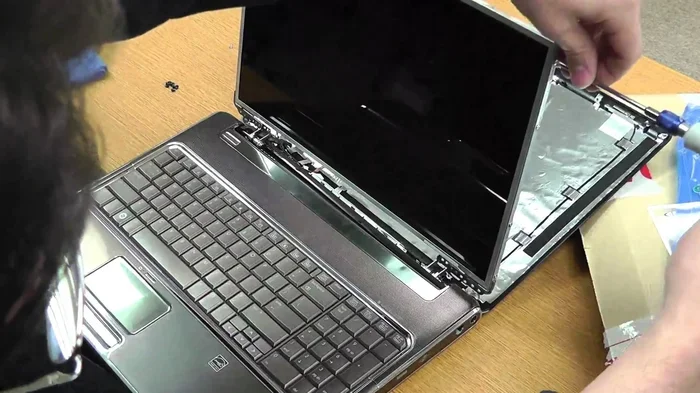
Step-by-Step Screen Replacement
Here is how to replace a HP laptop display step by step:
- Power off the laptop and unplug it from the wall. Remove the battery if possible.
- Remove the bezel around the screen. Use a plastic spudger to gently pry it off. Start at the corners and work your way around.
- Unscrew the old panel from the metal brackets inside the lid. There are usually four to six small screws holding it in place.
- Disconnect the display cable carefully. The cable connects to the back of the panel with a small clip. Gently flip the clip up and pull the cable out.
- Connect the new panel by plugging in the display cable first. Then secure it with the screws and brackets.
- Replace the bezel by pressing it firmly around the edges until it snaps into place.
- Power on the laptop and test the new screen. Adjust the brightness and check for dead pixels.
Go slow and be gentle. The cables are fragile, and forcing anything can cause more damage. If you feel stuck at any point, watch a video tutorial for your specific HP model. Visual guidance makes the process much easier.
Quick Tips for DIY Repair
- Always work on a clean, flat surface.
- Keep all screws in a small container so you do not lose them.
- Take photos at each step so you can remember how things go back together.
- Do not force any part that does not want to move.
- Test the new screen before fully reassembling the bezel.
Common Mistakes to Avoid
One of the biggest mistakes people make is buying the wrong replacement screen. Always double-check the model number and connector type before ordering. Another common error is stripping the screws by using the wrong size screwdriver. Do not rush the process. Rushing leads to accidental damage to the new panel or the laptop lid.
Some people forget to disconnect the battery before starting. This can cause a short circuit and damage the motherboard. Always remove the battery first, or at least disconnect the power cable and hold the power button for ten seconds to drain any remaining electricity.
When to Seek Professional Help
Not every screen issue is a good candidate for DIY repair. Some problems are better left to the experts. Knowing when to call a professional saves you time, money, and the risk of making things worse.
Complex Damage
If the HP laptop screen damage extends beyond the panel itself, professional help is the smart choice. For example, if the hinges are broken and the screen is physically damaged from a drop, you may need to repair or replace the entire display assembly. This involves more than just swapping out the panel. It requires working with the hinges, the lid structure, and the internal frame.
Liquid Damage
If you spilled liquid on your laptop and the screen stopped working, do not try to fix it yourself. Liquid damage can affect the internal circuitry behind the display. A professional technician can properly clean and diagnose whether the panel or the motherboard is the real culprit. Attempting a DIY fix on liquid-damaged equipment often leads to further problems.
Graphics or Motherboard Issues
Sometimes what looks like a screen problem is actually a graphics card or motherboard issue. If your external monitor also shows problems, the issue is not with the panel at all. In this case, replacing the screen will not fix anything. A professional can run diagnostics to identify the real cause and recommend the right repair.
HP Authorized Service Centers
If your laptop is still under warranty or you have HP Care Pack coverage, go directly to an authorized service center. They use genuine HP parts and their work is backed by a warranty. Even if your warranty has expired, authorized centers often provide quality service with trained technicians who know HP laptops inside and out.
You can find an authorized HP service center on the HP website. Enter your laptop model number and your zip code, and HP will show you the nearest options. This is the safest route when you are unsure about the repair.
How to Prevent HP Laptop Screen Damage
Prevention is always better than repair. Once you have fixed your HP laptop display, you will want to protect it from future damage. A few simple habits can extend the life of your screen by years.
Use a Protective Sleeve
When you carry your laptop around, use a padded sleeve or a good quality laptop bag. This absorbs shocks and prevents pressure points from reaching the screen. A $15 sleeve can save you hundreds in repair costs down the road.
Close the Lid Gently
It sounds simple, but many people slam their laptop lids shut. Over time, this pressure causes cracks and stress fractures on the panel. Always close the lid gently and make sure nothing is sitting on the keyboard before you shut it.
Keep Liquids Away
Water and laptops do not mix. Keep drinks on a separate surface from your laptop at all times. One accidental spill can ruin not just the screen but the entire motherboard. If you must have a drink nearby, use a spill-proof container.
Adjust Brightness to Save the Backlight
Running your screen at maximum brightness all the time puts extra strain on the backlight. Lower the brightness to a comfortable level, especially when working indoors. This small habit can significantly extend the life of your HP laptop screen and also saves battery power.
Clean the Screen Properly
Use a soft microfiber cloth to clean your screen. Never use harsh chemicals or paper towels, as they can scratch the surface. Gently wipe in one direction rather than circular motions. A clean screen is less likely to develop dust buildup that can cause overheating around the display area.
Expert Insights on HP Laptop Screen Repair
According to laptop repair professionals, most HP laptop screen issues fall into three categories: physical damage, connector problems, and backlight failure. Physical damage is the most common and usually requires a full panel replacement. Connector problems can often be fixed with simple reseating or cable replacement, which costs very little. Backlight failure is a middle-ground issue that sometimes allows partial repair, but full replacement is the most reliable long-term fix.
Tech experts also recommend always keeping a backup of your data. A broken screen does not mean your files are gone. You can connect an external monitor and access everything. This is especially important if your screen is flickering or intermittently working, as those symptoms can worsen over time and lead to a completely dead panel.
Another expert tip is to check the model-specific forums before ordering a replacement. HP has many different models, and even small variations within the same series can use different panels. Searching for your exact model number on forums or the HP support community can help you find the right part and learn from others who have done the same repair.
Key Takeaways
- Most HP laptop screens can be repaired or replaced depending on the damage type.
- DIY screen replacement is possible with basic tools and about an hour of time.
- Screen repair cost ranges from $50 to $300 based on the method and model.
- Check your HP warranty first to see if the repair is covered.
- Prevention habits like using a protective sleeve can save you from future damage.
- Know when to call a professional for complex or liquid damage situations.
Conclusion
So, can a HP laptop screen be repaired? Absolutely yes. Whether your screen is cracked, flickering, dim, or completely black, there is a solution for you. You can handle simple repairs at home with a replacement panel and basic tools, or you can visit a professional for more complex issues. The cost is almost always worth it compared to buying a brand new laptop.
Start by diagnosing the problem accurately. Use the external monitor test and the flashlight test to understand what is wrong. From there, decide whether DIY repair makes sense or if you need professional help. Always check your warranty before spending a dime. And once your screen is fixed, take steps to protect it from future damage.
Your HP laptop is a valuable investment. With the right care and timely repairs, a broken HP laptop screen does not have to mean the end of your device. Follow the steps in this guide, and you will be back to working and enjoying your laptop in no time.
FAQs
Can a HP laptop screen be repaired for less than $100?
Yes, if you opt for a DIY replacement and buy the panel online. Replacement screens for most HP models cost between $50 and $100. You will only need basic tools you likely already own at home. This is the most affordable way to fix a broken display.
How long does it take to replace a HP laptop screen?
A DIY screen replacement typically takes 30 to 60 minutes if you have some basic experience. First-time repairs might take a little longer, but watching a tutorial video beforehand helps a lot. Professional repair usually takes one to two business days.
Is it worth repairing a HP laptop screen or buying a new laptop?
In most cases, repairing the screen is much more affordable than buying a new laptop. A screen replacement costs a fraction of the price of a new device. Unless your laptop is very old and has other problems, repairing the screen is almost always the smarter choice.
Can I use my HP laptop with a broken screen connected to an external monitor?
Yes, you absolutely can. Connect your laptop to an external monitor using HDMI or USB-C, and your laptop will display everything on the bigger screen. This is a great temporary solution while you wait for the repair or replacement panel to arrive.
Will HP cover my laptop screen repair under warranty?
HP warranties typically cover manufacturing defects but not accidental damage like cracks or breaks. If your screen failed due to a defect, HP will likely cover the repair. If it was damaged by a drop or spill, you may need to pay out of pocket or use an extended protection plan.
What HP laptop models are most prone to screen problems?
Older models from the HP Pavilion, HP Envy, and HP EliteBook lines are more prone to backlight failure and hinge-related screen damage. These models have been in use for many years, so wear and tear adds up. However, any HP laptop can experience screen issues if handled roughly or exposed to pressure.