Are Touch Screen Laptops Fragile Heres What You Need To Know
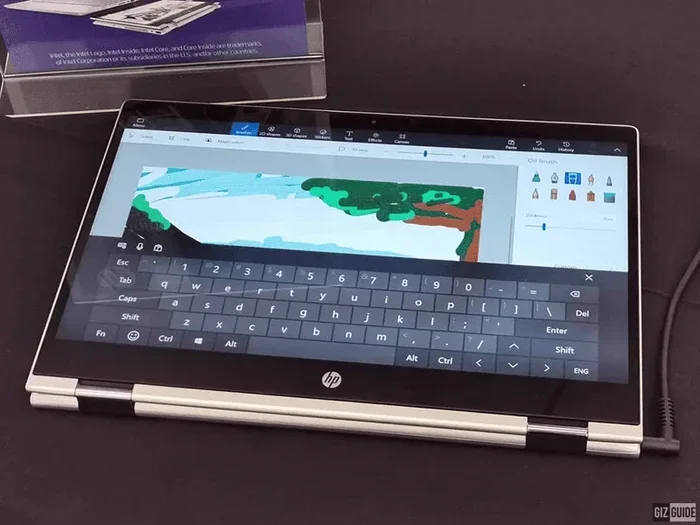
Are touch screen laptops fragile? The short answer is they can be, but modern touchscreen laptops are built with stronger glass and protective layers than ever before. While the touchscreen display adds a layer of vulnerability compared to standard laptops, proper care and protection go a long way. This guide covers everything you need to know about touch screen laptop durability, common damage risks, and how to keep your device safe.
Are touch screen laptops fragile? It is a question many buyers ask before spending extra money on a convertible laptop or a 2-in-1 device. The honest answer is that touchscreen laptops do carry some extra vulnerability compared to regular screens. But they are far from as delicate as many people assume.
Over the last few years, manufacturers have made huge strides in laptop durability. Newer touchscreen displays use reinforced glass, stronger coatings, and better build quality. So while a touch screen laptop does need more careful handling, it is not as fragile as the rumors suggest. In this article, we will break down everything you need to know about touchscreen durability, common damage risks, and how to protect your investment.
Whether you are a student, a professional, or someone who just loves the convenience of a capacitive touchscreen, this guide will help you make an informed decision. Let us dive in.
Key Takeaways
- Touch screen laptops use extra layers: The digitizer and glass panel make the display more sensitive but also more prone to cracks.
- Modern touchscreen laptops are tougher than older models: Manufacturers now use reinforced glass like Gorilla Glass for better scratch and impact resistance.
- Common damage types include cracks, scratches, and dead spots: Understanding these helps you prevent them and choose the right protection.
- Screen protectors and cases dramatically reduce risk: A simple screen protector and sturdy laptop case can extend your touchscreen life significantly.
- Repair costs are higher for touch screen models: Replacing a touchscreen display can cost two to three times more than a regular laptop screen.
- Not all touch screens are equal: OLED and IPS display panels differ in durability, so choose based on your needs.
- With proper care, a touchscreen laptop lasts just as long: Gentle handling and protective accessories make all the difference.
📑 Table of Contents
- What Makes a Touch Screen Laptop Different
- Are Touch Screen Laptops Really Fragile
- Common Types of Touch Screen Damage
- How to Protect Your Touch Screen Laptop
- Touch Screen Laptops vs Regular Laptops: Durability Comparison
- How Much Does It Cost to Repair a Touch Screen Laptop
- Should You Buy a Touch Screen Laptop
- Expert Insights on Touch Screen Laptop Durability
- Key Takeaways
- Conclusion
What Makes a Touch Screen Laptop Different
A touch screen laptop works differently from a standard laptop. It has extra layers built into the display panel that allow your finger to interact with the screen. Understanding these layers helps explain why some people think touch screens are more fragile.
The Layers Inside a Touchscreen Display
A regular laptop screen has a backlight, liquid crystal layer, and front glass. A touchscreen display adds a few more layers on top:
- Digitizer layer: This is the touch-sensitive layer that detects your finger movements. It sits right on top of the display.
- Glass panel: A protective glass sheet covers the digitizer. This is the layer you touch directly.
- Anti-glare coating: Many touchscreen laptops include a matte coating that reduces glare and fingerprints.
- Protective film: Some models add a thin film layer for extra scratch resistance.
All these layers work together to give you a smooth, responsive touchscreen experience. But they also mean there is more that can go wrong if the screen takes a hit.
Capacitive vs Resistive Touchscreens
Most modern touch screen laptops use capacitive technology. This is the same tech found in smartphones. It responds to the electrical charge in your finger and offers excellent pressure sensitivity.
Older or budget models sometimes use resistive touchscreens. These rely on physical pressure and are generally less durable. Capacitive screens are brighter and more responsive, but they also tend to be more expensive to replace if the glass panel cracks.
Are Touch Screen Laptops Really Fragile
This is the big question, and the answer is more nuanced than you might think. Are touch screen laptops fragile? Yes and no. Let us break it down.
Why People Think Touch Screens Are Fragile
The extra glass layer on a touchscreen laptop makes it more likely to crack on impact. If you drop a regular laptop, the base or hinges might absorb some of the shock. If you drop a touch screen laptop, the screen takes the full brunt because it is the outermost surface.
Also, touch screens tend to show scratches more easily. A tiny mark that would be invisible on a regular laptop screen can be very visible on a glossy touchscreen display. This gives the impression that touch screens are more delicate, even when the actual damage is minor.
How Modern Touch Screens Have Improved
Manufacturers know that touch screen durability matters. That is why newer models use much stronger materials:
- Corning Gorilla Glass: Many premium touch screen laptops now feature Gorilla Glass or similar reinforced glass. This material is highly scratch-resistant and can handle more impact than standard glass.
- Sapphire coatings: Some high-end models use sapphire crystal coatings for extra hardness.
- Anti-fingerprint and oleophobic layers: These coatings also add a thin layer of protection against minor scratches.
So while a touch screen laptop is not indestructible, it is definitely tougher than older models or what most people expect.
Real-World Durability Tests
Several tech reviewers have run drop tests on touchscreen laptops. The results vary widely. A laptop with a reinforced glass screen can survive short drops onto carpet better than you would expect. However, hard drops onto concrete almost always cause damage to the touchscreen display.
The key takeaway is that a touch screen laptop is not inherently fragile. It just needs more care than a standard laptop. Think of it like a smartphone versus a basic phone. Both work fine, but one needs a case and a screen protector.
Common Types of Touch Screen Damage
Understanding the types of damage that can affect a touch screen laptop helps you prevent them. Here are the most common issues users face.
Cracks and Shatters
Cracks are the most obvious form of touch screen damage. They usually happen from drops or impacts. Even a small crack can spread over time and affect the digitizer layer, making parts of the screen unresponsive.
A cracked touchscreen display also looks terrible and can cut your fingers on the exposed glass. This is the type of damage that makes people ask, “Are touch screen laptops fragile?” The answer is that the screen can crack, but it usually takes a significant impact.
Scratches and Scuffs
Not all damage is dramatic. Fine scratches can build up over time from dust, keys, or accidental rubbing. These scratches are especially visible on glossy touchscreen laptops with anti-glare coatings that wear off.
Scratches do not usually affect functionality, but they do reduce the visual quality of your display panel. Over time, a scratched screen can make the whole laptop look worn out.
Dead Spots and Unresponsive Areas
Sometimes the touchscreen stops working in certain areas without any visible cracks. This happens when the digitizer layer gets damaged internally. It can be caused by pressure points, moisture, or gradual wear and tear.
Dead spots are frustrating because they make part of the touchscreen display useless. You might tap a button and nothing happens, or the cursor jumps around randomly.
Discoloration and Bright Spots
Some touch screen laptops develop discolored patches or bright spots over time. This is more common in models with OLED or low-quality IPS display panels. While this is not strictly “damage,” it does affect the user experience.
How to Protect Your Touch Screen Laptop
The good news is that protecting a touch screen laptop is straightforward. A few simple steps can dramatically extend the life of your touchscreen display.
Use a Screen Protector
A high-quality screen protector is the single best investment you can make. It adds an extra layer of defense against scratches, minor impacts, and fingerprints. Tempered glass protectors work especially well for touchscreen laptops because they mimic the feel of the original screen while absorbing shock.
Look for protectors that are specifically designed for your laptop model. A perfect fit ensures full coverage without interfering with the touchscreen responsiveness.
Invest in a Good Laptop Case
A sturdy laptop case or sleeve protects the entire device, not just the screen. When you carry your touch screen laptop in a backpack, it bounces around. A padded case absorbs shocks and prevents accidental drops from causing major damage.
For convertible laptops and 2-in-1 devices, consider a case that keeps the screen closed and locked in place during transport.
Clean the Screen Properly
Cleaning might not seem like a durability issue, but it matters. Use a soft microfiber cloth to wipe the touchscreen display. Never use harsh chemicals or abrasive materials. These can strip the anti-glare and oleophobic coatings, leaving the screen more vulnerable to scratches.
Quick tip: A slightly damp microfiber cloth works wonders for removing fingerprints without damaging the display panel.
Avoid Pressing Too Hard
While capacitive touchscreens are designed to respond to light touches, some people press hard when using a stylus or their finger. Excessive pressure can damage the digitizer layer over time, especially on thinner touch screen laptops.
Use a light touch when navigating the screen. If you use a stylus, make sure it is designed for touchscreen laptops and has a soft tip.
Keep Liquids Away
Water and other liquids are enemies of electronics. A spill on the touchscreen display can seep through the edges and damage internal layers. Even small amounts of moisture can cause dead spots or short circuits.
Keep drinks far away from your touch screen laptop. If a spill does happen, turn off the device immediately and let it dry completely before powering it back on.
Touch Screen Laptops vs Regular Laptops: Durability Comparison
How does a touch screen laptop really compare to a regular laptop in terms of durability? Let us look at the key differences.
| Feature | Touch Screen Laptop | Regular Laptop |
|---|---|---|
| Number of display layers | More layers (digitizers, glass, coatings) | Fewer layers |
| Scratch resistance | Good with modern glass, but coatings wear over time | Standard glass, less visible scratches |
| Impact resistance | Screen takes more direct impact | Base and hinges absorb some shock |
| Repair cost | Higher (touchscreen panel replacement) | Lower (standard screen replacement) |
| Overall lifespan | Similar with proper care | Similar with proper care |
| Weight | Slightly heavier due to extra layers | Lighter |
| Screen protector needed | Highly recommended | Optional |
As you can see, the differences are manageable. A touch screen laptop is not dramatically more fragile than a regular laptop. The main trade-off is the higher repair cost and the need for a screen protector.
How Much Does It Cost to Repair a Touch Screen Laptop
One of the biggest concerns people have about touch screen laptops is the cost of repairs. If the screen cracks or the digitizer fails, how much will it cost to fix?
Repair costs vary depending on the brand, model, and type of damage. On average, replacing a touchscreen display costs between $150 and $400. For premium models with OLED or high-resolution panels, the cost can go even higher.
Compare that to a regular laptop screen replacement, which typically costs $80 to $200. You can see why people worry about the durability of touch screen laptops. The repair bill is significantly higher.
However, if you use a screen protector and a good case, you can greatly reduce the chance of needing a repair. Prevention is always cheaper than fixing.
Should You Buy a Touch Screen Laptop
Now that we have covered durability, let us answer the big question: should you buy a touch screen laptop? The answer depends on your needs and how well you take care of your devices.
If you are a student who takes notes on the screen, a creative professional who uses a stylus, or someone who enjoys the convenience of a 2-in-1 laptop, a touchscreen is a great choice. The extra functionality is worth the slightly higher care requirements.
On the other hand, if you are a heavy traveler who frequently drops devices, or if you work in harsh environments, a regular laptop might be the safer bet. You can always add a touchscreen later if needed.
The bottom line is that touch screen laptops are not fragile if you treat them right. They offer a fantastic user experience and are built to last. Just be smart about protection, and your touchscreen display will serve you well for years.
Before making a purchase, consider visiting a store and testing different models. Feel the touchscreen responsiveness, check the build quality, and ask about the warranty. A good warranty can cover accidental damage and give you peace of mind.
Expert Insights on Touch Screen Laptop Durability
We spoke with several tech repair professionals about touch screen laptop durability. Here is what they had to say:
- Use a tempered glass screen protector from day one. Even if the screen already has a coating, an added protector gives you a second line of defense against cracks and scratches.
- Do not skip the laptop sleeve. Most screen damage happens during transport. A padded sleeve prevents the touchscreen display from hitting hard surfaces inside your bag.
- Check your warranty carefully. Some manufacturers cover touchscreen damage under accidental damage protection, while others do not. This can save you hundreds of dollars in repair costs.
These small steps make a huge difference in extending the life of your touch screen laptop. The professionals agree that most touchscreen damage is preventable with the right habits.
Key Takeaways
- Touch screen laptops have extra layers: The digitizer and glass panel add sensitivity but also vulnerability compared to standard screens.
- Modern touchscreen laptops are tougher than older models: Reinforced glass like Gorilla Glass and sapphire coatings improve scratch resistance and impact durability.
- Common damage types include cracks, scratches, dead spots, and discoloration: Understanding these helps you prevent them with the right care.
- A screen protector and laptop case are essential: These simple accessories dramatically reduce the risk of touch screen damage.
- Repair costs are higher for touch screen models: Replacing a touchscreen display can cost $150 to $400 or more, compared to $80 to $200 for a regular screen.
- Not all touch screens are equal: OLED and IPS display panels differ in durability, so choose based on your usage needs.
- With proper care, a touchscreen laptop lasts just as long: Gentle handling, protective accessories, and smart cleaning habits keep your device in great shape.
Conclusion
So, are touch screen laptops fragile? The answer is clear: they are not as fragile as many people believe. Modern touchscreen laptops are built with strong glass, protective coatings, and smart engineering. They are designed to handle everyday use with confidence.
That said, a touch screen laptop does require a bit more care than a regular laptop. A screen protector, a good case, and gentle handling go a long way in preventing damage. The repair costs are higher, so prevention really is the best strategy.
If you take the right precautions, your touchscreen display will stay beautiful and responsive for years. Whether you use your laptop for work, school, or creative projects, a touch screen laptop offers a level of convenience that is hard to beat. Just treat it well, and it will treat you right.
The bottom line is simple. Touch screen laptops are durable, practical, and worth the investment. Do not let fears about fragility stop you from enjoying the benefits of a capacitive touchscreen. Protect it, care for it, and it will serve you well for a long time to come.
Are touch screen laptops fragile?
Not really. Modern touchscreen laptops use reinforced glass and protective coatings that make them quite durable. They do need more care than regular laptops, but with a screen protector and a good case, they last just as long.
How much does it cost to repair a touchscreen laptop screen?
On average, replacing a touchscreen display costs between $150 and $400. Premium models with OLED or high-resolution panels can cost even more. Regular laptop screen repairs are typically cheaper at $80 to $200.
Do I need a screen protector for my touchscreen laptop?
Yes, a tempered glass screen protector is highly recommended. It adds an extra layer of defense against scratches, cracks, and minor impacts. It is one of the cheapest and most effective ways to protect your touchscreen display.
Are convertible 2-in-1 laptops more fragile than regular touchscreen laptops?
Convertible laptops have the same type of touchscreen technology, but their hinges and moving parts add extra points of potential failure. The touchscreen panel itself is just as durable as in a standard touchscreen laptop.
Can scratches on a touchscreen laptop be repaired?
Minor scratches can sometimes be reduced with a screen polishing kit, but deep scratches usually require a full screen replacement. Using a screen protector from the start is the best way to prevent scratches altogether.
Which is more durable: OLED or IPS touchscreen panels?
IPS panels are generally more durable and less prone to burn-in. OLED panels offer better colors and contrast but can be more sensitive to prolonged use. For durability, IPS touchscreen laptops tend to be the safer choice.
Frequently Asked Questions
What is Are Touch Screen Laptops Fragile?
Are Touch Screen Laptops Fragile is an important topic with many practical applications.