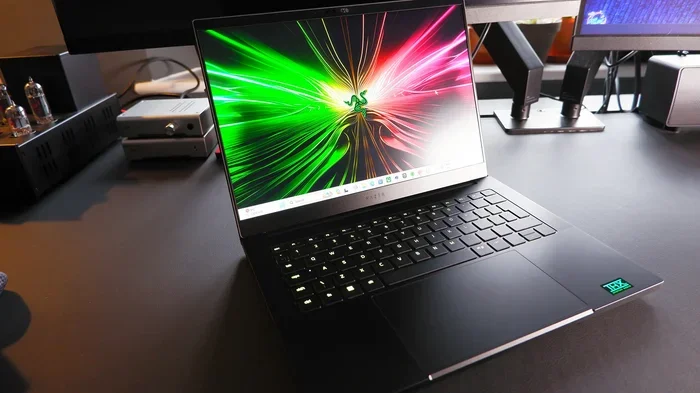
Are Razer Laptops Long Lasting Do They Really Hold Up
Are Razer laptops long lasting? Many users wonder about the durability of Razer laptops, and the answer is more nuanced than you might expect. Razer builds its laptops with premium materials like aluminum alloy, which gives them a solid feel and decent longevity. However, like any gaming laptop, factors like battery degradation, thermal management, and usage habits play a big role in how long they truly last. In this guide, we break down the real-world durability, common issues, and expert tips to help you decide if a Razer laptop is worth the investment for the long haul.
Are Razer laptops long lasting? This is a question that hangs over every gamer and creative professional considering a Razer purchase. You drop several thousand dollars on a machine, and you want it to survive years of heavy use. The short answer is yes, Razer laptops can last a long time, but the full picture is more detailed than a simple yes or no.
Razer has built a reputation for sleek design, powerful hardware, and RGB lighting that turns heads. But reputation alone does not guarantee durability. In this article, we dig deep into the Razer laptop lifespan, examine build quality, explore common failure points, and share practical tips to help you get the most years out of your device. Whether you are a student, a professional, or a hardcore gamer, this guide covers what you need to know.
We will look at real-world experiences, expert opinions, and technical details that go beyond marketing claims. By the end, you will have a clear picture of whether Razer laptops hold up over time and what you can do to maximize their durability.
Key Takeaways
- Premium Build Quality: Razer laptops use aluminum-magnesium alloy chassis that resists flex and feels durable.
- Average Lifespan: Most Razer laptops last 4-6 years with proper care, which is competitive for gaming laptops.
- Thermal Management Matters: Overheating is the biggest threat to long-term Razer laptop performance.
- Battery Degradation Is Inevitable: Expect noticeable battery decline after 2-3 years of heavy use.
- Warranty and Support Help: Razer offers limited warranties, and customer service has improved over the years.
- Maintenance Extends Life: Regular cleaning, proper cooling, and software updates can significantly extend your Razer laptop lifespan.
- Value Depreciates Fast: Razer laptops lose value quickly, so factor resale into your long-term decision.
📑 Table of Contents
- Build Quality and Materials: What Makes Razer Laptops Durable
- Performance Over Time: Do Razer Laptops Slow Down?
- Battery Life and Degradation: The Biggest Weakness
- Common Issues That Affect Razer Laptop Longevity
- Razer Warranty and Customer Support
- Razer vs. Competitors: How Do Razer Laptops Compare in Longevity?
- How to Make Your Razer Laptop Last Longer
- Expert Insights on Razer Laptop Durability
- Key Takeaways
- Conclusion
Build Quality and Materials: What Makes Razer Laptops Durable
The foundation of any long-lasting laptop is its build quality. Razer has consistently used premium materials in its laptop lineup, and this plays a huge role in determining how well these machines age.
Aluminum-Magnesium Alloy Chassis
Most Razer laptops, especially the popular Razer Blade series, feature an aluminum-magnesium alloy body. This material offers a great balance of strength and weight. It feels rigid when you press on the lid or the keyboard deck, which means less flex and less stress on internal components over time.
Compared to plastic-bodied laptops, the metal construction gives Razer machines a more premium feel. It also means they resist scratches and dents better. That said, aluminum can still dent under hard impacts, so a good protective case is always a smart investment.
Hinge Design and Screen Durability
The hinge on a laptop takes a lot of abuse. You open and close it every single day, and a weak hinge can render the entire machine useless. Razer has generally designed its hinges with durability in mind. The Razer Blade hinges feel sturdy and hold the screen firmly in any position.
However, some users have reported hinge looseness after several years of heavy use. This is not unique to Razer, but it is worth keeping in mind. Avoid opening the lid with one hand or squeezing the edges too tightly, as these habits can accelerate hinge wear over time.
Keyboard and Trackpad Longevity
Razer laptops come with backlit keyboards that are a joy to type on. The key switches are designed to handle millions of keystrokes, which is important for both typing and gaming. The trackpads are also smooth and responsive, with a glass surface that resists wear well.
One thing to watch is the spacebar. On some Razer models, the spacebar can feel mushy after extended use. This is a minor issue but worth noting if you type heavily for work or gaming.
Performance Over Time: Do Razer Laptops Slow Down?
Buying a fast laptop is one thing. Keeping it fast for years is another. Razer laptop performance over time depends on several factors, including hardware specs, thermal management, and software updates.
Hardware Degradation and Thermal Throttling
Gaming laptops generate a lot of heat. Razer packs powerful CPUs and GPUs into slim chassis, which means cooling is always a challenge. Over time, dust buildup inside the laptop can clog fans and heat sinks, leading to thermal throttling. This is when the system slows itself down to prevent overheating.
Thermal throttling does not just hurt performance. It also puts stress on components, which can shorten their lifespan. Regular cleaning and using a cooling pad can help prevent this issue. We will cover maintenance tips in detail later in this article.
Software and Driver Updates
Razer provides regular software updates through Razer Synapse. These updates can improve performance, fix bugs, and add new features. Keeping your drivers and firmware up to date is one of the easiest ways to maintain long-term performance.
That said, older Razer models sometimes struggle with newer operating systems. If you plan to hold onto your laptop for five or more years, check compatibility before upgrading your OS. This is a common concern among users who ask, are Razer laptops long lasting in terms of software support.
RAM and Storage Upgrades
Not all Razer laptops allow upgrades, but many models do offer accessible RAM and storage slots. This is a huge advantage for longevity. If your laptop starts to feel slow after a few years, adding more RAM or swapping in a faster SSD can breathe new life into the machine.
Before buying, check the specific model’s upgradeability. The Razer Blade 15 and Razer Blade 17 tend to be more upgrade-friendly than the slim Razer Blade Stealth series.
Battery Life and Degradation: The Biggest Weakness
Every laptop battery degrades over time, but gaming laptops tend to lose battery health faster because they draw more power. This is one of the most common complaints about Razer laptop durability.
How Fast Do Razer Batteries Degrade?
Most Razer laptops use lithium-ion batteries rated for roughly 300 to 500 charge cycles. In real-world terms, this means noticeable battery decline after about 2 to 3 years of regular use. If you game on battery power frequently, this timeline can be even shorter.
Some users report getting 4 or more years out of their battery with careful usage, such as keeping charge between 20% and 80% and avoiding extreme temperatures. But for most people, a battery replacement becomes necessary at some point.
Can You Replace the Battery?
Battery replacement on Razer laptops is possible but not always straightforward. On some models, the battery is soldered to the motherboard, which makes replacement much harder and more expensive. On others, you can access the battery with a screwdriver.
If battery life is important to you, consider buying an extended warranty or checking Razer’s battery replacement program. The cost of a new battery typically ranges from $80 to $150, depending on the model.
Tips to Extend Battery Lifespan
- Avoid extreme heat: Do not leave your laptop in a hot car or under direct sunlight for long periods.
- Keep charge between 20% and 80%: Constantly charging to 100% or draining to 0% accelerates battery wear.
- Use battery saver mode: Razer Synapse includes power management features that can reduce battery strain.
- Remove the charger when full: Unplugging once the battery hits 100% reduces stress on the cells.
- Store at 50% charge: If you are not using the laptop for weeks, store it at half charge to preserve battery health.
Common Issues That Affect Razer Laptop Longevity
No laptop is perfect, and Razer is no exception. Understanding common issues can help you avoid problems and plan for the future.
Overheating and Cooling Problems
Overheating is the number one enemy of any gaming laptop, and Razer machines are no exception. The slim design that makes Razer laptops so attractive also limits the space available for cooling components. Fans run at high speeds under load, and after years of use, fan bearings can wear out or collect dust.
Signs of cooling problems include loud fan noise, sudden shutdowns, and hot surfaces on the keyboard deck. If you notice these symptoms, clean the vents and fans immediately. Using compressed air every few months can make a big difference.
Screen Issues and Display Degradation
Razer laptops come with high-quality displays, often featuring 144Hz or 240Hz refresh rates. However, some users have reported screen flickering or dead pixels after a year or two of use. These issues are not widespread, but they do happen.
To protect your screen, always close the lid gently and avoid placing objects on the keyboard before closing. A laptop sleeve or case adds an extra layer of protection during transport.
Port and Connectivity Problems
Razer laptops have a limited number of ports, and the ones they do have are used heavily. USB-C ports, in particular, can become loose or develop connectivity issues after years of frequent plugging and unplugging. Thunderbolt 4 ports on newer models tend to be more robust, but wear and tear is still a factor.
Wi-Fi and Bluetooth Reliability
Some older Razer models have experienced Wi-Fi card failures over time. These issues are less common on newer machines with updated hardware, but they are worth being aware of if you are buying a used or older Razer laptop.
Razer Warranty and Customer Support
When you invest in a premium laptop, the warranty matters. Razer offers a limited one-year warranty on most laptops, which covers manufacturing defects but not accidental damage.
What the Warranty Covers
The standard Razer warranty covers hardware defects like faulty keyboards, malfunctioning displays, and motherboard issues. It does not cover damage from drops, spills, or normal wear and tear. This is standard for most laptop manufacturers, but it is important to understand what you are getting.
Extended Warranty Options
Razer offers extended warranty plans in some regions, and you can also purchase third-party protection plans from retailers. An extended warranty can be a smart move if you plan to keep your Razer laptop for several years.
Customer Support Experiences
Razer customer support has received mixed reviews over the years. Some users praise the quick turnaround and helpful representatives, while others have experienced long wait times and complicated repair processes. The quality of support can vary by region, so check local reviews before making a purchase.
If your Razer laptop develops an issue within the warranty period, document everything with photos and keep your receipts. This makes the claims process smoother and faster.
Razer vs. Competitors: How Do Razer Laptops Compare in Longevity?
To truly understand if Razer laptops are long lasting, it helps to compare them with competitors in the same price range.
Razer vs. Lenovo Legion
Lenovo Legion laptops are known for their robust build quality and excellent cooling systems. They often last as long as or longer than Razer laptops, partly because Lenovo uses more conservative thermal designs that reduce stress on components. Razer wins on design and portability, but Lenovo tends to edge ahead in raw durability.
Razer vs. ASUS ROG
ASUS ROG laptops offer similar performance to Razer Blade models, with the added benefit of more aggressive cooling solutions. ASUS also provides longer warranty options in some markets. Both brands produce excellent gaming laptops, but ASUS ROG models tend to have a slight edge in long-term reliability.
Razer vs. MSI
MSI laptops are built for heavy gaming and work loads, and they tend to be quite durable. MSI uses thicker chassis, which allows for better cooling and less thermal stress. Razer laptops are thinner and more portable, but this slim design comes with trade-offs in long-term thermal performance.
Quick Comparison Table
- Razer Blade: Premium build, slim design, average 4-6 year lifespan, limited thermal headroom.
- Lenovo Legion: Solid durability, excellent cooling, average 5-7 year lifespan, slightly heavier.
- ASUS ROG: Strong performance, good cooling, average 5-6 year lifespan, good warranty options.
- MSI: Durable construction, thick chassis, average 5-7 year lifespan, less portable.
How to Make Your Razer Laptop Last Longer
The lifespan of any laptop depends heavily on how you use and maintain it. Here are proven strategies to extend the life of your Razer laptop well beyond the average.
Keep It Clean
Dust is the silent killer of laptop performance. Use compressed air to blow out dust from vents and fans every two to three months. If you use your laptop on a bed or couch, consider a laptop stand that elevates it for better airflow.
Use a Cooling Pad
A cooling pad reduces the internal temperature of your laptop, which directly impacts component lifespan. Lower temperatures mean less thermal stress on the CPU, GPU, and battery. Look for a cooling pad with adjustable fan speeds and a size that matches your Razer model.
Avoid Power Surges
Plug your Razer laptop into a surge protector. Power surges can damage the motherboard and other internal components instantly. This is a simple and inexpensive precaution that many people overlook.
Update Software Regularly
Keep Razer Synapse, Windows, and all drivers up to date. Updates often include performance improvements and bug fixes that help your laptop run smoothly for longer.
Handle With Care
Avoid dropping your laptop, even with a protective case. Internal components can shift or loosen from impacts, leading to issues that may not appear until weeks or months later. Transport your Razer in a padded laptop bag.
Manage Storage Space
Keep at least 15-20% of your SSD free at all times. A full SSD slows down your system and can reduce the drive’s lifespan over time. Use external storage or cloud services for files you do not need on your main drive.
Expert Insights on Razer Laptop Durability
Laptop durability experts often point to a few key factors that determine how long a gaming laptop will last. Razer scores well on build quality but faces challenges in thermal management and battery life, which are common across the gaming laptop category.
According to industry reviews and long-term user reports, the Razer Blade series tends to hold up well for 4 to 5 years of regular use. With diligent maintenance and occasional upgrades, some users report getting 6 or even 7 years out of their Razer laptops. The key is staying on top of thermal management and battery care.
Repair professionals also note that Razer laptops can be more expensive to repair than some competitors because of their slim, proprietary designs. Parts are not always interchangeable, and authorized repair centers may have longer turnaround times. This is something to factor into your long-term ownership cost.
Key Takeaways
- Premium Build Quality: Razer laptops use aluminum-magnesium alloy chassis that resists flex and feels durable.
- Average Lifespan: Most Razer laptops last 4-6 years with proper care, which is competitive for gaming laptops.
- Thermal Management Matters: Overheating is the biggest threat to long-term Razer laptop performance.
- Battery Degradation Is Inevitable: Expect noticeable battery decline after 2-3 years of heavy use.
- Warranty and Support Help: Razer offers limited warranties, and customer service has improved over the years.
- Maintenance Extends Life: Regular cleaning, proper cooling, and software updates can significantly extend your Razer laptop lifespan.
- Value Depreciates Fast: Razer laptops lose value quickly, so factor resale into your long-term decision.
Conclusion
So, are Razer laptops long lasting? The answer is yes, with some important caveats. Razer builds excellent laptops that combine premium materials with powerful hardware, and with proper care, they can serve you well for 4 to 6 years or more. The aluminum chassis feels solid, the performance stays strong, and the overall build quality competes with the best in the industry.
However, no laptop is indestructible. Battery degradation, thermal challenges, and the inevitable wear of daily use all play a role in determining how long your Razer will last. The good news is that most of these issues are manageable with regular maintenance, smart usage habits, and occasional upgrades.
If you are willing to invest time in caring for your laptop, a Razer machine can be a reliable companion for years. Just go in with realistic expectations, budget for potential repairs or battery replacements, and enjoy the experience of using a well-built, powerful machine.
Ultimately, the question of are Razer laptops long lasting comes down to how you treat them. Treat your Razer right, and it will reward you with solid performance and a premium experience for a long time to come.
Frequently Asked Questions
How long do Razer laptops typically last?
Most Razer laptops last between 4 and 6 years with regular use and proper maintenance. Some users report getting 7 or more years out of their machines, especially if they keep up with cleaning, software updates, and battery care.
Can I upgrade the RAM and storage in my Razer laptop?
It depends on the model. The Razer Blade 15 and 17 often allow RAM and storage upgrades, while the slim Blade Stealth models may have soldered components. Always check the specifications of your specific model before purchasing.
Do Razer laptops overheat easily?
Razer laptops can run warm because of their slim designs and powerful hardware. They are not prone to overheating under normal conditions, but dust buildup and intensive workloads can cause thermal throttling. Using a cooling pad and cleaning vents regularly helps prevent this.
Is Razer customer support reliable for laptop issues?
Razer customer support has improved in recent years, but experiences vary by region. Some users report quick and helpful service, while others have faced long wait times. Documenting your issue with photos and keeping your purchase receipt can make the support process smoother.
How much does it cost to replace a Razer laptop battery?
Razer laptop battery replacements typically cost between $80 and $150, depending on the model. Some models have user-replaceable batteries, while others require professional service, which can add to the cost.
Are Razer laptops worth the price for long-term use?
Razer laptops offer premium build quality and performance, but they also come with a higher price tag and faster depreciation. If you plan to use a laptop for several years, factor in potential repair costs, battery replacements, and resale value when deciding if a Razer is worth the investment for you.