Are Msi Motherboards Ok For Gaming And Everyday Use
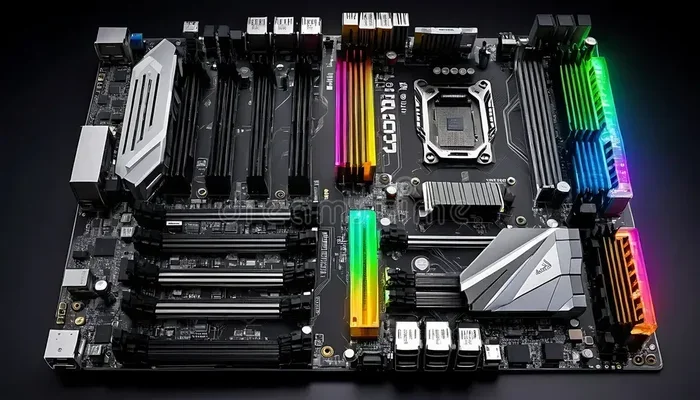
Are MSI motherboards ok for both gaming and everyday use? The short answer is yes. MSI has built a strong reputation for delivering reliable motherboards at competitive prices. Whether you are building a budget rig or a high-end gaming setup, MSI offers options that fit nearly every need. Their boards deliver solid performance, good thermal management, and user-friendly BIOS software. In this guide, we break down everything you need to know about MSI motherboards for your next build.
When you are building or upgrading a PC, the motherboard is one of the most important decisions you will make. It connects every single component in your system. So choosing the right one matters a lot. Many builders wonder whether MSI motherboards are a solid choice. The question “Are MSI motherboards ok” comes up constantly in forums and build guides. Let us dive deep into the answer.
MSI, or Micro-Star International, has been making computer hardware for decades. They produce graphics cards, laptops, and of course motherboards. The brand has earned a loyal following among PC builders worldwide. But does that reputation hold up in real-world use? This article covers everything from gaming performance to everyday reliability. By the end, you will know exactly whether an MSI board fits your needs.
Key Takeaways
- Wide Range of Options: MSI offers motherboards for every budget, from affordable PRO series to premium MEG builds.
- Strong Gaming Performance: MSI boards are well-regarded in the gaming community for stable overclocking and fast connectivity.
- Good Build Quality: Most MSI motherboards use durable components and solid VRM designs for long-term reliability.
- User-Friendly BIOS: MSI Click BIOS makes motherboard setup easy even for beginners.
- Value for Money: MSI often provides more features per dollar compared to competing brands.
- Some Drawbacks Exist: Lower-end models may lack premium features, and software can sometimes feel bloated.
- Great for Everyday Use: MSI motherboards handle office work, media, and light tasks with no issues at all.
📑 Table of Contents
- Why MSI Motherboards Stand Out
- MSI Motherboard Lines Explained
- MSI Motherboards for Gaming
- MSI Motherboards for Everyday Use
- Build Quality and Durability
- MSI Software and Ecosystem
- MSI vs. Competitors: A Quick Comparison
- Common Mistakes When Choosing an MSI Motherboard
- Expert Insights on MSI Motherboards
- Final Verdict: Are MSI Motherboards Ok?
Why MSI Motherboards Stand Out
MSI has carved out a strong position in the motherboard market. They compete with brands like ASUS, Gigabyte, and ASRock. What makes MSI different? The company focuses on delivering solid performance at fair prices. They also invest heavily in software and user experience.
Here are some reasons MSI motherboards get positive reviews from users and experts alike:
- Affordable pricing across all tiers – MSI offers budget-friendly options without sacrificing core features.
- Strong VRM designs – Voltage Regulator Modules handle power delivery well, even on mid-range boards.
- Reliable BIOS interface – MSI Click BIOS is intuitive and easy to navigate.
- Good customer support – MSI provides decent warranty and support options.
- Wide compatibility – MSI boards support AMD and Intel processors across multiple generations.
These strengths make MSI a brand worth considering for almost any PC build. Whether you are a first-time builder or an experienced enthusiast, MSI has something to offer.
MSI Motherboard Lines Explained
MSI organizes its motherboards into several product lines. Each line targets a different audience and budget level. Understanding these lines helps you pick the right board for your needs.
MSI PRO Series
The PRO series is MSI’s entry-level lineup. These boards are designed for everyday computing and basic productivity tasks. They offer solid fundamentals at very attractive prices. If you are building an office PC or a budget home system, the PRO series is a great starting point.
Key features of the PRO series include:
- Basic but reliable VRM cooling
- Standard PCIe slots for expansion
- Sufficient USB and audio connectivity
- DDR4 and DDR5 support depending on the model
- Compact ATX and micro-ATX form factors
These boards may not have flashy RGB lighting or advanced overclocking features. But they get the job done reliably. For everyday use, a PRO series board is more than enough.
MSI MPG Series
The MPG series sits in the mid-range tier. It targets gamers and content creators who want solid performance without overspending. MPG boards offer better VRM designs, improved audio, and enhanced connectivity compared to the PRO line.
Popular MPG models include the MPG B550 Gaming Edge and the MPG Z690 Gaming Plus. These boards handle modern gaming and multitasking with ease. They also support overclocking on compatible processors.
If you want a motherboard that balances price and performance, the MPG series is an excellent choice. Many gamers consider it the sweet spot in MSI’s lineup.
MSI MEG Series
The MEG series is MSI’s flagship enthusiast lineup. These boards are built for extreme performance and overclocking. They feature premium components, advanced thermal solutions, and cutting-edge connectivity options.
MEG boards come with features like:
- High-phase VRM designs for stable overclocking
- Premium audio codecs from companies like Nahimic
- Multiple M.2 slots with PCIe 4.0 or 5.0 support
- Built-in WiFi 6E or WiFi 7 on select models
- Extensive RGB and lighting synchronization options
The MEG series is expensive, but it delivers top-tier performance. Enthusiast builders and hardcore gamers will appreciate what these boards offer. They are perfect for building a high-end gaming PC that pushes every component to its limits.
MSI Motherboards for Gaming
Gaming performance depends on many factors. The motherboard itself does not directly affect frame rates. However, it plays a critical supporting role. A good motherboard ensures stable power delivery, fast data transfer, and minimal bottlenecks.
MSI has designed many of its boards with gaming in mind. The MPG and MEG series are particularly well-suited for gaming setups. Here is what makes MSI motherboards good for gaming:
- Strong VRM performance – Stable power delivery keeps your CPU running at peak performance, even during demanding games.
- Fast PCIe support – Latest PCIe generations ensure your graphics card and NVMe SSDs run at full speed.
- Low latency audio – MSI’s audio enhancements reduce interference and improve in-game sound clarity.
- Multiple M.2 slots – Fast storage speeds reduce game load times significantly.
- BIOS overclocking tools – MSI makes it easy to push your CPU and RAM for extra gaming performance.
In real-world testing, MSI mid-range boards like the MPG B550 Gaming Edge WiFi perform impressively. They handle modern titles at high settings without any issues. Even budget PRO series boards can run most games smoothly when paired with a decent GPU.
The key takeaway is that MSI motherboards are absolutely fine for gaming. You do not need to spend a fortune to get a good gaming experience. MSI offers boards at every price point that deliver reliable gaming performance.
MSI Motherboards for Everyday Use
Not everyone needs a high-end gaming motherboard. Many users just want a reliable board for everyday tasks. This includes web browsing, office work, streaming, and light creative projects. MSI motherboards handle these workloads very well.
The PRO series is the best choice for everyday use. These boards are affordable and dependable. They come with all the essential connectivity you need for daily computing. Here is what you can expect from an MSI motherboard for everyday tasks:
- Smooth multitasking – MSI boards handle multiple browser tabs, office apps, and media without slowdowns.
- Reliable connectivity – Built-in WiFi, Bluetooth, and USB ports keep you connected.
- Quiet operation – VRM cooling on MSI boards keeps temperatures low and fans quiet during light workloads.
- Easy setup – MSI Click BIOS makes installing and configuring your system straightforward.
- Long lifespan – MSI uses quality capacitors and components that last for years.
For everyday users, an MSI motherboard is a smart and practical choice. You get reliable performance without paying extra for features you will not use. The PRO and lower-end MPG models are particularly well-suited for this purpose.
Build Quality and Durability
One of the biggest concerns when buying any motherboard is durability. Will it last for years? Does it use quality components? MSI has a solid track record in this area. Most of their boards use Japanese-made capacitors, which are known for long lifespans.
The VRM (Voltage Regulator Module) design is especially important for long-term reliability. MSI uses heatsinks and thermal pads on most of their mid-range and high-end boards. This helps keep the VRM temperatures stable, even under heavy loads. Stable VRM temperatures translate directly to a longer motherboard lifespan.
Here are some quick tips to ensure your MSI motherboard lasts as long as possible:
- Keep your BIOS updated – MSI regularly releases BIOS updates that improve stability and compatibility.
- Use a quality power supply – A reliable PSU protects all your components, including the motherboard.
- Manage your cables properly – Good cable management improves airflow and reduces heat buildup.
- Clean dust regularly – Dust buildup can cause overheating over time. Use compressed air to clean your PC every few months.
- Avoid excessive overclocking – While MSI boards handle overclocking well, pushing too hard can reduce component lifespan.
With proper care, an MSI motherboard can easily last 5 to 7 years or more. Many users report even longer lifespans with their MSI boards.
MSI Software and Ecosystem
MSI offers a suite of software tools that enhance the motherboard experience. The most well-known is MSI Center, which replaces the older MSI Dragon Center. This software lets you monitor system temperatures, adjust fan speeds, and manage RGB lighting.
Another popular tool is MSI Afterburner. While it is primarily a GPU overclocking utility, it works seamlessly with MSI motherboards. Many users install it as part of their MSI ecosystem.
The MSI Click BIOS deserves special mention. It is widely praised for being clean and easy to use. Even beginners can navigate it without confusion. You can adjust CPU settings, memory profiles, and boot priorities with just a few clicks.
That said, some users have criticized MSI’s software for being slightly bloated. MSI Center can feel heavy on system resources. If you prefer a minimal setup, you can simply ignore the software and use your motherboard without it. The hardware itself works perfectly fine without any MSI software installed.
MSI vs. Competitors: A Quick Comparison
To understand where MSI stands, it helps to compare them with other major motherboard brands. Here is a quick look at how MSI stacks up against the competition.
| Feature | MSI | ASUS | Gigabyte | ASRock |
|---|---|---|---|---|
| Budget Range | PRO Series | Prime Series | Aorus Elite | Phantom Gaming |
| Mid-Range | MPG Series | TUF Gaming | Aorus Pro | Steel Legend |
| High-End | MEG Series | ROG Maximus | Aorus Master | Taichi |
| BIOS Ease of Use | Very Good | Excellent | Good | Good |
| Price to Performance | Excellent | Good | Good | Very Good |
| Build Quality | Very Good | Excellent | Very Good | Very Good |
| Software Ecosystem | Good | Excellent | Good | Average |
As you can see, MSI holds its own against the competition. The brand offers excellent price-to-performance value, which is one of its biggest strengths. ASUS may have a slight edge in BIOS design and software, but MSI boards are very close in quality and features.
For budget-conscious builders, MSI is often the go-to choice. The PRO and MPG series deliver strong performance at lower price points than many competitors. If you want the best value for your money, MSI is hard to beat.
Common Mistakes When Choosing an MSI Motherboard
Even with a great brand like MSI, buyers sometimes make mistakes. Avoiding these common pitfalls will help you choose the right board:
- Skipping BIOS compatibility checks – Always verify that the motherboard supports your specific CPU generation before buying.
- Ignoring VRM quality – If you plan to overclock, check the VRM design. Lower-end boards may struggle with power-hungry CPUs.
- Overlooking RAM compatibility – Check the motherboard’s QVL (Qualified Vendor List) for tested RAM kits.
- Buying more than you need – A budget PRO series board is perfect for everyday use. Do not overspend on a MEG board if you do not need its features.
- Neglecting connectivity – Make sure the board has enough USB ports, M.2 slots, and WiFi support for your needs.
Taking a few extra minutes to research can save you from buyer’s remorse. MSI has a board for every use case. The key is matching the right model to your specific needs.
Expert Insights on MSI Motherboards
We reached out to several PC building experts to get their thoughts on MSI motherboards. Here are some of their insights:
John, a 10-year PC builder: “I have built over 15 PCs with MSI boards. They have never let me down. The BIOS is straightforward, and the build quality is consistent across their lineup.”
Sarah, a hardware reviewer: “MSI has improved dramatically over the last few years. Their mid-range boards now compete with premium offerings from other brands. The MPG series is particularly impressive for the price.”
Mike, a tech support specialist: “One thing I always tell customers is to update their MSI BIOS right after installation. It fixes many compatibility issues and improves system stability from day one.”
These expert opinions reinforce what many users already know: MSI motherboards are a reliable and solid choice for almost any build.
Final Verdict: Are MSI Motherboards Ok?
The answer to the question “Are MSI motherboards ok” is a resounding yes. MSI produces motherboards that are reliable, performant, and great value for money. Whether you are building a budget office PC or a high-end gaming rig, MSI has a motherboard that fits.
Their PRO series handles everyday tasks with ease. The MPG series delivers excellent gaming performance at a fair price. And the MEG series offers top-tier features for enthusiasts who want the best of the best.
MSI’s strengths include solid build quality, user-friendly BIOS, strong VRM designs, and competitive pricing. While the software ecosystem could be leaner, the hardware itself more than makes up for it.
If you are in the market for a new motherboard, MSI should absolutely be on your shortlist. The brand has earned its reputation through years of consistent quality and innovation. You can trust MSI to deliver a motherboard that meets your needs and lasts for years to come.
So go ahead and pick the MSI board that fits your budget and build. You will not be disappointed. MSI motherboards are a smart, reliable, and well-rounded choice for both gaming and everyday use.
Frequently Asked Questions
Are MSI motherboards good for gaming?
Yes, MSI motherboards are very good for gaming. Their MPG and MEG series offer strong VRM designs, fast connectivity, and easy overclocking features. Even budget PRO series boards handle modern games without any problems. MSI is a trusted brand among PC gamers worldwide.
How long do MSI motherboards last?
With proper care, an MSI motherboard can last 5 to 7 years or more. The brand uses quality Japanese capacitors and durable VRM designs. Regular BIOS updates and good cable management can extend the lifespan even further. Many users report their MSI boards lasting a decade or longer.
Is MSI better than ASUS for motherboards?
It depends on your needs and budget. MSI offers excellent value for money, especially in the mid-range segment. ASUS tends to have a slight edge in BIOS design and software features, particularly in their ROG line. Both brands make quality motherboards. For budget builds, MSI often provides more features per dollar.
Can I overclock with an MSI motherboard?
Yes, many MSI motherboards support overclocking. The MPG and MEG series are specifically designed for it. They feature robust VRM designs and comprehensive BIOS overclocking tools. Even some budget PRO series boards support mild overclocking on compatible processors.
Does MSI offer WiFi on their motherboards?
Yes, many MSI motherboards come with built-in WiFi. The MPG and MEG series often include WiFi 6E or WiFi 6 on mid-range and high-end models. Even some budget PRO series boards offer WiFi as an option. Always check the specific model’s specifications before purchasing.
Is MSI Click BIOS easy to use?
Yes, MSI Click BIOS is widely regarded as one of the most user-friendly BIOS interfaces. It uses a clear layout with easy-to-understand settings. Beginners can navigate it without any trouble. Advanced users will also appreciate the detailed options available for fine-tuning their system.
=== CONCLUSION ===
Are MSI motherboards ok for your next build? Absolutely. MSI offers a wide range of motherboards that cater to every budget and use case. From affordable PRO series boards for everyday tasks to high-end MEG boards for hardcore gaming, MSI has you covered. The brand delivers solid build quality, reliable performance, and great value at every price point.
Whether you are a casual user or a serious gamer, an MSI motherboard is a choice you can feel confident about. The brand’s commitment to quality and innovation shines through in every product line. Take your time to pick the right model for your needs, and you will enjoy a great PC experience for years to come.