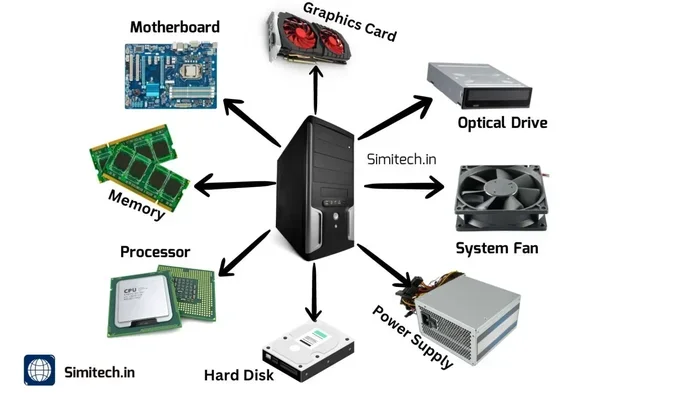
The 4 Main Parts That Make Up a Computer System
The 4 main parts computer system relies on are the input devices, the central processing unit, memory and storage, and output devices. Each part plays a unique role in making your computer work. Understanding these 4 main parts helps you buy better hardware and troubleshoot problems faster. This guide breaks down every component in simple, easy-to-understand language.
Every computer, whether it is a sleek laptop or a bulky desktop computer tower, is built from a few essential pieces. The 4 main parts computer system depends on work together like a well-oiled machine. Each part has a specific job, and without one, the whole system slows down or stops working entirely. In this guide, we will walk you through each of these parts in plain language. You do not need to be a tech expert to understand how your computer works.
By the end of this article, you will know exactly what each component does, why it matters, and how to choose the right parts for your needs. Whether you are building a new machine, upgrading an old one, or just curious about how things work, this guide has you covered. Let us dive into the world of computer hardware and break it all down.
Key Takeaways
- Input Devices: These let you send data into the computer, like keyboards, mice, and scanners.
- Central Processing Unit (CPU): The brain of your system that handles all calculations and tasks.
- Motherboard: The main circuit board that connects every component together.
- Memory and Storage: RAM gives temporary workspace, while hard drives and SSDs hold your data long-term.
- Output Devices: Monitors, speakers, and printers display or produce the results of your work.
- Power Supply Unit: Often overlooked, it keeps all components running with stable electricity.
- Knowing these parts: Helps you build, upgrade, or buy the right computer for your needs.
📑 Table of Contents
- What Are the 4 Main Parts of a Computer System?
- The Central Processing Unit (CPU) – The Brain of Your Computer
- The Motherboard – The Backbone That Connects Everything
- Memory and Storage – RAM and Your Data
- Input and Output Devices – How You Interact With Your Computer
- How the 4 Main Parts Work Together as One System
- Conclusion
What Are the 4 Main Parts of a Computer System?
When people talk about the 4 main parts computer system relies on, they are usually referring to the core components that make computing possible. These parts include input devices, the central processing unit, memory and storage, and output devices. Together, these four categories handle every single task your computer performs.
Think of it this way. You use a keyboard to type a message. That is input. The CPU processes your keystrokes. RAM holds the message temporarily while you work on it. Your storage drive saves the file for later. And your monitor displays the finished text on screen. That is output. Every single thing you do on a computer follows this basic flow.
The computer components inside your machine may look complicated, but the concept is quite simple. Each part feeds into the next, creating a seamless experience. Below, we will explore each of these parts in detail so you can truly understand how your system works.
Why Understanding Computer Hardware Matters
Knowing your computer hardware gives you real power. When something goes wrong, you can troubleshoot instead of guessing. When you want to upgrade, you know exactly which part to replace. And when you are shopping for a new machine, you can compare specs with confidence. Understanding the 4 main parts computer system uses also helps you communicate better with tech support or salespeople.
Many people buy computers without knowing what they are paying for. They see terms like “processor speed” or “8 GB RAM” and nod along. But once you understand what these parts do, you can make smarter decisions. You will avoid overspending on features you do not need and invest in the parts that actually matter for your daily tasks.
The Central Processing Unit (CPU) – The Brain of Your Computer
The CPU, or central processing unit, is often called the brain of your computer. It handles every calculation, every instruction, and every task you throw at your system. Without a working CPU, your computer is nothing more than a box of parts. This is the most important piece of computer hardware inside your machine.
When you open a web browser, the CPU processes the request. When you play a video game, the CPU handles the game logic and physics. When you edit a photo, the CPU applies filters and adjustments. Every action starts with the CPU. It is constantly working behind the scenes, even when you are not actively doing anything.
How the CPU Processes Information
The CPU works by fetching instructions from memory, decoding them, and then executing them. This process happens billions of times per second. The speed of this process depends on the clock speed of your CPU, measured in gigahertz (GHz). A higher GHz number generally means faster performance.
Modern CPUs also have multiple cores, which are like tiny processors inside one chip. A quad-core CPU can handle four tasks at once. An eight-core chip can handle even more. This parallel processing is why newer computers feel so much faster than older ones. The CPU processor you choose directly impacts how smooth your computing experience feels.
Types of CPUs for Different Needs
Not all CPUs are the same. Intel and AMD are the two main brands you will see in most desktop computers and laptops. Intel chips like the Core i5 and Core i7 are popular for everyday use and heavy workloads. AMD’s Ryzen series offers strong competition with excellent multi-core performance.
If you are building a computer for basic tasks like browsing and word processing, a mid-range CPU is plenty. For video editing, 3D rendering, or gaming, you will want a more powerful chip. The key is matching your CPU to your actual needs. You do not always need the most expensive option.
The Motherboard – The Backbone That Connects Everything
The motherboard is the large circuit board inside your computer tower where every component plugs in. It is the foundation of your system architecture. Without the motherboard, none of your computer components could communicate with each other. Think of it as the nervous system of your machine.
The motherboard carries data between the CPU, RAM, storage drives, and expansion cards. It also provides the ports you use every day, like USB slots, audio jacks, and video outputs. When people talk about computer hardware, the motherboard is not always the flashiest part, but it is absolutely essential.
Key Components on the Motherboard
Your motherboard has several important parts built right into it. The chipset controls how data flows between the CPU and other components. The BIOS firmware is the software that starts up your computer before the operating system loads. Expansion slots let you add graphics cards, sound cards, or extra storage. The power connector receives electricity from the power supply unit and distributes it to all parts.
Every motherboard also has RAM slots where you install your memory modules. The number of slots determines how much RAM you can add. Most modern motherboards have four slots, which is more than enough for most users. The form factor of the board, such as ATX or micro-ATX, determines the size and what case it fits into.
Choosing the Right Motherboard
When picking a motherboard, you need to match it to your CPU. Intel and AMD use different socket types, so you cannot mix and match randomly. You also need to consider how many USB ports you need, whether you want built-in Wi-Fi, and how many storage drives you plan to connect. For most people, a mid-range motherboard from a reputable brand like ASUS, MSI, or Gigabyte works perfectly.
Do not overspend on a motherboard unless you need its extra features. A basic board will serve you well for everyday computing. Only upgrade to a high-end model if you plan to use multiple graphics cards or need advanced overclocking features.
Memory and Storage – RAM and Your Data
Memory and storage are two different things, but they work closely together. Random access memory, or RAM, gives your computer short-term workspace. Storage devices like hard drives and solid state drives hold your files long-term. Both are critical parts of the 4 main parts computer system relies on.
Without enough RAM, your computer slows down because it has to constantly swap data to storage. Without enough storage space, you cannot save your files, install programs, or keep your photos and videos. Getting the right balance of both is key to a smooth computing experience.
Understanding RAM Memory
RAM is volatile memory, which means it forgets everything when you turn off your computer. It only holds data while the machine is running. When you open a program, it loads from storage into RAM. The CPU then accesses that data instantly from RAM, which is much faster than pulling it from a hard drive every time.
Most computers today come with 8 GB of RAM as standard. For basic tasks like web browsing and document editing, 8 GB is usually enough. If you edit videos, run virtual machines, or play demanding games, 16 GB or more will give you a much better experience. RAM memory is one of the easiest upgrades you can make to speed up an older computer.
Hard Drive vs Solid State Drive
Traditional hard drives use spinning magnetic disks to store data. They are affordable and offer lots of space, but they are slow. Solid state drives, or SSDs, use flash memory with no moving parts. They are dramatically faster, which means your computer boots up in seconds and programs launch almost instantly.
For the best performance, use an SSD as your main drive for the operating system and your most-used programs. You can add a larger hard drive for storing photos, videos, and other files that do not need fast access. This combination gives you both speed and plenty of space. Most modern computers come with SSDs as the default storage option.
Input and Output Devices – How You Interact With Your Computer
Input and output devices are how you communicate with your computer. Input devices send data into the system, while output devices display or produce the results. These peripheral devices are the parts you touch and use every single day.
Without input devices, your computer would just sit there doing nothing. Without output devices, you would never see or hear what the computer is doing. Together, they create the bridge between you and the machine. They are some of the most important computer components for everyday use.
Common Input Devices
The most familiar input devices are the keyboard and mouse. You use them to type, click, and navigate. But input devices go far beyond that. Touchscreens let you tap and swipe directly on the screen. Microphones capture your voice for calls and voice commands. Webcams let you video chat with friends and coworkers. Scanners digitize physical documents. Game controllers turn your computer into a gaming machine.
Even your fingerprint reader or face recognition camera counts as an input device. These security peripherals send your biometric data to the computer for verification. The variety of input devices available today means you can customize your setup to fit exactly how you work and play.
Common Output Devices
The monitor is the most important output device for most people. It displays everything you see on your screen. Speakers and headphones let you hear audio from your computer. Printers produce physical copies of your digital files. Projectors can turn any wall into a giant screen for presentations or movie nights.
Graphics cards play a big role in output quality, especially for gaming and video work. A dedicated graphics card handles the heavy lifting of rendering images and video. Many computers use integrated graphics built into the CPU for everyday tasks. But if you want smooth gameplay or fast video editing, a separate graphics card makes a huge difference.
How the 4 Main Parts Work Together as One System
The beauty of a computer is how all the parts work together seamlessly. When you press a key on your keyboard, that is input. The signal travels through the motherboard to the CPU. The CPU processes the keystroke and sends it to RAM for temporary storage. The data is then saved to your SSD or hard drive for permanent storage. Finally, the result appears on your monitor as output.
This entire process happens in milliseconds. You never notice it because the 4 main parts computer system uses are designed to work in harmony. Each component depends on the others. A fast CPU is useless without enough RAM to feed it data. A huge storage drive is pointless if the motherboard cannot support it. A beautiful monitor means nothing if the graphics card cannot power it.
The power supply unit keeps everything running by delivering stable electricity to every part. It converts wall outlet power into the specific voltages each component needs. A quality power supply protects your hardware from power surges and fluctuations. It is one of those parts you should never cheap out on.
When you understand how these parts connect, you can make smarter choices. You know which upgrade will give you the biggest boost. You can spot bottlenecks that are slowing you down. And you can build or buy a computer that fits your exact needs and budget.
Quick Tips for Maintaining Your Computer System
- Keep your computer tower in a well-ventilated area to prevent overheating.
- Clean dust from fans and vents every few months.
- Update your drivers and operating system regularly for best performance.
- Use a surge protector to shield your hardware from electrical spikes.
- Back up your data to an external drive or cloud storage frequently.
- Scan for malware and viruses with a trusted security program.
Common Mistakes People Make With Computer Parts
- Buying a CPU that is too powerful for their actual needs wastes money.
- Skipping RAM upgrades when the computer starts slowing down.
- Using a hard drive as the only storage, leading to painfully slow boot times.
- Ignoring the power supply quality, which can damage other components.
- Forgetting to check motherboard compatibility before buying a new CPU or RAM.
Avoiding these mistakes will save you time, money, and frustration. Take a few minutes to research before you buy or upgrade. Your future self will thank you.
Conclusion
The 4 main parts computer system relies on are more than just technical terms. They are the building blocks of everything you do on your machine. From the keyboard you type on to the CPU that processes every command, each part plays a vital role. Understanding these components empowers you to make better choices, troubleshoot problems faster, and get the most out of your technology.
You do not need to be an engineer to appreciate how these parts work together. The next time you turn on your computer, you can think about the amazing journey your data takes from input to output. The 4 main parts computer system uses are constantly communicating, processing, and delivering results at incredible speeds. And now, you understand exactly how it all works.
Take what you have learned here and apply it. Whether you are shopping for a new machine, upgrading your current setup, or just satisfying your curiosity, this knowledge will serve you well. Your computer is only as good as its weakest part. Invest wisely, maintain regularly, and enjoy the experience.
Frequently Asked Questions
What are the 4 main parts of a computer system?
The 4 main parts computer system relies on are input devices, the central processing unit (CPU), memory and storage, and output devices. Each part handles a specific role in the computing process. Together, they make everything your computer does possible.
Is the motherboard considered one of the 4 main parts?
The motherboard is not always listed as one of the 4 main parts, but it is the backbone that connects all components. It carries data between the CPU, RAM, storage, and peripherals. Without it, none of the parts could communicate with each other.
How much RAM do I need for everyday use?
8 GB of RAM is enough for most everyday tasks like browsing, email, and document editing. If you multitask heavily or do creative work, 16 GB will give you a much smoother experience. Power users and gamers may want 32 GB or more.
What is the difference between RAM and storage?
RAM is short-term memory that your CPU uses while the computer is running. Storage is long-term memory where your files and programs are saved permanently. RAM is much faster but loses its data when you turn off the computer. Storage retains your data even when the power is off.
Can I upgrade individual parts of my computer system?
Yes, most desktop computers allow you to upgrade individual components like RAM, storage, and even the CPU. Laptops are more limited but still offer some upgrade options. Always check compatibility with your motherboard before buying new parts.
Why is the CPU called the brain of the computer?
The CPU processes every instruction and calculation your computer performs. It fetches data from memory, executes commands, and sends results to other components. Just like a brain controls the body, the CPU controls everything your computer does.

One Comment