Do Orbi Extenders Have Ethernet Ports And Why It Matters
Do Orbi Extenders Have Ethernet Ports? The answer is yes, and it matters more than most people realize. Having an Orbi extender ethernet port gives you the option to connect devices directly with a cable, which means faster speeds and more stable connections. In this guide, we break down exactly which Orbi models offer this feature and why a wired connection can transform your home network.
Have you ever bought a WiFi range extender only to find out it does not have the ports you need? If you own a Netgear Orbi system or are thinking about getting one, you might be wondering about the Orbi extender ethernet port. This is a question that comes up a lot, and for good reason. Having a wired connection option can make a huge difference in how your home network performs.
In this article, we will cover everything you need to know about Orbi extender ethernet port availability. We will look at which models have them, why they matter, and how to get the best results. Whether you are setting up a new home network or trying to fix a slow connection, this guide has you covered.
The short answer is yes, most Orbi extenders and satellite units do come with ethernet ports. But the details matter. The type of port, the speed it supports, and how you use it can all affect your network performance. Let us dive into the full story so you can make the best decision for your setup.
Key Takeaways
- Yes, Orbi extenders have ethernet ports: Most Orbi satellite units and some extender models include at least one LAN port for wired connections.
- Wired connections boost performance: Using an Orbi extender ethernet port can reduce latency and improve network stability significantly.
- Not all models are equal: Higher-end Orbi systems offer Gigabit Ethernet ports, while budget models may have slower ports.
- Wired backhaul is a game changer: Connecting your Orbi satellite to the router via an ethernet cable improves the entire mesh network.
- Setup is straightforward: You do not need advanced technical skills to use the ethernet port on your Orbi device.
- Multiple devices benefit: Smart TVs, gaming consoles, and desktop PCs all perform better with a direct wired connection.
- Check your model first: Always verify the specifications of your specific Orbi unit before assuming it has an ethernet port.
📑 Table of Contents
- Do Orbi Extenders Have Ethernet Ports?
- Which Orbi Models Offer Ethernet Ports?
- Why Having an Ethernet Port on Your Orbi Extender Matters
- Wired vs. Wireless Backhaul: What Is the Difference?
- How to Set Up a Wired Connection with Your Orbi Extender
- Common Mistakes People Make with Orbi Ethernet Ports
- Expert Insights on Maximizing Your Orbi Ethernet Connection
- Key Takeaways
- Frequently Asked Questions
- Conclusion
Do Orbi Extenders Have Ethernet Ports?
The Orbi extender ethernet port is a feature found on most Orbi satellite units and some dedicated Orbi extender models. These ports are standard RJ45 LAN ports that allow you to plug in an ethernet cable directly from your device to the Orbi unit. This creates a wired link that bypasses the wireless signal entirely.
Not every Orbi model is the same, though. The number and type of ports can vary depending on the product line. Let us look at what you can typically expect.
What Kind of Ethernet Ports Do Orbi Units Have?
Most Orbi satellite units come with one or two Gigabit Ethernet ports. This means they can support speeds up to 1,000 Mbps, which is plenty for most home internet plans. The router unit itself usually has more ports since it serves as the central hub of your mesh network.
Here is a quick breakdown of what you can expect from different Orbi product lines:
- Orbi RBK series: Most models include one or two Gigabit LAN ports on the satellite unit.
- Orbi Pro series: These business-grade units often have multiple ports and support for Gigabit Ethernet on all connections.
- Orbi Ultra series: The latest models may include faster port options and improved network configuration capabilities.
Always check the product specifications before purchasing. The box or the manufacturer website will list the exact port details for each model.
Which Orbi Models Offer Ethernet Ports?
When you are shopping for an Orbi extender ethernet port setup, it helps to know which models include this feature. The good news is that the vast majority of Orbi systems do include ethernet ports on their satellite units. Let us go through some of the most popular models.
Popular Orbi Models with Ethernet Ports
The Netgear Orbi RBK50 series is one of the most popular mesh network systems on the market. Each satellite unit in this series includes one Gigabit Ethernet port. The RBK60 series offers similar port configurations with improved speed and range.
For those who need more ports, the Orbi Pro line (such as the SRK60) includes multiple LAN ports on both the router and satellite units. These are designed for small businesses and power users who need to connect several wired devices.
Here is a quick comparison of some popular Orbi models and their ethernet port availability:
| Model | Satellite LAN Ports | Port Speed | Wired Backhaul Support |
|---|---|---|---|
| Orbi RBK50 | 1 port | Gigabit (1 Gbps) | Yes |
| Orbi RBK60 | 2 ports | Gigabit (1 Gbps) | Yes |
| Orbi Pro SRK60 | 2 ports | Gigabit (1 Gbps) | Yes |
| Orbi Ultra MK63 | 2 ports | Gigabit (1 Gbps) | Yes |
As you can see, nearly all modern Orbi systems support wired connections through their satellite units. This is great news for anyone who wants to use the Orbi extender ethernet port to improve their setup.
Why Having an Ethernet Port on Your Orbi Extender Matters
You might be wondering why the Orbi extender ethernet port is such a big deal. After all, WiFi works fine for most devices, right? While that is true for phones and laptops, there are many situations where a wired connection makes a real difference.
Faster and More Stable Speeds
A wired connection through an Orbi extender ethernet port gives you a direct link to your network. There is no wireless signal to degrade, no interference from walls or other devices, and no shared bandwidth issues. The result is faster and more stable speeds, especially for devices that need a lot of bandwidth.
If you have ever experienced buffering while streaming or lag during online gaming, a wired connection can solve those problems. The network latency drops significantly when you use a cable instead of a wireless signal.
Better Performance for Smart Home Devices
Many smart home devices benefit from a wired connection. Smart TVs, security cameras, and gaming consoles all perform better when they are plugged in directly. Using the Orbi extender ethernet port for these devices ensures they get the full speed of your internet plan without wireless interference.
Extending Your Network to Hard-to-Reach Areas
One of the biggest advantages of having an ethernet port on your Orbi extender is the ability to reach areas of your home where WiFi signals are weak. If you have a WiFi dead zone in your basement or garage, a wired connection through the Orbi satellite can bring strong broadband speed to that area.
You simply run an ethernet cable from the Orbi satellite to a second router or access point in the dead zone. This creates a reliable wired access point that extends your WiFi coverage without any signal loss.
Wired vs. Wireless Backhaul: What Is the Difference?
This is one of the most important concepts when it comes to using the Orbi extender ethernet port. Backhaul refers to the connection between your Orbi router and its satellite units. There are two types: wireless backhaul and wired backhaul.
Wireless Backhaul
By default, Orbi systems use wireless backhaul. This means the satellite communicates with the router using a dedicated wireless band. While this is convenient and requires no cables, it does share bandwidth with your wireless devices. The result can be slower speeds, especially if you have many devices connected.
Wired Backhaul
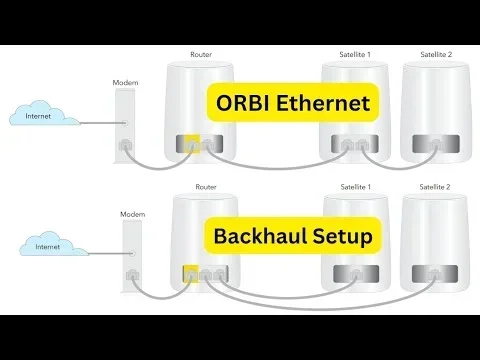
Wired backhaul uses the Orbi extender ethernet port to connect the satellite directly to the router with a cable. This is the preferred method for serious home network setups. With wired backhaul, the satellite does not have to split its resources between communicating with the router and serving wireless devices. The result is better network performance for every device in your home.
Think of it this way. Wireless backhaul is like having a conversation in a crowded room. Wired backhaul is like having a private phone line. Both work, but the private line is always clearer and faster.
When to Use Wired Backhaul
You should consider using wired backhaul if:
- You have many devices connected to your home network setup.
- You experience slow speeds even with your Orbi system.
- Your satellite is far from the router and wireless signal is weak.
- You use bandwidth-heavy applications like 4K streaming or video calls.
- You are a gamer or work from home and need the most stable connection possible.
Setting up wired backhaul is simple. Just plug an ethernet cable from your router into the Orbi extender ethernet port on the satellite unit. The Orbi system will automatically detect the wired connection and prioritize it for backhaul traffic.
How to Set Up a Wired Connection with Your Orbi Extender
Getting the most out of your Orbi extender ethernet port is easier than you might think. You do not need to be a tech expert to set up a wired connection. Here is a simple step-by-step guide.
Step 1: Gather Your Equipment
You will need an ethernet cable and your Orbi system. Most people already have an ethernet cable lying around. If not, a Cat5e or Cat6 cable will work perfectly for Gigabit speeds. Make sure the cable is long enough to reach from your router to the Orbi satellite.
Step 2: Connect the Cable
Plug one end of the ethernet cable into a LAN port on your router. Plug the other end into the ethernet port on your Orbi satellite unit. That is it for the physical setup.
Step 3: Check the Connection
Once connected, the Orbi system should automatically detect the wired backhaul. You can verify this by logging into the Orbi admin panel through a web browser or the Orbi app. Look for the backhaul status to confirm it is using the wired connection.
Quick Tips for Best Results
- Use a high-quality ethernet cable rated for Gigabit speeds.
- Keep cable runs as short as possible for the best performance.
- Avoid running ethernet cables near power cords to reduce interference.
- Label your cables so you can easily identify which cable connects to which device.
- Run an internet speed test before and after the setup to measure the improvement.
Following these simple steps ensures you get the full benefit of the Orbi extender ethernet port in your home network.
Common Mistakes People Make with Orbi Ethernet Ports
Even though setting up a wired connection is simple, there are a few common mistakes that can cause problems. Avoiding these pitfalls will help you get the best results from your Orbi extender ethernet port.
Using the Wrong Ethernet Cable
Not all ethernet cables are created equal. Using an old Cat5 cable will limit your speeds to 100 Mbps, even if your Orbi unit supports Gigabit speeds. Always use a Cat5e or Cat6 cable for the best performance. This is one of the most common and easily avoidable mistakes.
Connecting to the Wrong Port
On some Orbi models, the ethernet port on the satellite is labeled for a specific purpose. Make sure you are plugging your cable into the LAN port, not the WAN port (if there is one). Connecting to the wrong port can cause your device to lose internet access or create a network loop.
Ignoring Firmware Updates
Netgear regularly releases firmware updates for Orbi systems. These updates can improve how wired backhaul works and fix bugs related to the ethernet port. Always keep your Orbi system updated to the latest firmware. Check the Orbi app or admin panel regularly for updates.
Overlooking the Orbi Router Ethernet Ports
People often focus on the satellite units but forget that the Orbi router also has ethernet ports. You can connect wired devices directly to the router for the best possible performance. The router is the heart of your Orbi system, and its ports are typically the fastest in your network.
Expert Insights on Maximizing Your Orbi Ethernet Connection
We spoke with networking professionals to get their advice on using the Orbi extender ethernet port effectively. Here is what the experts recommend.
Use wired backhaul as your default setup. If you have the option to run a cable between your router and satellite, always do it. The improvement in network performance is dramatic. Wireless backhaul is fine for casual use, but wired backhaul is the way to go for serious home networking.
Think about your device connectivity needs before you set up. Map out which devices need the best performance and plan your wired connections accordingly. Smart TVs and gaming consoles should always be wired when possible. Use WiFi for mobile devices and things that do not need maximum speed.
Run an internet speed test regularly. This is the best way to see if your wired connections are working properly. Compare speeds at different times of day to identify any issues. If you notice a drop in broadband speed, check your cables and connections first before troubleshooting other parts of your network.
Consider your cable management. A clean setup is a reliable setup. Use cable ties, raceways, or flat cables that can run along baseboards and under carpets. Good cable management not only looks better but also reduces the risk of accidental disconnections that can disrupt your home network setup.
Do not be afraid to expand your network. If one Orbi satellite with an ethernet port is not enough, you can add more satellites to your mesh network. Each additional satellite can also serve as a wired access point if you run a cable to it. This is a great way to extend WiFi coverage to large homes or buildings with multiple floors.
Key Takeaways
- Orbi extenders do have ethernet ports: Most Orbi satellite units include at least one Gigabit LAN port for wired connections.
- The Orbi extender ethernet port enables wired backhaul: This dramatically improves network performance by creating a direct wired link between the router and satellite.
- Nearly all modern Orbi models support wired connections: From the RBK50 to the latest Ultra series, ethernet ports are standard on satellite units.
- Wired connections reduce latency and improve stability: Devices connected via ethernet experience faster speeds and fewer interruptions compared to wireless connections.
- Setup is simple: Just plug in an ethernet cable between your router and the Orbi satellite to enable wired backhaul.
- Avoid common mistakes: Use the right cable, connect to the correct port, and keep your firmware updated for the best results.
- The Orbi extender ethernet port is a valuable feature: It gives you flexibility and control over your home network that wireless-only setups cannot match.
Frequently Asked Questions
Can I use the Orbi extender ethernet port to connect a PC directly?
Yes, you can connect a desktop PC directly to the ethernet port on your Orbi satellite unit. This gives your PC a stable wired connection that bypasses WiFi entirely. You will get the full Gigabit speed if your Orbi model supports it and you use a quality ethernet cable.
Does using the Orbi extender ethernet port slow down WiFi for other devices?
No, using the ethernet port does not slow down WiFi for other devices. In fact, when you use wired backhaul, it can improve WiFi performance for wireless devices because the satellite has more bandwidth available to serve them.
What kind of ethernet cable should I use with my Orbi extender?
Use a Cat5e or Cat6 ethernet cable for the best results. These cables support Gigabit speeds up to 1,000 Mbps. Avoid using very old Cat5 cables or excessively long cables, as these can limit your speeds and reduce performance.
Can I daisy-chain multiple Orbi satellites using ethernet cables?
Yes, you can connect multiple Orbi satellites in a daisy chain using ethernet cables. This is called wired daisy-chain backhaul and it can extend your network coverage to very large homes. Each satellite connects to the previous one via the Orbi extender ethernet port, creating a strong and reliable wired backbone for your mesh network.
Why is my Orbi extender ethernet port not working?
If your ethernet port is not working, first check that you are using a good quality ethernet cable. Make sure the cable is firmly plugged in on both ends. Also check that your Orbi firmware is up to date. If the problem persists, try resetting the Orbi unit and setting it up again. You can also contact Netgear support for further troubleshooting help.
Is wired backhaul worth the extra effort of running cables?
Absolutely. Wired backhaul through the Orbi extender ethernet port is one of the best upgrades you can make to your home network. It provides faster speeds, lower latency, and more reliable connections for all your devices. If you have the option to run a cable, it is always worth doing, especially for gaming, streaming, and work-from-home setups.
Conclusion
The Orbi extender ethernet port is a feature that can truly transform your home network. Most Orbi systems include ethernet ports on their satellite units, giving you the option to create wired connections for better speed, stability, and performance. Whether you are using wired backhaul to improve your mesh network or connecting devices directly with a cable, the ethernet port adds a level of flexibility that wireless-only setups simply cannot match.
Now that you know the answer to the question Do Orbi Extenders Have Ethernet Ports, you can make informed decisions about your home network setup. Take advantage of this feature by using quality cables, enabling wired backhaul, and connecting bandwidth-hungry devices directly to your Orbi system.
Your home network deserves the best possible performance. The Orbi extender ethernet port is a simple yet powerful tool that helps you get there. Start using it today and experience the difference a wired connection can make.