Can You Put A WiFi Thermostat In Your RV Find Out Now
Yes, you can put a WiFi thermostat in your RV and enjoy smart temperature control from anywhere. A WiFi thermostat in RV setups lets you adjust your climate remotely, save energy, and stay comfortable whether you are parked at a campground or driving down the highway. This guide covers everything you need to know about RV thermostat WiFi options, installation, compatibility, and top picks for mobile living.
Key Takeaways
- WiFi thermostats work in RVs: You can install a wireless thermostat in most RV HVAC systems with basic tools and a little know-how.
- Remote control is a game changer: Use a thermostat app on your phone to adjust temperatures from anywhere with internet or cellular access.
- Energy savings add up fast: Smart temperature control helps you cut down on propane and electricity use while camping.
- Compatibility matters: Check your RV HVAC system type, power source, and wiring before buying a WiFi thermostat.
- Installation is doable DIY: Most RV WiFi thermostat installations take less than an hour with basic tools.
- Connectivity challenges exist: Campground WiFi can be weak, so consider cellular-enabled or hub-based thermostat options.
📑 Table of Contents
- Can You Put a WiFi Thermostat in Your RV? Let Us Break It Down
- How Does a WiFi Thermostat Work in an RV?
- Can You Install a WiFi Thermostat in Any RV?
- Benefits of Using a WiFi Thermostat for RV Living
- Best WiFi Thermostats for RV Use Compared
- Step-by-Step Installation Guide for RV WiFi Thermostats
- Troubleshooting Common WiFi Thermostat Issues in RVs
- Key Takeaways
- Final Thoughts on WiFi Thermostats for RVs
Can You Put a WiFi Thermostat in Your RV? Let Us Break It Down
If you love life on the road, you know how important it is to keep your rig comfortable. Whether you are boondocking in the mountains or parked at a busy campground, your RV thermostat WiFi setup can make or break your experience. The good news is that yes, you absolutely can put a WiFi thermostat in your RV. It is simpler than you might think, and the benefits are huge.
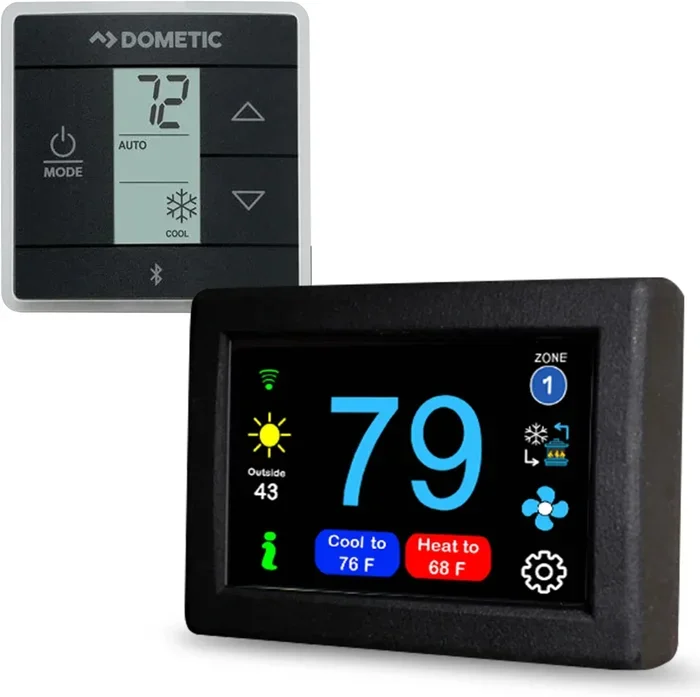
A smart thermostat for RV use gives you remote control over your climate. Imagine waking up in a cold morning and warming up your rig from the comfort of your bed. Or adjusting the air conditioning before you even pull into your campsite. That is the power of wireless thermostat technology in a mobile home on wheels. Let us dive into everything you need to know.
Many RV owners are making the switch from manual thermostats to WiFi-enabled climate control. The reasons are clear. You get convenience, energy savings, and peace of mind. Whether you live in your RV full time or just enjoy weekend getaways, a WiFi thermostat in RV setup can transform how you manage your indoor environment. This guide will walk you through compatibility, installation, the best products, and common pitfalls to avoid.
Why This Topic Matters for RV Owners
Temperature control in an RV is not like controlling it in a house. Your RV HVAC system works differently. It runs on propane, electricity, or both. The space is smaller and enclosed. Insulation varies from rig to rig. All of these factors make choosing the right thermostat for mobile homes a critical decision. A WiFi thermostat in RV setup helps you manage all of this more efficiently than a traditional dial thermostat ever could.
How Does a WiFi Thermostat Work in an RV?
A WiFi thermostat RV setup works by connecting your thermostat to your wireless network. This allows the device to communicate with your smartphone or tablet through a dedicated app. You can then adjust the temperature from anywhere within range. Some models also work with cellular data, which is a big deal for RVers who camp in areas with weak or no WiFi.
The Basics of Wireless Thermostat Technology
At its core, a wireless thermostat uses a built-in WiFi module to connect to your network. The thermostat reads the temperature from its sensors and sends that data to the app on your phone. You can set schedules, adjust temperatures, and monitor your RV climate control in real time. Some advanced models even learn your habits and adjust automatically.
Here is how the process typically works:
- The thermostat measures the current temperature inside your RV.
- It sends that data to the cloud through your WiFi connection.
- The app on your phone pulls that data and displays it to you.
- You can send commands back through the app to adjust the temperature.
- The thermostat receives the command and adjusts your RV air conditioning or heater accordingly.
WiFi Thermostat vs Traditional Thermostat in an RV
A traditional thermostat is a simple device. You turn a dial or press buttons to set the temperature. It controls your HVAC system directly with no fancy features. A smart thermostat, on the other hand, connects to the internet. It gives you remote access, scheduling, and often energy tracking. For RV living, the smart option offers far more flexibility and control.
Here is a quick comparison of the two approaches:
- Traditional thermostat: Works without WiFi. Simple to install. Limited control. No remote access. No energy reports.
- WiFi thermostat: Requires a WiFi connection. Slightly more complex setup. Full remote control. Energy tracking. Smart scheduling.
Most RV owners find that the benefits of a WiFi thermostat in RV setup far outweigh the small extra effort during installation.
Can You Install a WiFi Thermostat in Any RV?
The short answer is no, not every RV is compatible with every thermostat. But the good news is that most modern RVs can support a WiFi thermostat RV setup with minimal modifications. The key is understanding your specific HVAC system and wiring before you buy.
Compatibility Considerations for RV HVAC Systems
Before you purchase a smart thermostat for RV use, you need to check a few things. First, what type of HVAC system does your RV have? Most RVs use one of three systems: a rooftop air conditioner with electric heat, a propane furnace with electric air conditioner, or a combination unit. Each has different wiring requirements.
Second, check the voltage. Most RV thermostats run on 12V DC power. Some WiFi thermostats require a C-wire (common wire) for continuous power. Not all RV wiring includes a C-wire. You may need to add one or use a thermostat that does not require it.
Third, consider the physical size of the thermostat. RV thermostat spaces are often smaller than home thermostat spaces. Make sure the unit you choose will fit properly in your RV’s wall plate.
Power Source Requirements for RV WiFi Thermostats
Thermostat power source is an important consideration. Some WiFi thermostats run on batteries, which is great for RVs where wiring may be limited. Others need a constant power supply through the HVAC wiring. Here are the common options:
- Battery-powered thermostats: Easy to install. No wiring changes needed. Just swap batteries periodically.
- C-wire powered thermostats: More reliable power. Requires a C-wire in your RV’s wiring. May need a professional install.
- Hybrid thermostats: Can run on batteries or C-wire. Great flexibility for RV owners.
If you are not sure about your wiring, a quick look at your current thermostat’s base plate will tell you a lot. Count the wires and note their colors. This information will help you choose a compatible WiFi thermostat in RV model.
Quick Tips Before You Buy
- Check your RV HVAC system type before shopping.
- Verify whether your wiring includes a C-wire.
- Measure the wall plate space for the new thermostat.
- Make sure the thermostat supports your RV’s voltage (usually 12V DC).
- Read reviews from other RV owners for real-world compatibility insights.
Benefits of Using a WiFi Thermostat for RV Living
Once you understand the basics, the benefits of a WiFi thermostat in RV setup become very clear. This is not just a luxury add-on. It is a practical upgrade that improves comfort and saves money.
Remote Temperature Control While Camping
One of the biggest advantages is remote control. Let us say you are driving to a campsite on a hot summer day. With a WiFi thermostat RV setup, you can turn on the air conditioning before you arrive. Your rig is cool and ready when you pull in. No more walking into a sweltering RV after a long drive.
You can also adjust the temperature from your phone while you are away. Maybe you want to drop the heat before you go to bed or raise the AC while you are out exploring. A thermostat app puts all of this control in your pocket.
Energy Savings and Efficiency
Energy savings are another major benefit. A programmable thermostat lets you set schedules so your HVAC system only runs when you need it. This is especially helpful when you are campground WiFi connected and can monitor your usage. Over time, these small adjustments add up to real savings on propane and electric bills.
Some smart thermostats also provide energy reports. You can see how much energy your RV climate control system uses each day. This data helps you make smarter decisions about when and how to run your heater or AC.
Peace of Mind for Full-Time RVers
If you live in your RV full time, a WiFi thermostat in RV setup offers peace of mind. You can monitor your temperature remotely. If something goes wrong, you get alerts on your phone. This is especially valuable during winter months when freezing temperatures can damage your RV’s pipes and systems.
Expert Insight
Many full-time RVers recommend choosing a thermostat with both WiFi and cellular backup connectivity. This ensures you always have control, even when you are camping in areas with poor WiFi coverage. A cellular thermostat or one that supports a hub device can bridge the gap when traditional Wi-Fi connectivity is unreliable.
Best WiFi Thermostats for RV Use Compared
Not all WiFi thermostats are created equal. Some are better suited for RV use than others. Here is a look at the top options for WiFi thermostat in RV setups, along with what makes each one stand out.
| Thermostat Model | WiFi Enabled | Battery Powered | App Control | RV Compatible | Price Range |
|---|---|---|---|---|---|
| Nest Learning Thermostat | Yes | No (needs C-wire) | Yes | Yes (with C-wire) | $200-$250 |
| Ecobee SmartThermostat | Yes | Yes (with batteries) | Yes | Yes | $230-$280 |
| Honeywell Home T9 | Yes | Yes (with batteries) | Yes | Yes | $150-$200 |
| RV-specific Skyline WiFi Thermostat | Yes | Yes | Yes | Yes (designed for RVs) | $180-$220 |
| Honeywell Home T10 Pro | Yes | Yes (with batteries) | Yes | Yes | $200-$250 |
When choosing the best WiFi thermostat for your RV, consider your budget, your HVAC system type, and your connectivity needs. An RV-specific thermostat like the Skyline model is designed with RV users in mind. It accounts for the unique challenges of mobile climate control. But mainstream smart thermostats like Nest and Ecobee also work well if your wiring supports them.
Features to Look For in an RV WiFi Thermostat
Not all features are created equal for RV use. Here are the key features to prioritize when shopping for a WiFi thermostat RV setup:
- Battery backup: Keeps your thermostat running even if power is interrupted. Essential for boondocking.
- Cellular connectivity support: Lets you control temperature even without WiFi. Critical for remote camping.
- Compact design: Fits in the smaller wall plates common in RVs.
- 12V DC compatibility: Matches the power system in most RVs.
- Multi-zone support: Useful if your RV has separate heating and cooling zones.
- Durable construction: RVs vibrate and experience temperature extremes. Your thermostat should handle that.
Step-by-Step Installation Guide for RV WiFi Thermostats
Installing a WiFi thermostat in RV setup is a manageable DIY project for most people. You do not need to be an electrician or an RV technician. With the right tools and a little patience, you can have your new thermostat up and running in under an hour.
What You Need Before Starting
Gather these tools and materials before you begin your thermostat installation:
- Screwdriver set (Phillips and flathead)
- Wire stripper
- Voltage tester
- Your new WiFi thermostat (and its mounting plate)
- Labeling tape or a camera (to document wire positions)
- A friend or partner to help hold wires (optional but helpful)
Installation Process Step by Step
Follow these steps carefully for a smooth WiFi thermostat RV installation:
- Turn off power: Switch off your RV’s HVAC system at the breaker or disconnect switch. This is a safety first step. Never work on live wires.
- Remove the old thermostat: Unscrew the faceplate from the wall. Gently pull it away to expose the wiring. Take a photo of the wire positions before disconnecting anything.
- Label the wires: Use tape or a marker to label each wire. Note which terminal each wire was connected to. Common labels include R, Rh, Rc, Y, G, W, and C.
- Disconnect the wires: Carefully remove each wire from its terminal. Do not let the wires retract into the wall. Use a pencil or small tool to gently pull them out.
- Install the new mounting plate: Attach the mounting plate that came with your new thermostat. Use the screws provided. Make sure it is level and secure.
- Connect the wires: Attach each labeled wire to the corresponding terminal on the new thermostat base. Refer to the manufacturer’s wiring guide for exact placement.
- Attach the thermostat face: Snap or slide the thermostat display onto the base. Make sure it is firmly connected.
- Restore power: Turn your HVAC system back on at the breaker.
- Connect to WiFi: Open the thermostat’s app and follow the on-screen instructions to connect it to your wireless network.
- Test the system: Set the temperature a few degrees higher and lower to make sure the heating and cooling both work properly.
Common Mistakes to Avoid
- Forgetting to turn off power: This is the most common and most dangerous mistake. Always disconnect power before touching any wires.
- Not labeling wires before removal: If you forget which wire goes where, you will be guessing. A quick photo or label saves hours of frustration.
- Ignoring the C-wire requirement: Some WiFi thermostats need a C-wire for power. If your RV does not have one, you may need to install a power extender or choose a battery-powered model.
- Choosing the wrong thermostat size: RV wall plates are often smaller than home plates. Measure before you buy to avoid a poor fit.
Troubleshooting Common WiFi Thermostat Issues in RVs
Even with a careful installation, you may run into issues with your WiFi thermostat in RV setup. This is normal, especially in mobile environments. Here are the most common problems and how to solve them.
WiFi Connectivity Issues in Remote Areas
One of the biggest challenges with a WiFi thermostat RV setup is connectivity. Campground WiFi can be slow, spotty, or completely unavailable. If your thermostat relies on WiFi and you lose connection, you lose remote access. Here is how to deal with this:
- Use a WiFi extender: A small WiFi range extender can boost your signal within your RV. Place it near the thermostat for the best results.
- Choose a thermostat with cellular support: Some models work with a cellular data connection. This is a game changer for RVers who camp off-grid.
- Use a mobile hotspot: Your smartphone can act as a hotspot for your thermostat. This works well when campground WiFi is unreliable.
- Set up offline schedules: Most smart thermostats store schedules locally. Even without WiFi, your thermostat will follow the schedule you set.
Thermostat Not Connecting to the Network
If your wireless thermostat will not connect to your WiFi network, try these steps:
- Make sure you are entering the correct WiFi password.
- Move your router closer to the thermostat if possible.
- Restart both the thermostat and your WiFi router.
- Check if your router uses a 5GHz band. Some thermostats only connect to 2.4GHz networks. Switch to 2.4GHz if needed.
- Factory reset the thermostat and try the setup again from scratch.
Thermostat Losing Power Frequently
If your thermostat power source keeps dying, the issue is usually related to wiring. A thermostat that loses power often may not be getting enough current from the HVAC system. This is a common issue in RVs. Try adding a C-wire or switching to a battery-powered model for more reliable operation.
Expert Insight
Many RV technicians recommend the Skyline WiFi thermostat or similar RV-specific models for first-time installers. These units are designed specifically for the unique wiring and space constraints found in RVs. They are more forgiving during installation and less likely to cause compatibility headaches.
Key Takeaways
- You can install a WiFi thermostat in your RV: Most RV HVAC systems are compatible with smart WiFi thermostats with basic wiring considerations.
- Remote control is a major benefit: Adjust your RV climate control from your phone whether you are at home or on the road.
- Energy savings are real: Smart scheduling and remote adjustments help you reduce propane and electricity consumption significantly.
- Compatibility checks are essential: Verify your HVAC type, wiring, and power source before purchasing a WiFi thermostat in RV setup.
- Installation is DIY-friendly: Most installs take less than an hour with basic tools and careful attention to wire labels.
- Connectivity challenges can be solved: WiFi extenders, cellular support, and mobile hotspots keep your thermostat connected even in remote areas.
Final Thoughts on WiFi Thermostats for RVs
Putting a WiFi thermostat in your RV is one of the smartest upgrades you can make for mobile living. It gives you control, comfort, and savings that a traditional thermostat simply cannot match. Whether you are a full-time RVer or someone who enjoys weekend camping trips, the convenience of remote temperature monitoring is hard to beat.
The key is to choose the right thermostat for your specific rig. Check your HVAC system, verify your wiring, and pick a model that fits your needs and budget. Installation is straightforward, and the payoff is immediate. You will wonder how you ever managed without it.
Remember that WiFi connectivity in an RV can be unpredictable. Plan for this by choosing a thermostat with offline capabilities or cellular backup. This way, you always have control over your RV climate control, no matter where the road takes you.
Take the time to research your options. Read reviews from other RV owners. Watch installation videos. And when you are ready, go ahead and make the switch. A WiFi thermostat in RV setup is a small investment that pays big dividends in comfort, convenience, and energy savings. Your future self, relaxing in a perfectly cooled or warmed RV, will thank you for it.