Do All HDMI Cables Support Arc Everything You Should Know
Not all HDMI cables support ARC. The right cable depends on your HDMI version, device compatibility, and the audio format you want to use. This guide breaks down everything you need to know about HDMI ARC compatibility, from basic requirements to advanced eARC features, so you can avoid buying the wrong cable and enjoy seamless audio.
Key Takeaways
- Not every HDMI cable works with ARC: You need at least a High-Speed HDMI cable or an HDMI Ethernet cable to support Audio Return Channel.
- HDMI version matters: HDMI 1.4 and later support standard ARC, while HDMI 2.1 unlocks enhanced eARC for uncompressed audio formats.
- Labeling is your friend: Look for “High Speed” or “Premium High Speed” labels on the cable packaging to confirm ARC support.
- eARC is the future: It supports advanced audio formats like Dolby Atmos and DTS:X, which standard ARC cannot handle.
- Common mistakes cause problems: Using an older or wrong cable can lead to no audio, audio sync issues, or limited format support.
- Network cables and HDMI share a connection: HDMI cables with Ethernet can share your home network, much like how network cables provide wired connectivity for your devices.
- Smart home devices add complexity: Connected gadgets like smart rings or IoT devices interact with your HDMI setup in ways that affect overall connectivity.
📑 Table of Contents
- Do All HDMI Cables Support Arc? The Short Answer
- What Is HDMI ARC and Why Does It Matter?
- Which HDMI Cables Support ARC?
- HDMI ARC vs eARC: What Is the Difference?
- How to Check if Your HDMI Cable Supports ARC
- Common HDMI ARC Problems and How to Fix Them
- Does HDMI Ethernet Channel Affect ARC?
- Do You Need a Special HDMI Cable for Your Soundbar?
- How to Choose the Right HDMI Cable for ARC
- Final Thoughts on HDMI ARC Cable Compatibility
- Frequently Asked Questions
Do All HDMI Cables Support Arc? The Short Answer
If you have ever plugged in an HDMI cable and wondered why your TV audio is not flowing to your soundbar, the answer might be your cable. Do all HDMI cables support ARC? The simple answer is no. Not every HDMI cable is created equal, and ARC support depends on several factors. These include the cable category, the HDMI version it supports, and the devices you are connecting.
Audio Return Channel, commonly known as HDMI ARC, is a handy feature that lets your TV send audio back through the same HDMI cable to a soundbar, AV receiver, or home theater system. This means you only need one remote and one cable to handle both video and audio. It is convenient, clean, and eliminates cable clutter. But here is the catch: your cable must be compatible with ARC for it to work.
In this guide, we will walk through everything you need to know. We will cover what HDMI ARC is, which cables support it, how eARC differs, and how to avoid common mistakes. By the end, you will know exactly which cable to buy and why.
Understanding HDMI cable compatibility is essential in today’s home entertainment setups. With 4K TVs, soundbars, and streaming devices becoming standard, the right cable makes all the difference. Let us dive in.
What Is HDMI ARC and Why Does It Matter?
HDMI ARC stands for Audio Return Channel. It is a feature built into the HDMI standard that allows audio to travel in two directions through a single cable. Normally, HDMI sends video from a source device like a Blu-ray player to your TV. ARC flips the script by letting your TV send audio back down the same cable to an external speaker system.
This matters because it simplifies your setup. Without ARC, you would need a separate audio cable from your TV to your soundbar or receiver. That means extra wires, extra ports used, and sometimes extra remote controls. With ARC, everything flows through one HDMI connection.
How ARC Changed Home Audio Setups
Before ARC, connecting a TV to a sound system was messy. You ran an optical cable or an RCA cable from the TV audio output to the speaker system. Each method had limitations. Optical cables do not carry lossless formats. RCA cables are bulky and analog. ARC changed the game by using the same digital connection that already carried video.
Today, most modern TVs and soundbars include ARC support. But the cable you use still matters. A standard HDMI cable from the early 2000s likely will not support ARC. You need a cable that meets the HDMI 1.4 specification or later. This is where the confusion begins for many people.
What Devices Benefit From HDMI ARC?
Several devices rely on ARC for a clean audio setup:
- Soundbars: The most common use case. Plug one HDMI cable from your TV ARC port to your soundbar, and you are done.
- AV Receivers: Home theater enthusiasts use ARC to route all audio through a central receiver.
- Streaming Devices: Roku, Apple TV, and Chromecast with Google TV all benefit from ARC when connected to a TV.
- Gaming Consoles: PlayStation and Xbox can send audio through ARC to compatible sound systems.
- Smart Home Hubs: Devices like smart displays and connected home hubs sometimes use ARC for audio output.
Which HDMI Cables Support ARC?
Not all cables carry the same capabilities. The cable you choose directly affects whether HDMI ARC works. Here is a breakdown of the cable types and their ARC compatibility.
Standard HDMI Cable
The original Standard HDMI cable supports HDMI 1.0 to 1.2. These cables handle basic video and audio but do not support ARC. If you are using a Standard HDMI cable, you will not get the audio return channel feature. Period. These cables are fine for older devices that do not need ARC, but they are not the right choice for modern setups.
High-Speed HDMI Cable
This is the minimum cable you need for ARC. High-Speed HDMI cables support HDMI 1.3 and later versions, which include ARC support. They handle bandwidth up to 10.2 Gbps and can carry 1080p and 4K signals. If you buy a cable labeled “High Speed” or “High-Speed HDMI,” it should support ARC without any issues.
When shopping, look for the “High Speed” certification on the packaging. This label guarantees the cable meets the bandwidth requirements for ARC and basic 4K content.
Premium High-Speed HDMI Cable
The Premium High-Speed HDMI cable goes a step further. It supports HDMI 2.0 and is certified for 4K at 60Hz, HDR, and expanded color gamuts. All Premium High-Speed cables support ARC and are the recommended choice for most modern home theater setups. If you own a 4K TV and a soundbar, this is the cable you want.
Ultra High-Speed HDMI Cable
The newest category, Ultra High-Speed HDMI cables, supports HDMI 2.1. These cables handle bandwidth up to 48 Gbps and support 8K, 4K at 120Hz, and eARC. If you are building a cutting-edge home theater or gaming setup, this is the cable to choose. They fully support both standard ARC and enhanced eARC.
HDMI ARC vs eARC: What Is the Difference?
You have probably seen the term eARC alongside ARC. Enhanced Audio Return Channel, or eARC, is an upgrade to the original ARC standard. It was introduced with HDMI 2.1 and offers significant improvements over standard ARC.
Audio Format Support
Standard ARC supports compressed audio formats like Dolby Digital and DTS. It also supports basic uncompressed stereo audio. However, it cannot carry lossless formats or advanced surround sound. This is a big limitation if you own a soundbar or receiver that supports Dolby Atmos or DTS:X.
eARC solves this problem. It supports uncompressed audio, lossless formats, and advanced codecs like Dolby Atmos and DTS:X. If you want the full immersive audio experience, eARC is essential.
Bandwidth and Speed
Standard ARC uses a portion of the HDMI bandwidth reserved for the audio channel. This limits what it can carry. eARC uses a dedicated channel with much higher bandwidth. This means it can handle more data, faster refresh rates, and higher-quality audio all at once.
Which Cables Support eARC?
To use eARC, you need an Ultra High-Speed HDMI cable or a cable certified for HDMI 2.1. Standard High-Speed cables will not support eARC, even if they support basic ARC. Always check the cable specifications before purchasing if eARC is what you need.
Quick Comparison Table
| Feature | Standard ARC | Enhanced ARC (eARC) |
|---|---|---|
| HDMI Version Required | HDMI 1.4+ | HDMI 2.1 |
| Cable Required | High-Speed HDMI | Ultra High-Speed HDMI |
| Dolby Atmos Support | No | Yes |
| DTS:X Support | No | Yes |
| Lossless Audio | Limited | Yes |
| Max Bandwidth | ~1 Mbps | ~37 Mbps |
| Lip Sync Correction | Basic | Advanced |
How to Check if Your HDMI Cable Supports ARC
Not sure if your current cable supports ARC? You do not need to be a tech expert to find out. Here are simple ways to check your cable compatibility.
Check the Label on the Cable or Packaging
Look for the words “High Speed,” “Premium High Speed,” or “Ultra High Speed” on the cable itself or its packaging. If you see “Standard HDMI” only, it likely does not support ARC. The certification labels are your quickest indicator.
Check the HDMI Version
If you know the HDMI version your cable supports, you can determine ARC compatibility. HDMI 1.4 and later versions include ARC support. HDMI 1.3 and earlier do not. You can usually find the version number on the cable specification sheet or the manufacturer’s website.
Test It with Your Devices
The easiest test is to connect your TV to your soundbar using the cable and enable ARC in your TV settings. Go to your TV audio settings and look for HDMI ARC or eARC. If it appears and audio flows to your soundbar, your cable supports ARC. If you see no audio option or get an error, the cable may not be compatible.
When in Doubt, Upgrade
If you are unsure about your cable, it is usually worth upgrading to a High-Speed or Premium High-Speed HDMI cable. These cables are affordable and widely available. They future-proof your setup and ensure compatibility with ARC and newer features like HDR and 4K.
Common HDMI ARC Problems and How to Fix Them
Even with the right cable, ARC can sometimes cause headaches. Here are the most common issues and how to solve them.
No Audio Through ARC
If you have no audio coming through your soundbar or receiver, the first thing to check is the cable connection. Make sure the HDMI cable is firmly seated in both the TV and the speaker device. Try unplugging and replugging both ends. Also, confirm that ARC is enabled in your TV settings. Many TVs have ARC turned off by default.
Audio and Video Are Out of Sync
Audio sync issues are frustrating but common with ARC. This happens when the audio processing delay does not match the video delay. To fix this, look for a “Lip Sync” or “Audio Delay” setting in your TV or soundbar menu. Adjusting this setting usually resolves the problem. Using a certified High-Speed HDMI cable can also reduce sync issues.
ARC Keeps Disconnecting
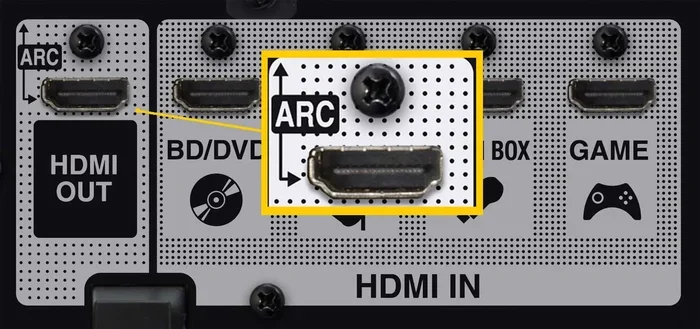
If ARC keeps turning off or disconnecting, try using a different HDMI port on your TV. Not all ports support ARC, even if they are HDMI ports. Look for ports labeled “ARC” or “eARC” on the back of your TV. Also, avoid using HDMI splitters or extenders, as these can interfere with the ARC signal.
Limited Audio Format Support
If your soundbar only plays stereo audio even though it supports surround formats, you may be using a cable that only supports standard ARC. Upgrading to an Ultra High-Speed HDMI cable that supports eARC will unlock advanced audio formats. Check your TV and soundbar settings to make sure eARC is enabled if your devices support it.
Quick Tips for a Smooth ARC Experience
- Always use a certified High-Speed or higher HDMI cable.
- Enable ARC in both your TV and soundbar settings.
- Use HDMI ports specifically labeled ARC or eARC.
- Keep your cable length under 6 feet for best signal quality.
- Update your TV and soundbar firmware regularly.
- Avoid cheap, uncertified cables from unknown brands.
- If you have a complex setup, consider a dedicated network cable for your home entertainment system to reduce interference.
Does HDMI Ethernet Channel Affect ARC?
Some HDMI cables include an Ethernet channel. This feature allows connected devices to share a network connection through the HDMI cable. You might wonder if HDMI Ethernet affects ARC compatibility. The answer is no. HDMI Ethernet is a separate feature that does not interfere with ARC or eARC.
In fact, HDMI cables with Ethernet can be useful in setups where you want to reduce the number of network cables running to your entertainment center. Just like how connected smart home devices rely on stable network connections, HDMI Ethernet can simplify your connectivity setup. However, it is not required for ARC to work.
Do You Need a Special HDMI Cable for Your Soundbar?
Most soundbars work with standard High-Speed HDMI cables. You do not need the most expensive Ultra High-Speed cable unless you are using eARC or plan to use advanced audio formats. Check your soundbar manual for the recommended cable type. In most cases, any certified High-Speed HDMI cable will do the job.
If your soundbar supports Dolby Atmos or DTS:X, you will need eARC, which requires an Ultra High-Speed HDMI cable. Always match your cable to the highest feature you plan to use. This ensures you get the best audio quality without unnecessary spending.
How to Choose the Right HDMI Cable for ARC
Choosing the right cable does not have to be confusing. Follow these simple steps to make the right choice.
- Check your devices: Look at your TV and soundbar specs to see what HDMI versions they support.
- Determine your needs: Do you want basic ARC or advanced eARC with Dolby Atmos?
- Pick the right cable category: High-Speed for standard ARC, Ultra High-Speed for eARC.
- Look for certifications: Choose cables with HDMI Licensing Administrator certifications.
- Buy from reputable brands: Avoid generic cables that do not list their specifications clearly.
Taking these steps ensures you get a cable that supports ARC and delivers the best possible audio quality for your setup.
Final Thoughts on HDMI ARC Cable Compatibility
The question “do all HDMI cables support ARC” has a clear answer: no. The right cable depends on your devices, your desired audio quality, and the features you want to use. Standard HDMI cables do not support ARC. High-Speed HDMI cables do. Premium High-Speed cables offer even more. And Ultra High-Speed cables give you access to eARC and the latest audio formats.
Investing in the correct cable is one of the easiest ways to improve your home entertainment experience. It eliminates audio sync issues, unlocks advanced sound formats, and keeps your setup clean and simple. Next time you buy an HDMI cable, check the label, verify the version, and make sure it meets your ARC needs.
Your ears will thank you. A proper HDMI ARC setup delivers rich, immersive audio without the clutter of extra cables. Take the time to get it right, and your home theater will perform at its best every time you turn it on.
Frequently Asked Questions
Can I Use Any HDMI Cable for ARC?
No, not any HDMI cable works with ARC. You need at least a High-Speed HDMI cable that supports HDMI 1.4 or later. Standard HDMI cables from older versions do not include ARC support. Always check the cable label or specifications before purchasing to ensure compatibility.
How Do I Know if My HDMI Cable Supports eARC?
Your cable must be an Ultra High-Speed HDMI cable certified for HDMI 2.1 to support eARC. Look for the “Ultra High Speed” label on the packaging. If your cable only says “High Speed,” it supports standard ARC but not eARC. Check your TV and soundbar settings to confirm eARC is enabled.
Does HDMI ARC Work With All TVs?
Most TVs made after 2012 support HDMI ARC, but not all of them. Check your TV manual or look for an HDMI port labeled “ARC” on the back of your TV. Some older or budget models may not include ARC support even with an HDMI port. Always verify before assuming your TV has it.
Why Is My HDMI ARC Not Working Even With the Right Cable?
Even with the correct cable, ARC can fail if it is not enabled in your TV settings. Go to your TV audio settings and turn on HDMI CEC and ARC. Also, make sure you are using an HDMI port labeled ARC. Firmware updates for your TV or soundbar can also resolve connectivity issues.
Can I Use an HDMI Splitter With ARC?
Most HDMI splitters do not pass through the ARC signal. This means audio will not return from your TV to your soundbar when a splitter is in the chain. If you need to split your HDMI signal, look for a splitter specifically designed to support ARC or use a direct connection between your TV and soundbar.
Is HDMI ARC Better Than Optical Audio?
HDMI ARC is generally better than optical audio because it supports higher-quality formats and handles both video and audio through one cable. Optical audio is limited to compressed formats and does not carry video. However, optical connections are less prone to certain types of interference. For most modern setups, HDMI ARC is the preferred choice.