Can You Connect Hdmi To Coax Everything You Need To Know
Connecting HDMI to Coax is possible with the right adapter or converter, making it easy to bridge modern devices with older television systems. Whether you are setting up a new streaming device on an older TV or extending your cable television signal, understanding HDMI to Coax conversion helps you avoid common headaches. This guide covers everything from the basics of each connection type to step-by-step setup instructions, recommended adapters, and expert tips for maintaining strong signal quality throughout your home entertainment system.
Have you ever stared at the back of your television and wondered whether your shiny new HDMI device could work with that old coaxial port on the wall? You are not alone. Many people face this exact situation when they try to set up a streaming box, gaming console, or cable box in a home that still relies on older coaxial connections. The good news is that connecting HDMI to Coax is entirely doable, and you do not need to be a tech expert to make it work.
In this guide, we will walk you through everything you need to know about HDMI to Coax conversion. We will explain what each connection type does, why you might need to bridge them, which adapters work best, and how to troubleshoot common problems. By the end, you will feel confident setting up your own signal conversion setup without calling a technician or spending a fortune.
Whether you are trying to connect a modern streaming device to an older TV or extend your cable television signal across the house, this article has you covered. Let us dive right in.
Key Takeaways
- HDMI to Coax conversion is achievable: You need the right adapter or RF modulator to convert digital HDMI signals to analog coaxial output.
- Multiple adapter types exist: From simple HDMI to Coax converters to RF modulators, each serves a different purpose and budget.
- Signal quality matters: Longer cables and cheap adapters can degrade your picture and sound, so invest in quality equipment.
- Common problems are fixable: Issues like signal loss, audio video sync problems, and no output can usually be solved with basic troubleshooting.
- Future-proof your setup: Choosing the right connection type today saves you time and money down the road.
📑 Table of Contents
- What Are HDMI and Coax Cables?
- Why Connect HDMI to Coax?
- How to Connect HDMI to Coax: Step-by-Step Guide
- Types of Adapters and Converters
- Common Problems and Solutions
- Expert Tips for Best Signal Quality
- Quick Tips for HDMI to Coax Success
- Common Mistakes to Avoid
- Frequently Asked Questions
- Final Thoughts
What Are HDMI and Coax Cables?
Before we talk about connecting them, it helps to understand what each cable type does and why they are different. Both carry audio and video, but they use very different technologies.
Understanding HDMI Technology
HDMI stands for High Definition Multimedia Interface. It is the standard connection type for most modern devices. Your Blu-ray player, gaming console, laptop, and streaming device likely use HDMI. The cable carries both high-definition video and multi-channel audio through a single cord. This makes setup simple and keeps your entertainment area tidy.
HDMI supports digital signals, which means the data travels in a clean, uncompressed format. This is why HDTV screens look so sharp when connected via HDMI. The current versions can handle 4K and even 8K resolution at high frame rates. If you want the best picture and sound quality, HDMI is the way to go.
However, HDMI has one limitation. Not every television or display has an HDMI port. Older models, especially those from the early 2000s or before, often only have coaxial, composite, or component inputs. That is where the challenge begins.
Understanding Coaxial Cables
A coaxial cable, often called coax, has been around for decades. You probably recognize the round cable with the single metal pin that connects to your cable wall outlet. Coax was the standard connection type for cable television for many years. It carries an analog signal that your TV can decode into picture and sound.
Coaxial cables are durable and reliable. They handle long distances well, which is why cable companies still use them to deliver cable television to millions of homes. The signal stays strong even over 50 or 100 feet of cable, which is a big advantage in larger houses.
The downside is that coax carries analog signals, and the resolution quality is much lower than what HDMI provides. Standard definition is the norm for coax, and you will not get the crisp, vibrant picture that modern digital signal technology delivers. That is why many people want to convert their HDMI output to work through a coaxial connection.
Why Connect HDMI to Coax?
You might be wondering why anyone would want to go from a better quality signal to a lower quality one. The answer comes down to compatibility and convenience. Let us look at the most common reasons people need HDMI to Coax conversion.
Common Scenarios That Require Conversion
Here are a few situations where you might need to connect an HDMI device to a coaxial input:
- Older televisions: Many households still have older TVs that only have coaxial or antenna inputs. If you want to use a modern streaming stick or gaming console, you need a way to make it work with that older set.
- Hotel rooms and rental properties: Some hotels and vacation rentals only offer coaxial connections for their in-room televisions. A portable HDMI to Coax converter lets you use your own devices.
- Whole-home distribution: If you want to send the same signal to multiple TVs using existing coax wiring, a converter can help you distribute your HDMI content across the house.
- Security camera systems: Some older security setups use coaxial cable for video transmission, and you may need to integrate a modern HDMI source into that system.
Parents who want to simplify their home entertainment setup might also find value in exploring other gadgets that make daily life easier. Check out our guide on 10 Gadgets To Make Moms Life Easier for more ideas on streamlining your home tech.
Benefits of Using HDMI to Coax
Even though coax carries a lower quality signal than HDMI, there are real benefits to using this conversion approach:
- Compatibility with legacy systems: You get to use modern devices without replacing your entire television or wiring setup.
- Long cable runs: Coax handles distance better than HDMI, so you can place your device farther from the TV.
- Simpler setup: Coax connections are plug and play with no need for additional audio cables in many cases.
- Cost savings: Instead of buying a new TV, a converter lets you keep using what you already have.
How to Connect HDMI to Coax: Step-by-Step Guide
Now for the part you have been waiting for. Let us walk through the actual process of setting up your HDMI to Coax connection. The steps are straightforward, and you do not need any special tools.
What You Will Need
Before you start, gather these items:
- An HDMI to Coax converter or adapter (more on types below)
- An HDMI cable (standard or mini, depending on your device)
- A coaxial cable long enough to reach from the converter to your TV
- Optional: an RF modulator if you are distributing the signal to multiple outputs
- Your TV remote and any device you want to connect
The Connection Process
Follow these steps to get your setup running:
- Connect the HDMI cable from your source device (streaming box, game console, or laptop) to the HDMI input on the converter.
- Plug the coaxial cable into the coaxial output on the converter. The other end goes into your TV’s coaxial input or the wall coax outlet.
- Power on the converter if it requires external power. Some adapters are passive and do not need a power source.
- Switch your TV to the correct input. Use your remote to tune to the coaxial channel, usually channel 3 or 4 for most converters.
- Test the connection. Play a video or open a menu on your source device. You should see the picture on your TV through the coaxial connection.
That is it. The whole process takes about five minutes. If you do not see a picture, do not worry. We will cover troubleshooting in the next section.
For those dealing with phone-related connectivity issues, you might also find our guide on Adding Prefixes To Numbers On Iphone helpful for managing your device settings more effectively.
Types of Adapters and Converters
Not all converters are created equal. Different types serve different needs, and choosing the right one makes a big difference in your experience. Let us break down the main options.
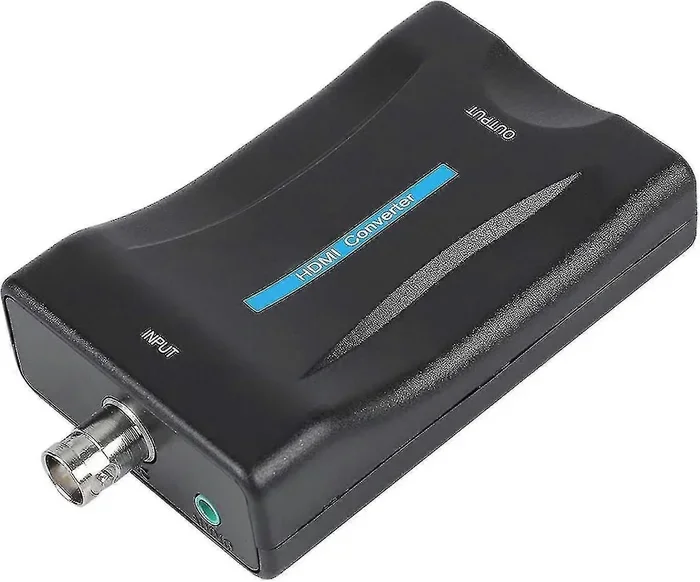
HDMI to Coax Converters
These are the most common devices for HDMI to Coax conversion. They take the digital HDMI signal and convert it to an analog signal that can travel through coaxial cable. Most converters output on channel 3 or channel 4, which is the standard for composite-style coax connections.
Key features to look for in a good converter include:
- Support for at least 720p or 1080p input resolution
- Built-in audio extraction for coax output
- Compact size for easy placement behind your TV
- LED indicator lights to show power and signal status
- Compatibility with major brands like Roku, Apple TV, Fire Stick, and gaming consoles
Popular brands in this space include Mediasonic, Actiontec, and Cable Matters. Prices typically range from 20 to 60 dollars depending on features and build quality.
RF Modulators Explained
An RF modulator is a more advanced option for signal conversion. It takes your HDMI input and modulates it onto a radio frequency signal that travels through coaxial cable. RF modulators are commonly used in whole-home entertainment setups where you need to send the same signal to multiple televisions.
Here is how they compare to basic converters:
- RF modulators offer better signal distribution across multiple TVs and longer cable runs.
- Basic converters are simpler, cheaper, and easier to set up for single-TV installations.
- RF modulators often include channel selection controls and adjustable output power.
If you are running cables through walls or across multiple rooms, an RF modulator is the better choice. For a simple one-to-one setup, a basic converter works perfectly fine.
Active vs Passive Adapters
You will also come across active and passive adapters. An active adapter requires external power and provides signal boosting, which helps maintain signal quality over longer distances. A passive adapter simply changes the connection type without any amplification. For most home setups under 25 feet, a passive adapter works well. For longer runs, go with an active model.
Common Problems and Solutions
Even with the right equipment, you might run into issues during setup. Here are the most common problems people face when connecting HDMI to Coax and how to fix them.
Signal Loss Issues
If your picture looks fuzzy, snowy, or keeps cutting out, signal loss is the likely culprit. Here are the most common causes and fixes:
- Cheap or damaged cables: Replace your coaxial cable with a high-quality, shielded cable. Avoid running coax near power cords, which can cause interference.
- Long cable runs: If your coax cable is longer than 50 feet, consider using an active converter with signal boosting. A splitter can also help distribute the signal without degradation.
- Loose connections: Make sure all connections are tight and secure. A loose coax connection is the number one cause of signal problems.
Audio and Video Sync Problems
Sometimes the picture and sound get out of sync, which is frustrating to watch. This usually happens because the converter introduces a slight delay. Try these solutions:
- Check if your converter has a latency or delay setting and adjust it.
- Make sure your source device is outputting at a resolution your converter supports.
- Try a different converter model if the issue persists, as some handle audio video sync better than others.
No Picture at All
If you see nothing on your screen, start with these basic checks:
- Confirm the converter is powered on and all cables are firmly connected.
- Make sure your TV is tuned to the correct channel, usually 3 or 4.
- Try a different HDMI port on your source device.
- Test the converter with a different TV to rule out a TV-side problem.
Expert Tips for Best Signal Quality
Getting your HDMI to Coax setup working is one thing. Getting it working well is another. Here are expert tips to help you maximize your experience.
Cable Length Matters
Shorter cables always give you a better signal. Try to keep your coax run under 50 feet for the best results. If you must go longer, use a higher-quality cable with better shielding, or add an inline signal booster. The quality of your cable television wiring at home also plays a role, so check that your wall outlets and connections are in good condition.
Resolution Settings
Remember that coax output is typically limited to standard definition or 480p at best. Set your source device to output at 480p or 720p to avoid unnecessary scaling that can degrade the picture. Your converter will handle the final output to the coaxial signal, so matching the settings helps reduce processing issues.
Keep Your Setup Future Proof
If you are planning to upgrade your television or devices soon, consider investing in a higher-quality converter now. A good HDMI to Coax adapter can serve you well for years, even as you swap out source devices. Look for converters that support the latest HDMI standards, such as HDMI 2.0 or 2.1, so you are ready for 4K content when the time comes.
When setting up any home entertainment system, think about the bigger picture. A well-organized setup with quality cables and proper signal management makes a noticeable difference. For families looking to simplify their tech environment, a clean and efficient setup goes a long way toward reducing daily frustration.
Quick Tips for HDMI to Coax Success
- Always test your setup with a known working source before troubleshooting the converter.
- Keep a spare coaxial cable and HDMI cable on hand for quick swaps.
- Label your cables at both ends so you always know which is which.
- Update your converter firmware if the manufacturer provides updates.
- Use a surge protector for your converter and source devices to prevent electrical damage.
- Clean your cable connectors with a dry cloth before plugging them in for the best contact.
Common Mistakes to Avoid
Steer clear of these mistakes that can ruin your HDMI to Coax experience:
- Buying the cheapest adapter you can find: Ultra-cheap converters often produce poor picture quality and fail within months. Spend a little more for reliability.
- Using the wrong channel: If your TV is not on the correct coax channel, you will see no picture. Always double-check that you are on channel 3 or 4.
- Ignoring audio connections: Some converters only send video through coax and require separate audio cables. Read the product specs carefully.
- Overloading the converter: Do not chain multiple converters together. Each conversion step degrades the signal further.
- Neglecting firmware updates: Many modern converters receive firmware updates that improve compatibility and fix bugs. Check the manufacturer website periodically.
Frequently Asked Questions
Can You Connect HDMI to Coax Without an Adapter?
No, you cannot directly connect HDMI to Coax without some form of adapter or converter. The two connection types use completely different signal formats. HDMI carries a digital signal while coax carries an analog signal. You need a converter or modulator to bridge the gap between them and make the connection work properly.
Does HDMI to Coax Conversion Reduce Picture Quality?
Yes, there is typically some loss of quality because you are converting a digital signal to an analog one. The output is usually limited to standard definition or 480p resolution. However, a good-quality converter minimizes this loss and still delivers a clear, watchable picture that is perfectly fine for most viewing needs.
What Is the Best HDMI to Coax Converter?
The best converter depends on your needs and budget. For simple single-TV setups, a basic HDMI to Coax converter from brands like Mediasonic or Actiontec works great. For whole-home distribution, an RF modulator is the better choice. Look for models that support at least 1080p input and include reliable audio output for the best experience.
Can I Use HDMI to Coax for Gaming?
You can, but the experience will not match a direct HDMI connection. The analog coax output limits resolution and can introduce slight input lag. For casual gaming on an older TV, it works fine. For competitive or fast-paced gaming where every millisecond counts, a direct HDMI connection to a modern display is strongly recommended.
How Much Does an HDMI to Coax Converter Cost?
Most converters cost between 20 and 60 dollars. Basic passive adapters are on the lower end, while active converters with signal boosting and advanced features cost more. RF modulators for whole-home distribution can range from 50 to 150 dollars depending on the number of outputs and build quality.
Is HDMI to Coax Conversion Legal?
Yes, using an HDMI to Coax converter is completely legal. These are standard signal conversion devices that have been widely available for decades. There are no licensing or legal restrictions on using them in your home or business setup. They simply translate one signal format into another so your devices can communicate.
Final Thoughts
Connecting HDMI to Coax opens up a world of possibilities for your home entertainment setup. Whether you are breathing new life into an older television, distributing your signal across multiple rooms, or simply trying to make a modern device work with legacy wiring, the right converter or adapter gets the job done.
The key is choosing the right type of conversion tool for your situation. Basic converters work well for simple one-to-one setups. RF modulators shine when you need to send signals to multiple TVs over long distances. And always remember that cable quality, proper channel selection, and correct resolution settings all contribute to a smooth and enjoyable viewing experience.
Do not let an old coaxial port hold you back from enjoying your favorite content. With the knowledge you have gained from this guide, you can confidently set up your own HDMI to Coax connection and start watching right away. Grab your converter, plug in your cables, and enjoy your entertainment on your own terms.